
dify内网环境离线安装插件(附改造后的脚本)
dify内网环境离线安装插件
打包步骤
-
克隆插件打包项目:https://github.com/junjiem/dify-plugin-repackaging.git
-
通过 Git Bash 或 WSL 打开项目目录,执行
chmod 755 plugin_repackaging.sh添加执行权限 -
在 Dify 插件市场中下载离线安装包
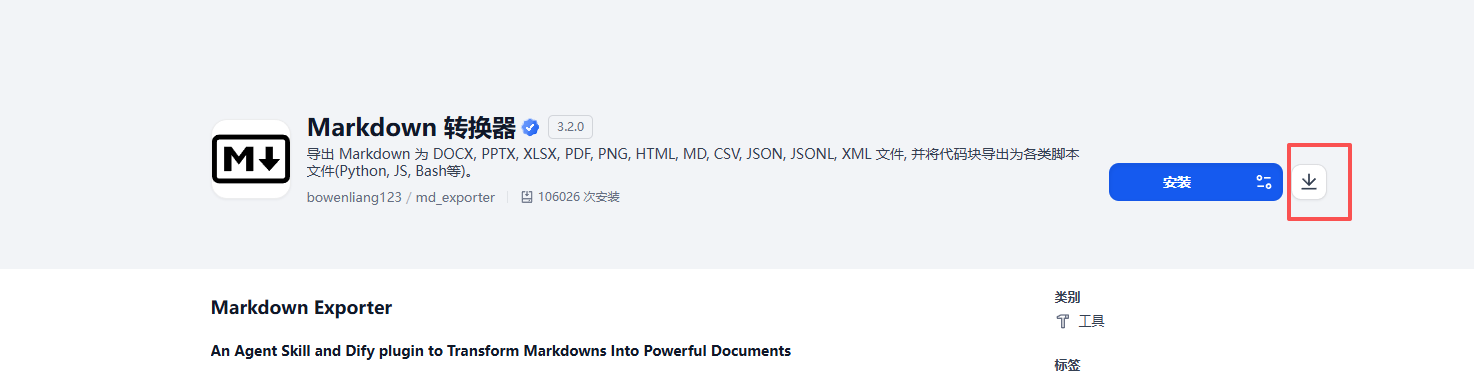
-
执行
./plugin_repackaging.sh local ./bowenliang123-md_exporter_3.2.0.difypkg -
等待打包完成后生成新文件,将新文件放到内网 Dify 插件市场中安装即可

过程中遇到的问题
1. 打包后在内网安装报依赖错误
报错内容如下:
[INFO]new plugin logged in: bowenliang123/md_exporter:3.2.0
2026/01/26 02:35:27 full_duplex.go:59: [INFO]init environment for plugin bowenliang123/md_exporter:3.2.0
2026/01/26 02:35:27 full_duplex.go:65: [ERROR]init environment failed: failed to install dependencies: exit status 1, output:   × Failed to download and build `odfpy==1.4.1`
├─▶ Failed to resolve requirements from `setup.py` build
├─▶ No solution found when resolving: `setuptools>=40.8.0`
╰─▶ Because setuptools was not found in the provided package locations and
you require setuptools>=40.8.0, we can conclude that your requirements
are unsatisfiable.
help: `odfpy` (v1.4.1) was included because `pandas[excel]` (v2.3.3) depends
on `odfpy>=1.4.1`
, retrying
问题原因:离线安装时遇到源码包(sdist)就会触发“构建依赖 + 系统依赖”两条额外依赖链;而你的离线包里通常只收集了 requirements.txt 里声明的运行时依赖,所以每次撞到一个需要编译的包,就会再缺一批新的东西。
说人话版:打离线包是通过将插件中所有依赖下载成本地 whl 文件的方式实现内网环境的安装,但是某些依赖下载下来是 .tar.gz 后缀的源码包,无法直接安装。
解决办法:这里提供了我修改后的脚本,通过把源码包本地构建成 .whl → 删除源码包,只保留 .whl 文件。(以下为 Ubuntu 系统的脚本,CentOS 需要进行修改)
#!/bin/bash
# author: Junjie.M

DEFAULT_GITHUB_API_URL=https://github.com
DEFAULT_MARKETPLACE_API_URL=https://marketplace.dify.ai
DEFAULT_PIP_MIRROR_URL=https://mirrors.aliyun.com/pypi/simple

GITHUB_API_URL="${GITHUB_API_URL:-$DEFAULT_GITHUB_API_URL}"
MARKETPLACE_API_URL="${MARKETPLACE_API_URL:-$DEFAULT_MARKETPLACE_API_URL}"
PIP_MIRROR_URL="${PIP_MIRROR_URL:-$DEFAULT_PIP_MIRROR_URL}"

CURR_DIR=`dirname $0`
cd $CURR_DIR
CURR_DIR=`pwd`
USER=`whoami`
ARCH_NAME=`uname -m`
OS_TYPE=$(uname)
OS_TYPE=$(echo "$OS_TYPE" | tr '[:upper:]' '[:lower:]')

CMD_NAME="dify-plugin-${OS_TYPE}-amd64"
if [[ "arm64" == "$ARCH_NAME" || "aarch64" == "$ARCH_NAME" ]]; then
	CMD_NAME="dify-plugin-${OS_TYPE}-arm64"
fi

PIP_PLATFORM=""
PACKAGE_SUFFIX="offline"

market(){
	if [[ -z "$2" || -z "$3" || -z "$4" ]]; then
		echo ""
		echo "Usage: "$0" market [plugin author] [plugin name] [plugin version]"
		echo "Example:"
		echo "	"$0" market junjiem mcp_sse 0.0.1"
		echo "	"$0" market langgenius agent 0.0.9"
		echo ""
		exit 1
	fi
	echo "From the Dify Marketplace downloading ..."
	PLUGIN_AUTHOR=$2
	PLUGIN_NAME=$3
	PLUGIN_VERSION=$4
	PLUGIN_PACKAGE_PATH=${CURR_DIR}/${PLUGIN_AUTHOR}-${PLUGIN_NAME}_${PLUGIN_VERSION}.difypkg
	PLUGIN_DOWNLOAD_URL=${MARKETPLACE_API_URL}/api/v1/plugins/${PLUGIN_AUTHOR}/${PLUGIN_NAME}/${PLUGIN_VERSION}/download
	echo "Downloading ${PLUGIN_DOWNLOAD_URL} ..."
	curl -L -o ${PLUGIN_PACKAGE_PATH} ${PLUGIN_DOWNLOAD_URL}
	if [[ $? -ne 0 ]]; then
		echo "Download failed, please check the plugin author, name and version."
		exit 1
	fi
	echo "Download success."
	repackage ${PLUGIN_PACKAGE_PATH}
}

github(){
	if [[ -z "$2" || -z "$3" || -z "$4" ]]; then
		echo ""
		echo "Usage: "$0" github [Github repo] [Release title] [Assets name (include .difypkg suffix)]"
		echo "Example:"
		echo "	"$0" github junjiem/dify-plugin-tools-dbquery v0.0.2 db_query.difypkg"
		echo "	"$0" github https://github.com/junjiem/dify-plugin-agent-mcp_sse 0.0.1 agent-mcp_see.difypkg"
		echo ""
		exit 1
	fi
	echo "From the Github downloading ..."
	GITHUB_REPO=$2
	if [[ "${GITHUB_REPO}" != "${GITHUB_API_URL}"* ]]; then
		GITHUB_REPO="${GITHUB_API_URL}/${GITHUB_REPO}"
	fi
	RELEASE_TITLE=$3
	ASSETS_NAME=$4
	PLUGIN_NAME="${ASSETS_NAME%.difypkg}"
	PLUGIN_PACKAGE_PATH=${CURR_DIR}/${PLUGIN_NAME}-${RELEASE_TITLE}.difypkg
	PLUGIN_DOWNLOAD_URL=${GITHUB_REPO}/releases/download/${RELEASE_TITLE}/${ASSETS_NAME}
	echo "Downloading ${PLUGIN_DOWNLOAD_URL} ..."
	curl -L -o ${PLUGIN_PACKAGE_PATH} ${PLUGIN_DOWNLOAD_URL}
	if [[ $? -ne 0 ]]; then
		echo "Download failed, please check the github repo, release title and assets name."
		exit 1
	fi
	echo "Download success."
	repackage ${PLUGIN_PACKAGE_PATH}
}

_local(){
	echo $2
	if [[ -z "$2" ]]; then
		echo ""
		echo "Usage: "$0" local [difypkg path]"
		echo "Example:"
		echo "	"$0" local ./db_query.difypkg"
		echo "	"$0" local /root/dify-plugin/db_query.difypkg"
		echo ""
		exit 1
	fi
	PLUGIN_PACKAGE_PATH=`realpath $2`
	repackage ${PLUGIN_PACKAGE_PATH}
}

repackage(){
	local PACKAGE_PATH=$1
	PACKAGE_NAME_WITH_EXTENSION=`basename ${PACKAGE_PATH}`
	PACKAGE_NAME="${PACKAGE_NAME_WITH_EXTENSION%.*}"
	echo "Unziping ..."
	install_unzip
	unzip -o ${PACKAGE_PATH} -d ${CURR_DIR}/${PACKAGE_NAME}
	if [[ $? -ne 0 ]]; then
		echo "Unzip failed."
		exit 1
	fi
	echo "Unzip success."
	echo "Repackaging ..."
	cd ${CURR_DIR}/${PACKAGE_NAME}
	mkdir -p ./wheels
	download_setuptools
	pip download ${PIP_PLATFORM} -r requirements.txt -d ./wheels --index-url ${PIP_MIRROR_URL} --trusted-host mirrors.aliyun.com
	if [[ $? -ne 0 ]]; then
		echo "Pip download failed."
		exit 1
	fi
	build_wheels_from_sdists
	cleanup_wheels_non_whl
	if [[ "linux" == "$OS_TYPE" ]]; then
		sed -i '1i\--no-index --find-links=./wheels/' requirements.txt
	elif [[ "darwin" == "$OS_TYPE" ]]; then
		sed -i ".bak" '1i\
--no-index --find-links=./wheels/
	  ' requirements.txt
		rm -f requirements.txt.bak
	fi
	IGNORE_PATH=.difyignore
	if [ ! -f "$IGNORE_PATH" ]; then
		IGNORE_PATH=.gitignore
	fi
	if [ -f "$IGNORE_PATH" ]; then
		if [[ "linux" == "$OS_TYPE" ]]; then
			sed -i '/^wheels\//d' "${IGNORE_PATH}"
		elif [[ "darwin" == "$OS_TYPE" ]]; then
			sed -i ".bak" '/^wheels\//d' "${IGNORE_PATH}"
			rm -f "${IGNORE_PATH}.bak"
		fi
	fi
	cd ${CURR_DIR}
	chmod 755 ${CURR_DIR}/${CMD_NAME}
	${CURR_DIR}/${CMD_NAME} plugin package ${CURR_DIR}/${PACKAGE_NAME} -o ${CURR_DIR}/${PACKAGE_NAME}-${PACKAGE_SUFFIX}.difypkg --max-size 5120
	if [ $? -ne 0 ]; then
    echo "Repackage failed."
    exit 1
  fi
	echo "Repackage success."
}

# 如果 'unzip' 命令不存在,则安装它。
install_unzip(){
	if ! command -v unzip &> /dev/null; then
		echo "Installing unzip ..."
		#yum -y install unzip
		sudo apt -y install unzip
		if [ $? -ne 0 ]; then
			echo "Install unzip failed."
			exit 1
		fi
	fi
}

download_setuptools(){
    echo "Downloading setuptools..."
    pip download ${PIP_PLATFORM} setuptools>=40.8.0 -d ./wheels --index-url ${PIP_MIRROR_URL} --trusted-host mirrors.aliyun.com
    if [[ $? -ne 0 ]]; then
        echo "Download setuptools failed."
        exit 1
    fi
}

build_wheels_from_sdists(){
	while IFS= read -r -d '' sdist_file; do
		pip wheel --no-deps -w ./wheels "${sdist_file}"
		if [[ $? -ne 0 ]]; then
			echo "Build wheel failed: ${sdist_file}"
			exit 1
		fi
		rm -f "${sdist_file}"
	done < <(find ./wheels -maxdepth 1 -type f \( -name "*.tar.gz" -o -name "*.zip" \) -print0)
}

cleanup_wheels_non_whl(){
	if [ ! -d "./wheels" ]; then
		return 0
	fi
	find ./wheels -type f ! -name "*.whl" -delete
}

print_usage() {
	echo "usage: $0 [-p platform] [-s package_suffix] {market|github|local}"
	echo "-p platform: python packages' platform. Using for crossing repacking.
        For example: -p manylinux2014_x86_64 or -p manylinux2014_aarch64"
	echo "-s package_suffix: The suffix name of the output offline package.
        For example: -s linux-amd64 or -s linux-arm64"
	exit 1
}

while getopts "p:s:" opt; do
	case "$opt" in
		p) PIP_PLATFORM="--platform ${OPTARG}" ;;
		s) PACKAGE_SUFFIX="${OPTARG}" ;;
		*) print_usage; exit 1 ;;
	esac
done

shift $((OPTIND - 1))

echo "$1"
case "$1" in
	'market')
	market $@
	;;
	'github')
	github $@
	;;
	'local')
	_local $@
	;;
	*)

print_usage
exit 1
esac
exit 0
个人博客地址:april note

 浙公网安备 33010602011771号