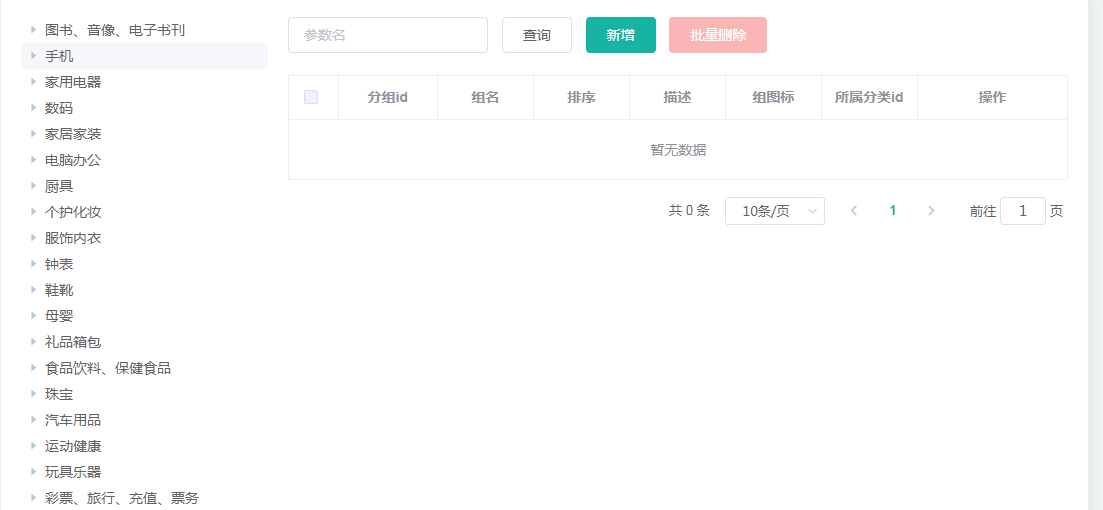
1、从自动生成的代码拷贝相关内容到attrgroup.vue页面,显示以下效果
\renren\main\resources\src\views\modules\product\attrgroup.vue
![]()
2、拷贝表格数据
放在<el-col :span="18">标签内
      <div class="mod-config">
        <el-form :inline="true" :model="dataForm" @keyup.enter.native="getDataList()">
          <el-form-item>
            <el-input v-model="dataForm.key" placeholder="参数名" clearable></el-input>
          </el-form-item>
          <el-form-item>
            <el-button @click="getDataList()">查询</el-button>
            <el-button v-if="isAuth('product:attrgroup:save')" type="primary" @click="addOrUpdateHandle()">新增
            </el-button>
            <el-button v-if="isAuth('product:attrgroup:delete')" type="danger" @click="deleteHandle()"
              :disabled="dataListSelections.length <= 0">批量删除</el-button>
          </el-form-item>
        </el-form>
        <el-table :data="dataList" border v-loading="dataListLoading" @selection-change="selectionChangeHandle"
          style="width: 100%;">
          <el-table-column type="selection" header-align="center" align="center" width="50">
          </el-table-column>
          <el-table-column prop="attrGroupId" header-align="center" align="center" label="分组id">
          </el-table-column>
          <el-table-column prop="attrGroupName" header-align="center" align="center" label="组名">
          </el-table-column>
          <el-table-column prop="sort" header-align="center" align="center" label="排序">
          </el-table-column>
          <el-table-column prop="descript" header-align="center" align="center" label="描述">
          </el-table-column>
          <el-table-column prop="icon" header-align="center" align="center" label="组图标">
          </el-table-column>
          <el-table-column prop="catelogId" header-align="center" align="center" label="所属分类id">
          </el-table-column>
          <el-table-column fixed="right" header-align="center" align="center" width="150" label="操作">
            <template slot-scope="scope">
              <el-button type="text" size="small" @click="addOrUpdateHandle(scope.row.attrGroupId)">修改</el-button>
              <el-button type="text" size="small" @click="deleteHandle(scope.row.attrGroupId)">删除</el-button>
            </template>
          </el-table-column>
        </el-table>
        <el-pagination @size-change="sizeChangeHandle" @current-change="currentChangeHandle" :current-page="pageIndex"
          :page-sizes="[10, 20, 50, 100]" :page-size="pageSize" :total="totalPage"
          layout="total, sizes, prev, pager, next, jumper">
        </el-pagination>
        <!-- 弹窗, 新增 / 修改 -->
        <add-or-update v-if="addOrUpdateVisible" ref="addOrUpdate" @refreshDataList="getDataList"></add-or-update>
      </div>
3、拷贝js相关代码
覆盖原来的data()
data() {
      return {
        dataForm: {
          key: ''
        },
        dataList: [],
        pageIndex: 1,
        pageSize: 10,
        totalPage: 0,
        dataListLoading: false,
        dataListSelections: [],
        addOrUpdateVisible: false
      }
    },

    activated() {
      this.getDataList()
    },
覆盖原来的methods,并把原来的treenodeclick方法放到methods里面
    methods: {
      // 获取数据列表
      getDataList() {
        this.dataListLoading = true
        this.$http({
          url: this.$http.adornUrl('/product/attrgroup/list'),
          method: 'get',
          params: this.$http.adornParams({
            'page': this.pageIndex,
            'limit': this.pageSize,
            'key': this.dataForm.key
          })
        }).then(({ data }) => {
          if (data && data.code === 0) {
            this.dataList = data.page.list
            this.totalPage = data.page.totalCount
          } else {
            this.dataList = []
            this.totalPage = 0
          }
          this.dataListLoading = false
        })
      },
      // 每页数
      sizeChangeHandle(val) {
        this.pageSize = val
        this.pageIndex = 1
        this.getDataList()
      },
      // 当前页
      currentChangeHandle(val) {
        this.pageIndex = val
        this.getDataList()
      },
      // 多选
      selectionChangeHandle(val) {
        this.dataListSelections = val
      },
      // 新增 / 修改
      addOrUpdateHandle(id) {
        this.addOrUpdateVisible = true
        this.$nextTick(() => {
          this.$refs.addOrUpdate.init(id)
        })
      },
      // 删除
      deleteHandle(id) {
        var ids = id ? [id] : this.dataListSelections.map(item => {
          return item.attrGroupId
        })
        this.$confirm(`确定对[id=${ids.join(',')}]进行[${id ? '删除' : '批量删除'}]操作?`, '提示', {
          confirmButtonText: '确定',
          cancelButtonText: '取消',
          type: 'warning'
        }).then(() => {
          this.$http({
            url: this.$http.adornUrl('/product/attrgroup/delete'),
            method: 'post',
            data: this.$http.adornData(ids, false)
          }).then(({ data }) => {
            if (data && data.code === 0) {
              this.$message({
                message: '操作成功',
                type: 'success',
                duration: 1500,
                onClose: () => {
                  this.getDataList()
                }
              })
            } else {
              this.$message.error(data.msg)
            }
          })
        })
      }
    }
4、拷贝自动生成的attrgroup-add-or-update.vue文件到项目中的product目录下
\renren\main\resources\src\views\modules\product\attrgroup-add-or-update.vue
5、在attrgroup.vue页面引入和注册
import AddOrUpdate from './attrgroup-add-or-update';

components: { Category, AddOrUpdate },
6、完整页面如下:
<template>
  <el-row :gutter="20">
    <el-col :span="6">
      <category @children-onde-click="treenodeclick"></category>
    </el-col>
    <el-col :span="18">
      <div class="mod-config">
        <el-form :inline="true" :model="dataForm" @keyup.enter.native="getDataList()">
          <el-form-item>
            <el-input v-model="dataForm.key" placeholder="参数名" clearable></el-input>
          </el-form-item>
          <el-form-item>
            <el-button @click="getDataList()">查询</el-button>
            <el-button v-if="isAuth('product:attrgroup:save')" type="primary" @click="addOrUpdateHandle()">新增
            </el-button>
            <el-button v-if="isAuth('product:attrgroup:delete')" type="danger" @click="deleteHandle()"
              :disabled="dataListSelections.length <= 0">批量删除</el-button>
          </el-form-item>
        </el-form>
        <el-table :data="dataList" border v-loading="dataListLoading" @selection-change="selectionChangeHandle"
          style="width: 100%;">
          <el-table-column type="selection" header-align="center" align="center" width="50">
          </el-table-column>
          <el-table-column prop="attrGroupId" header-align="center" align="center" label="分组id">
          </el-table-column>
          <el-table-column prop="attrGroupName" header-align="center" align="center" label="组名">
          </el-table-column>
          <el-table-column prop="sort" header-align="center" align="center" label="排序">
          </el-table-column>
          <el-table-column prop="descript" header-align="center" align="center" label="描述">
          </el-table-column>
          <el-table-column prop="icon" header-align="center" align="center" label="组图标">
          </el-table-column>
          <el-table-column prop="catelogId" header-align="center" align="center" label="所属分类id">
          </el-table-column>
          <el-table-column fixed="right" header-align="center" align="center" width="150" label="操作">
            <template slot-scope="scope">
              <el-button type="text" size="small" @click="addOrUpdateHandle(scope.row.attrGroupId)">修改</el-button>
              <el-button type="text" size="small" @click="deleteHandle(scope.row.attrGroupId)">删除</el-button>
            </template>
          </el-table-column>
        </el-table>
        <el-pagination @size-change="sizeChangeHandle" @current-change="currentChangeHandle" :current-page="pageIndex"
          :page-sizes="[10, 20, 50, 100]" :page-size="pageSize" :total="totalPage"
          layout="total, sizes, prev, pager, next, jumper">
        </el-pagination>
        <!-- 弹窗, 新增 / 修改 -->
        <add-or-update v-if="addOrUpdateVisible" ref="addOrUpdate" @refreshDataList="getDataList"></add-or-update>
      </div>
    </el-col>
  </el-row>
</template>

<script>

  //导入tree公共组件
  import Category from "../common/category";
  import AddOrUpdate from './attrgroup-add-or-update';
  export default {
    //import引入的组件需要注入到对象中才能使用
    components: { Category, AddOrUpdate },
    data() {
      return {
        dataForm: {
          key: ''
        },
        dataList: [],
        pageIndex: 1,
        pageSize: 10,
        totalPage: 0,
        dataListLoading: false,
        dataListSelections: [],
        addOrUpdateVisible: false
      }
    },

    activated() {
      this.getDataList()
    },
    methods: {
      //tree公共组件点击时传递数据
      treenodeclick(data, node) {
        console.log("tree子组件传递的数据是:", data, node);
      },
      // 获取数据列表
      getDataList() {
        this.dataListLoading = true
        this.$http({
          url: this.$http.adornUrl('/product/attrgroup/list'),
          method: 'get',
          params: this.$http.adornParams({
            'page': this.pageIndex,
            'limit': this.pageSize,
            'key': this.dataForm.key
          })
        }).then(({ data }) => {
          if (data && data.code === 0) {
            this.dataList = data.page.list
            this.totalPage = data.page.totalCount
          } else {
            this.dataList = []
            this.totalPage = 0
          }
          this.dataListLoading = false
        })
      },
      // 每页数
      sizeChangeHandle(val) {
        this.pageSize = val
        this.pageIndex = 1
        this.getDataList()
      },
      // 当前页
      currentChangeHandle(val) {
        this.pageIndex = val
        this.getDataList()
      },
      // 多选
      selectionChangeHandle(val) {
        this.dataListSelections = val
      },
      // 新增 / 修改
      addOrUpdateHandle(id) {
        this.addOrUpdateVisible = true
        this.$nextTick(() => {
          this.$refs.addOrUpdate.init(id)
        })
      },
      // 删除
      deleteHandle(id) {
        var ids = id ? [id] : this.dataListSelections.map(item => {
          return item.attrGroupId
        })
        this.$confirm(`确定对[id=${ids.join(',')}]进行[${id ? '删除' : '批量删除'}]操作?`, '提示', {
          confirmButtonText: '确定',
          cancelButtonText: '取消',
          type: 'warning'
        }).then(() => {
          this.$http({
            url: this.$http.adornUrl('/product/attrgroup/delete'),
            method: 'post',
            data: this.$http.adornData(ids, false)
          }).then(({ data }) => {
            if (data && data.code === 0) {
              this.$message({
                message: '操作成功',
                type: 'success',
                duration: 1500,
                onClose: () => {
                  this.getDataList()
                }
              })
            } else {
              this.$message.error(data.msg)
            }
          })
        })
      }
    }
  };
</script>
<style>
</style>


 浙公网安备 33010602011771号