react简书
项目预期
- 可以登录,并设置是否登陆才能使用某个功能的权限
- 主要为首页部分的布局
- 有路由的相关知识,跳转到不同页面
- 异步数据获取
整体初始化样式
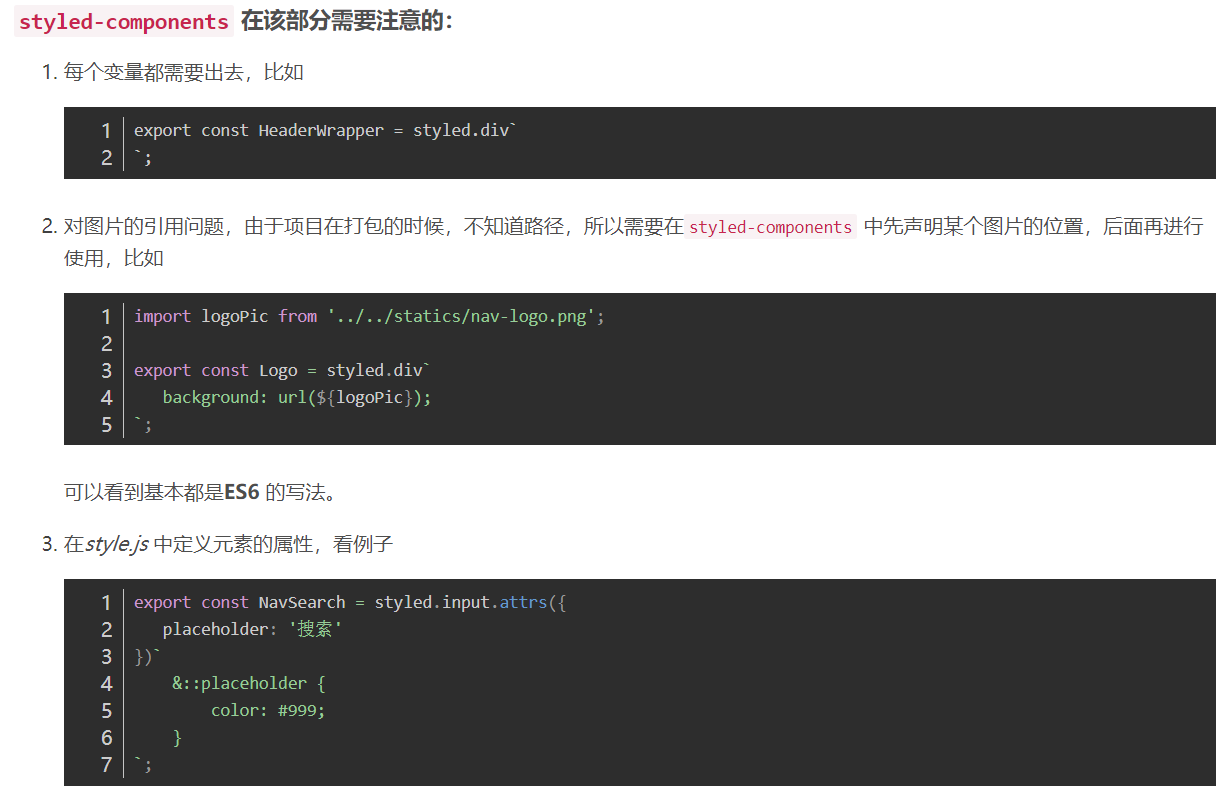
2.1 使用styled-components
styled-components 是一个常用的 css in js 类库。和所有同类型的类库一样,通过 js 赋能解决了原生 css 所不具备的能力,比如变量、循环、函数等。
相对于其他预处理有什么优点?
- 诸如 sass&less 等预处理可以解决部分 css 的局限性,但还是要学习新的语法,而且需要对其编译,其复杂的 webpack 配置也总是让开发者抵触。
- 如果有过sass&less的经验,也能很快的切换到styled-components,因为大部分语法都类似,比如嵌套,& 继承等, styled-componens 很好的解决了学习成本与开发环境问题,很适合 React 技术栈 && React Native 的项目开发。
解决了什么问题?
- className 的写法会让原本写css的写法十分难以接受
- 如果通过导入css的方式 会导致变量泄露成为全局 需要配置webpack让其模块化
- 以及上面提到的解决了原生 css 所不具备的能力,能够加速项目的快速开发
style.js 全局样式
import {injectGlobal} from 'styled-components';
injectGlobal`
    body{
    margin:0;
    padding:0;
    background:red;
}`
2.2 使用resets.css
去除各种浏览器的差异性影响
三、创建header
使用styled-components第三方模块进行样式布局,实现带样式的组件,这些组件的样式是互不影响的,有效的避免了多个组件可能的样式冲突问题。
在src下创建common文件夹,在这个文件中创建header文件夹,并创建index和style俩个文件来创建header
创建header基本样式
四、header搜索框动画

这个动画效果主要有俩点:
input框长度的变化和iconfont的背景色
1.input聚焦(onFocus)时 给input框添加focused类名称,给iconfont放大镜框添加focused类名称
2.input框失焦(onBlur)时 类名称为空
五、使用redux与react-redux管理数据
使用流程
这里是一个比较大的项目,所以会有很多个 store ,也会有一个大的 store 用来连接分支 store。
- src 目录下创建一个 store 文件夹,里面有index.js 和 reducer.js
- index.js 中引入redux 和reducer
- 在 App.js 中引入 store
- 在 App.js 中引入 Provider (来自于react-redux) 。用法是用 <Provider store={store}></Provider> 包裹所有的页面,或者会使用到 store的内容的页面。作用是可以让其包裹的所有页面都可以使用到引入的 store中的数据,或者说 Provider 可以把store 中的数据提供给包裹在内的所有页面。
- 在 header 的index.js 中引入 connect 来自于 react-redux。 用法是在最后面使用这么一句 export default connect(mapStateToProps, mapDispatchToProps)(Header); 便可以将 store 中的数据和 Header 组件连接在一起 mapStateToProps 中写的是从store 中取数据的方法 mapDispatchToProps 中写的是组件要改变 store 中数据的方法
- 将数据移到 reducer 中,将处理聚焦改变 focused 的值的方法也移到reducer 中
- 将函数的派发写到mapDispatchToProps
-
已经知道,在最外层有一个store ,在每一个页面也有一个小的store 所以我们一般会把每个页面的逻辑放在自己的 store 中,而把连接所有分支 store 的总体代码写到外层那个大的 store 中。
链接的方法就是在外面大的 store 中引入小的,逻辑写在 reducer.js 中这里需要引入一个 combineReducers ,来自于 redux-immutable ;然后其他的都需要 reducer as headerReducer 的形式来引入,这句是 ES6 中该名字的语法,原因是多个reducer 的名字一样,会出现重名的错误。
最后再导出去便可以了,由于这里使用了 redux-immutable ,所以直接看下面代码
import { combineReducers } from "redux-immutable";
import { reducer as headerReducer } from '../common/header/store';

const reducer = combineReducers({
   header: headerReducer,         // 前面header 是自己起的名字
});

export default reducer;
这个代码还有一点就是第二行引入 headerReducer 的时候我们看到并没有指向 header 中的store 中的 reducer ,这是因为 header 中的 store 中的 index.js 将其导出出去,这样,这个 index.js 就相当于这个 header 的 reducer 出口文件,而大的 store 便可以直接从那里去链接了。
9. 使用 actinCreater
使用 actinCreater 有一个好处就是可以将所有使用的 action 都放在其中,这样业务逻辑会更加清晰。
actinCreater 是一个函数,可以返回一个对象。
使用actinCreater 创建了action,就在 header 的index.js 中引入,这里要注意写法。
使用 actinCreater 会出现一些字符串,会使得出错不易发现,所以再新建一个 constants.js ,将字符串都改成常量。
最后在使用这个常量的地方都引入就可以用了。
10. immutable对象
使用方法
import { fromJS } from 'immutable';

const defaultState = fromJS({
    focused: false,
    mouseIn: false,
    list: [],
    page: 1,
    totalPage: 1
});
- 首先将 reducer 中的数据使用 fromJS 变成一个 immutable 对象
- 在 reducer 中使,用的时候就需要使用 immutable 的方法,比如使用 state.set('focused', true) 将 focused 的值改变为 true 。
- 在 index.js 中也就不能使用一般的方法去获取或者发送数据了,也需要使用 immutable 的方法,比如获取数据就需要使用focused: state.getIn(['header', 'focused']) 来获取数据,一般推荐使用后者,写起来比较少一些。
redux-immutable
这个 header 也是 state 的值,所以我们也需要对它进行保护,但是它是由redux中的combineReducers生成的,所以我们就需要 redux-immutable
import { combineReducers } from "redux-immutable";
// import headerReducer from "../common/header/store/reducer"
import {reducer as headerReducer} from "../common/header/store";  //从index中引入reducer  as 起别名
const reducer =combineReducers({
     header :headerReducer    //将JS对象转换成immutable对象
})
export default reducer;
热门搜索异步请求
import { createStore, compose, applyMiddleware } from 'redux';
import thunk from 'redux-thunk';
import reducer from './reducer';

const store = createStore(reducer, composeEnhancers(
    applyMiddleware(thunk)
));
const composeEnhancers = window.__REDUX_DEVTOOLS_EXTENSION_COMPOSE__ || compose;
export default store;
- 引入 redux-thunk
- 引入 redux 的
applyMiddleware,进行多中间件的使用 - 通过
applyMiddleware同时使用 redux-thunk 和 redux-dev-tools
- 成功引入redux-thunk,axios
- index——在mapDisptachToProps方法中派发action到actionCreators的getList() 方法。
- actionCreators——定义getList() 使用axios获取模拟数据,并且要在actionType中定义type。
- reducer——提供存储数据的地方list[],定义 action,接受参数 data,并将action.data赋值给list数组,同时因为我们使用了 Immutable,所以需要将获取的数据转换为 immutable 类型。
- index——在const mapStateToProps中获取到list数据,并循环遍历输出该数据。import { fromJS } from 'immutable';
const changeList = (data) => ({
    type: constants.CHANGE_LIST,
    data: fromJS(data),  //immutable化数据
    totalPage: Math.ceil(data.length / 10)
});

export const getList = () => {
    return (dispatch) => {
        axios.get('/api/headerList.json').then((res) => {
            const data = res.data;
            dispatch(changeList(data.data));
        }).catch(() => {
            console.log('error');
        })
    }
};

reducer.js
case constants.CHANGE_LIST:
return state.merge({
list: action.data,
totalPage: action.totalPage
});
reducer.js ——设置页数 page 和总页数 totalPage
actionCreators.js ——计算总页数,每页展示10条数据
reducer.js ——通过action设置总页数 totalPage,可以通过 merge 方法同时设置多个 state 值
index——mapStateToProps 获取数据
index——进行计算:一开始显示 0-9 共 10 条,换页的时候显示 10-19 ……以此类推
解决失焦获焦的问题
在做换页功能之前,我们解决之前遗留问题:在我们失焦于输入框的时候,我们的【热门搜索】模块就会消失,从而看不到我们点击【换一批】按钮的效果,所以我们需要修改代码,当鼠标在【热门模块】中时,这个模块不会消失,当我们鼠标失焦且鼠标不在热门模块中时,热门模块才消失。
实现换一换功能
1. 解决的失焦获焦问题:
- 在 reducer.js 中设置鼠标移动到热门模块为mouseIn: false
- 在 index.js 中设置鼠标进入为 handleMouseEnter,移出为 handleMouseLeave,并且在 mapDispathToProps 定义 这俩个方法
- 在 actionCreators.js 中定义这两个方法:mouseEnter 和 mouseLeave
- 在 actionTypes.js 中新增 action 类型
- 在 reducer.js 中判断这两个 action 执行设置 mouseIn的true or false
- 在 index.js 中 mapStateToProps 获取 mouseIn
- 在 index.js 中的判断中多加一个 mouseIn,这样只要有一个为 true,它就不会消失
2. 实现换一批的功能:
- 在 index.js 中进行换页功能实现,添加点击事件,传递参数 page 和 totalPage
- 在 index.js 调用 handelChangePage 方法,进行判断,并 dispatch 方法
- 在 actionCreators.js 中定义 changePageList 方法,并接收当前页数page
- 在 actionTypes.js 中定义 action
- 在 reducer.js 中判断 action 类型,并进行设置页数
路由的使用
import React, { Component } from 'react';
import { Provider } from 'react-redux';
import { BrowserRouter, Route } from 'react-router-dom';
import Header from './common/header';
import Home from './pages/home';
//import Detail from './pages/detail/loadable.js';
import Login from './pages/login';
import Write from './pages/write';
import store from './store';
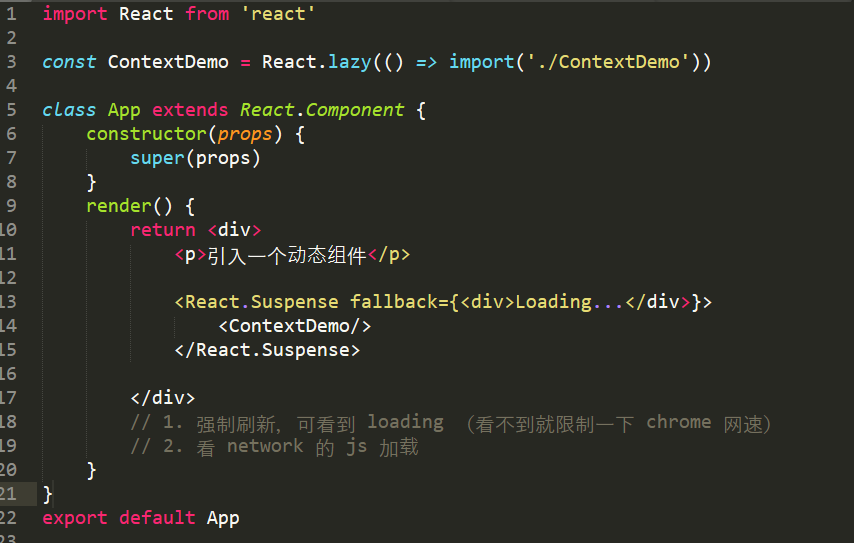
const Detail=React.lazy(()=> import ('./pages/detail'))

class App extends Component {
  render() {
    return (
        <Provider store={store}>
          <BrowserRouter>
              <div>
            <Header />
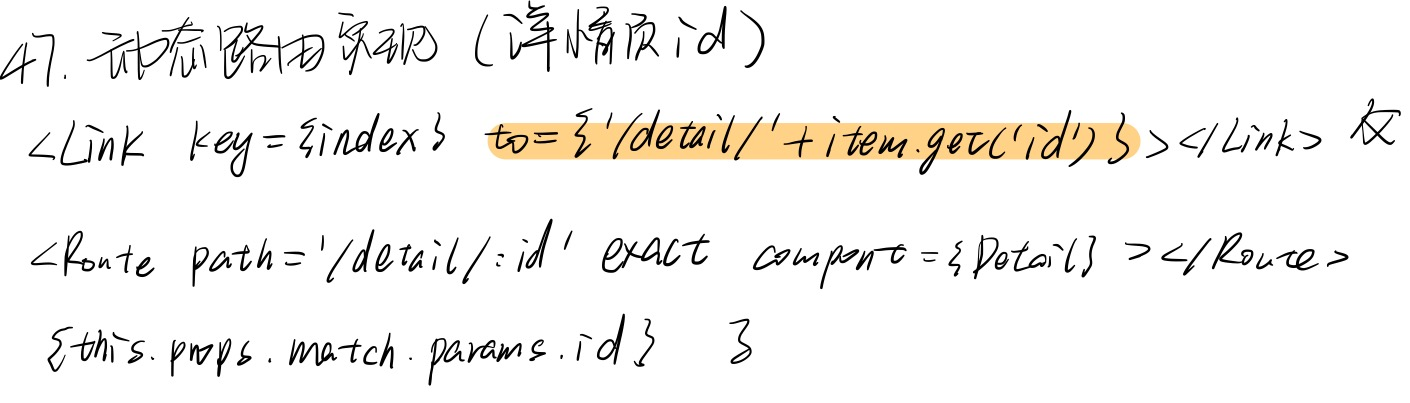
            <Route path='/' exact component={Home}></Route>
            <Route path='/login' exact component={Login}></Route>
            <Route path='/write' exact component={Write}></Route>
            <React.Suspense fallback={<div>Loading</div>}>
                   <Route path='/detail/:id' exact component={Detail}></Route>
            </React.Suspense>
              </div>
          </BrowserRouter>
      </Provider>
    );
  }
}
export default App;
避免无意义的ajax请求,提升组件性能
- 给
searchFocus传递list - 在
searchFocus中判断list的size是不是等于 0,如果是才请求数据(第一次),不是的话则不请求
渲染数据
<TopicWrapper>
                {
                    list.map((item) => (
                        <TopicItem key={item.get('id')}>
                            <img className='topic-pic' src={item.get('imgUrl')} alt=''/>
                            {item.get('title')}  //immutable对象使用get获取属性
                        </TopicItem>
                    ))
                }
            </TopicWrapper>
性能优化
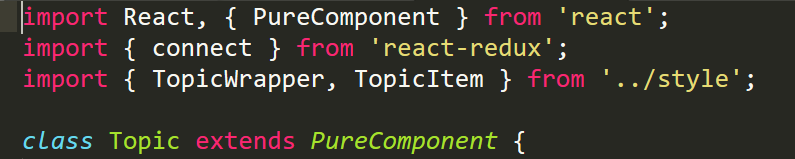
- 使用PureComponent代替shouldComponentUpdate,使得即使用了connect的组件,但是自身的数据没有变化,在state数据改变时,render无需重新渲染。
2. 减少ajax发送次数,只有数据为空时,才初次请求依一次数据,之后不重复请求了。

动态路由
异步加载
登录功能
import React, { PureComponent } from 'react';
import { Redirect } from 'react-router-dom';
import { connect } from 'react-redux';
import { LoginWrapper, LoginBox, Input, Button } from './style';
import { actionCreators } from './store';

class Login extends PureComponent {
    render() {
        const { loginStatus } = this.props;
        if (!loginStatus) {
            return (
                <LoginWrapper>
                    <LoginBox>
                        <Input placeholder='账号' innerRef={(input) => {this.account = input}}/>   //使用innerRef获取DOM节点
                        <Input placeholder='密码' type='password' innerRef={(input) => {this.password = input}}/>
                        <Button onClick={() => this.props.login(this.account, this.password)}>登陆</Button>
                    </LoginBox>
                </LoginWrapper>
            )
        }else {
            return <Redirect to='/'/>    //重定向到首页
        }
    }
}

const mapState = (state) => ({
    loginStatus: state.getIn(['login', 'login'])
})

const mapDispatch = (dispatch) => ({
    login(accountElem, passwordElem){
        dispatch(actionCreators.login(accountElem.value, passwordElem.value))
    }
})

export default connect(mapState, mapDispatch)(Login);
import React, { PureComponent } from 'react';
import { Redirect } from 'react-router-dom';
import { connect } from 'react-redux';

class Write extends PureComponent {
    render() {
        const { loginStatus } = this.props;
        if (loginStatus) {
            return (
                <div>写文章页面</div>
            )
        }else {
            return <Redirect to='/login'/>
        }
    }
}

const mapState = (state) => ({
    loginStatus: state.getIn(['login', 'login'])
})

export default connect(mapState, null)(Write);
分析总结:
去掉constructor中的内容
在mapStateToProps中接收store中的数据(state)
在mapDisptachToProps定义方法改变数据(dispatch)
在index中使用this.props 接收数据与方法
在reducer中,修改数据并返回给store,最终传给index

 浙公网安备 33010602011771号