
XML学习笔记(九):XML和ADO.NET
将DataSet的内容存储为XML文件—串行化:
WriteXml(), WriteXmlSchema(), GetXml(), GetXmlSchema()
XmlWriteMode的几个主要的属性
IgnoreSchema: 将DataSet内容写入XML文件,不包括XSD架构信息
WriteSchema: 同时将DataSet内容和XSD架构信息写入
DiffGram: 写入为DiffGram格式
Saving Only the Schema:仅仅写入XSD架构信息,不包括实际的数据
示例如下:
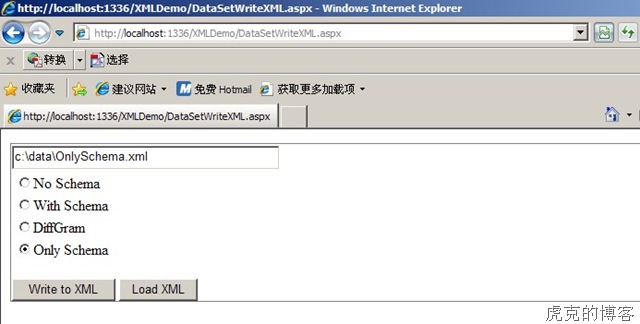
DataSetWriteXML.aspx
<%@ Page Language="C#" AutoEventWireup="true" CodeFile="DataSetWriteXML.aspx.cs"Inherits="DataSetWriteXML" %>
<!DOCTYPE html PUBLIC "-//W3C//DTD XHTML 1.0 Transitional//EN" "http://www.w3.org/TR/xhtml1/DTD/xhtml1-transitional.dtd">
<html xmlns="http://www.w3.org/1999/xhtml">
<head runat="server">
<title></title>
</head>
<body>
<form id="form1" runat="server">
<div>
<fieldset title="DataSet to XML">
<asp:TextBox ID="TextBox1" runat="server" Height="20px" Width="284px"></asp:TextBox>
<br />
<asp:RadioButtonList ID="RadioButtonList1" runat="server">
<asp:ListItem Value="0">No Schema</asp:ListItem>
<asp:ListItem Value="1">With Schema</asp:ListItem>
<asp:ListItem Value="2">DiffGram</asp:ListItem>
<asp:ListItem Value="3">Only Schema</asp:ListItem>
</asp:RadioButtonList>
<br />
<asp:Button ID="Button1" runat="server" Text="Write to XML" OnClick="Button1_Click" />
<asp:Button ID="Button2" runat="server" Text="Load XML" OnClick="Button2_Click" />
</fieldset>
</div>
</form>
</body>
</html>
DataSetWriteXML.aspx.cs
1: using System;
2: using System.Collections.Generic;
3: using System.Linq;
4: using System.Web;
5: using System.Web.UI;
6: using System.Web.UI.WebControls;
7: using System.Data;
8: using System.Data.SqlClient;
9: using System.Xml;
10: 11: public partial class DataSetWriteXML : System.Web.UI.Page
12: {13: protected void Page_Load(object sender, EventArgs e)
14: { 15: 16: }17: protected void Button1_Click(object sender, EventArgs e)
18: {19: DataSet ds = new DataSet();
20: SqlDataAdapter da = new SqlDataAdapter("SELECT employeeid,firstname,lastname,homephone,notes FROM employees", @"data source=.;initial catalog=northwind;integrated security=true");
21: da.Fill(ds, "employees");
22: switch (RadioButtonList1.SelectedValue.ToString())
23: {24: case "0":
25: ds.WriteXml(TextBox1.Text, XmlWriteMode.IgnoreSchema);26: break;
27: case "1":
28: ds.WriteXml(TextBox1.Text, XmlWriteMode.WriteSchema);29: break;
30: case "2":
31: ds.WriteXml(TextBox1.Text, XmlWriteMode.DiffGram);32: break;
33: case "3":
34: ds.WriteXmlSchema(TextBox1.Text);35: break;
36: default:
37: break;
38: } 39: }40: protected void Button2_Click(object sender, EventArgs e)
41: { 42: XmlDocument doc = new XmlDocument();
43: doc.Load(TextBox1.Text); 44: } 45: }XML文件结果
No Schema
<?xml version="1.0" standalone="yes"?>
<NewDataSet>
<employees>
<employeeid>1</employeeid>
<firstname>Nancy</firstname>
<lastname>Davolio</lastname>
<homephone>(206) 555-9857</homephone>
<notes>Education includes a BA in psychology from Colorado State University in 1970. She also completed "The Art of the Cold Call." Nancy is a member of Toastmasters International.</notes>
</employees>
<employees>
With Schema
<?xml version="1.0" standalone="yes"?>
<NewDataSet>
<xs:schema id="NewDataSet" xmlns="" xmlns:xs="http://www.w3.org/2001/XMLSchema" xmlns:msdata="urn:schemas-microsoft-com:xml-msdata">
<xs:element name="NewDataSet" msdata:IsDataSet="true" msdata:UseCurrentLocale="true">
<xs:complexType>
<xs:choice minOccurs="0" maxOccurs="unbounded">
<xs:element name="employees">
<xs:complexType>
<xs:sequence>
<xs:element name="employeeid" type="xs:int" minOccurs="0" />
<xs:element name="firstname" type="xs:string" minOccurs="0" />
<xs:element name="lastname" type="xs:string" minOccurs="0" />
<xs:element name="homephone" type="xs:string" minOccurs="0" />
<xs:element name="notes" type="xs:string" minOccurs="0" />
</xs:sequence>
</xs:complexType>
DiffGram
<?xml version="1.0" standalone="yes"?>
<diffgr:diffgram xmlns:msdata="urn:schemas-microsoft-com:xml-msdata" xmlns:diffgr="urn:schemas-microsoft-com:xml-diffgram-v1">
<NewDataSet>
<employees diffgr:id="employees1" msdata:rowOrder="0">
<employeeid>1</employeeid>
<firstname>Nancy</firstname>
<lastname>Davolio</lastname>
<homephone>(206) 555-9857</homephone>
<notes>Education includes a BA in psychology from Colorado State University in 1970. She also completed "The Art of the Cold Call." Nancy is a member of Toastmasters International.</notes>
</employees>
<employees diffgr:id="employees2" msdata:rowOrder="1">
<employeeid>2</employeeid>
<firstname>Andrew</firstname>
<lastname>Fuller</lastname>
<homephone>(206) 555-9482</homephone>
<notes>Andrew received his BTS comm
Only Schema
?xml version="1.0" standalone="yes"?><xs:schema id="NewDataSet" xmlns="" xmlns:xs="http://www.w3.org/2001/XMLSchema" xmlns:msdata="urn:schemas-microsoft-com:xml-msdata">
<xs:element name="NewDataSet" msdata:IsDataSet="true" msdata:UseCurrentLocale="true">
<xs:complexType>
<xs:choice minOccurs="0" maxOccurs="unbounded">
<xs:element name="employees">
<xs:complexType>
<xs:sequence>
<xs:element name="employeeid" type="xs:int" minOccurs="0" />
<xs:element name="firstname" type="xs:string" minOccurs="0" />
<xs:element name="lastname" type="xs:string" minOccurs="0" />
<xs:element name="homephone" type="xs:string" minOccurs="0" />
<xs:element name="notes" type="xs:string" minOccurs="0" />
</xs:sequence>
</xs:complexType>
将XML数据读取到DataSet—反串行化
ReadXml(), ReadXmlSchema(), InferXmlSchema().
XMLReadDataSet.aspx
<%@ Page Language="C#" AutoEventWireup="true" CodeFile="XMLReadDataSet.aspx.cs" Inherits="XMLReadDataSet" %><!DOCTYPE html PUBLIC "-//W3C//DTD XHTML 1.0 Transitional//EN" "http://www.w3.org/TR/xhtml1/DTD/xhtml1-transitional.dtd">
<html xmlns="http://www.w3.org/1999/xhtml">
<head runat="server">
<title></title>
</head>
<body>
<form id="form1" runat="server">
<div>
Source XML File:
<asp:TextBox ID="TextBox1" runat="server" Height="22px" Width="305px"></asp:TextBox>
<asp:RadioButtonList ID="RadioButtonList1" runat="server" AutoPostBack="True">
<asp:ListItem Value="0">Automatically decide best read mode</asp:ListItem>
<asp:ListItem Value="1">Read the DiffGram and apply changes</asp:ListItem>
<asp:ListItem Value="2">Read XML Fragments</asp:ListItem>
<asp:ListItem Value="3">Ignore Schema even if present</asp:ListItem>
<asp:ListItem Value="4">Infer Schema from data</asp:ListItem>
<asp:ListItem Value="5">Read Schema</asp:ListItem>
</asp:RadioButtonList>
</div>
<p>
<asp:Button ID="Button1" runat="server" Text="Read" OnClick="Button1_Click" />
</p>
</form>
</body>
</html>
XMLReadDataSet.aspx.cs
1: using System;
2: using System.Data;
3: 4: public partial class XMLReadDataSet : System.Web.UI.Page
5: {6: protected void Page_Load(object sender, EventArgs e)
7: { 8: 9: }10: protected void Button1_Click(object sender, EventArgs e)
11: {12: DataSet ds = new DataSet();
13: XmlReadMode mode = XmlReadMode.Auto;14: switch (RadioButtonList1.SelectedValue.ToString())
15: {16: case "0":
17: mode = XmlReadMode.Auto;18: break;
19: case "1":
20: mode = XmlReadMode.DiffGram;21: break;
22: case "2":
23: mode = XmlReadMode.Fragment;24: break;
25: case "3":
26: mode = XmlReadMode.IgnoreSchema;27: break;
28: case "4":
29: mode = XmlReadMode.InferSchema;30: break;
31: case "5":
32: mode = XmlReadMode.ReadSchema;33: break;
34: default:
35: break;
36: } 37: ds.ReadXml(TextBox1.Text, mode);38: Response.Write("XML file read successfully!");
39: } 40: }
 浙公网安备 33010602011771号