
XML学习笔记(四):格式化输出XML文档
页面代码:
1: <%@ Page Language="C#" AutoEventWireup="true" CodeFile="WriteXMLFormat.aspx.cs" Inherits="WriteXML" %>
2: 3: <!DOCTYPE html PUBLIC "-//W3C//DTD XHTML 1.0 Transitional//EN" "http://www.w3.org/TR/xhtml1/DTD/xhtml1-transitional.dtd">
4: <html xmlns="http://www.w3.org/1999/xhtml">
5: <head runat="server">
6: <title></title>
7: </head>
8: <body>
9: <form id="form1" runat="server">
10: <div>
11: ConnecionString:12: <asp:TextBox ID="TextBox1" runat="server" Height="70px" Width="531px"></asp:TextBox><br />
13: Table Name:14: <asp:TextBox ID="TextBox2" runat="server" Height="48px" Width="525px"></asp:TextBox><br />
15: Destination File Name:16: <asp:TextBox ID="TextBox3" runat="server" Height="56px" Width="519px"></asp:TextBox><br />
17: </div>
18: <asp:RadioButton ID="RadioButton1" Text="Columns as elements" runat="server" GroupName="ExportType" />
19: <br />
20: <asp:RadioButton ID="RadioButton2" Text="Columns as attributes" runat="server" GroupName="ExportType" />
21: <br />
22: <asp:CheckBox ID="CheckBox1" Text="Format XML Document" runat="server" />
23: <br />
24: Indention:25: <asp:TextBox ID="TextBox4" runat="server"></asp:TextBox>
26: <br />
27: Indent Character:<br />
28: <br />
29: <asp:RadioButton ID="RadioButton3" Text="Space" GroupName="IndentCharacter" runat="server" />
30: <br />
31: <asp:RadioButton ID="RadioButton4" Text="Tab" GroupName="IndentCharacter" runat="server" />
32: <br />
33: <asp:Button ID="Button1" runat="server" Height="31px" Text="Export Data" Width="134px"
34: OnClick="Button1_Click" />
35: </form>
36: </body>
37: </html>
执行代码:
1: using System;
2: using System.Data.SqlClient;
3: using System.Xml;
4: 5: public partial class WriteXML : System.Web.UI.Page
6: {7: protected void Page_Load(object sender, EventArgs e)
8: { 9: 10: }11: /// <summary>
12: /// Handles the Click event of the Button1 control.
13: /// </summary>
14: /// <param name="sender">The source of the event.</param>
15: /// <param name="e">The <see cref="System.EventArgs"/> instance containing the event data.</param>
16: protected void Button1_Click(object sender, EventArgs e)
17: {18: SqlConnection cnn = new SqlConnection(TextBox1.Text);
19: SqlCommand cmd = new SqlCommand();
20: cmd.Connection = cnn;21: cmd.CommandText = "SELECT * FROM " + TextBox2.Text;
22: cnn.Open(); 23: SqlDataReader reader = cmd.ExecuteReader();24: XmlTextWriter writer = new XmlTextWriter(TextBox3.Text, null);
25: if (CheckBox1.Checked)
26: { 27: writer.Formatting = Formatting.Indented;28: writer.Indentation = int.Parse(TextBox4.Text);
29: writer.IndentChar = (RadioButton3.Checked ? ' ' : '\t');
30: } 31: writer.WriteStartDocument();32: writer.WriteComment("File exported on " + DateTime.Now);
33: writer.WriteStartElement("table");
34: while (reader.Read())
35: {36: if (RadioButton1.Checked)
37: {38: writer.WriteStartElement("row");
39: for (int i = 0; i < reader.FieldCount; i++)
40: { 41: writer.WriteStartElement(reader.GetName(i)); 42: writer.WriteString(reader.GetValue(i).ToString()); 43: writer.WriteEndElement(); 44: } 45: writer.WriteEndElement(); 46: }47: else
48: {49: writer.WriteStartElement("row");
50: for (int i = 0; i < reader.FieldCount; i++)
51: { 52: writer.WriteAttributeString(reader.GetName(i), 53: reader.GetValue(i).ToString()); 54: } 55: writer.WriteEndElement(); 56: } 57: } 58: writer.WriteEndElement(); 59: writer.Close(); 60: reader.Close(); 61: cnn.Close(); 62: } 63: }
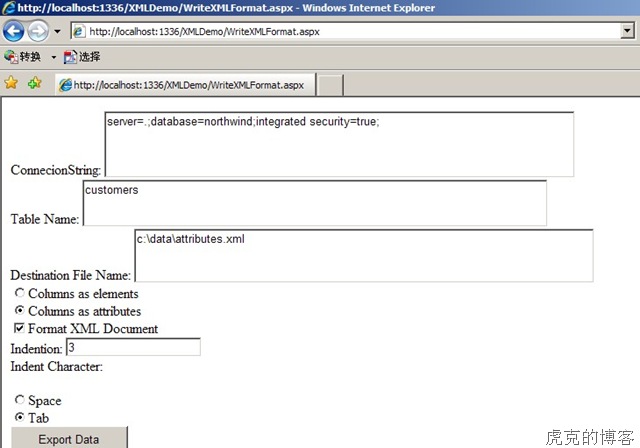
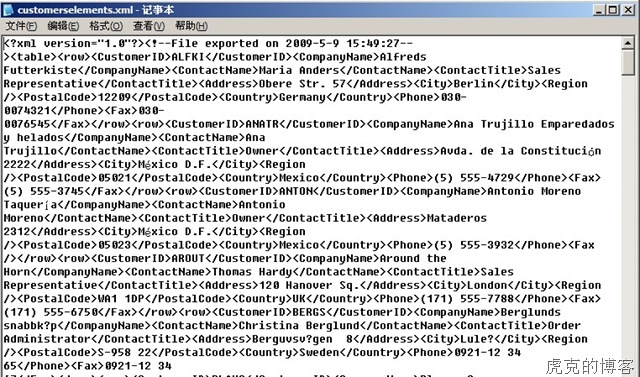
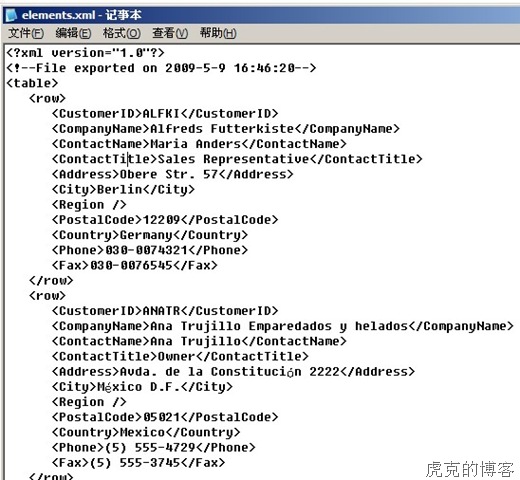
输出结果和界面:
未经格式化的XML输出文件
经过格式化的XML输出文件
WriteStartElement()方法的重载方法可以写入命名空间、前缀和LocalName


 浙公网安备 33010602011771号