


示例XML文件:
<?xml version="1.0" encoding="utf-8" ?>
<!-- This is list of employees --><employees>
<employee employeeid="1">
<firstname>Nancy</firstname>
<lastname>Davolio</lastname>
<homephone>(206) 555-9857</homephone>
<notes>
<![CDATA[includes a BA in psychology from Colorado State University in1970. She also completed "The Art of the Cold Call." Nancy is a member of
Toastmasters International.]]></notes>
</employee>
<employee employeeid="2">
<firstname>Andrew</firstname>
<lastname>Fuller</lastname>
<homephone>(206) 555-9482</homephone>
<notes>
<![CDATA[Andrew received his BTS commercial in 1974 and a Ph.D. ininternational marketing from the University of Dallas in 1981. He is fluent
in French and Italian and reads German. He joined the company as a sales
representative, was promoted to sales manager in January 1992 and to vice
president of sales in March 1993. Andrew is a member of the Sales
Management Roundtable, the Seattle Chamber of Commerce, and the Pacific
Rim Importers Association.]]></notes>
</employee>
<employee employeeid="3">
<firstname>Janet</firstname>
<lastname>Leverling</lastname>
<homephone>(206) 555-3412</homephone>
<notes>
<![CDATA[Janet has a BS degree in chemistry from Boston College (1984).She has also completed a certificate program in food retailing management.
Janet was hired as a sales associate in 1991 and promoted to sales
representative in February 1992.]]></notes>
</employee>
</employees>
1、在XML文档的元素间移动(Moving Between Elements)
五个基本方法:
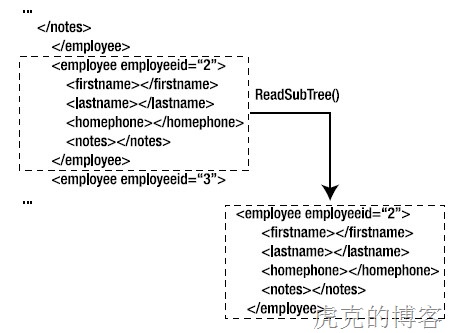
ReadSubTree()方法:读取当前节点的子节点并返回XMLReader实例的一个子树。当你解析一个较大的XML文件,但是只希望处理其中的少部分数据的时候,这个方法非常有效。
作用示意如下图:
ReadToDescendant():
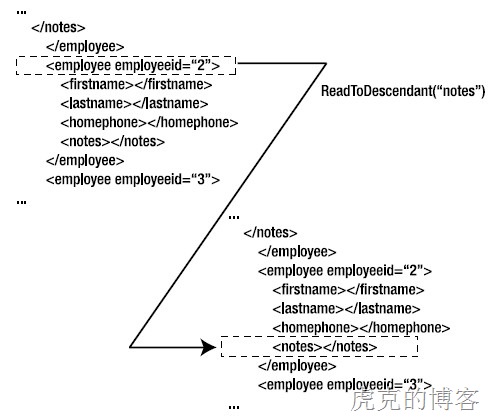
ReadToFollowing()
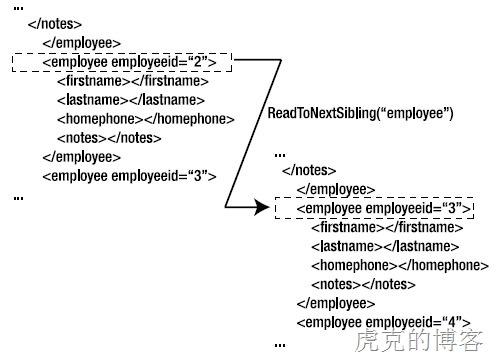
ReadToNextSibling()
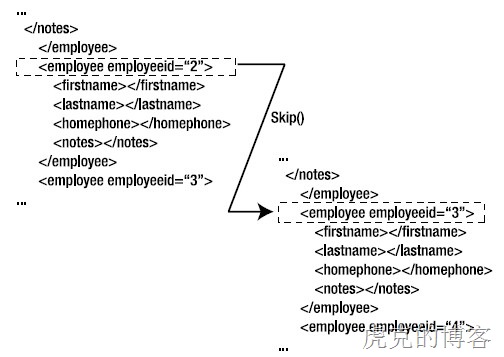
Skip()
2、在属性间移动(Moving Between Attributes)
四个主要方法:
MoveToAttribute()
MoveToFirstAttribute()
MoveToNextAttribute()
MoveToElement()
作用示意:

As you can see in above figure, if you call MoveToAttribute() by passing firstname as the parameter, the reader moves to the firstname attribute. When you are on the lastname attribute, calling MoveToFirst() will take the reader to the id attribute. Calling MoveToNextAttribute() when the reader is on the id attribute will advance the reader to the firstname attribute. Finally, calling MoveToElement() from any attribute will take the reader back to the <employee> element.
3、读取数据Reading Content
ReadInnerXml()
ReadOuterXml()
ReadString()
方法解释:
假如Reader处于第一个<employee>元素位置,ReadInnerXML()方法返回的XML内容如下:
<firstname>Nancy</firstname>
<lastname>Davolio</lastname>
<homephone>(206) 555-9857</homephone>
<notes>
<![CDATA[includes a BA in psychology from Colorado State University in 1970. Shealso completed "The Art of the Cold Call." Nancy is a member of Toastmasters
International.]]></notes>
而ReaderOuterXML()方法返回的XML内容如下:
<employee employeeid="1">
<firstname>Nancy</firstname>
<lastname>Davolio</lastname>
<homephone>(206) 555-9857</homephone>
<notes>
<![CDATA[includes a BA in psychology from Colorado State University in 1970. Shealso completed "The Art of the Cold Call." Nancy is a member of Toastmasters
International.]]></notes>
</employee>

 浙公网安备 33010602011771号