

go lang的编译
一、go编译exe文件
我们先快速的看下生成.exe需要的过程
利用golang工具,创建工程,然后创建一个tesmodule模块,建立一个带main()的文件即可
C:\Go\src\myProject2\testmodule>go build -n
found packages testmodule (mymath_test.go) and main (test.go) in C:\Go\src\myProject2\testmodule

C:\Go\src\myProject2\testmodule>go build -n

#
# testmodule

mkdir -p $WORK\b001\
cat >$WORK\b001\_gomod_.go << 'EOF' # internal
package main
import _ "unsafe"
//go:linkname __debug_modinfo__ runtime.modinfo
var __debug_modinfo__ = "0w\xaf\f\x92t\b\x02A\xe1\xc1\a\xe6\xd6\x18\xe6path\ttestmodule\nmod\ttestmodule\t(devel)\t\n\xf92C1\x86\x18 r\x00\x82B\x10A\x16\xd8\xf2"
EOF
cat >$WORK\b001\importcfg << 'EOF' # internal
# import config
packagefile fmt=C:\Users\king\AppData\Local\go-build\7f\7f68ed4110c1c7127612f1ae40da99c0053735cd556238a6e2d947b73f672d5a-d
packagefile runtime=c:\go\pkg\windows_amd64\runtime.a
EOF
cd C:\Go\src\myProject2\testmodule
"c:\\go\\pkg\\tool\\windows_amd64\\compile.exe" -o "$WORK\\b001\\_pkg_.a" -trimpath "$WORK\\b001=>" -p main -lang=go1.17 -std -complete -buildid k-rm4dmUP-XCuSeJ67YD/k-rm4d
mUP-XCuSeJ67YD -goversion go1.17.1 -importcfg "$WORK\\b001\\importcfg" -pack -c=4 "C:\\Go\\src\\myProject2\\testmodule\\test.go" "$WORK\\b001\\_gomod_.go"
"c:\\go\\pkg\\tool\\windows_amd64\\buildid.exe" -w "$WORK\\b001\\_pkg_.a" # internal
cat >$WORK\b001\importcfg.link << 'EOF' # internal
packagefile testmodule=$WORK\b001\_pkg_.a
packagefile fmt=C:\Users\king\AppData\Local\go-build\7f\7f68ed4110c1c7127612f1ae40da99c0053735cd556238a6e2d947b73f672d5a-d
packagefile runtime=c:\go\pkg\windows_amd64\runtime.a
packagefile errors=c:\go\pkg\windows_amd64\errors.a
packagefile internal/fmtsort=C:\Users\king\AppData\Local\go-build\2c\2c8ea4d2dda30a1e425955c7209937cc5dbcb93140e9f0f23ac666290a354a8c-d
packagefile io=c:\go\pkg\windows_amd64\io.a
packagefile math=c:\go\pkg\windows_amd64\math.a
packagefile os=C:\Users\king\AppData\Local\go-build\04\0419aa578c97c8e9c4d6b193d869b4e122521bffbe029c7005e4f8922b41b5a1-d
packagefile reflect=C:\Users\king\AppData\Local\go-build\bb\bb68a4a480bfcf583713f5f82528fbe88b2224f05005ab10cec17a1757a02838-d
packagefile strconv=C:\Users\king\AppData\Local\go-build\42\42f7ff3e97e6f7be301fe7d55aa57f5fb97498cd38e787a8e78c677ba576c820-d
packagefile sync=c:\go\pkg\windows_amd64\sync.a
packagefile unicode/utf8=C:\Users\king\AppData\Local\go-build\f2\f2c9b19cc558bb6a7f59af55a110123ce04ff0a99a2602021be7d4ddcc47ebf6-d
packagefile internal/abi=c:\go\pkg\windows_amd64\internal\abi.a
packagefile internal/bytealg=c:\go\pkg\windows_amd64\internal\bytealg.a
packagefile internal/cpu=c:\go\pkg\windows_amd64\internal\cpu.a
packagefile internal/goexperiment=c:\go\pkg\windows_amd64\internal\goexperiment.a
packagefile runtime/internal/atomic=c:\go\pkg\windows_amd64\runtime\internal\atomic.a
packagefile runtime/internal/math=c:\go\pkg\windows_amd64\runtime\internal\math.a
packagefile runtime/internal/sys=c:\go\pkg\windows_amd64\runtime\internal\sys.a
packagefile internal/reflectlite=c:\go\pkg\windows_amd64\internal\reflectlite.a
packagefile sort=c:\go\pkg\windows_amd64\sort.a
packagefile math/bits=c:\go\pkg\windows_amd64\math\bits.a
packagefile internal/itoa=c:\go\pkg\windows_amd64\internal\itoa.a
packagefile internal/oserror=c:\go\pkg\windows_amd64\internal\oserror.a
packagefile internal/poll=C:\Users\king\AppData\Local\go-build\70\70308dd19deb23002fcd77db5a876296e3fd992c8ab68f9e5ffa1b75a71dda04-d
packagefile internal/syscall/execenv=c:\go\pkg\windows_amd64\internal\syscall\execenv.a
packagefile internal/syscall/windows=c:\go\pkg\windows_amd64\internal\syscall\windows.a
packagefile internal/testlog=c:\go\pkg\windows_amd64\internal\testlog.a
packagefile internal/unsafeheader=c:\go\pkg\windows_amd64\internal\unsafeheader.a
packagefile io/fs=C:\Users\king\AppData\Local\go-build\1b\1bb056bfb8d8b30fbb71c32b048411872c2f399ea83433f5f20e4d79ae6e3074-d
packagefile sync/atomic=c:\go\pkg\windows_amd64\sync\atomic.a
packagefile syscall=c:\go\pkg\windows_amd64\syscall.a
packagefile time=c:\go\pkg\windows_amd64\time.a
packagefile unicode/utf16=c:\go\pkg\windows_amd64\unicode\utf16.a
packagefile unicode=c:\go\pkg\windows_amd64\unicode.a
packagefile internal/race=c:\go\pkg\windows_amd64\internal\race.a
packagefile internal/syscall/windows/sysdll=c:\go\pkg\windows_amd64\internal\syscall\windows\sysdll.a
packagefile path=C:\Users\king\AppData\Local\go-build\bd\bd7fdb56f4a83405627a883e952d7b3af1bcc135bf4114824bc010322e2574fc-d
packagefile internal/syscall/windows/registry=c:\go\pkg\windows_amd64\internal\syscall\windows\registry.a
EOF
mkdir -p $WORK\b001\exe\
cd .
"c:\\go\\pkg\\tool\\windows_amd64\\link.exe" -o "$WORK\\b001\\exe\\a.out.exe" -importcfg "$WORK\\b001\\importcfg.link" -buildmode=pie -buildid=kSq4efjjX0oabocSvn-f/k-rm4dmU
P-XCuSeJ67YD/k-rm4dmUP-XCuSeJ67YD/kSq4efjjX0oabocSvn-f -extld=gcc "$WORK\\b001\\_pkg_.a"
"c:\\go\\pkg\\tool\\windows_amd64\\buildid.exe" -w "$WORK\\b001\\exe\\a.out.exe" # internal
mv $WORK\b001\exe\a.out.exe testmodule.exe
从另一个角度,做些破坏性的实验看go.exe 会用到哪些东西,这种方式会比较直接,也节省了很多分析的时间,编译中我们会看到很容易就找到关键的点
1.我修改src下fmt文件夹之后,所以读取不到报错
C:\Go\src\myProject2\testmodule>go build -n
test.go:3:8: package fmt is not in GOROOT (c:\go\src\fmt)

2.注意这个文件夹没有访问到
  C:\Go\src\go

3.这个是存放.a的静态库文件,会大量被调用
  C:\Go\pkg
4. 调用C:\Go\pkg\tool\windows_amd64 目录下的编译工具
C:\Go\src\myProject2\testmodule>go build -n
go tool: no such tool "compile"
  提示需要compile.exe文件

5.C:\Go\src\myProject2\testmodule>go build -n
go tool: no such tool "asm"
提示缺少asm.exe文件

6.C:\Go\src\myProject2\testmodule>go build -n
go tool: no such tool "buildid"
提示缺少buildid.exe
C:\Go\src\myProject2\testmodule>go build -n

7.C:\Go\src\myProject2\testmodule>go build -n
go tool: no such tool "link"
提示缺少link.exe
实际C:\Go\pkg\tool\windows_amd64 下编译时需要的exe文件就4个,如下
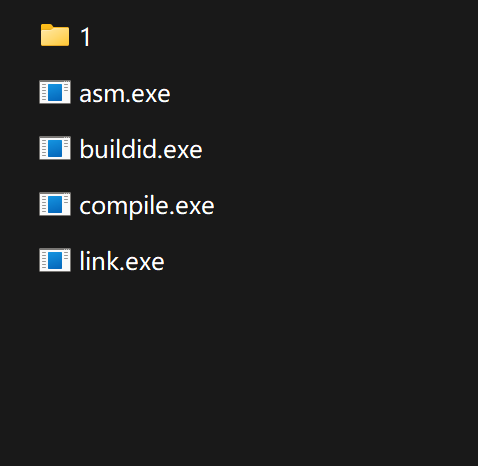
相当于用gcc编译的时候会有四个步骤,但是基本就是编译与链接
我们再看下他执行的过程,我们进行相关的一些归类和处理
C:\Go\src\myProject2\testmodule>go build -n
# testmodule
mkdir -p $WORK\b001\
cat >$WORK\b001\_gomod_.go << 'EOF' # internal
package main
import _ "unsafe"
//go:linkname __debug_modinfo__ runtime.modinfo
var __debug_modinfo__ = "0w\xaf\f\x92t\b\x02A\xe1\xc1\a\xe6\xd6\x18\xe6path\ttestmodule\nmod\ttestmodule\t(devel)\
EOF
cat >$WORK\b001\importcfg << 'EOF' # internal
# import config
packagefile fmt=C:\Users\king\AppData\Local\go-build\7f\7f68ed4110c1c7127612f1ae40da99c0053
packagefile runtime=c:\go\pkg\windows_amd64\runtime.a
packagefile fmt=C:\Users\king\AppData\Local\go-build\7f\7f68ed4110c1c7127612f1ae40da99c0053735cd556238a6e2d947b73f672d5a-d
EOF
cd C:\Go\src\myProject2\testmodule
"c:\\go\\pkg\\tool\\windows_amd64\\compile.exe" -o "$WORK\\b001\\_pkg_.a" -trimpath "$WORK\\b001=>"
    -p main -lang=go1.17 -std -complete -buildid k-rm4dmUP-XCuSeJ67YD/k-rm4d
mUP-XCuSeJ67YD -goversion go1.17.1 -importcfg "$WORK\\b001\\importcfg"
    -pack -c=4 "C:\\Go\\src\\myProject2\\testmodule\\test.go" "$WORK\\b001\\_gomod_.go"
"c:\\go\\pkg\\tool\\windows_amd64\\buildid.exe" -w "$WORK\\b001\\_pkg_.a" # internal
cat >$WORK\b001\importcfg.link << 'EOF' # internal
packagefile testmodule=$WORK\b001\_pkg_.a


packagefile runtime=c:\go\pkg\windows_amd64\runtime.a
是 Go 编程语言运行 时库的一部分,该库 对于 执行 Go 程序至关重要。它包含 了 Go 执行所需的运行时组件,包括线程 环境块和其他 系统调用。
windows_amd64 版本 专为运行 Windows 设计系统 采用 AMD64架构。

packagefile errors=c:\go\pkg\windows_amd64\errors.a
packagefile internal/fmtsort=C:\Users\king\AppData\Local\go-build\2c\2c8ea4d
packagefile io=c:\go\pkg\windows_amd64\io.a
packagefile math=c:\go\pkg\windows_amd64\math.a
packagefile sync=c:\go\pkg\windows_amd64\sync.a

packagefile os=C:\Users\king\AppData\Local\go-build\04\0419aa578c97c8e9c4d6b193d869b4
packagefile reflect=C:\Users\king\AppData\Local\go-build\bb\bb68a4a480bfcf583713f5f82528fbe8
packagefile strconv=C:\Users\king\AppData\Local\go-build\42\42f7ff3e97e6f7be301fe7d55aa57f5fb9749
packagefile unicode/utf8=C:\Users\king\AppData\Local\go-build\f2\f2c9b19cc558bb6a7f59af55a110123ce04ff0a


packagefile internal/abi=c:\go\pkg\windows_amd64\internal\abi.a
packagefile internal/bytealg=c:\go\pkg\windows_amd64\internal\bytealg.a
packagefile internal/cpu=c:\go\pkg\windows_amd64\internal\cpu.a
packagefile internal/goexperiment=c:\go\pkg\windows_amd64\internal\goexperiment.a
packagefile runtime/internal/atomic=c:\go\pkg\windows_amd64\runtime\internal\atomic.a
packagefile runtime/internal/math=c:\go\pkg\windows_amd64\runtime\internal\math.a
packagefile runtime/internal/sys=c:\go\pkg\windows_amd64\runtime\internal\sys.a
packagefile internal/reflectlite=c:\go\pkg\windows_amd64\internal\reflectlite.a
packagefile sort=c:\go\pkg\windows_amd64\sort.a
packagefile math/bits=c:\go\pkg\windows_amd64\math\bits.a
packagefile internal/itoa=c:\go\pkg\windows_amd64\internal\itoa.a
packagefile internal/oserror=c:\go\pkg\windows_amd64\internal\oserror.a
packagefile internal/poll=C:\Users\king\AppData\Local\go-build\70\70308dd19deb23002fcd77db5a876296e3f
packagefile internal/syscall/execenv=c:\go\pkg\windows_amd64\internal\syscall\execenv.a
packagefile internal/syscall/windows=c:\go\pkg\windows_amd64\internal\syscall\windows.a
packagefile internal/testlog=c:\go\pkg\windows_amd64\internal\testlog.a
packagefile internal/unsafeheader=c:\go\pkg\windows_amd64\internal\unsafeheader.a
packagefile internal/race=c:\go\pkg\windows_amd64\internal\race.a
packagefile internal/syscall/windows/sysdll=c:\go\pkg\windows_amd64\internal\syscall\windows\sysdll.a
packagefile io/fs=C:\Users\king\AppData\Local\go-build\1b\1bb056bfb8d8b30fbb71c32b048411872c2f399ea83433

packagefile sync/atomic=c:\go\pkg\windows_amd64\sync\atomic.a
packagefile syscall=c:\go\pkg\windows_amd64\syscall.a packagefile
time=c:\go\pkg\windows_amd64\time.a
packagefile unicode/utf16=c:\go\pkg\windows_amd64\unicode\utf16.a
packagefile unicode=c:\go\pkg\windows_amd64\unicode.a
packagefile path=C:\Users\king\AppData\Local\go-build\bd\bd7fdb56f4a83405627a883e952d7b3af1bcc135b
packagefile internal/syscall/windows/registry=c:\go\pkg\windows_amd64\internal\syscall\windows\registry.a
EOF //这里编译结束
mkdir -p $WORK\b001\exe\
cd . "c:\\go\\pkg\\tool\\windows_amd64\\link.exe" -o "$WORK\\b001\\exe\\a.out.exe"  -importcfg "$WORK\\b001\\importcfg.link"
-buildmode=pie -buildid=kSq4efjjX0oabocSvn-f/k-rm4dmU
P-XCuSeJ67YD/k-rm4dmUP-XCuSeJ67YD/kSq4efjjX0oabocSvn-f -extld=gcc "$WORK\\b001\\_pkg_.a"
"c:\\go\\pkg\\tool\\windows_amd64\\buildid.exe" -w "$WORK\\b001\\exe\\a.out.exe" # internal
mv $WORK\b001\exe\a.out.exe testmodule.exe
二、编译go.exe
1. go语言官网
https://go.googlesource.com/go
https://go.dev/dl/
2.下载安装1.17.1版本的二进制文件,下载地址: All releases - The Go Programming Language
3.执行make.bat
要求你必须使用对应版本的 Go 源码 执行自举(Bootstrap)编译
下载到1.17.1 https://github.com/golang/go/tags?after=go1.17.1
D:\gosourceoffice\go-go1.17.1\src>make.bat
查看
D:\gosourceoffice\go-go1.17.1\bin 会生成 go.exe
D:\gosourceoffice\go-go1.17.1\pkg\tool\windows_amd64\ 会生成compile.exe等一系列工具
三、验证生成的compile.exe等文件
创建main.go文件
package main
import (
    "fmt"
    "os"
)
//go:noinline
func AddNine(a, b, c int) int {
    sum := a
    sum += b
    sum += c
    return sum
}
func main() {

    val := len(os.Args)
    fmt.Println(AddNine(val, val,val))
}
这里我们将使用obj6.go ,Go 编译器是用 Go 编写的。当你修改了 src/cmd/internal/obj/x86/obj6.go 后,你实际上修改的是编译器的源代码,而不是你正在运行的二进制编译器(compile.exe),需要你重新编译。这会产生一个新的 compile 二进制文件,这个新文件里才包含了你修改后的 obj6.go 逻辑。
注意这里的obj6.go是你下载的源码里面的obj6.go, 修改“二进制安装包”里的 obj6.go 是没有任何意义的。
我本地为: D:\gosourceoffice\go-go1.17.1\src\cmd\internal\obj\x86\obj6.go
验证方法:
func preprocess(ctxt *Link, cursym *LSym, newprog ProgAlloc) { if cursym != nil && strings.Contains(cursym.Name, "AddNine") {
panic("--- 编译器正在物理重构 AddNine 函数 ---")
}
}
使用新生成的编译器查看它对函数是否生效:
D:\mytest>D:\gosourceoffice\go-go1.17.1\bin\go.exe tool compile -S -N -l main.go
obj6.go 中添加了 panic,此时屏幕上应立即出现该崩溃信息,这证明你亲自构建的compile.exe 编译 已正式生效。D:\mytest>D:\gosourceoffice\go-go1.17.1\bin\go.exe tool -n compile9i c:\go\pkg\tool\windows_amd64\compile.exe
如果出现这种情况可以尝试
D:\mytest>D:\gosourceoffice\go-go1.17.1\pkg\tool\windows_amd64\compile.exe -S -N -l main.go
或者把 compile.exe 复制到 C:\Go\pkg\tool\windows_amd64下,反正有很多种测试方法。
四、重新编译
如果你想再次编译, 但在运行
make.bat 之前,建议先清理磁盘上的旧产物。在 Go 源码根目录下执行:
- 删除旧工具链:手动删除
pkg文件夹(这里存放着旧的compile.exe文件)。 - 删除旧二进制:手动删除
bin文件夹。
make.bat 运行太慢,您可以尝试在成功执行过一次 make.bat 后,使用指令 ..\bin\go install -v cmd/compile 来进行快速的针对性重新编译 你也可以使用编译好的compile.exe来编译新的compile.exe .

 浙公网安备 33010602011771号