

关于go源码的测试样例
我们在学习go语言当中经常会涉及到一些测试样例的寻找和实际功能的测试,实际无论go源码还是安装以后的src目录下都会有大量的测试代码
当然前提是你要懂一定的使用方法。网上的很多写的要么不完整,要么很潦草,要么写的很深奥,但是又不能很快入手,这些测试用例起码可以解决测试用例不足的问题,而且很多都是对各个包进行的针对性测试,当然包括我自己的有些文章也是一样有些潦草,因为工作有时候比较忙等原因。
所以挖掘源码包里面的测试内容实际更贴合go编译开发者的思路,包括第三方开发库在开发完成后也会有一定的示例代码。例如docker、k8s是比较成功的典范
我们这里看下官方在这方面的表现
本机实验:
1.go 解析器 1.17.1 环境
安装在 c:/go 目录下,实际golang工具和pycharm基本上是用界面和习惯都差不多。所以可结合着学习
2. go解析器源码包
官方github
git clone https://github.com/golang/go 下载即可
一、 gosourceoffice即我下载的官方源码包
D:\gosourceoffice\go\test
D:\gosourceoffice\go
1.D:\gosourceoffice\go\api
   下面是各个版本的变化情况
    从go1.1.txt 一直到go1.26.txt
2.D:\gosourceoffice\go\test
  这里有大量的测试代码,可以提供测试
二、c:\go\src目录
举例1: C:\Go\src\math\big下的rat_test.go的使用,测试使用 TestZeroRat 函数
1.golang软件下新建工程myproject
  注意工程目录最好建在c:\go\src\myproject,这里截个图吧
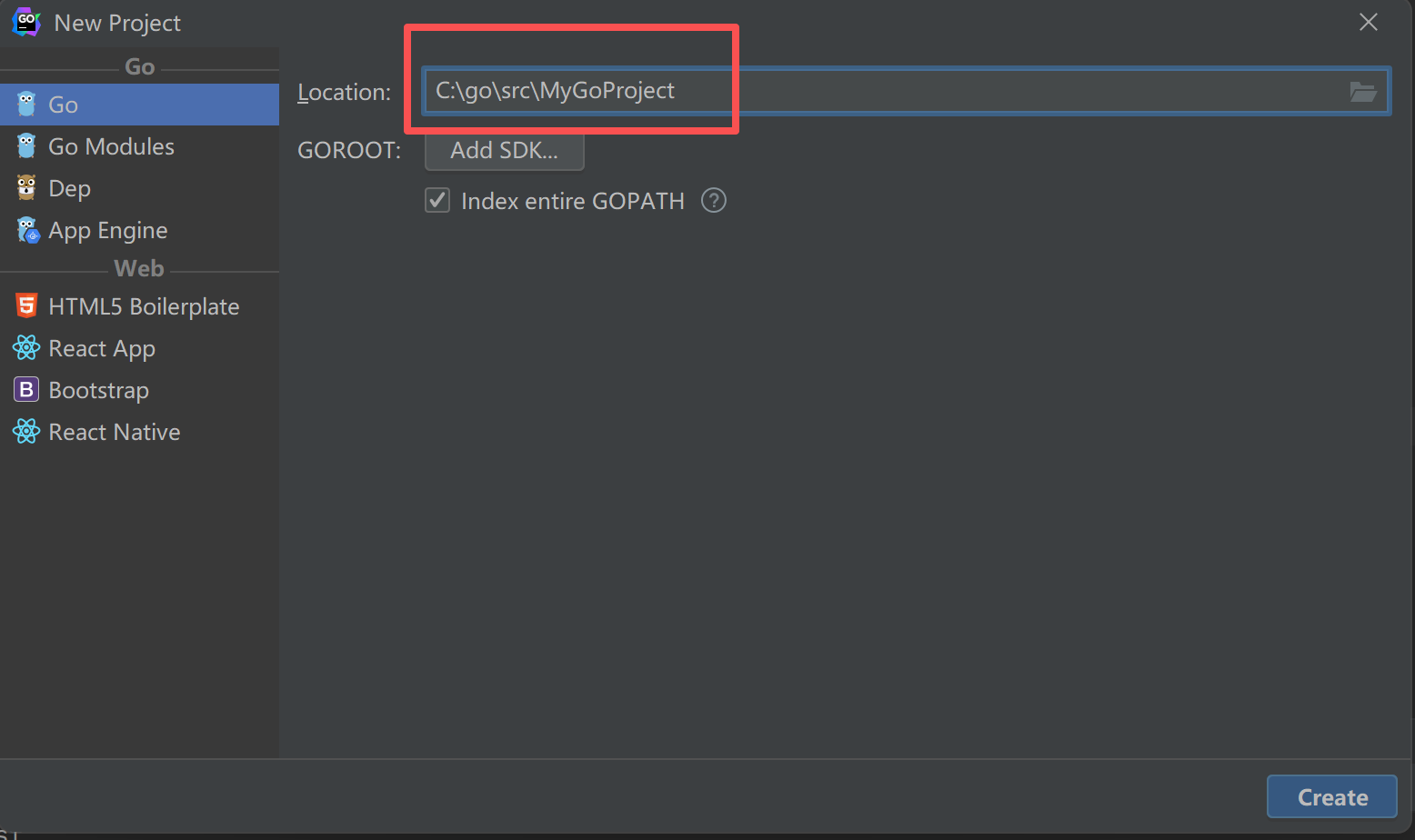
2.工程建好之后,在工程里面创建一个目录testmodule即所谓的模块
3.在testmodule模块下新建文件my_test.go
//注意一定要加_test.go,因为你用到了testing模块
package testmodule
import (
    "math/big"  //包引入,需要改一下
    "testing"
)
/*
math/big/rat.go
type Rat struct {
    // To make zero values for Rat work w/o initialization,
    // a zero value of b (len(b) == 0) acts like b == 1. At
    // the earliest opportunity (when an assignment to the Rat
    // is made), such uninitialized denominators are set to 1.
    // a.neg determines the sign of the Rat, b.neg is ignored.
    a, b Int
}
*/

/*
Rat 是在  math/big/rat.go 中定义
type Rat struct {
    // To make zero values for Rat work w/o initialization,
    // a zero value of b (len(b) == 0) acts like b == 1. At
    // the earliest opportunity (when an assignment to the Rat
    // is made), such uninitialized denominators are set to 1.
    // a.neg determines the sign of the Rat, b.neg is ignored.
    a, b Int
}
*/

func TestZeroRat(t *testing.T) {
    var x, y, z big.Rat   //这里原来是Rat,改成big.Rat
    y.SetFrac64(0, 42)

    if x.Cmp(&y) != 0 {
    t.Errorf("x and y should be both equal and zero")
    }

    if s := x.String(); s != "0/1" {
    t.Errorf("got x = %s, want 0/1", s)
    }

    if s := x.RatString(); s != "0" {
    t.Errorf("got x = %s, want 0", s)
    }

    z.Add(&x, &y)
    if s := z.RatString(); s != "0" {
    t.Errorf("got x+y = %s, want 0", s)
    }

    z.Sub(&x, &y)
    if s := z.RatString(); s != "0" {
    t.Errorf("got x-y = %s, want 0", s)
    }

    z.Mul(&x, &y)
    if s := z.RatString(); s != "0" {
    t.Errorf("got x*y = %s, want 0", s)
    }

    // check for division by zero
    defer func() {
    if s := recover(); s == nil || s.(string) != "division by zero" {
    panic(s)
    }
    }()
    z.Quo(&x, &y)
}
3.执行go test ,验证你的函数是否通过验证
C:\Go\src\myProject2\testmodule>go test
# myProject2/testmodule [myProject2/testmodule.test]
.\Rax_test.go:4:2: imported and not used: "math"
.\Rax_test.go:20:14: undefined: big
FAIL myProject2/testmodule [build failed]
#这是因为 math应改为math/big
C:\Go\src\myProject2\testmodule>go test
PASS
ok myProject2/testmodule 0.660s

4.想测试哪个就建个目录即可,自己建一个文件*_test.go(因为源码包中会大量使用 testing来做测试, 比如: my_test.go ,否则不会文件中定义的 测试代码

5.使用golang时注意下,最好创建在安装目录 c:\go\src 目录下,否则不识别你自己创建的包,这样节约时间。
举例2:
C:\Go\src\unicode\utf8\example_test.go
本例由于不是用的testing包,所以直接copy到项目下,改名为example.go
 example_test.go里面的只取了ExampleDecodeLastRune函数部分的代码
package utf8_test

import (
    "fmt"
    "unicode/utf8"
)

func ExampleDecodeLastRune() {
    b := []byte("Hello, 世界")

    for len(b) > 0 {
        r, size := utf8.DecodeLastRune(b)
        fmt.Printf("%c %v\n", r, size)

        b = b[:len(b)-size]
    }
    // Output:
    // 界 3
    // 世 3
    //   1
    // , 1
    // o 1
    // l 1
    // l 1
    // e 1
    // H 1
}
改为项目里面使用的example.go,代码如下 只改了2个地方
package main

import (
    "fmt"
    "unicode/utf8"
)

func ExampleDecodeLastRune() {
    b := []byte("Hello, 世界")
    for len(b) > 0 {
        r, size := utf8.DecodeLastRune(b)
        fmt.Printf("%c %v\n", r, size)

        b = b[:len(b)-size]
    }
    // Output:
    // 界 3
    // 世 3
    //   1
    // , 1
    // o 1
    // l 1
    // l 1
    // e 1
    // H 1
}
func main(){
    ExampleDecodeLastRune()
}

讲解一下:
utf8.DecodeLastRune 定义在 C:\Go\src\unicode\utf8\utf8.go
1.注意引入的包名 "unicode/utf8"
2.utf8.DecodeLastRune  实际就是 unicode\utf8\utf8.go中 DecodeLastRune函数,注意如果外部想访问到必须使用必须首字母大写,这个很多资料中没有提到。
  包内的函数不想让外部访问到即类似其他语言的private,则函数名第一个字母写成小写即可。
3.是否必须建unicode/utf8/utf8.go 形式来访问utf8.DecodeLastRune呢,当然不是,
  你可以改成 unicode/utf8/hello.go , import写法不变即"unicode/utf8" ,但是调用时要改成hello.DecodeLastRune
举例3:
干预包的行为,例如C:\Go\src\bytes\bytes.go,我们可以直接修改bytes.go文件
go和python都具有这种特性,src下的内容都可以自己修改,同时会影响程序的运行
package main

import (
    "fmt"

)
/*
C:\Go\src\bytes\bytes.go中
//由于没有fmt包引入,所以bytes.go import 加入 fmt包
Equal函数原型修改:
func Equal(a, b []byte) bool {
    //此行执行后会被打印
    fmt.Println("a and b Equal ?",a,b)
    // Neither cmd/compile nor gccgo allocates for these string conversions.
    return string(a) == string(b)
}
*/
func 定义bytes(){
    // Using integer values (ASCII 'G', 'o', '!')
    byteSlice3 := []byte{71, 111, 33}
    fmt.Printf("%s\n", byteSlice3) // Output: Go!
    //转换为字符串
    fmt.Printf("%s\n", string(byteSlice3))
    bytes.Equal(buffer,byteSlice3)
}
func main(){
     定义bytes()
}

//由于支持中文函数名,这样你可以在一个有main函数的文件中,定义不同的测试代码,省去了很多声明变量名称时的烦恼。这样不同函数中局部变量可以一样。
三、关于D:\gosourceoffice\go\api 目录
里面是go1.1.txt->go.1.26.txt 各个版本的情况,就比如之前在弄hadoop时候,我就曾经下载过所有的版本,对比各个版本的差异。包括k8s的dns模块的变化会在不同版本中体现出来。所以学习还是要有一个方法。
其他也多看看如:
C:\Go\src\fmt\fmt_test.go
C:\Go\src\fmt\scan_test.go
C:\Go\src\fmt\example_test.go

 浙公网安备 33010602011771号