

pycharm vue 开发
本文目的是记录pycharm的vue开发过程,同时介绍一些基本内容
 使用vue.js开发,需三件套 node.js , npm(也可用yarn,pnpm代替) 和vue脚手架(vue cli)
 打包工具有时会使用vite、webpack等
1、Node.js 自带了一个名为npm (Node Package Manager) 的包管理器,用于管理和安装第三方库
2、npm是node.js 第三方包管理器,类似python pip
   npm、cnpm、yarn、pnpm等都是包管理工具,可以通过组合进行使用。
以下是一些常用的Node.js第三方模块,它们各自提供了独特的功能和优势。
   Express:   一个灵活的Node.js web应用框架,提供了一系列强大的功能,帮助你创建各种Web和移动设备应用。
   Sequelize: 一个基于Promise的Node.js ORM,支持多种数据库系统,如MySQL、PostgreSQL、SQLite和Microsoft SQL Server,简化了数据库操作。
   CORS:      一个Node.js包,提供跨域资源共享(CORS)的实现,使得不同域之间的资源可以安全地共享。
   Nodemailer: 一个允许从Node.js发送电子邮件的模块,支持多种邮件传输协议,包括SMTP。
   Passport:   一个身份验证中间件,支持多种认证策略,包括OAuth、OpenID和本地账户认证。
   Async:      一个实用工具模块,提供了一系列的函数来处理异步操作,如并行处理、序列处理等。
   Socket.IO:  一个实时通信库,允许在客户端和服务器之间进行实时、双向和基于事件的通信。
   Lodash:     一个实用的JavaScript库,提供了许多有用的函数,帮助开发者编写更清晰、更高效的代码。
   Axios:      一个基于Promise的HTTP客户端,适用于浏览器和node.js,提供了简洁的API来发送HTTP请求。
   Puppeteer:  一个Node.js库,它提供了一个高级API来控制Chrome或Chromium,常用于自动化测试和网页爬取。
   Multer:     一个Node.js中间件,用于处理multipart/form-data类型的表单数据,主要用于上传文件。
   Dotenv:     一个用于加载环境变量的模块,它允许你将环境变量放在一个单独的.env文件中,而不是直接在代码中硬编码。
   Winston:    一个多功能的Node.js日志记录库,支持多种日志级别和日志传输方式,如文件、数据库等。
3. cnpm 因为npm安装插件是从国外服务器下载,受网络的影响比较大,所以你可以使用cnpm,他拉取的是国内的 npmjs.org 镜像
安装命令 > npm install -g cnpm --registry=https://registry.npmmirror.com
使用命令> cnpm install packagename
一、介绍vue
  1.Vue (读音/vjuː/,类似于view) 是一套用于构建用户界面的渐进式框架,vue,vue2,vue3都是vue.js的不同版本。
  Vue:Vue.js的第一个版本,也称为Vue 1.x。它于2014年首次发布,并获得了广泛的应用和认可。

  2.Vue2:Vue.js的第二个版本,也称为Vue 2.x。它在Vue 1.x的基础上进行了升级和改进,提供了更好的性能、更多的功能和更好的开发体验。
  Vue2是目前广泛应用的稳定版本,在许多项目中使用。

  3.Vue3:Vue.js的最新版本,也称为Vue 3.x。它在Vue 2.x的基础上进行了重构和升级,引入了许多新特性和改进。
   Vue3提供了更快的渲染速度、更小的包大小、更好的响应性和更方便的开发工具。
二、创建vue project
pycharm创建vue.js项目
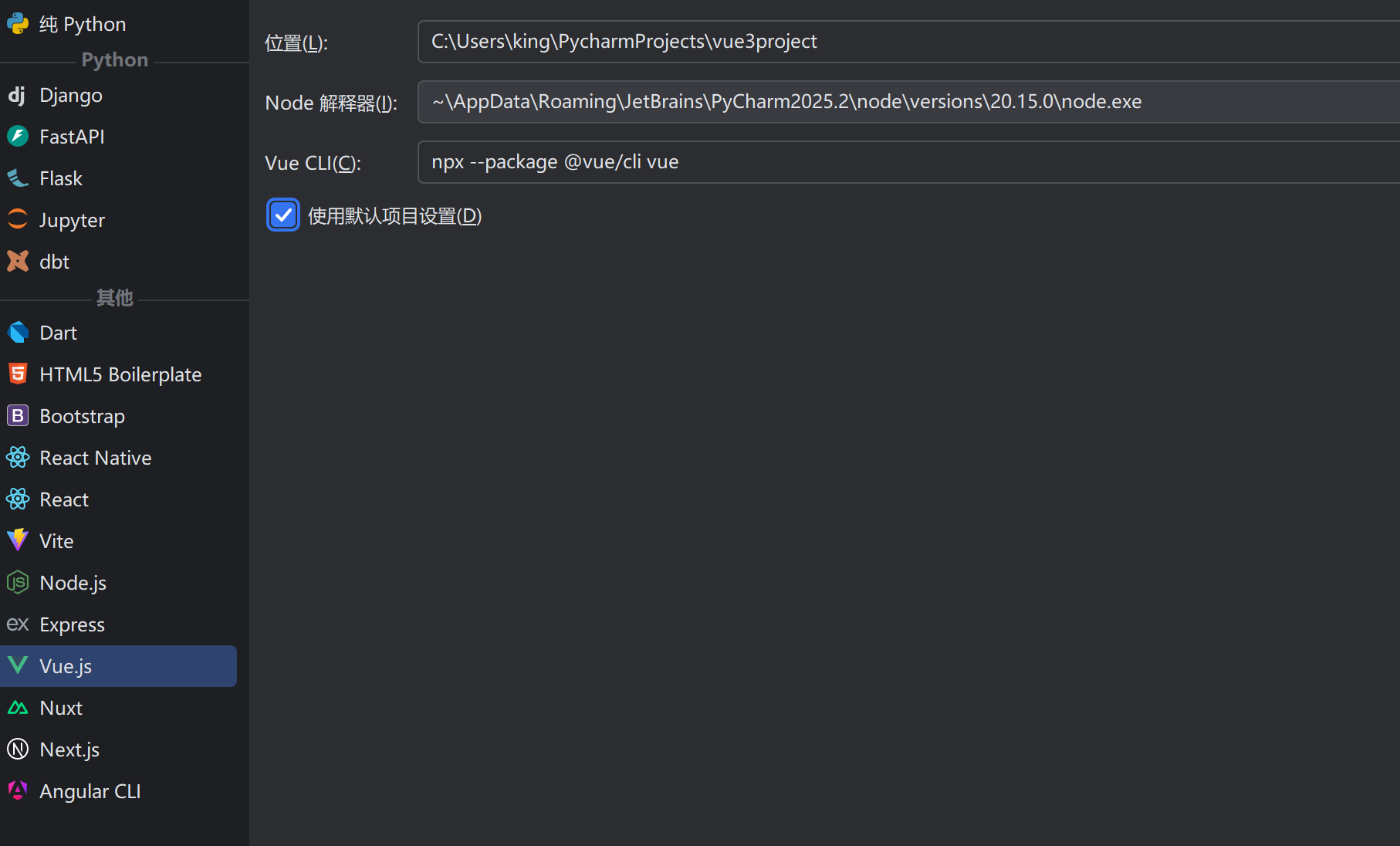
注意你创建时时间会比较长,因为这是一个虚拟环境,所以要下载很多相关的包,即使你已经有有pycharm vue项目了,但是每个项目都是一个独立的运行环境。
如果一些还是可以共用比如vue-cli以及之前安装的比如cnpm等
2)创建后如下目录结构
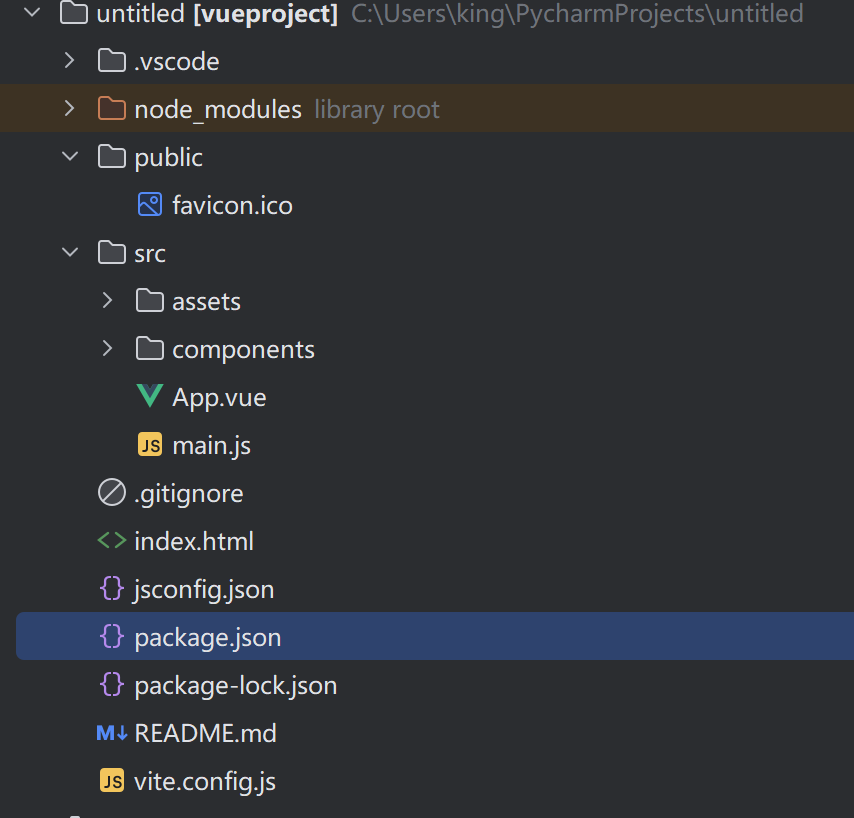
3) 注意本机并没有安装node.js,完全用pycharm 的 node.js 环境,在外部的dos下不可用,类似目前处于虚拟环境中运行
4) C:\Users\king\PycharmProjects\vue3project> npm run serve 运行即可浏览器访问
三、node
1.执行node 帮助
PS C:\Users\king\PycharmProjects\untitled> node --help
Usage: node [options] [ script.js ] [arguments]
       node inspect [options] [ script.js | host:port ] [arguments]

Options:
  -                                                 script read from stdin (default if no file name is provided,
                                                    interactive mode if a tty)
  --                                                indicate the end of node options
  --abort-on-uncaught-exception                     aborting instead of exiting causes a core file to be generated for
                                                    analysis
  --allow-addons                                    allow use of addons when any permissions are set
  --allow-child-process                             allow use of child process when any permissions are set
  --allow-fs-read=...                               allow permissions to read the filesystem
  --allow-fs-write=...                              allow permissions to write in the filesystem
  --allow-worker                                    allow worker threads when any permissions are set
....
四、vue命令
1.vue命令不识别
PS C:\Users\king\PycharmProjects\untitled> vue
vue : 无法将“vue”项识别为 cmdlet、函数、脚本文件或可运行程序的名称。请检查名称的拼写,如果包括路径,请确保路径正确,然后再试一次。
所在位置 行:1 字符: 1
+ vue
+ ~~~
    + CategoryInfo          : ObjectNotFound: (vue:String) [], CommandNotFoundException
    + FullyQualifiedErrorId : CommandNotFoundException
2.安装vue cli(脚手架)
Vue CLI 是一个基于 Vue.js 进行快速开发的完整系统,提供:
通过 @vue/cli 实现的交互式的项目脚手架。 ( 安装 npm install -g @vue/cli)
通过 @vue/cli + @vue/cli-service-global 实现的零配置原型开发。(  安装 npm install -g  @vue/cli-service-global)
一个运行时依赖 (@vue/cli-service),该依赖:
可升级;
基于 webpack 构建,并带有合理的默认配置;
可以通过项目内的配置文件进行配置;
可以通过插件进行扩展。
一个丰富的官方插件集合,集成了前端生态中最好的工具。
一套完全图形化的创建和管理 Vue.js 项目的用户界面。
CLI (@vue/cli) 是一个全局安装的 npm 包,提供了终端里的 vue 命令。它可以通过 vue create 快速搭建一个新项目,或者直接通过 vue serve 构建新想法的原型。你也可以通过 vue ui 通过一套图形化界面管理你的所有项目。
CLI 服务
CLI 服务 (@vue/cli-service) 是一个开发环境依赖。它是一个 npm 包,局部安装在每个 @vue/cli 创建的项目中。

    CLI 服务是构建于 webpack 和 webpack-dev-server 之上的。它包含了:

加载其它 CLI 插件的核心服务;
一个针对绝大部分应用优化过的内部的 webpack 配置;
项目内部的 vue-cli-service 命令,提供 serve、build 和 inspect 命令。
    如果你熟悉 create-react-app 的话,@vue/cli-service 实际上大致等价于 react-scripts,尽管功能集合不一样。
CLI 插件
CLI 插件是向你的 Vue 项目提供可选功能的 npm 包,例如 Babel/TypeScript 转译、ESLint 集成、单元测试和 end-to-end 测试等。
Vue CLI 插件的名字以 @vue/cli-plugin- (内建插件) 或 vue-cli-plugin- (社区插件) 开头,非常容易使用。
当你在项目内部运行 vue-cli-service 命令时,它会自动解析并加载 package.json 中列出的所有 CLI 插件。
PS C:\Users\king\PycharmProjects\untitled> npm install -g @vue/cli (安装脚手架)
PS C:\Users\king\PycharmProjects\untitled> npm install -g @vue/cli
npm warn deprecated source-map-url@0.4.1: See https://github.com/lydell/source-map-url#deprecated
npm warn deprecated urix@0.1.0: Please see https://github.com/lydell/urix#deprecated
npm warn deprecated resolve-url@0.2.1: https://github.com/lydell/resolve-url#deprecated
npm warn deprecated source-map-resolve@0.5.3: See https://github.com/lydell/source-map-resolve#deprecated
npm warn deprecated @babel/plugin-proposal-class-properties@7.18.6: This proposal has been merged to the ECMAScript standard and thus this plugin is no longer maintained. Please use @babel/plugin-transform-class-properties instead.
npm warn deprecated @babel/plugin-proposal-nullish-coalescing-operator@7.18.6: This proposal has been merged to the ECMAScript standard and thus this plugin is no longer maintained. Please use @babel/plugin-transform-nullish-coalescing-operator instead.
npm warn deprecated rimraf@2.6.3: Rimraf versions prior to v4 are no longer supported
npm warn deprecated @babel/plugin-proposal-optional-chaining@7.21.0: This proposal has been merged to the ECMAScript standard and thus this plugin is no longer maintained. Please use @babel/plugin-transform-optional-chaining instead.
npm warn deprecated inflight@1.0.6: This module is not supported, and leaks memory. Do not use it. Check out lru-cache if you want a good and tested way to coalesce async requests by a key value, which is much more comprehensive and powerful.
npm warn deprecated glob@7.2.3: Glob versions prior to v9 are no longer supported
..... 下面省略
87 packages are looking for funding
run `npm fund` for details
3.测试运行vue命令
PS C:\Users\king\PycharmProjects\untitled> vue
Usage: vue <command> [options]
Options:
  -V, --version                              output the version number
  -h, --help                                 display help for command
Commands:
  create [options] <app-name>                create a new project powered by vue-cli-service
  add [options] <plugin> [pluginOptions]     install a plugin and invoke its generator in an already created project
  invoke [options] <plugin> [pluginOptions]  invoke the generator of a plugin in an already created project
  inspect [options] [paths...]               inspect the webpack config in a project with vue-cli-service
  serve                                      alias of "npm run serve" in the current project
  build                                      alias of "npm run build" in the current project
  ui [options]                               start and open the vue-cli ui
  init [options] <template> <app-name>       generate a project from a remote template (legacy API, requires @vue/cli-init)
  config [options] [value]                   inspect and modify the config
  outdated [options]                         (experimental) check for outdated vue cli service / plugins
  upgrade [options] [plugin-name]            (experimental) upgrade vue cli service / plugins
  migrate [options] [plugin-name]            (experimental) run migrator for an already-installed cli plugin
  info                                       print debugging information about your environment
  help [command]                             display help for command

  Run vue <command> --help for detailed usage of given command.
4.npm
npm是node.js的包管理器
PS C:\Users\king\PycharmProjects\untitled> npm --help
npm <command>
Usage:
npm install        install all the dependencies in your project
npm install <foo>  add the <foo> dependency to your project
npm test           run this project's tests
npm run <foo>      run the script named <foo>
npm <command> -h   quick help on <command>
npm -l             display usage info for all commands
npm help <term>    search for help on <term> (in a browser)
npm help npm       more involved overview (in a browser)
All commands:
    access, adduser, audit, bugs, cache, ci, completion,
    config, dedupe, deprecate, diff, dist-tag, docs, doctor,
    edit, exec, explain, explore, find-dupes, fund, get, help,
    help-search, hook, init, install, install-ci-test,
    install-test, link, ll, login, logout, ls, org, outdated,
    owner, pack, ping, pkg, prefix, profile, prune, publish,
    query, rebuild, repo, restart, root, run-script, sbom,
    search, set, shrinkwrap, star, stars, start, stop, team,
    test, token, uninstall, unpublish, unstar, update, version,
    view, whoami
Specify configs in the ini-formatted file:
    C:\Users\king\.npmrc
or on the command line via: npm <command> --key=value
More configuration info: npm help config
Configuration fields: npm help 7 config
npm@10.7.0 C:\Users\king\AppData\Roaming\JetBrains\PyCharm2025.2\node\versions\20.15.0\node_modules\npm
5. 安装vue/cli-service
CLI 服务( @vue/cli-service ) 是一个开发环境依赖。它是一个npm 包,局部安装在每个 @vue/cli 创建的项目中
PS C:\Users\king\PycharmProjects\untitled> npm install -g  @vue/cli-service-global
npm warn EBADENGINE Unsupported engine {
npm warn EBADENGINE   package: '@achrinza/node-ipc@9.2.2',
npm warn EBADENGINE   required: { node: '8 || 10 || 12 || 14 || 16 || 17' },
npm warn EBADENGINE   current: { node: 'v20.15.0', npm: '10.7.0' }
npm warn EBADENGINE }
npm warn deprecated inflight@1.0.6: This module is not supported, and leaks memory. Do not use it. Check out lru-cache if you want a good and tested way to coalesce async requests by a key value, which is much more comprehensive and powerful.
npm warn deprecated @babel/plugin-proposal-class-properties@7.18.6: This proposal has been merged to the ECMAScript standard and thus this plugin is no longer maintained. Please use @babel/plugin-transform-class-properties instead.
npm warn deprecated source-map-url@0.4.1: See https://github.com/lydell/source-map-url#deprecated
npm warn deprecated rimraf@2.6.3: Rimraf versions prior to v4 are no longer supported
npm warn deprecated urix@0.1.0: Please see https://github.com/lydell/urix#deprecated
npm warn deprecated glob@7.2.3: Glob versions prior to v9 are no longer supported
npm warn deprecated source-map-resolve@0.5.3: See https://github.com/lydell/source-map-resolve#deprecated
npm warn deprecated resolve-url@0.2.1: https://github.com/lydell/resolve-url#deprecated
npm warn deprecated vue@2.7.16: Vue 2 has reached EOL and is no longer actively maintained. See https://v2.vuejs.org/eol/ for more details.
npm warn deprecated stable@0.1.8: Modern JS already guarantees Array#sort() is a stable sort, so this library is deprecated. See the compatibility table on MDN: https://developer.mozilla.org/en-US/docs/Web/JavaScript/Reference/Global_Objects/Array/sort#browser_compatibility
npm warn deprecated q@1.5.1: You or someone you depend on is using Q, the JavaScript Promise library that gave JavaScript developers strong feelings about promises. They can almost certainly migrate to the native JavaScript promise now. Thank you literally everyone for joining me in this bet against the odds. Be excellent to each other.
npm warn deprecated
npm warn deprecated (For a CapTP with native promises, see @endo/eventual-send and @endo/captp)
npm warn deprecated uuid@3.4.0: Please upgrade  to version 7 or higher.  Older versions may use Math.random() in certain circumstances, which is known to be problematic.  See https://v8.dev/blog/math-random for details.
npm warn deprecated har-validator@5.1.5: this library is no longer supported
npm warn deprecated svgo@1.3.2: This SVGO version is no longer supported. Upgrade to v2.x.x.
npm warn deprecated fs-write-stream-atomic@1.0.10: This package is no longer supported.
npm warn deprecated copy-concurrently@1.0.5: This package is no longer supported.
npm warn deprecated @types/minimatch@6.0.0: This is a stub types definition. minimatch provides its own type definitions, so you do not need this installed.
npm warn deprecated rimraf@2.7.1: Rimraf versions prior to v4 are no longer supported
npm warn deprecated move-concurrently@1.0.1: This package is no longer supported.
npm warn deprecated consolidate@0.15.1: Please upgrade to consolidate v1.0.0+ as it has been modernized with several long-awaited fixes implemented. Maintenance is supported by Forward Email at https://forwardemail.net ; follow/watch https://github.com/ladjs/consolidate for updates and release changelog
npm warn deprecated @hapi/address@2.1.4: Moved to 'npm install @sideway/address'
npm warn deprecated @hapi/bourne@1.3.2: This version has been deprecated and is no longer supported or maintained
npm warn deprecated @hapi/hoek@8.5.1: This version has been deprecated and is no longer supported or maintained
npm warn deprecated @hapi/topo@3.1.6: This version has been deprecated and is no longer supported or maintained
npm warn deprecated request@2.88.2: request has been deprecated, see https://github.com/request/request/issues/3142
npm warn deprecated figgy-pudding@3.5.2: This module is no longer supported.
npm warn deprecated @hapi/joi@15.1.1: Switch to 'npm install joi'
npm warn deprecated webpack-chain@6.5.1: Package no longer supported. Contact Support at https://www.npmjs.com/support for more info.
npm warn deprecated html-webpack-plugin@3.2.0: 3.x is no longer supported
npm warn deprecated eslint-loader@2.2.1: This loader has been deprecated. Please use eslint-webpack-plugin
npm warn deprecated babel-eslint@10.1.0: babel-eslint is now @babel/eslint-parser. This package will no longer receive updates.
npm warn deprecated eslint@5.16.0: This version is no longer supported. Please see https://eslint.org/version-support for other options.
6.vue应用构成
// 一个Vue应用,由根实例+Vue 实例(组件)树组成
根实例
└─ 根组件 // 此行开始,为组件树
   ├─ 组件1
   │  ├─ 组件1-1
   │  └─ 组件1-2
   └─ 组件2
      ├─ 组件2-1
      └─ 组件2-2
7.安装 vue-router
PS C:\Users\king\PycharmProjects\untitled\demo> npm install vue-router

added 2 packages, and audited 919 packages in 10s

120 packages are looking for funding
  run `npm fund` for details

12 vulnerabilities (8 moderate, 4 high)

To address issues that do not require attention, run:
  npm audit fix

To address all issues (including breaking changes), run:
  npm audit fix --force

Run `npm audit` for details.


使用vue-router
import Vue from 'vue';
import VueRouter from 'vue-router';
Vue.use(VueRouter);
const routes = [
  {
    path: '/',
    name: 'Home',
    component: () => import('@/views/Home.vue'),
  },
  {
    path: '/about',
    name: 'About',
    component: () => import('@/views/About.vue'),
  },
];
我们使用new VueRouter()创建了一个VueRouter实例
const router = new VueRouter({
  routes,
});
export default router;
8、我们利用vue create 创建一个demo项目
执行 \PycharmProjects\untitled> vue create demo
在目录下执行 \PycharmProjects\untitled\demo> npm run serve
下面代码经过精简之后:
1.App.vue

<!--一个组件的基础设置 -->
<template>
 <!-- 组件hw使用-->
  <MyComponent msg=" 欢迎 -----------Vue.js App"/>
</template>

<script>
import MyComponent from './components/myapptest.vue'

export default {
  name: 'App',
  components: {MyComponent}
}
</script>

2. 在components目录创建myapptest.vue组件
<template>
  <div class="hello">
    <h1>{{ msg }}</h1>
  </div>
</template>

<script>
export default {
  name: 'MyComponent',
  props: {
    msg: String
  }
}
</script>
3.main.js
import { createApp } from 'vue'
//从一个单文件组件中导入根组件
import App from './App.vue'
//挂载应用
createApp(App).mount('#app')
9.关于生产部署
Vue项目在开发阶段需要Node.js环境,而在打包后不再需要Node.js环境的原因在于两者的工作内容不同。
一、开发阶段(需要Node.js)
  1)构建工具和开发服务器
    Vue项目通常使用如Webpack、Vite等构建工具,以及Vue CLI开发服务器。这些工具需要Node.js来运行。它们帮助你实时编译、打包、热更新你的代码,提供一个高效的开发环境。
  2)依赖管理
    在开发过程中,通过Node.js的包管理工具(如npm或yarn),你可以安装、管理项目的依赖库和插件。
  3)构建和打包代码
    在开发阶段,你的源代码包括Vue组件、SCSS/LESS样式、ES6+语法等,浏览器无法直接理解这些内容。Node.js通过构建工具(如Webpack、Vite)
     将这些代码转译和打包成可以在浏览器中运行的JavaScript文件、CSS文件和HTML文件。
 二、打包后(不再需要Node.js)
    打包后的Vue项目生成了浏览器可以直接运行的静态文件(HTML、CSS、JavaScript)。这些文件不再需要Node.js,
    因为浏览器原生支持,打包后的项目已经将所有Vue组件、ES6代码和样式转译为浏览器可以理解的格式。浏览器只需要这些静态文件,无需Node.js来解释或构建它们。
    部署和运行打包后的Vue项目可以被部署到任何支持静态文件托管的服务器上,例如Nginx、Apache、GitHub Pages、Vercel等。浏览器通过HTTP请求这些静态资源后,就能直接运行它们。
10.图形化的向导创建项目
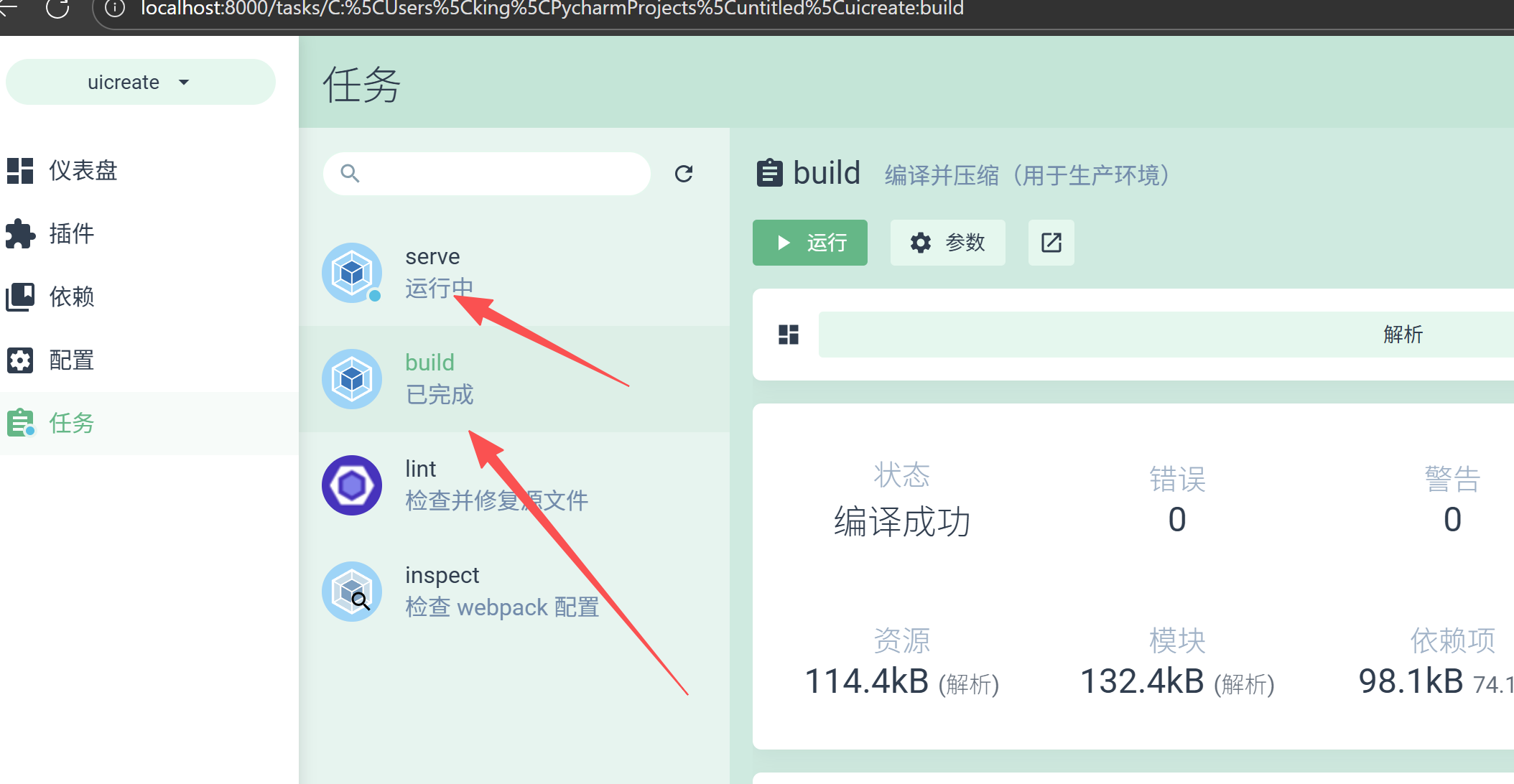
进入终端控制台,在demoproject目录下执行 vue ui 命令 直接启动浏览器,进行创建、运行、构建(build)等
创建时你可以选择vue2,vue3等创建(目前官方vue2已经停止维护)
PS C:\Users\king\PycharmProjects\untitled\demo> vue ui
🚀  Starting GUI...
🌠  Ready on http://localhost:8000
浏览器界面的截图
11、手工编译
进入应用运行 npm run build ,如果dist目录没有,会生成dist编译目录
PS C:\Users\king\PycharmProjects\untitled\uicreate> npm run build

> uicreate@0.1.0 build
> vue-cli-service build

All browser targets in the browserslist configuration have supported ES module.
Therefore we don't build two separate bundles for differential loading.


/  Building for production...

 DONE  Compiled successfully in 6701ms                                                                                                                   14:37:48

  File                                 Size                                                        Gzipped

  dist\js\chunk-vendors.671a0cc2.js    96.18 KiB                                                   35.50 KiB
  dist\js\app.9891c62a.js              13.07 KiB                                                   8.46 KiB
  dist\css\app.2cf79ad6.css            0.33 KiB                                                    0.23 KiB

  Images and other types of assets omitted.
  Build at: 2025-11-28T06:37:49.007Z - Hash: 10bb951e25692176 - Time: 6701ms

 DONE  Build complete. The dist directory is ready to be deployed.
 INFO  Check out deployment instructions at https://cli.vuejs.org/guide/deployment.html
12.现代前端构建工具对比:Vue CLI、Webpack 和 Vite
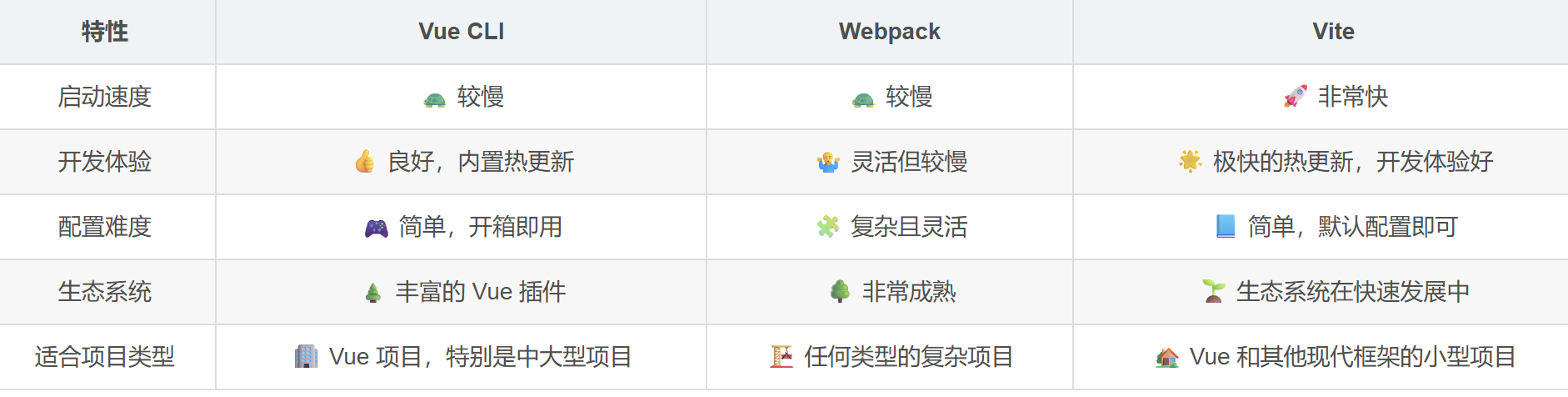
但是要注意几点
1、 在Webpack中,要启动一个服务需要先编译,再启动
2、在Vite中,是先启动服务,可以按需进行编译 ,默认版本是vue3
参考:
https://godbasin.github.io/vue-ebook/vue-ebook/2.html#_2-2-vue-cli-%E8%84%9A%E6%89%8B%E6%9E%B6
https://cli.vuejs.org/
https://github.com/vuejs/core/tree/main/packages/vue#readme

 浙公网安备 33010602011771号