

在x86-64位系统中编译运行x86-32的c程序
实验环境:
[root@ht6 test]# uname -a
Linux ht6.node 3.10.0-1160.62.1.el7.x86_64 #1 SMP Tue Apr 5 16:57:59 UTC 2022 x86_64 x86_64 x86_64 GNU/Linux
[root@ht6 test]# cat /etc/redhat-release
CentOS Linux release 7.9.2009 (Core)
[root@ht6 test]# lscpu
Architecture:          x86_64  //64位
CPU op-mode(s):        32-bit, 64-bit
Byte Order:            Little Endian
CPU(s):                8
On-line CPU(s) list:   0-7
Thread(s) per core:    1
Core(s) per socket:    4
Socket(s):             2
NUMA node(s):          1
Vendor ID:             GenuineIntel
CPU family:            6
Model:                 63
Model name:            Intel(R) Xeon(R) CPU E5-2660 v3 @ 2.60GHz
Stepping:              2
CPU MHz:               2593.993
BogoMIPS:              5187.98
Hypervisor vendor:     VMware
Virtualization type:   full
L1d cache:             32K
L1i cache:             32K
L2 cache:              256K
L3 cache:              25600K
NUMA node0 CPU(s):     0-7

[root@ht6 test]# getconf LONG_BIT
64  //64位

[root@ht6 test]# arch
x86_64
在x86-64位系统中编译运行x86-32的c程序(寄存器为64位)
//需要安装兼容包
 [root@ht6 asm]# yum -y install glibc-devel.i686 glibc-devel ibstdc++-devel.i686
代码test.c
#include <stdio.h>
int add(int a, int b)
{
        int result = a + b;
        return result;
}

int main(int argc)
{
        int answer;
        answer = add(111, 222);
}
实验: 编译32位程序
 [root@ht6 asm]# gcc -m32 -S test.c  //生成汇编 test.s   -m32参数指定编译为32位程序
 [root@ht6 asm]# gcc -m32 -o output32 test.c   //编译出可执行 outpu32程序
生成汇编文件如下命令:
gcc -m32 -S test.c   #AT&T风格语法,-m32指定32位汇编指令
[root@ht6 asm]# vim test.s

        .file   "test.c"
        .text
        .globl  bar
        .type   bar, @function
bar:
.LFB0:
        .cfi_startproc
        pushl   %ebp
        .cfi_def_cfa_offset 8
        .cfi_offset 5, -8
        movl    %esp, %ebp
        .cfi_def_cfa_register 5
        subl    $16, %esp
        movl    $555, -4(%ebp)
        movl    12(%ebp), %eax
        movl    8(%ebp), %edx
        addl    %edx, %eax
        movl    %eax, -8(%ebp)
        leave
        .cfi_restore 5
        .cfi_def_cfa 4, 4
        ret
        .cfi_endproc
.LFE0:
        .size   bar, .-bar
        .globl  foo
        .type   foo, @function
foo:
.LFB1:
        .cfi_startproc
        pushl   %ebp
        .cfi_def_cfa_offset 8
        .cfi_offset 5, -8
四个阶段完成整个的编译

gdb测试:
  [root@ht6 asm]# gdb -tui -q ./output32
   (gdb) b main
   (gdb)r
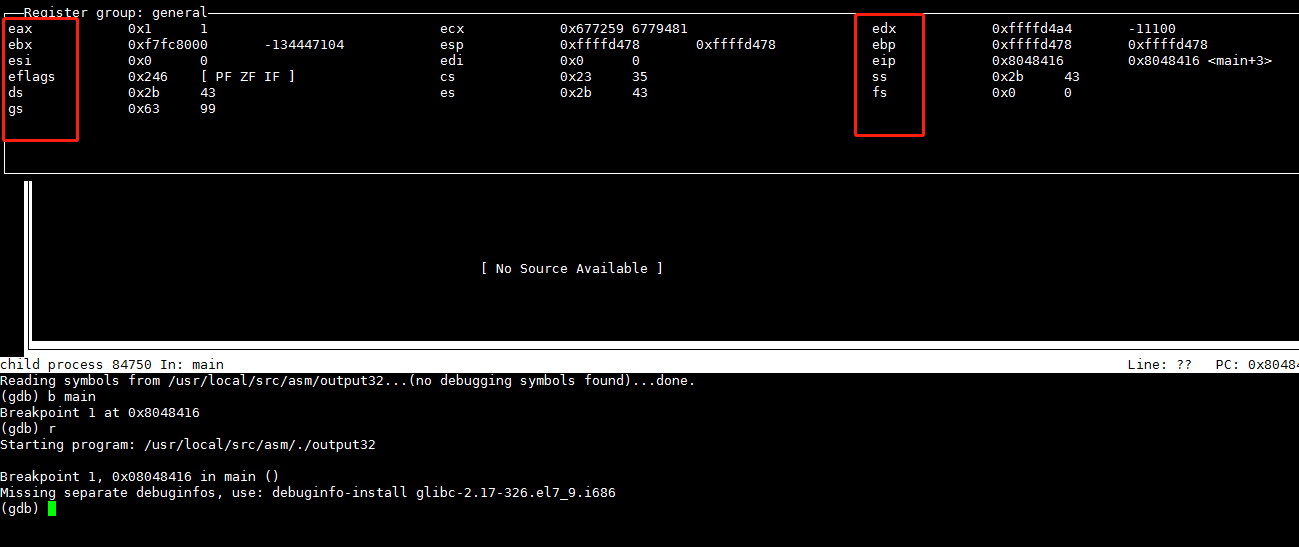
 (gdb)layout regs  ### 命令执行显示效果如下,
注意寄存器红色名称:
查看文件格式
[root@ht6 asm]# file output32
output32: ELF 32-bit LSB executable, Intel 80386, version 1 (SYSV), dynamically linked
   (uses shared libs), for GNU/Linux 2.6.32, BuildID[sha1]=8e9ffb90783e7855fec3c49d2ff55a7e469d4423,
   not stripped
反汇编结果只留下我感兴趣的,其他删掉了:(AT&T语法) -
[root@ht6 asm]# objdump -d output32
output32:     file format elf32-i386  //格式
Disassembly of section .init:
0804828c <_init>:
 804828c:    53                       push   %ebx   //第一行,53代表操作码(指令解析器层次)
 804828d:    83 ec 08                 sub    $0x8,%esp
 8048290:    e8 7b 00 00 00           call   8048310 <__x86.get_pc_thunk.bx>
 8048295:    81 c3 6b 1d 00 00        add    $0x1d6b,%ebx
 804829b:    8b 83 fc ff ff ff        mov    -0x4(%ebx),%eax
 80482a1:    85 c0                    test   %eax,%eax
 80482a3:    74 05                    je     80482aa <_init+0x1e>
 80482a5:    e8 26 00 00 00           call   80482d0 <.plt.got>
 80482aa:    83 c4 08                 add    $0x8,%esp
 80482ad:    5b                       pop    %ebx
 80482ae:    c3                       ret

Disassembly of section .text:

080482e0 <_start>:
 80482e0:    31 ed                    xor    %ebp,%ebp
 80482e2:    5e                       pop    %esi
 80482e3:    89 e1                    mov    %esp,%ecx
 80482e5:    83 e4 f0                 and    $0xfffffff0,%esp
 80482e8:    50                       push   %eax
 80482e9:    54                       push   %esp
 80482ea:    52                       push   %edx
 80482eb:    68 90 84 04 08           push   $0x8048490
 80482f0:    68 20 84 04 08           push   $0x8048420
 80482f5:    51                       push   %ecx
 80482f6:    56                       push   %esi
 80482f7:    68 13 84 04 08           push   $0x8048413
 80482fc:    e8 bf ff ff ff           call   80482c0 <__libc_start_main@plt>
 8048301:    f4                       hlt
 8048302:    66 90                    xchg   %ax,%ax
 8048304:    66 90                    xchg   %ax,%ax
 8048306:    66 90                    xchg   %ax,%ax
 8048308:    66 90                    xchg   %ax,%ax
 804830a:    66 90                    xchg   %ax,%ax
 804830c:    66 90                    xchg   %ax,%ax
 804830e:    66 90                    xchg   %ax,%ax

080483dd <bar>:
 80483dd:    55                       push   %ebp
 80483de:    89 e5                    mov    %esp,%ebp
 80483e0:    83 ec 10                 sub    $0x10,%esp
 80483e3:    c7 45 fc 2b 02 00 00     movl   $0x22b,-0x4(%ebp)
 80483ea:    8b 45 0c                 mov    0xc(%ebp),%eax
 80483ed:    8b 55 08                 mov    0x8(%ebp),%edx
 80483f0:    01 d0                    add    %edx,%eax
 80483f2:    89 45 f8                 mov    %eax,-0x8(%ebp)
 80483f5:    c9                       leave
 80483f6:    c3                       ret

080483f7 <foo>:
 80483f7:    55                       push   %ebp
 80483f8:    89 e5                    mov    %esp,%ebp
 80483fa:    83 ec 08                 sub    $0x8,%esp
 80483fd:    c7 44 24 04 de 00 00     movl   $0xde,0x4(%esp)
 8048404:    00
 8048405:    c7 04 24 6f 00 00 00     movl   $0x6f,(%esp)
 804840c:    e8 cc ff ff ff           call   80483dd <bar>
 8048411:    c9                       leave
 8048412:    c3                       ret

08048413 <main>:
 8048413:    55                       push   %ebp
 8048414:    89 e5                    mov    %esp,%ebp
 8048416:    e8 dc ff ff ff           call   80483f7 <foo>  //栈帧的起始地址,main+3=8048416
 804841b:    5d                       pop    %ebp
 804841c:    c3                       ret
 804841d:    66 90                    xchg   %ax,%ax
 804841f:    90                       nop
objdump -x 显示文件头信息
[root@ht6 asm]# objdump -x  output32
output32:     file format elf32-i386
output32
architecture: i386, flags 0x00000112:
EXEC_P, HAS_SYMS, D_PAGED
start address 0x080482e0

Program Header:
//.....忽略
objdump:支持的目标:
    elf64-x86-64 elf32-i386 elf32-iamcu elf32-x86-64 a.out-i386-linux
    pei-i386 pei-x86-64 elf64-l1om elf64-k1om elf64-little elf64-big elf32-little
elf32-big plugin srec symbolsrec verilog tekhex binary ihex
objdump:支持的体系结构:
    i386 i386:x86-64 i386:x64-32 i8086 i386:intel i386:x86-64:intel
    i386:x64-32:intel i386:nacl i386:x86-64:nacl i386:x64-32:nacl iamcu iamcu:intel l1om l1om:intel
k1om k1om:intel plugin

 浙公网安备 33010602011771号