
Powershell 窗口 运行命令查找项目中ui组件使用情况
个人感觉挺好玩的,就分享一下,背景是公司要求把小程序优化一下,然后看看项目中哪个文件过大啥的,后续有成熟的优化方案再补充
1.查询项目中大文件
1.查询项目中大文件
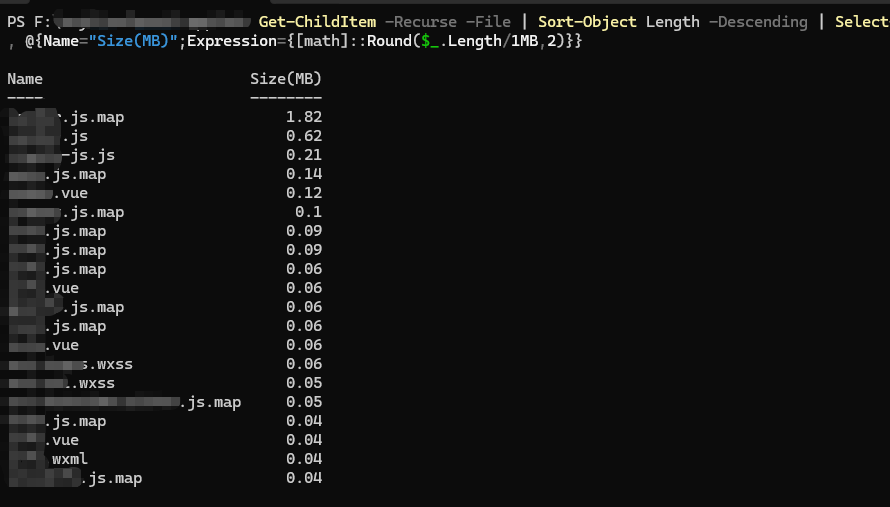
Get-ChildItem -Recurse -File | Sort-Object Length -Descending | Select-Object -First 20 Name, @{Name="Size(MB)";Expression={[math]::Round($_.Length/1MB,2)}}
运行结果是这样的,哎多人参与代码,里面命名规则啥的不大行,所以就不给看了
2.查询项目中使用uview有哪些
# 检查 uview 组件使用情况
Write-Host "检查项目中哪些文件使用了 uview-ui" -ForegroundColor Cyan
Write-Host "及具体使用了哪些组件" -ForegroundColor Cyan
Write-Host "=" * 40
Write-Host ""

# 查找所有使用了 uview 的 .vue 文件
$files = Get-ChildItem -Recurse -Filter "*.vue" | Where-Object {
    $_.FullName -notmatch "node_modules" -and
    (Get-Content $_.FullName -Raw) -match 'u-'
}

Write-Host "找到了 $($files.Count) 个使用了 uview 的文件:" -ForegroundColor Yellow
Write-Host ""

$allComponents = @()

foreach ($file in $files) {
    Write-Host "文件: $($file.FullName)" -ForegroundColor Green

    $content = Get-Content $file.FullName -Raw
    $components = [regex]::Matches($content, 'u-\w+').Value |
        Where-Object { $_ -match '^u-[a-z-]+$' } |
        Sort-Object | Get-Unique

    if ($components.Count -gt 0) {
        Write-Host "  组件: $($components -join ', ')" -ForegroundColor Yellow
        $allComponents += $components
    }

    Write-Host ""
}

# 去重
$uniqueComponents = $allComponents | Sort-Object | Get-Unique

Write-Host "=" * 40
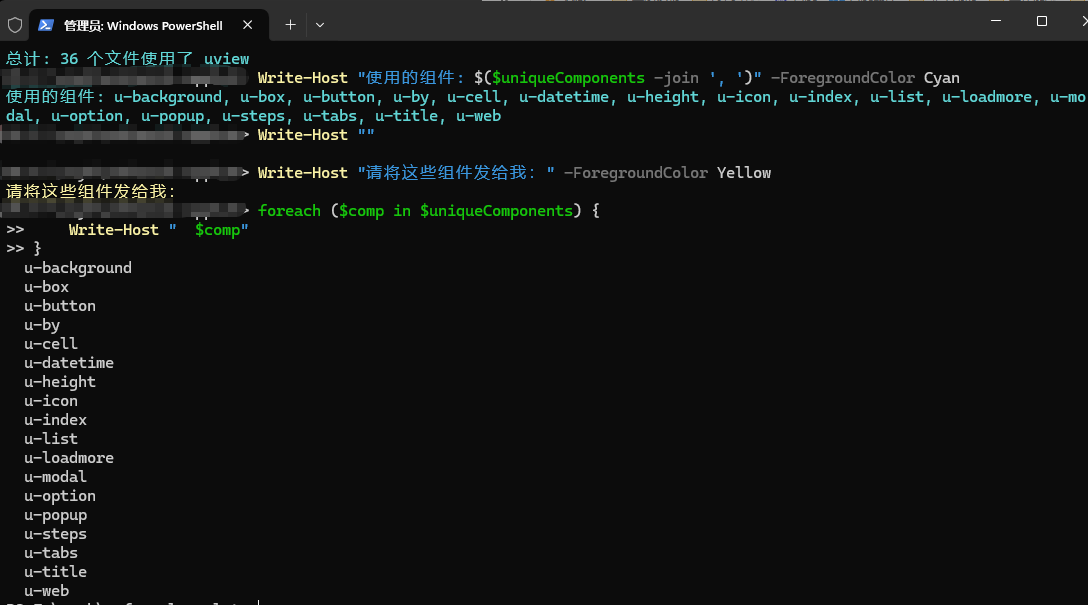
Write-Host "总计: $($files.Count) 个文件使用了 uview" -ForegroundColor Cyan
Write-Host "使用的组件: $($uniqueComponents -join ', ')" -ForegroundColor Cyan
Write-Host ""
Write-Host "请将这些组件发给我:" -ForegroundColor Yellow
foreach ($comp in $uniqueComponents) {
    Write-Host "  $comp"
}
# Uni-UI组件统计
Write-Host "🔍 正在扫描Uni-UI组件..." -ForegroundColor Cyan
Write-Host "═" * 50

$componentStats = @{}
$filesUsingUni = 0

Get-ChildItem -Recurse -Include "*.vue" | ForEach-Object {
    $content = Get-Content $_.FullName -Raw
    $tags = [regex]::Matches($content, '<(uni-[a-zA-Z-]+)')

    if ($tags.Count -gt 0) {
        $filesUsingUni++
        $tags.Groups[1].Value | Select-Object -Unique | ForEach-Object {
            if (-not $componentStats.ContainsKey($_)) {
                $componentStats[$_] = 0
            }
            $componentStats[$_]++
        }
    }
}

# 显示结果
Write-Host "📊 统计结果" -ForegroundColor Green
Write-Host "═" * 50

if ($componentStats.Count -gt 0) {
    # 按使用次数排序
    $sortedComponents = $componentStats.GetEnumerator() | Sort-Object Value -Descending

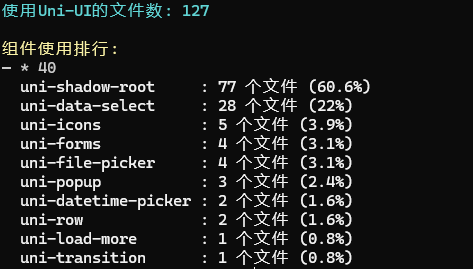
    Write-Host "使用Uni-UI的文件数: $filesUsingUni" -ForegroundColor Cyan
    Write-Host ""
    Write-Host "组件使用排行:" -ForegroundColor Yellow
    Write-Host "─" * 40

    foreach ($item in $sortedComponents) {
        $percent = [math]::Round(($item.Value / $filesUsingUni * 100), 1)
        Write-Host "  $($item.Key.PadRight(20)): $($item.Value) 个文件 ($percent%)" -ForegroundColor White
    }
} else {
    Write-Host "未找到Uni-UI组件" -ForegroundColor Red
}
4.查看项目中使用vant情况
# 简洁版查找Vant使用情况
Write-Host "正在扫描Vant组件使用情况..." -ForegroundColor Cyan
Write-Host "=" * 50

$results = @()

# 扫描所有Vue文件
Get-ChildItem -Recurse -Include "*.vue" | ForEach-Object {
    $file = $_
    $content = Get-Content $_.FullName -Raw

    # 查找van-标签
    $vanTags = [regex]::Matches($content, '<(van-[a-zA-Z-]+)')
    if ($vanTags.Count -gt 0) {
        $uniqueTags = $vanTags.Groups[1].Value | Select-Object -Unique

        $result = [PSCustomObject]@{
            File = $file.Name
            Path = $file.FullName
            Tags = $uniqueTags -join ", "
            TagCount = $uniqueTags.Count
        }

        $results += $result

        # 显示结果
        Write-Host "`n[$($file.Name)]" -ForegroundColor Green
        Write-Host "路径: $($file.DirectoryName)" -ForegroundColor Gray
        Write-Host "使用的Vant组件: " -ForegroundColor Yellow -NoNewline
        Write-Host ($uniqueTags -join ", ") -ForegroundColor White
    }
}

# 汇总统计
Write-Host "`n" + "=" * 50
if ($results.Count -gt 0) {
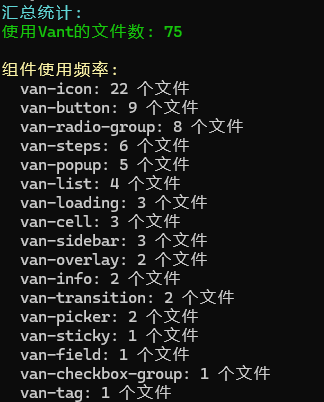
    Write-Host "汇总统计:" -ForegroundColor Cyan
    Write-Host "使用Vant的文件数: $($results.Count)" -ForegroundColor Green

    # 统计所有组件
    $allTags = @()
    foreach ($result in $results) {
        $allTags += ($result.Tags -split ", ")
    }

    $tagStats = $allTags | Group-Object | Sort-Object Count -Descending

    Write-Host "`n组件使用频率:" -ForegroundColor Yellow
    foreach ($tag in $tagStats) {
        Write-Host "  $($tag.Name): $($tag.Count) 个文件" -ForegroundColor Gray
    }
} else {
    Write-Host "未找到Vant组件" -ForegroundColor Red
}

 浙公网安备 33010602011771号