



基于 Jenkins + k8s + Git + DockerHub
一、简介
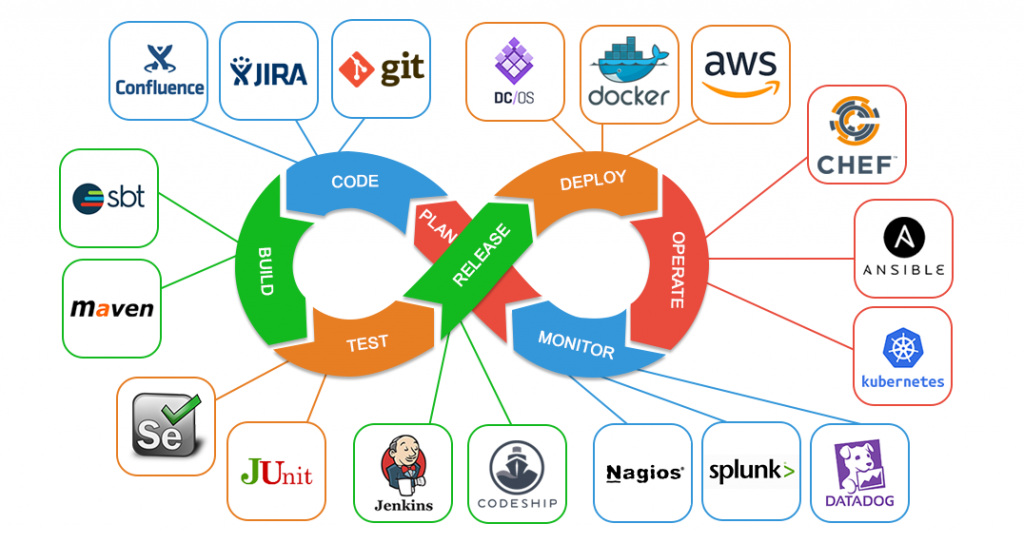
The continuous integration/continuous delivery pipeline is rightly called an agile DevOps workflow; it not only allows teams to adhere to a frequent deployment schedule but also ensures that the builds cater to reliable product releases. This framework consists of the following:
- CI: Continuous Integration
- CD: Continuous Delivery
- Continuous Deployment
2.1. Jenkins
[root@anyu967master1 devops]# kubectl create namespace jenkins-k8s
namespace/jenkins-k8s created
[root@anyu967master1 devops]# cat jenkins_pv.yaml
apiVersion: v1
kind: PersistentVolume
metadata:
  name: jenkins-k8s-pv
spec:
  capacity:
    storage: 5Gi
  accessModes:
  - ReadWriteMany
  nfs:
    server: 192.168.56.129
    path: /home/xy/data/devops/v2
[root@anyu967master1 devops]# cat jenkins_pvc.yaml
apiVersion: v1
kind: PersistentVolumeClaim
metadata:
  name: jenkins-k8s-pvc
  namespace: jenkins-k8s
spec:
  resources:
    requests:
      storage: 5Gi
  accessModes:
  - ReadWriteMany
[root@anyu967master1 devops]# kubectl create sa jenkins-k8s-sa -n jenkins-k8s
serviceaccount/jenkins-k8s-sa created
[root@anyu967master1 devops]# kubectl create clusterrolebinding jenkins-k8s-sa-cluster -n jenkins-k8s --clusterrole=cluster-admin --serviceaccount=jenkins-k8s:jenkins-k8s-sa
clusterrolebinding.rbac.authorization.k8s.io/jenkins-k8s-sa-cluster created
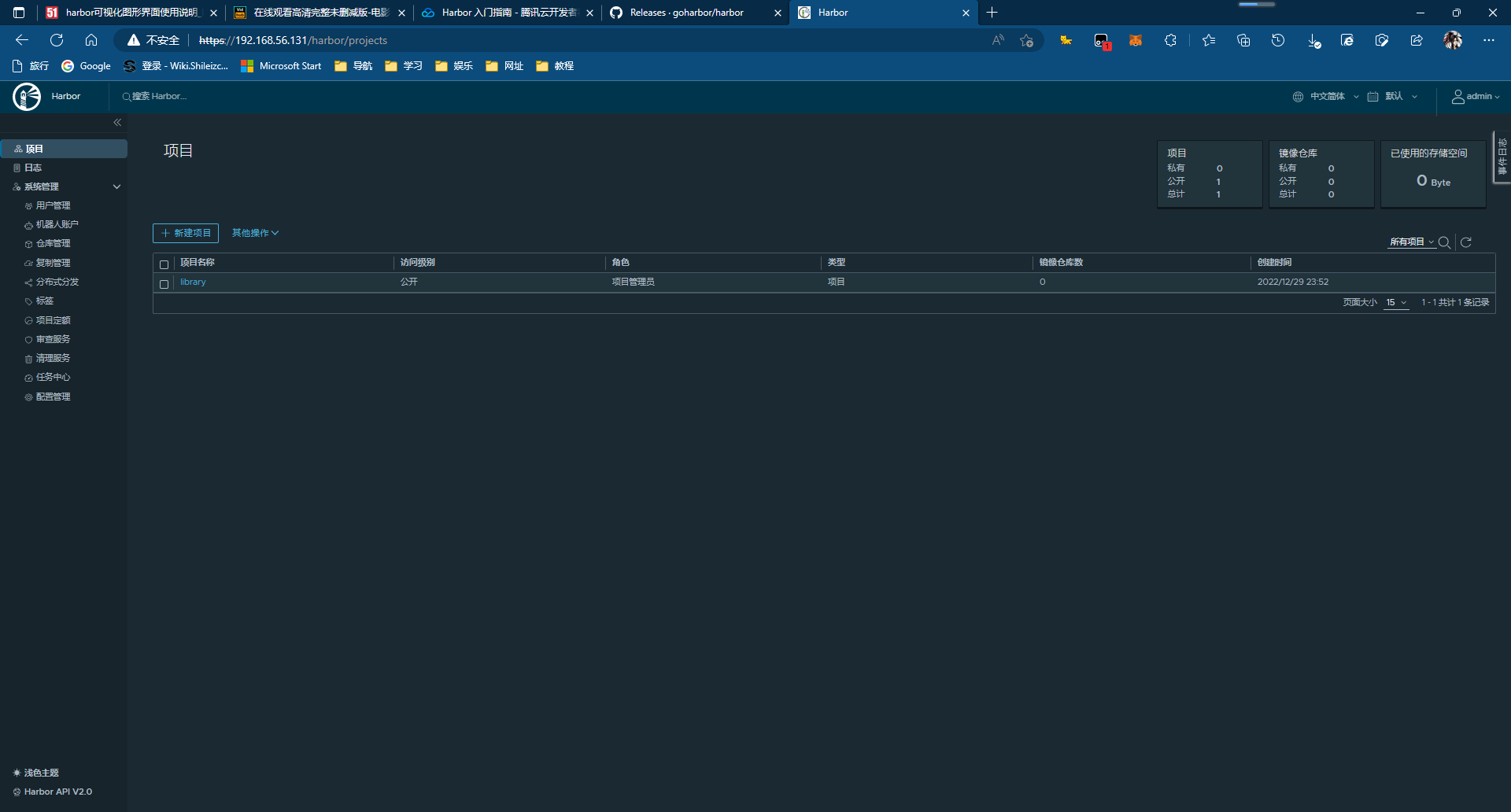
2.2. Harbor安装
kubernetes-搭建之环境初始化
Harbor 入门指南
Configure HTTPS Access to Harbor
[root@harbor ~]# yum list docker-ce --showduplicates | sort -r
[root@harbor ~]# yum install docker-ce-20.10.18-3.el7.x86_64
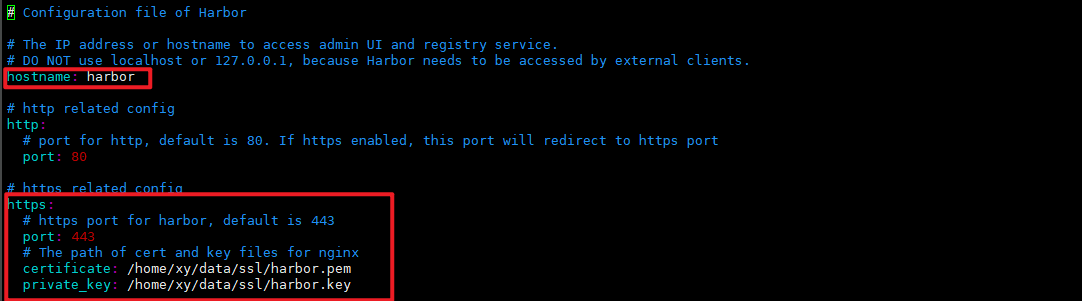
# 签发证书
# 生成 CA 证书私钥
[root@harbor ssl]# openssl genrsa -out ca.key 4096
# 生成 CA 证书(*.pem/*.crt)
[root@harbor ssl]# openssl req -x509 -new -nodes -sha512 -days 3650 -subj "/C=CN/ST=Beijing/L=Beijing/O=example/OU=Personal/CN=harbor" -key ca.key -out ca.crt

# 生成 Server 私钥
[root@harbor ssl]# openssl genrsa -out harbor.key 4096
# 生成 Server 证书签名请求
[root@harbor ssl]# openssl req -sha512 -new -subj "/C=CN/ST=Beijing/L=Beijing/O=example/OU=Personal/CN=11.8.36.21" -key harbor.key -out harbor.csr

# 生成x509 v3扩展
# 分为 IP/域名
[root@harbor ssl]# cat > v3.ext <<-EOF
authorityKeyIdentifier=keyid,issuer
basicConstraints=CA:FALSE
keyUsage = digitalSignature, nonRepudiation, keyEncipherment, dataEncipherment
extendedKeyUsage = serverAuth
subjectAltName = @alt_names
# subjectAltName = IP:yourip

[alt_names]
DNS.1=yourdomain.harbor.com

# 用 CA 证书签发 Server 证书(*.pem/*.crt)
[root@harbor ssl]# openssl x509 -req -sha512 -extfile v3.ext -in harbor.csr -CA ca.pem -CAkey ca.key -CAcreateserial -out harbor.crt -days 3650

# Harbor 和 Docker 配置证书
[root@harbor ssl]# mkdir cert && cp ../harbor.crt ../harbor.key ./cert
[root@harbor cert]# openssl x509 -inform PEM -in harbor.crt -out harbor.cert
[root@harbor cert]# mkdir /etc/docker/certs.d && cp ./harbor.crt ./harbor.key ../ca.key /etc/docker/certs.d
[root@harbor ssl]# openssl x509 -noout -text -in harbor.pem  # 验证
[root@harbor harbor]# more /etc/docker/daemon.json
{
    "registry-mirrors": ["https://my5f0mvy.mirror.aliyuncs.com","https://registry.docker.cn.com","https://docker.mirrors.ustc.edu.cn","https://dockerhub.azk8s.cn","https://hub.mirror.c.163.com"],
    "insecure-registries": ["192.168.56.131:1180","harbor:8443"]
}

[root@harbor harbor]# systemctl daemon-reload
[root@harbor harbor]# systemctl restart docker
[root@harbor harbor]# docker login 192.168.56.131:1180  # 走 http
Username: admin
Password:
WARNING! Your password will be stored unencrypted in /root/.docker/config.json.
Configure a credential helper to remove this warning. See
[https://docs.docker.com/engine/reference/commandline/login/#credentials-store](https://docs.docker.com/engine/reference/commandline/login/#credentials-store)
Login Succeeded
[root@harbor ssl]# docker tag hello-world:latest harbor:8443/test/hello-world:v1
[root@harbor ssl]# docker push harbor:8443/test/hello-world:v1
三、Rancher
1)Rancher 是一个 Kubernetes 管理工具,让你能在任何地方和任何提供商上部署和运行集群。
2)Rancher 可以创建来自 Kubernetes 托管服务提供商的集群,创建节点并安装 Kubernetes,或者导入在任何地方运行的现有 Kubernetes 集群。
3)Rancher 基于 Kubernetes 添加了新的功能,包括统一所有集群的身份验证和 RBAC,让系统管理员从一个位置控制全部集群的访问。
4)此外,Rancher 可以为集群和资源提供更精细的监控和告警,将日志发送到外部提供商,并通过应用商店(Application Catalog)直接集成 Helm。如果你拥有外部 CI/CD 系统,你可以将其与 Rancher 对接。没有的话,你也可以使用 Rancher 提供的 Fleet 自动部署和升级工作负载。
4)Rancher 是一个 全栈式 的 Kubernetes 容器管理平台,为你提供在任何地方都能成功运行 Kubernetes 的工具。
四、Istio微服务
4.1. 简介
Simplify observability, traffic management, security, and policy with the leading service mesh.
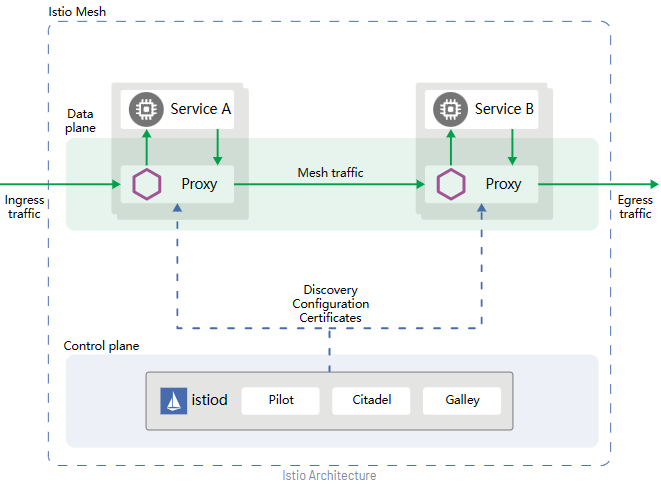
数据平面:由一组智能代理(Envoy)组成,被部署为 Sidecar。这些代理负责协调和控制微服务之间的所有网络通信。它们还收集和报告所有网格流量的遥测数据。
控制平面:管理并配置代理来进行流量路由。
- Pilot
- 为Envoy提供服务发现
- 提供流量管理功能(A/B测试、金丝雀发布等)及弹性功能(超时、重试、熔断器等)
- 生成Envoy配置
- 监控并管理Envoy的运行状况
- Envoy
- 动态服务发现、负载均衡
- TLS终端、HTTP/2与gRPC代理
- 断路器、健康检查、流量拆分、灰度发布、故障注入
- Citadel
- 负责处理系统上不同服务之间的TLS通信
- Gallery
- Istio的配置验证、提取、处理和分发的组件,提供配置管理服务
4.2. 部署Istio
[root@anyu967master1 istio]# istioctl install --set profile=demo -y
五、CEPH
5.1. 简介
ceph是一种开源的分布式存储系统:块存储、对象存储、文件系统
六、Helm
6.1. 简介
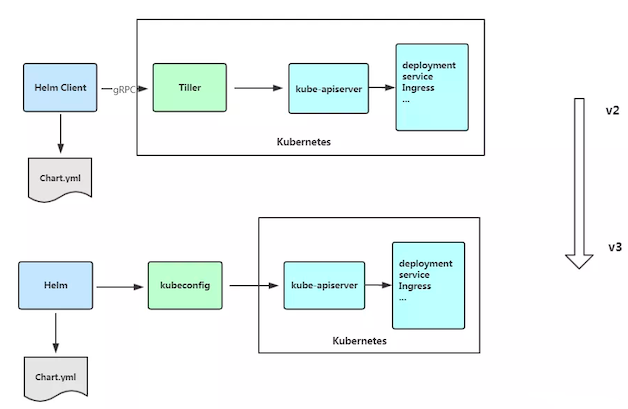
Helm 是 Kubernetes 的包管理器,包管理器类似于我们在 Ubuntu 中使用的apt、Centos中使用的yum 或者Python中的 pip 一样,能快速查找、下载和安装软件包,Helm 由客户端组件 helm 和服务端组件 Tiller 组成,能够将一组K8S资源打包统一管理,是查找、共享和使用为Kubernetes构建的软件的最佳方式。
Helm 包含两个组件,分别是 helm 客户端 和 Tiller 服务器:
- chart Helm的打包格式叫做chart,所谓chart就是一系列文件, 它描述了一组相关的 k8s 集群资源
- helm 是一个命令行工具,用于本地开发及管理chart,chart仓库管理等
- Tiller 是 Helm 的服务端。Tiller 负责接收 Helm 的请求,与 k8s 的 apiserver 交互,根据chart 来生成一个 release 并管理 release
- release 使用 helm install 命令在 Kubernetes 集群中部署的 Chart 称为 Release
- Repoistory Helm chart 的仓库,Helm 客户端通过 HTTP 协议来访问存储库中 chart 的索引文件和压缩包
6.2. 安装
https://github.com/helm/helm/releases
[root@anyu967master1 helm]# tar -xzvf helm-v3.6.3-linux-amd64.tar.gz
[root@anyu967master1 helm]# mv linux-amd64/helm /usr/bin/
# 配置chart仓库地址
[root@anyu967master1 helm]# helm repo add aliyun https://kubernetes.oss-cn-hangzhou.aliyuncs.com/charts
[root@anyu967master1 helm]# helm repo add bitnami https://charts.bitnami.com/bitnami
[root@anyu967master1 helm]# helm repo update
Hang tight while we grab the latest from your chart repositories...
...Successfully got an update from the "aliyun" chart repository
...Successfully got an update from the "bitnami" chart repository
Update Complete. ⎈Happy Helming!⎈
6.3. 使用
[root@anyu967master1 helm]# helm search repo aliyun |grep memcached
aliyun/mcrouter               	0.1.0        	0.36.0       	Mcrouter is a memcached protocol router for sca...
aliyun/memcached              	2.0.1        	             	Free & open source, high-performance, distribut...
[root@anyu967master1 helm]# helm show chart aliyun/memcached
[root@anyu967master1 helm]# helm pull aliyun/memcached
[root@anyu967master1 memcached]# tree .
.
├── Chart.yaml
├── README.md
├── templates
│   ├── _helpers.tpl
│   ├── NOTES.txt
│   ├── pdb.yaml
│   ├── statefulset.yaml
│   └── svc.yaml
└── values.yaml
[root@anyu967master1 memcached]# helm install memcached ./
# 自定义
[root@anyu967master1 helm]# helm create myapp
[root@anyu967master1 myapp]# tree .
.
├── charts
├── Chart.yaml
├── templates
│   ├── deployment.yaml
│   ├── _helpers.tpl
│   ├── hpa.yaml
│   ├── ingress.yaml
│   ├── NOTES.txt
│   ├── serviceaccount.yaml
│   ├── service.yaml
│   └── tests
│       └── test-connection.yaml
└── values.yaml
本文来自博客园,作者:anyu967,转载请注明原文链接:https://www.cnblogs.com/anyu967/articles/17343432.html

 浙公网安备 33010602011771号