

K8s - Tips
01 - 05
01 - 将 Docker Compose 文件转换为 Kubernetes 资源
Kompose 一个转换工具, 用来帮助 Docker Compose 用户迁移至 Kubernetes。
使用 Kompose:
- 将一个 Docker Compose 文件解释成 Kubernetes 对象
- 将本地 Docker 开发 转变成通过 Kubernetes 来管理
- 转换 v1 或 v2 Docker Compose
yaml文件 或 已发布的应用程序包
也就是说,利用Kompose 转换工具,可将 compose(即 Docker Compose)所组装的所有内容 转换成容器编排器(Kubernetes 或 OpenShift)可识别的形式。
示例: 将 Docker Compose 文件转换为 Kubernetes 资源 | Kubernetes
更多信息请参考 Kompose 官网 http://kompose.io。
从GitHub下载并安装
[anliven@anliven ~]$ curl -L https://github.com/kubernetes/kompose/releases/download/v1.22.0/kompose-linux-amd64 -o kompose
  % Total    % Received % Xferd  Average Speed   Time    Time     Time  Current
                                 Dload  Upload   Total   Spent    Left  Speed
100   625  100   625    0     0    653      0 --:--:-- --:--:-- --:--:--   653
100 23.8M  100 23.8M    0     0  5783k      0  0:00:04  0:00:04 --:--:-- 7973k
[anliven@anliven ~]$
[anliven@anliven ~]$ chmod +x kompose
[anliven@anliven ~]$
[anliven@anliven ~]$ sudo mv ./kompose /usr/local/bin/kompose
[anliven@anliven ~]$
[anliven@anliven ~]$ kompose version
1.22.0 (955b78124)
[anliven@anliven ~]$
02 - 将Kubernetes清单文件保存在版本控制中并安全地分享或公开
Kubernetes 集群具有不同类型的资源,例如 Deployment、DaemonSet、ConfigMap 和 Secret等。
Secret 是一种资源,可帮助集群操作员管理对密码、OAuth 令牌和 SSH 密钥等敏感信息的部署。
这些 Secret 可作为数据卷进行装载,也可以作为环境变量向 Kubernetes Pod 中的容器公开,从而解耦 Pod 部署与管理 Pod 中容器化应用程序所需的敏感数据。
但Secret 中的数据仅使用 Base64 编码进行混淆。解码 Base64 编码的数据很简单,因此将这样的文件存储在 Git 存储库中是非常不安全的。
开发人员经常会不小心将这些文件检入 Git 存储库中,使凭据等敏感信息暴露到生产数据库中。
为了应对这项挑战,Sealed Secrets 开源项目提供了一种针对 Secret 对象的加密机制,使您可以安全地将其存储在私有或公有存储库中。
也可以借助 kubectl 等工具使用常规工作流将这些已加密的 Secret 部署到 Kubernetes 集群中。
03 - 利用Kubeless部署函数
- Kubeless: https://coldtea214.gitbook.io/cncf-serverless/installableplatform/kubeless
- OpenFaas:https://coldtea214.gitbook.io/cncf-serverless/installableplatform/openfaas
04 - Kubectl Kubernetes CheatSheet
CheatSheet
- https://github.com/dennyzhang/cheatsheet-kubernetes-A4
- https://cheatsheet.dennyzhang.com/cheatsheet-kubernetes-A4
kubectl 命令行界面: https://kubernetes.io/zh/docs/reference/kubectl/
05 - Kubeadm
kubeadm 是一个命令行工具, 可以用来在物理机、云服务器或虚拟机(目前处于 alpha 阶段) 上轻松部署一个安全可靠的 Kubernetes 集群。
https://kubernetes.io/zh/docs/reference/setup-tools/kubeadm/
Kubeadm 是一个提供了 kubeadm init 和 kubeadm join 的工具,作为创建 Kubernetes 集群的 “快捷途径” 的最佳实践。
kubeadm 通过执行必要的操作来启动和运行最小可用集群,但 kubeadm 只关注启动引导,而非配置机器,理想情况下,使用 kubeadm 作为所有部署工作的基准将会更加易于创建一致性集群。
- kubeadm init 用于搭建控制平面节点
- kubeadm join 用于搭建工作节点并将其加入到集群中
- kubeadm upgrade 用于升级 Kubernetes 集群到新版本
- kubeadm config 如果你使用了 v1.7.x 或更低版本的 kubeadm 版本初始化你的集群,则使用
kubeadm upgrade来配置你的集群 - kubeadm token 用于管理
kubeadm join使用的令牌 - kubeadm reset 用于恢复通过
kubeadm init或者kubeadm join命令对节点进行的任何变更 - kubeadm version 用于打印 kubeadm 的版本信息
- kubeadm alpha 用于预览一组可用于收集社区反馈的特性
06 - 10
06 - 通过命令行终端观察Kubernetes对象的变化
示例:
kubectl get pods --watch  # 通过--watch选项,独占前台,实时显示,但可能不稳定

watch kubectl get pods  # 使用watch命令
07 - 深入了解Kubernetes资源和字段的信息
kubectl get - 显示一个或者多个资源信息
例如:
kubectl get all  # 查看所有资源
kubectl get pods,services,deployment  # 查看所有的pods,服务和部署
# get 命令的基本输出
kubectl get services                          # 列出当前命名空间下的所有 services
kubectl get pods --all-namespaces             # 列出所有命名空间下的全部的 Pods
kubectl get pods -o wide                      # 列出当前命名空间下的全部 Pods,并显示更详细的信息
kubectl get deployment my-dep                 # 列出某个特定的 Deployment
kubectl get pods                              # 列出当前命名空间下的全部 Pods
kubectl get pod my-pod -o yaml                # 获取一个 pod 的 YAML
kubectl describe - 显示某个资源或某组资源的详细信息
[anliven@anliven ~]$ kubectl get services
NAME         TYPE        CLUSTER-IP   EXTERNAL-IP   PORT(S)   AGE
kubernetes   ClusterIP   10.96.0.1    <none>        443/TCP   134d
[anliven@anliven ~]$
[anliven@anliven ~]$ kubectl describe services
Name:              kubernetes
Namespace:         default
Labels:            component=apiserver
                   provider=kubernetes
Annotations:       <none>
Selector:          <none>
Type:              ClusterIP
IP:                10.96.0.1
Port:              https  443/TCP
TargetPort:        8443/TCP
Endpoints:         192.168.49.2:8443
Session Affinity:  None
Events:            <none>
[anliven@anliven ~]$
kubectl explain - 显示资源文档说明,可以了解某个资源和字段的含义以及默认值
[anliven@anliven ~]$ kubectl explain nodes
KIND:     Node
VERSION:  v1

DESCRIPTION:
     Node is a worker node in Kubernetes. Each node will have a unique
     identifier in the cache (i.e. in etcd).

FIELDS:
   apiVersion   <string>
     APIVersion defines the versioned schema of this representation of an
     object. Servers should convert recognized schemas to the latest internal
     value, and may reject unrecognized values. More info:
     https://git.k8s.io/community/contributors/devel/sig-architecture/api-conventions.md#resources

   kind <string>
     Kind is a string value representing the REST resource this object
     represents. Servers may infer this from the endpoint the client submits
     requests to. Cannot be updated. In CamelCase. More info:
     https://git.k8s.io/community/contributors/devel/sig-architecture/api-conventions.md#types-kinds

   metadata     <Object>
     Standard object's metadata. More info:
     https://git.k8s.io/community/contributors/devel/sig-architecture/api-conventions.md#metadata

   spec <Object>
     Spec defines the behavior of a node.
     https://git.k8s.io/community/contributors/devel/sig-architecture/api-conventions.md#spec-and-status

   status       <Object>
     Most recently observed status of the node. Populated by the system.
     Read-only. More info:
     https://git.k8s.io/community/contributors/devel/sig-architecture/api-conventions.md#spec-and-status

[anliven@anliven ~]$
08 - Kubernetes资源简称
在kubectl命令中可以直接简称来使用大部分的资源,通过 api-resources 命令可以获得api资源列表,从中可以查看到对应的资源简称。
[anliven@anliven ~]$ kubectl api-resources
NAME                              SHORTNAMES   APIGROUP                       NAMESPACED   KIND
bindings                                                                      true         Binding
componentstatuses                 cs                                          false        ComponentStatus
configmaps                        cm                                          true         ConfigMap
endpoints                         ep                                          true         Endpoints
events                            ev                                          true         Event
limitranges                       limits                                      true         LimitRange
namespaces                        ns                                          false        Namespace
nodes                             no                                          false        Node
persistentvolumeclaims            pvc                                         true         PersistentVolumeClaim
persistentvolumes                 pv                                          false        PersistentVolume
pods                              po                                          true         Pod
podtemplates                                                                  true         PodTemplate
replicationcontrollers            rc                                          true         ReplicationController
resourcequotas                    quota                                       true         ResourceQuota
secrets                                                                       true         Secret
serviceaccounts                   sa                                          true         ServiceAccount
services                          svc                                         true         Service
mutatingwebhookconfigurations                  admissionregistration.k8s.io   false        MutatingWebhookConfiguration
validatingwebhookconfigurations                admissionregistration.k8s.io   false        ValidatingWebhookConfiguration
customresourcedefinitions         crd,crds     apiextensions.k8s.io           false        CustomResourceDefinition
apiservices                                    apiregistration.k8s.io         false        APIService
controllerrevisions                            apps                           true         ControllerRevision
daemonsets                        ds           apps                           true         DaemonSet
deployments                       deploy       apps                           true         Deployment
replicasets                       rs           apps                           true         ReplicaSet
statefulsets                      sts          apps                           true         StatefulSet
tokenreviews                                   authentication.k8s.io          false        TokenReview
localsubjectaccessreviews                      authorization.k8s.io           true         LocalSubjectAccessReview
selfsubjectaccessreviews                       authorization.k8s.io           false        SelfSubjectAccessReview
selfsubjectrulesreviews                        authorization.k8s.io           false        SelfSubjectRulesReview
subjectaccessreviews                           authorization.k8s.io           false        SubjectAccessReview
horizontalpodautoscalers          hpa          autoscaling                    true         HorizontalPodAutoscaler
cronjobs                          cj           batch                          true         CronJob
jobs                                           batch                          true         Job
certificatesigningrequests        csr          certificates.k8s.io            false        CertificateSigningRequest
leases                                         coordination.k8s.io            true         Lease
endpointslices                                 discovery.k8s.io               true         EndpointSlice
events                            ev           events.k8s.io                  true         Event
ingresses                         ing          extensions                     true         Ingress
ingressclasses                                 networking.k8s.io              false        IngressClass
ingresses                         ing          networking.k8s.io              true         Ingress
networkpolicies                   netpol       networking.k8s.io              true         NetworkPolicy
runtimeclasses                                 node.k8s.io                    false        RuntimeClass
poddisruptionbudgets              pdb          policy                         true         PodDisruptionBudget
podsecuritypolicies               psp          policy                         false        PodSecurityPolicy
clusterrolebindings                            rbac.authorization.k8s.io      false        ClusterRoleBinding
clusterroles                                   rbac.authorization.k8s.io      false        ClusterRole
rolebindings                                   rbac.authorization.k8s.io      true         RoleBinding
roles                                          rbac.authorization.k8s.io      true         Role
priorityclasses                   pc           scheduling.k8s.io              false        PriorityClass
csidrivers                                     storage.k8s.io                 false        CSIDriver
csinodes                                       storage.k8s.io                 false        CSINode
storageclasses                    sc           storage.k8s.io                 false        StorageClass
volumeattachments                              storage.k8s.io                 false        VolumeAttachment
[anliven@anliven ~]$
09 - 验证Kubernetes清单文件
kube-linter
https://github.com/stackrox/kube-linter
KubeLinter 是一个静态的分析工具,它可以查看 Kubernetes YAML 文件以确保声明的应用程序配置坚持最佳实践。
KubeLinter 是 StackRox 首个开源工具,用于从命令行实现安全检查以及作为 CI 流程的一部分。
KubeLinter 是一个二进制文件,它接收 YAML 文件的路径,并对它们进行一系列的检查。
管理员和开发人员可以创建自己的策略来执行,从而实现更快、更自动化的部署。
10 - Kubernetes上API的访问点
kubectl proxy - 运行一个 kubernetes API 服务器代理
以本地监听为例
[anliven@anliven ~]$ kubectl proxy
Starting to serve on 127.0.0.1:8001
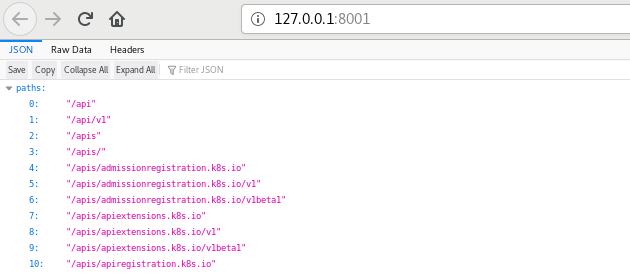
然后通过curl命令或者浏览器访问:
[anliven@anliven ~]$ curl http://127.0.0.1:8001/api
{
  "kind": "APIVersions",
  "versions": [
    "v1"
  ],
  "serverAddressByClientCIDRs": [
    {
      "clientCIDR": "0.0.0.0/0",
      "serverAddress": "192.168.49.2:8443"
    }
  ]
}[anliven@anliven ~]$
11 - 15
11 - Kubectl 自动补全
对于Linux和bash shell可以通过如下命令激活kubectl的自动补齐。
source <(kubectl completion bash) # 在 bash 中设置当前 shell 的自动补全,要先安装 bash-completion 包。
echo "source <(kubectl completion bash)" >> ~/.bashrc # 在您的 bash shell 中永久的添加自动补全
https://kubernetes.io/zh/docs/reference/kubectl/cheatsheet/
12 - 打标签
[anliven@anliven ~]$ kubectl run nginx --image nginx  # 通过kubectl run命令生成一个nginx部署
pod/nginx created
[anliven@anliven ~]$
[anliven@anliven ~]$ kubectl get pods -Lrun  # run=nginx是kubectl run命令自动生成的标签
NAME    READY   STATUS    RESTARTS   AGE   RUN
nginx   1/1     Running   0          10s   nginx
[anliven@anliven ~]$
[anliven@anliven ~]$ kubectl label pods nginx  run=notworking --overwrite  # 使用--overwrite参数重新标记
pod/nginx labeled
[anliven@anliven ~]$
[anliven@anliven ~]$ kubectl get pods -Lrun  # 查看更新后的标签
NAME    READY   STATUS    RESTARTS   AGE     RUN
nginx   1/1     Running   0          7m59s   notworking
[anliven@anliven ~]$
13 - JSON查询工具jq
通过JSON查询工具jq可以掌握并解析资源的状态,便于根据资源的状态进行相应的操作
- https://stedolan.github.io/jq/
- https://stedolan.github.io/jq/tutorial/
- https://stedolan.github.io/jq/manual/
- https://jqplay.org/
示例:
[anliven@anliven ~]$ wget https://github.com/stedolan/jq/releases/download/jq-1.6/jq-linux64
[anliven@anliven ~]$ mv jq-linux64 jq
[anliven@anliven ~]$ chmod +x jq
[anliven@anliven ~]$ sudo mv ./jq /usr/local/bin/
[anliven@anliven ~]$ jq --version
jq-1.6
[anliven@anliven ~]$ jq --help
jq - commandline JSON processor [version 1.6]

Usage:  jq [options] <jq filter> [file...]
        jq [options] --args <jq filter> [strings...]
        jq [options] --jsonargs <jq filter> [JSON_TEXTS...]

jq is a tool for processing JSON inputs, applying the given filter to
its JSON text inputs and producing the filter's results as JSON on
standard output.

The simplest filter is ., which copies jq's input to its output
unmodified (except for formatting, but note that IEEE754 is used
for number representation internally, with all that that implies).

For more advanced filters see the jq(1) manpage ("man jq")
and/or https://stedolan.github.io/jq

Example:

        $ echo '{"foo": 0}' | jq .
        {
                "foo": 0
        }

Some of the options include:
  -c               compact instead of pretty-printed output;
  -n               use `null` as the single input value;
  -e               set the exit status code based on the output;
  -s               read (slurp) all inputs into an array; apply filter to it;
  -r               output raw strings, not JSON texts;
  -R               read raw strings, not JSON texts;
  -C               colorize JSON;
  -M               monochrome (don't colorize JSON);
  -S               sort keys of objects on output;
  --tab            use tabs for indentation;
  --arg a v        set variable $a to value <v>;
  --argjson a v    set variable $a to JSON value <v>;
  --slurpfile a f  set variable $a to an array of JSON texts read from <f>;
  --rawfile a f    set variable $a to a string consisting of the contents of <f>;
  --args           remaining arguments are string arguments, not files;
  --jsonargs       remaining arguments are JSON arguments, not files;
  --               terminates argument processing;

Named arguments are also available as $ARGS.named[], while
positional arguments are available as $ARGS.positional[].

See the manpage for more options.
[anliven@anliven ~]$
[anliven@anliven ~]$ kubectl get pod nginx
NAME    READY   STATUS    RESTARTS   AGE
nginx   1/1     Running   0          42m
[anliven@anliven ~]$
[anliven@anliven ~]$ kubectl get pods nginx -o json |jq -r .status.podIP  # 通过jq工具以json格式查看pod清单文件,找到pod的IP地址
172.17.0.3
[anliven@anliven ~]$ kubectl get pods nginx -o json |jq --raw-output .status.qosClass  # --raw-output显示原始数据,等同于参数-r
BestEffort
[anliven@anliven ~]$
[anliven@anliven ~]$ kubectl get services
NAME         TYPE        CLUSTER-IP   EXTERNAL-IP   PORT(S)   AGE
kubernetes   ClusterIP   10.96.0.1    <none>        443/TCP   136d
[anliven@anliven ~]$
[anliven@anliven ~]$ kubectl get services kubernetes -o json |jq -r .spec.ports
[
  {
    "name": "https",
    "port": 443,
    "protocol": "TCP",
    "targetPort": 8443
  }
]
[anliven@anliven ~]$
14 - 调试与排错
- 调试运行中的 Pod: https://kubernetes.io/zh/docs/tasks/debug-application-cluster/debug-running-pod/
- 调试 Pods 和 ReplicationControllers: https://kubernetes.io/zh/docs/tasks/debug-application-cluster/debug-pod-replication-controller/
- 应用故障排查: https://kubernetes.io/zh/docs/tasks/debug-application-cluster/debug-application/
- 应用自测与调试: https://kubernetes.io/zh/docs/tasks/debug-application-cluster/debug-application-introspection/
- 调试服务: https://kubernetes.io/zh/docs/tasks/debug-application-cluster/debug-service/
- 集群故障排障: https://kubernetes.io/zh/docs/tasks/debug-application-cluster/debug-cluster/
OODA循环流程
- 观察(Observe):现象是什么?日志有什么?发生了什么?网络连通性如何?
- 调整(Orient):制定合理的假设,大胆设想,但不急于下结论
- 决定(Decide):选择一种假设
- 行动(Act):测试选择的假设,如果得到证实,那么就确定了问题的原因,否则重新开始第一步。
Check List
- 问题现象是否可以重现?
- 相关的清单文件是否正确?
- 相关的网络连通性如何?
- 相关的资源是否充足或者受限?
- 集群的DNS是否正常?
- 。。。。。。
15 - 获得集群状态的详细快照
使用`kuberctl cluster-info dump`命令以获取整个集群状态的详细快照,便于调整、检查或排除故障。
```
kubectl cluster-info dump --output-directory=/path/to/cluster-state # 将当前集群状态输出到 /path/to/cluster-state```
16 - 20
16 - 对Kubernetes节点实施维护
通过`kubectl drain`命令可以安全地对节点实施安全补丁或升级等维护工作。
安全地清空一个节点: https://kubernetes.io/zh/docs/tasks/administer-cluster/safely-drain-node/
```
kubectl cordon my-node                                                # 标记 my-node 节点为不可调度
kubectl drain my-node                                                 # 对 my-node 节点进行清空操作,为节点维护做准备
kubectl uncordon my-node                                              # 标记 my-node 节点为可以调度
```
17 - 容器化与服务编排
# 容器化与服务编排
- Docker与虚拟机
- 服务编排与调度

# 构建基础镜像
- 母镜像的选择
- 基础镜像的特点
- 生成基础镜像

# 构建业务镜像
- 微服务打包
- 镜像构建的Dockerfile文件
- 镜像集成构建

# 服务编排
- 服务创建
- 服务版本升级
- 参数配置
- 服务版本降级

# 目录挂载
- 创建建持久化卷
- 绑定持久化卷
- 挂载持久化卷

# 环境变量
Kubernetes统一应用配置管理方案ConfigMap
- 创建Config Map
- 使用Config Map
18 - Kubernetes基础要点
## 前置知识
- 容器技术简介、Kubernetes架构与组件、核心资源
- 在Kubernetes中可以通过Dashboard、kubectl命令行、资源文件的方式部署应用程序
- kubectl管理工具的子命令和常用操作

## 集群部署
- 环境的初始化配置
- 安装 Docker、cri-docker、kubeadm 和 kubelet
- 部署 Master节点、Node节点、网络插件 和 Dashboard
- 清空 Kubernetes 环境

## Pod资源对象
- Pod的作用、容器之间网络通信和文件共享、常见字段及值类型、常用命令
- 容器运行命令与参数:command、args
- 镜像拉取策略、声明端口、容器环境变量、初始化容器
- 容器健康检查:存活探针、就绪探针、启动探针以及对应检查方法
- 容器资源配额:资源请求、资源限制、理想配额、服务质量
- 容器生命周期回调:postStart、preStop
- Pod生命周期:创建、启动、销毁

## 工作负载资源对象
- Deployment:应用的部署、升级、回滚、扩容与缩容、下线和灰度发布
- DaemonSet
- Job 与 CronJob

## Service 资源对象
- Service 公开类型:ClusterIP、NodePort、LoadBalancer、ExternalName
- Endpoints 对象
- Service 服务发现:环境变量、DNS
- Service 代理模式:iptables、ipvs

## Ingress资源对象
- Ingress工作原理、部署Ingress控制器
- 对外公开 HTTP 服务、基于请求路径转发不同服务、配置 HTTPS
- 自定义配置:增加代理超时时间、设置客户端请求体大小、重定向、会话保持、自定义规则
- 灰度发布:基于权重的流量切分、基于客户端请求的流量切分

## 存储管理
- 卷的类型:emptyDir、hostPath、nfs、容器存储接口
- 持久卷:创建PV和PVC、在Pod中使用PVC、PV动态供给和生命周期
- 内置存储对象:ConfigMap、Secret、配置文件自动重新加载

## 有状态应用管理
- StatefulSet工作负载资源:稳定的网络标识符和独享存储
- Operator:自定义资源定义、控制器

## 调度管理
- 节点选择器、节点亲和性
- Pod亲和性和反亲和性
- 污点与容忍
- nodeName

## 安全配置
- API访问控制:安全框架、RBAC、内置集群角色、面向用户授权案例、面向应用程序授权
- Pod安全上下文: 容器以普通用户运行、容器启用特权、容器设置只读文件系统
- 网络策略:网络策略实现、网络策略资源、默认策略、Pod 级别限制、命名空间级别限制、细粒度限制、IP 段限制、出站流量限制

## 网络插件Calico
- Docker网络模型:容器的内外部通信与访问
- Kubernetes 网络模型
- 部署Calico、calicoctl 管理工具
- Calico工作模式、VXLAN、IPIP、BGP、RR以及工作模式优缺点

## Prometheus 监控 Kubernetes
- Kubernetes关注的指标
- 在 Kubernetes 中搭建 Prometheus 监控系统
- 监控内容: Node、Pod、资源对象、Service 和 Ingress 对象、集群中应用程序、Kubernetes组件
19 - xxx
xxx
20 - xxx
xxx
行动是绝望的解药!
欢迎转载和引用,但请在明显处保留原文链接和原作者信息!
本博客内容多为个人工作与学习的记录,少数内容来自于网络并略有修改,已尽力标明原文链接和转载说明。如有冒犯,即刻删除!
以所舍,求所得,有所获,方所成。

 浙公网安备 33010602011771号