使用DDD模式实现简单API(8/1)
使用纯SQL语句和DDD模式实现简单的读写分离(转)
转载自(http://www.kamilgrzybek.com/design/simple-cqrs-implementation-with-raw-sql-and-ddd/)
介绍
这篇文章将展示如何使用.NET CORE和CQRS,完成一个简单的REST API应用。这是最简单的实现版本-通过Write Model(写模型)更新数据,Read Model(读模型)的数据也立即更新。在大多数的情况下,将逻辑拆分为读和写并使用各自的模型是非常有效的,在这篇文章里的示例程序中就是如此。具体代码在github(https://github.com/kgrzybek/sample-dotnet-core-cqrs-api.git)。
目标
通过这个解决方案,希望完成下面几个目标:
1、清晰的拆分读模型和写模型。
2、使用读模型获取数据应该尽可能快。
3、写模型应该使用DDD模式实现;DDD实现的层级视领域的复杂度而定。
4、应用的逻辑应该与UI层解耦。
5、选择的第三方库应该是成熟的、知名的且有团队支持的。
设计
组件间高层级的流程如下:
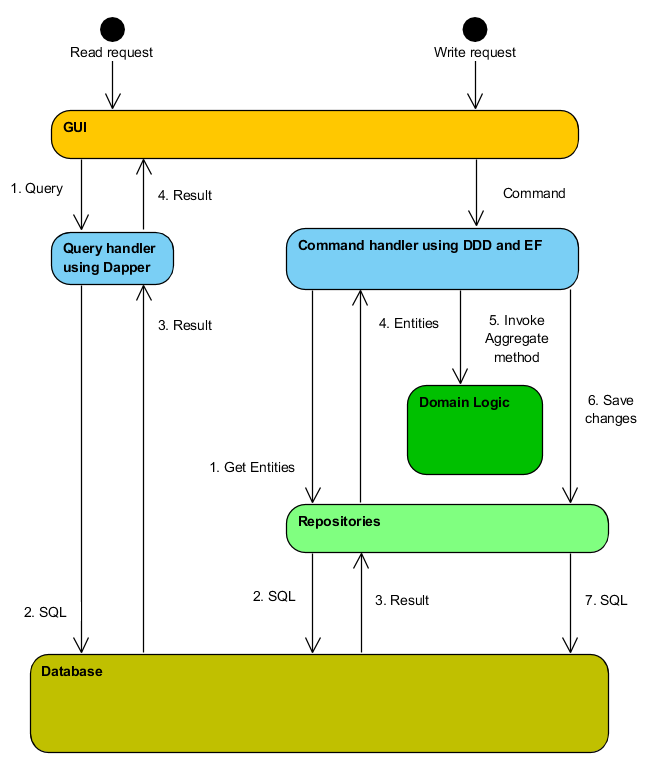
如上图,读取数据的流程是相当简单直接的,因为需要尽可能快的获取数据。在这里不需要多级抽象和复杂的实现方式。从查询对象获取参数,执行SQL语句获取数据即可完成流程。
在写入数据的时候情况就不一样了,写操作通常需要更加进阶的技术,因为需要执行逻辑、计算数据或者进行验证。使用拥有跟踪改变功能的ORM工具和仓储模式,可以实现上述需求,并保持领域模型的完整。
解决方案
读模型
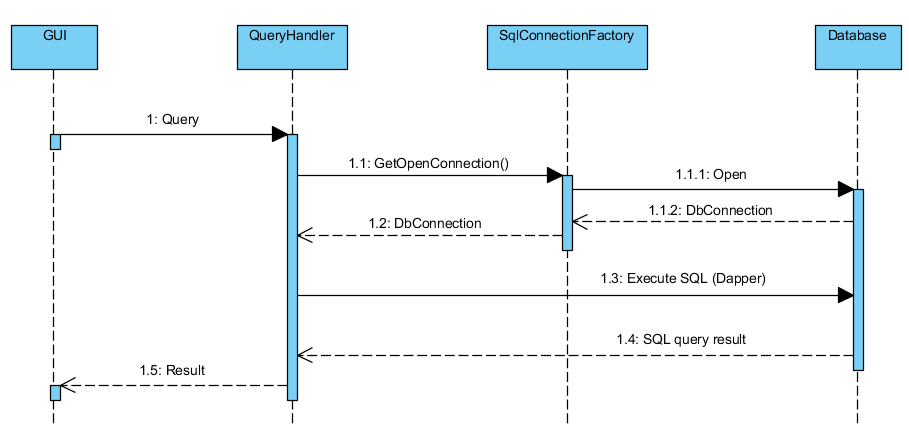
下面的图展示了完成读取操作时,组件之间的数据流转:
UI层负责创建查询对象:
 1 /// <summary>
 2 /// Get customer order details.
 3 /// </summary>
 4 /// <param name="orderId">Order ID.</param>
 5 [Route("{customerId}/orders/{orderId}")]
 6 [HttpGet]
 7 [ProducesResponseType(typeof(OrderDetailsDto), (int)HttpStatusCode.OK)]
 8 public async Task<IActionResult> GetCustomerOrderDetails(
 9     [FromRoute]Guid orderId)
10 {
11     var orderDetails = await _mediator.Send(new GetCustomerOrderDetailsQuery(orderId));
12
13     return Ok(orderDetails);
14 }
1 internal class GetCustomerOrderDetailsQuery : IRequest<OrderDetailsDto>
2 {
3     public Guid OrderId { get; }
4
5     public GetCustomerOrderDetailsQuery(Guid orderId)
6     {
7         this.OrderId = orderId;
8     }
9 }
然后,查询处理器执行查询操作:
 1 internal class GetCustomerOrderDetialsQueryHandler : IRequestHandler<GetCustomerOrderDetailsQuery, OrderDetailsDto>
 2 {
 3     private readonly ISqlConnectionFactory _sqlConnectionFactory;
 4
 5     public GetCustomerOrderDetialsQueryHandler(ISqlConnectionFactory sqlConnectionFactory)
 6     {
 7         this._sqlConnectionFactory = sqlConnectionFactory;
 8     }
 9
10     public async Task<OrderDetailsDto> Handle(GetCustomerOrderDetailsQuery request, CancellationToken cancellationToken)
11     {
12         using (var connection = this._sqlConnectionFactory.GetOpenConnection())
13         {
14             const string sql = "SELECT " +
15                                "[Order].[Id], " +
16                                "[Order].[IsRemoved], " +
17                                "[Order].[Value] " +
18                                "FROM orders.v_Orders AS [Order] " +
19                                "WHERE [Order].Id = @OrderId";
20             var order = await connection.QuerySingleOrDefaultAsync<OrderDetailsDto>(sql, new {request.OrderId});
21
22             const string sqlProducts = "SELECT " +
23                                "[Order].[ProductId] AS [Id], " +
24                                "[Order].[Quantity], " +
25                                "[Order].[Name] " +
26                                "FROM orders.v_OrderProducts AS [Order] " +
27                                "WHERE [Order].OrderId = @OrderId";
28             var products = await connection.QueryAsync<ProductDto>(sqlProducts, new { request.OrderId });
29
30             order.Products = products.AsList();
31
32             return order;
33         }
34     }
35 }
 1 public class SqlConnectionFactory : ISqlConnectionFactory, IDisposable
 2 {
 3     private readonly string _connectionString;
 4     private IDbConnection _connection;
 5
 6     public SqlConnectionFactory(string connectionString)
 7     {
 8         this._connectionString = connectionString;
 9     }
10
11     public IDbConnection GetOpenConnection()
12     {
13         if (this._connection == null || this._connection.State != ConnectionState.Open)
14         {
15             this._connection = new SqlConnection(_connectionString);
16             this._connection.Open();
17         }
18
19         return this._connection;
20     }
21
22     public void Dispose()
23     {
24         if (this._connection != null && this._connection.State == ConnectionState.Open)
25         {
26             this._connection.Dispose();
27         }
28     }
29 }
首先,获取打开的数据库连接,这通过SqlConnectionFactory类实现,这个类从IOC容器的Http Request生命周期中获取,所以可以保证,在一次请求过程中使用相同的数据库连接。
第二步是准备和执行SQL,这里尝试不和数据库表关联而是与数据库视图关联。这使应用与数据库的表解耦,尽可能的隐藏数据库的内部结构。
对于SQL的执行,使用了微型ORM框架-Dapper,因为它差不多和本地的ADO.NET一样快。简而言之,它做了它该做的事情,而且做的很好。
写模型
下图展示了写操作时,组件之间的数据流转:
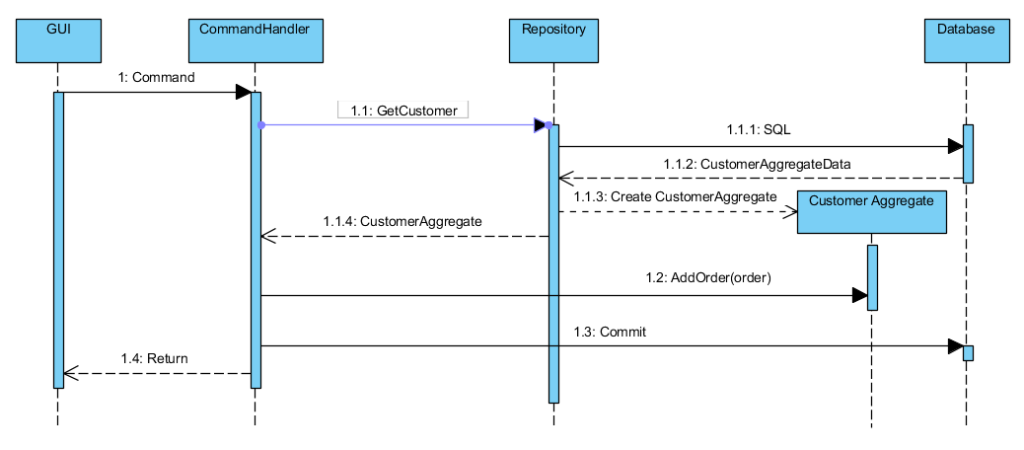
写操作的起点和读操作差不多,但是创建了Command对象代替了Query对象。
 1 /// <summary>
 2 /// Add customer order.
 3 /// </summary>
 4 /// <param name="customerId">Customer ID.</param>
 5 /// <param name="request">Products list.</param>
 6 [Route("{customerId}/orders")]
 7 [HttpPost]
 8 [ProducesResponseType((int)HttpStatusCode.Created)]
 9 public async Task<IActionResult> AddCustomerOrder(
10     [FromRoute]Guid customerId,
11     [FromBody]CustomerOrderRequest request)
12 {
13    await _mediator.Send(new AddCustomerOrderCommand(customerId, request.Products));
14
15    return Created(string.Empty, null);
16 }
接下来,命令处理器被调用。
 1 public class AddCustomerOrderCommandHandler : IRequestHandler<AddCustomerOrderCommand>
 2 {
 3     private readonly ICustomerRepository _customerRepository;
 4     private readonly IProductRepository _productRepository;
 5
 6     public AddCustomerOrderCommandHandler(
 7         ICustomerRepository customerRepository,
 8         IProductRepository productRepository)
 9     {
10         this._customerRepository = customerRepository;
11         this._productRepository = productRepository;
12     }
13
14     public async Task<Unit> Handle(AddCustomerOrderCommand request, CancellationToken cancellationToken)
15     {
16         var customer = await this._customerRepository.GetByIdAsync(request.CustomerId);
17
18         var selectedProducts = request.Products.Select(x => new OrderProduct(x.Id, x.Quantity)).ToList();
19         var allProducts = await this._productRepository.GetAllAsync();
20
21         var order = new Order(selectedProducts, allProducts);
22
23         customer.AddOrder(order);
24
25         await this._customerRepository.UnitOfWork.CommitAsync(cancellationToken);
26
27         return Unit.Value;
28     }
29 }
命令处理器不同于查询处理器,因为在写操作中通常会比读操作复杂,在这里使用了DDD方法的高度抽象,Aggregates和Entities。命令处理器创建Aggregates并调用其方法,最终保存数据到数据库。
客户Aggregate定义如下:
 1 public class Customer : Entity
 2 {
 3     public Guid Id { get; private set; }
 4
 5     private readonly List<Order> _orders;
 6
 7     private Customer()
 8     {
 9         this._orders = new List<Order>();
10     }
11
12     public void AddOrder(Order order)
13     {
14         this._orders.Add(order);
15
16         this.AddDomainEvent(new OrderAddedEvent(order));
17     }
18
19     public void ChangeOrder(Guid orderId, List<OrderProduct> products, IReadOnlyCollection<Product> allProducts)
20     {
21         var order = this._orders.Single(x => x.Id == orderId);
22         order.Change(products, allProducts);
23
24         this.AddDomainEvent(new OrderChangedEvent(order));
25     }
26
27     public void RemoveOrder(Guid orderId)
28     {
29         var order = this._orders.Single(x => x.Id == orderId);
30         order.Remove();
31
32         this.AddDomainEvent(new OrderRemovedEvent(order));
33     }
34 }
 1 public class Order : Entity
 2 {
 3     public Guid Id { get; private set; }
 4     private bool _isRemoved;
 5     private decimal _value;
 6     private List<OrderProduct> _orderProducts;
 7
 8     private Order()
 9     {
10         this._orderProducts = new List<OrderProduct>();
11         this._isRemoved = false;
12     }
13
14     public Order(List<OrderProduct> orderProducts, IReadOnlyCollection<Product> allProducts)
15     {
16         this.Id = Guid.NewGuid();
17         this._orderProducts = orderProducts;
18
19         this.CalculateOrderValue(allProducts);
20     }
21
22     internal void Change(List<OrderProduct> products, IReadOnlyCollection<Product> allProducts)
23     {
24         foreach (var product in products)
25         {
26             var orderProduct = this._orderProducts.SingleOrDefault(x => x.ProductId == product.ProductId);
27             if (orderProduct != null)
28             {
29                 orderProduct.ChangeQuantity(product.Quantity);
30             }
31             else
32             {
33                 this._orderProducts.Add(product);
34             }
35         }
36
37         var existingProducts = this._orderProducts.ToList();
38         foreach (var existingProduct in existingProducts)
39         {
40             var product = products.SingleOrDefault(x => x.ProductId == existingProduct.ProductId);
41             if (product == null)
42             {
43                 this._orderProducts.Remove(existingProduct);
44             }
45         }
46
47         this.CalculateOrderValue(allProducts);
48     }
49
50     internal void Remove()
51     {
52         this._isRemoved = true;
53     }
54
55     private void CalculateOrderValue(IReadOnlyCollection<Product> allProducts)
56     {
57         this._value = this._orderProducts.Sum(x => x.Quantity * allProducts.Single(y => y.Id == x.ProductId).Price);
58     }
59 }
架构
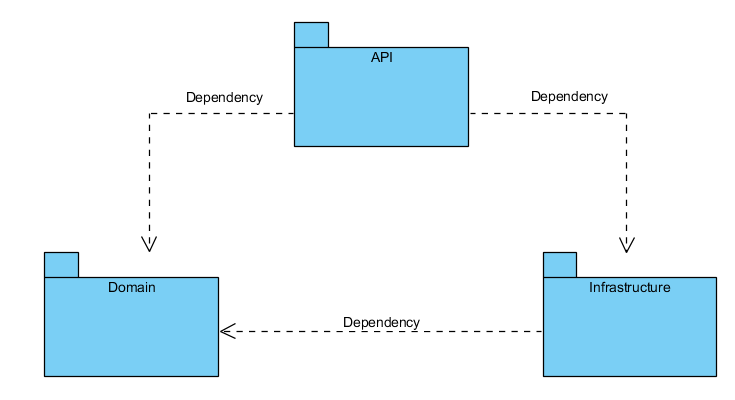
解决方案的架构基于知名的Onion Architecture定义,如下图:
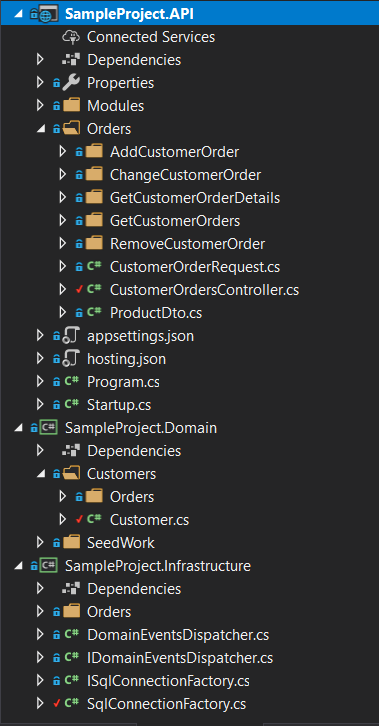
如上图,定义了三个项目:
- API项目包含程序端点和应用逻辑(命令和查询处理器)。
- 领域项目和领域模型
- 基础架构项目包含与数据库的集成
总结
在这篇文章中,尝试用最简单的方法来实现CQRS模式,使用原始sql脚本作为读模型端处理,使用DDD方法作为写模型端实现。这样就能够在不失去开发速度的情况下实现更多的关注点分离。引入这种解决方案的成本非常低,而且回报很快。

 浙公网安备 33010602011771号