
GeoTools-地理数据操作Java库
GeoTools 是一个开源Java库,为地理空间数据的操作提供了方法,其数据结构基于开放地理空间联盟(OGC)规范。
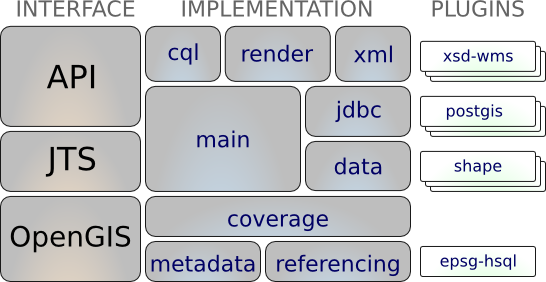
- OpenGIS:地理空间支持
- JTS(Java Topology Suite):空间几何支持
相关解释
数据格式
- WKT(Well-known Text):OGC制定的文本标记语言,用于表示适量几何对象、空间参考系统以及空间参照系统之间的转换。如
"POINT(2 2)"表示位于坐标(2,2)的点 - WKB(Well-known binary):WKT的二进制表示形式,便于传输和数据库存储
- GeoJSON:JSON格式的Feature表达格式。
数据模型
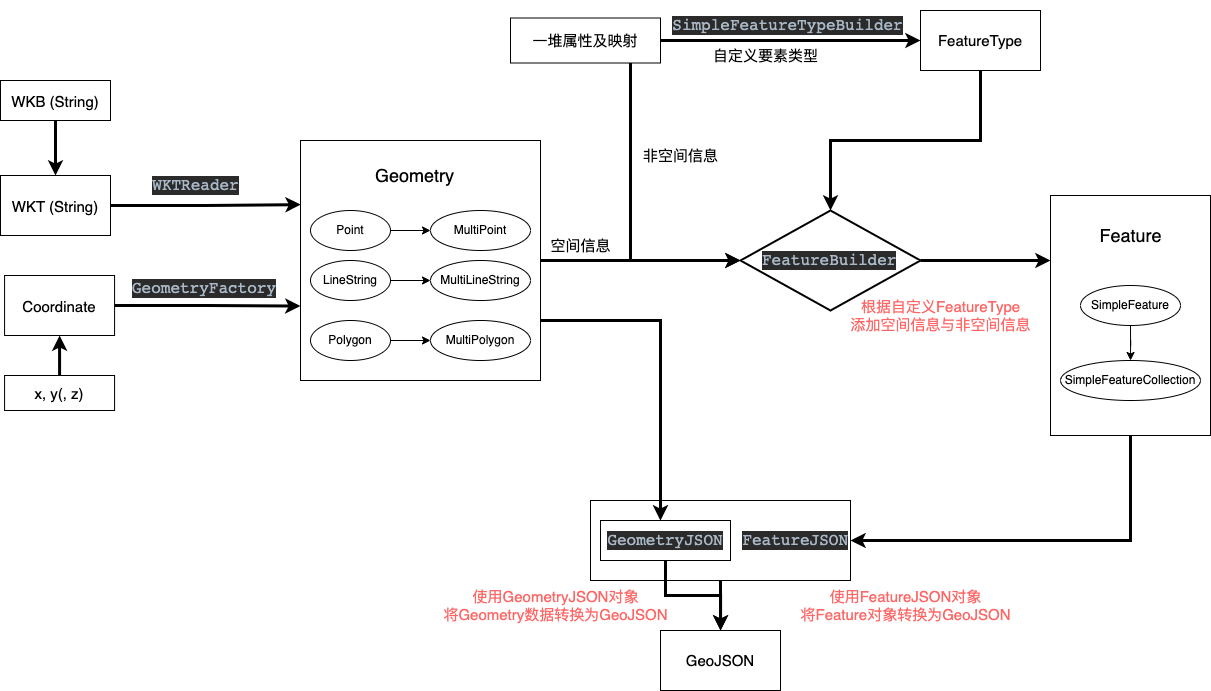
Coordinate:坐标,使用长度为N的数字序列表示N维空间的某个位置,其表达的是空间中的哪个位置Geometry:空间几何,一般有点Point、线LineString、面Polygon、点集MultiPoint、线集MultiLineString、面集MultiPolygon,其表达的是在空间中哪里绘制什么样的图形FeatureType:要素类型,是对空间要素的定义,其表达的是这一类的要素包含哪些空间信息和非空间信息。Feature:空间要素,包含空间信息与非空间信息,其表达的是在地图上绘制的东西以及含义FeatureCollection:要素集合,包含一系列的空间要素,同时还包括CRS等信息,其表达的是一组具体的空间要素。
使用
Maven引入
<!-- 1. 引入仓库 -->
<repositories>
    <repository>
        <id>osgeo</id>
        <name>OSGeo Release Repository</name>
        <url>https://repo.osgeo.org/repository/release/</url>
        <snapshots><enabled>false</enabled></snapshots>
        <releases><enabled>true</enabled></releases>
    </repository>
</repositories>

<!-- 2. 导入依赖 -->
<dependencies>
    <!-- https://mvnrepository.com/artifact/org.geotools/gt-geojson -->
    <dependency>
        <groupId>org.geotools</groupId>
        <artifactId>gt-geojson</artifactId>
        <version>${geotools.version}</version>
    </dependency>
</dependencies>
gt-geojson已包含gt-main等包
自定义简单工具类
简单数据类型或格式间的转换,如点、线、GeoJson、WKT等
@Slf4j
public class GeoUtils {

    /**
     * 地理数据类型
     * 点、线、面、几何集合
     */
    private static final String[] GEO_TYPE = new String[]{"Geometry", "Point", "LineString", "Polygon", "MultiPoint", "MultiLineString", "MultiPolygon", "GeometryCollection"};

    private final static GeometryFactory geometryFactory = JTSFactoryFinder.getGeometryFactory(null);

    // WKT 读取器
    private final static WKTReader reader = new WKTReader(geometryFactory);
    // GeoJSON 转换器
    private final static GeometryJSON geometryJson = new GeometryJSON(2); // 精度2位小数
    private final static FeatureJSON featureJson = new FeatureJSON(geometryJson);

    /**
     * 获取几何类型
     * @param wkt WKT格式字符串
     * @return 几何类型
     */
    public static String getGeoTypeFromWKT(String wkt){
        String type = null;
        if (Strings.isNotEmpty(wkt)) {
            try {
                Geometry read = reader.read(wkt);
                type = read.getGeometryType();
            }catch (Exception e) {
                log.error("invalid WKT String:", e);
                e.printStackTrace();
            }
        }
        return type;
    }

    /**
     * 点坐标值转换为WKT格式
     * @param x x坐标值
     * @param y y坐标值
     * @return 点类型WKT
     */
    public static String Point2WKT(int x, int y){
        return "POINT(" + x + " " + y + ")";
    }

    /**
     * 线坐标值转换为WKT格式
     * @param x1 起点x坐标值
     * @param y1 起点y坐标值
     * @param x2 终点x坐标值
     * @param y2 终点y坐标值
     * @return 线类型WKT
     */
    public static String Line2WKT(int x1, int y1, int x2, int y2){
        return "LINESTRING("+x1+ " "+y1 + ","+x2+" "+y2 +")";
    }

    /**
     * WKT格式文本对象转换为GeoJSON
     * @param wkt WKT格式文本
     * @return GeoJson对象
     */
    public static String wktToJson(String wkt) {
        String json = null;
        try {
            Geometry geometry = reader.read(wkt);
            json = geometryJson.toString(geometry);
        } catch (Exception e) {
            e.printStackTrace();
        }
        return json;
    }

    /**
     * Geometry对象转换为GeoJSON
     * @param geometry 空间几何对象
     * @return GeoJSON对象
     */
    public static String geoToJson(Geometry geometry) {
        return geometryJson.toString(geometry);
    }

    /**
     * Feature转换为GeoJSON
     * @param feature Feature要素对象
     * @return GeoJSON对象
     */
    public static String featureToJson(SimpleFeature feature){
        String json = null;
        try{
            json = featureJson.toString(feature);
        } catch (IOException e) {
            throw new RuntimeException(e);
        }
        return json;
    }

    /**
     * Feature集合转换为GeoJSON
     * @param features FeatureCollection对象
     * @return GeoJSON文本
     */
    public static String featureCollectionToJson(SimpleFeatureCollection features){
        String json = null;
        try{
            json = featureJson.toString(features);
        } catch (IOException e) {
            throw new RuntimeException(e);
        }
        return json;
    }

    /**
     * 1*2二维坐标数组转换为点对象
     * point(Array) -> coordinate -> Point(Geometry)
     * @param x x坐标
     * @param y y坐标
     * @return Point(Geometry) 点对象
     */
    public static Point createPoint(double x, double y) {
        return geometryFactory.createPoint(new Coordinate(x, y));
    }


    /**
     * n*2二维坐标数组转换为点集对象
     * points(Array[Array]) -> Point[] -> MultiPoint(Geometry)
     * @param pointArrays n*2数组
     * @return MultiPoint(Geometry) 点集对象
     */
    public static MultiPoint createMultiPoint(double[][] pointArrays){
        int size = pointArrays.length;
        Point[] points = new Point[size];
        for (int i = 0; i < size; i++) {
                points[i] = createPoint(pointArrays[i][0], pointArrays[i][1]);
        }
        return geometryFactory.createMultiPoint(points);
    }
}
要素创建(Builder方式)
builder可使用reset进行复用
空间要素类型
SimpleFeatureTypeBuilder typeBuilder = new SimpleFeatureTypeBuilder();

//set the name
typeBuilder.setName( "Flag" );  // type 字段

//add some properties
typeBuilder.add( "name", String.class );
typeBuilder.add( "classification", Integer.class );
typeBuilder.add( "height", Double.class );

//add a geometry property
typeBuilder.setCRS( DefaultGeographicCRS.WGS84 );
typeBuilder.add( "location", Point.class );

//build the type
SimpleFeatureType featureType = typeBuilder.buildFeatureType();
空间要素
//create the builder
SimpleFeatureBuilder builder = new SimpleFeatureBuilder(featureType);

//add the values
builder.add( "Canada" );
builder.add( 1 );
builder.add( 20.5 );
builder.add( geometryFactory.createPoint(new Coordinate(-124, 52)) );

//build the feature with provided ID
SimpleFeature feature = builder.buildFeature( "fid.1" );
空间要素集合
List<SimpleFeature> featureList = new ArrayList<>();
features.add(feature);
// 1. 使用FeatureCollection的子类(共用数据源)
SimpleFeatureCollection collection = new ListFeatureCollection(featureType, featureList);

// 2. 使用DataUtilities(静态,复制数据源)
SimpleFeatureCollection collection1 = DataUtilities.collection(featureList);
DataUtilities.collection()方法创建的是DefaultFeatureCollection,其内部是将传入的List<SimpleFeature>另存为Map,所以修改List不会改变该集合;而
new ListFeatureCollection以List格式保存传入的List<SimpleFeature>,本质上是共用同一个List,所以修改List的同时也会改变该集合。此外,对于ListFeatureCollection,会按照传入的featureType判断Feature格式,不可以存在混合Type。如ListFeatureCollection构造方法会自动修改,而DataUtilities方法会提示
警告: Feature Collection contains a heterogeneous mix of features
官方工具类DataUtilities
本质上就是使用约定的文本格式解析内容
createType
public static SimpleFeatureType createType(String typeName,
                                           String typeSpec)
                                    throws SchemaException
public static SimpleFeatureType createType(String namespace,
                                           String name,
                                           String typeSpec)
                                    throws SchemaException
以约定格式的字符串创建FeatureType
格式为:属性名1:属性类型1,属性名2:属性类型2,属性名3:属性类型3,...
其中属性类型可以为以下内容:
0,Integer,int: 表示Integer类型0.0,Double,double:表示Double类型"",String,string:表示字符串类型Geometry,Point,LineString, … :表示空间对象UUIDDate- 具体的类对象路径,如
java.sql.Timestamp
对于地理空间信息可以以属性名1:属性类型1:提示1进行表示,其中提示的内容为nilllable或srid=<#>
举几个栗子🌰
name:"",age:0,geom:Geometry,centroid:Point,url:java.io.URL"id:String,polygonProperty:Polygon:srid=32615identifier:UUID,location:Point,*area:MultiPolygon,created:Dateuuid:UUID,name:String,description:String,time:java.sql.Timestamp
encodeType
public static String encodeType(SimpleFeatureType featureType)
将featureType解释为原typeSpec格式的字符串(属性名1:属性类型1:提示1,...格式)
createFeature
public static SimpleFeature createFeature(SimpleFeatureType featureType,
                                          String line)
以约定格式创建的与featureType定义的属性想对应的字符串要素ID=属性值1|属性值2|属性值3...进行创建
- 未配置要素ID会随机生成
- 属性间以
|分割 - 几何数据会使用 WKTReader进行处理,即传入参数以WKT格式表示
- 注意空格、换行、
\等可以采用转义字符\
encodeFeature
public static String encodeFeature(SimpleFeature feature)
将Feature解释为约定格式要素ID=属性值1|属性值2|属性值3...

 浙公网安备 33010602011771号