
maven使用感受
第一次接触的时候,什么都不懂,感觉好复杂。
后来系统地看了一个使用教程:
简单评价一下:
自动帮我们下载jar架包,还有就是可以执行命令自己部署到远程服务器上面去。
缺点:
学习成本。一般人不了解。第二,如果网络卡的话,就要命了,下载就要好多时间,还不如直接copy架包方便。
2018-10-12
mvn install的时候,包含源码,方便查看。
            <plugin>
                <groupId>org.apache.maven.plugins</groupId>
                <artifactId>maven-source-plugin</artifactId>
                <version>2.2.1</version>
                <executions>
                    <execution>
                        <id>attach-sources</id>
                        <goals>
                            <goal>jar-no-fork</goal>
                        </goals>
                    </execution>
                </executions>
                <configuration>
                    <attach>true</attach>
                </configuration>
            </plugin>
2018-10-20
一直提示maven-resources-plugin:2.6找不到,本来是有网的,又不去下载,每次maven install都失败,换了eclipse也是这样。
解决办法:https://blog.csdn.net/lilun517735159/article/details/78289699
maven setting.xml里加上
<mirror>
  <id>Central</id>
  <url>http://mirrors.ibiblio.org/pub/mirrors/maven2</url>
  <mirrorOf>central</mirrorOf>
</mirror>
后来又不行了,在eclipse执行不了,用cmd使用mvn install又行,好奇怪。
后来还是找到原因了:
Eclipse -> Window -> Preferences -> 左边菜单找到Maven -> 找到User Settings
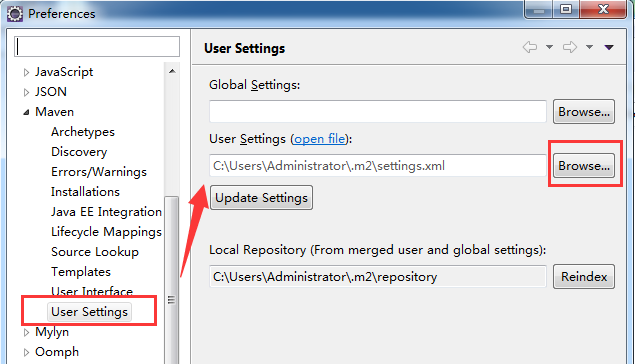
看到没,它的默认地址是C:\Users\Administrator\.m2\setting.xml,按“Browserr”定位到你自己的setting.xml,里面要有上面说到的镜像修改,这样设置后,就ok了。
2018-10-24
使用CXF生成代码出现:WSDLToJava Error: Rpc/encoded wsdls are not supported with CXF
解决办法:打开wsdl文件,把里面的style="rpc"改成style="document"
<wsdlsoap:binding style="rpc" transport="http://schemas.xmlsoap.org/soap/http"/>
2018-10-31
今天好神奇,用maven,在eclipse里面Run As -> Maven install 控制台显示BUILD SUCCESS了。
但是另一个工程死活识别不了最新的代码,后来,我进入工程之后,运行cmd控制台,mvn install 然后就好了,另一个工程也能识别了。
2020-04-17
JUnit Test能通过,但是Maven Test不能通过,
原来是因为JUnit Test能识别src/main/resource中的文件,但是Maven Test不能识别src/main/resource
解决办法,在pom.xml里加上
    <build>
        <resources>
            <resource>
                    <directory>${project.basedir}/src/main/resource</directory>
            </resource>
        </resources>
    </build>
2024-03-21
来自文心一言:
指定目录打包进war中:
<project>
    ...
    <build>
        <plugins>
            <plugin>
                <groupId>org.apache.maven.plugins</groupId>
                <artifactId>maven-war-plugin</artifactId>
                <version>3.3.1</version> <!-- 使用适合你的 Maven 版本的插件版本 -->
                <configuration>
                    <webResources>
                        <resource>
                            <directory>src/main/webapp/custom</directory>
                            <targetPath>WEB-INF/custom</targetPath> <!-- 可选,指定打包后的路径 -->
                        </resource>
                    </webResources>
                </configuration>
            </plugin>
        </plugins>
    </build>
    ...
</project>
配置文件放到war中
<project>
    ...
    <build>
        <resources>
            <resource>
                <directory>src/main/resources</directory> <!-- 默认资源目录 -->
            </resource>
            <resource>
                <directory>src/main/myconfigs</directory> <!-- 额外的资源目录 -->
                <includes>
                    <include>**/*.properties</include> <!-- 只包含 .properties 文件 -->
                </includes>
            </resource>
        </resources>
        ...
    </build>
    ...
</project>
2025-06-16
在pom.xml中
加上
  <build>
    <plugins>
      <plugin>
        <groupId>org.springframework.boot</groupId>
        <artifactId>spring-boot-maven-plugin</artifactId>
        <configuration>
          <finalName>xx_api</finalName>
        </configuration>
      </plugin>
    </plugins>
  </build>
之后,打包的jar中就有清单了,就是用java -jar xxx.jar 能找到main方法并执行了。
2025-06-17
      <resource>
        <directory>src/main/resources</directory>
        <filtering>true</filtering>
        <excludes>
          <exclude>conf/</exclude>
        </excludes>
      </resource>
conf后面记得有一个/, 有/的时候,才会过滤掉conf目录。没/的时候,conf目录没过滤掉。
2025-07-08
插入本地jar库
mvn install:install-file -Dfile=my.jar -DgroupId=com.example -DartifactId=my -Dversion=1.0.0 -Dpackaging=jar
2025-08-24
说一个昨天很搞笑的事
项目中想用lo4j2, 但是有logback, 我就需要在pom.xml中排除它。
然后,我几乎在所有可能的父包中都写了排除logback的语句,最后还是失败了。最后要崩溃了。
后为你知道是怎么发现不对的吗?
后来我无意间对比了一个包名,所以实现的包名和我写在排除里的包名不同。
反来如此,因为包名不同(就是<groupId>),所以排除失败。
你知道吗?groupId是用的AI填充的,我以为AI肯定能猜对,这一次反而坑了我。
2025-09-05
原来有时候看配置依赖的时候,没有写版本号,是因为父类帮你写了
- 父项目声明:
<dependency><groupId>com.example</groupId><artifactId>demo</artifactId><version>1.0.0</version></dependency> - 子模块引入:仅需
<dependency><groupId>com.example</groupId><artifactId>demo</artifactId></dependency>
2025-11-23
本来本地库里就有对应的包,但是系统里,就是说识别不了,
后来配了一个本地的jar包才编译通过:
<dependency>
    <groupId>com.example</groupId>  <!-- 自定义GroupID -->
    <artifactId>local-demo</artifactId> <!-- 自定义ArtifactID -->
    <version>1.0.0</version> <!-- 自定义版本号 -->
    <scope>system</scope>
    <!-- 注意:systemPath必须是绝对路径!Windows用反斜杠\或双斜杠//,Linux/Mac用正斜杠/ -->
    <systemPath>${project.basedir}/lib/local-demo.jar</systemPath>
</dependency>
posted on 2017-02-17 21:53 angelshelter 阅读(258) 评论(0) 收藏 举报


 浙公网安备 33010602011771号