
微信公众号开发(二)
接收微信的消息推送并且做出相应的处理
一、access_token的获取
微信公众号提供了很多接口给我们调用,调用这些接口都有一个前提,就是获取access_token。
关于access_token,在微信公众平台开发者文档上的获取接口调用凭据有比较详细的介绍:access_token是公众号的全局唯一票据,公众号调用各接口时都需使用access_token,开发者需要妥善保存access_token的存储至少要保留512个字符空间。access_token的有效期目前为2个小时,需定时刷新,重复获取将导致上次获取的access_token失效。并且每天调用获取access_token接口的上限是2000次。
关于access_token的获取方式,在微信公众平台开发者文档上有说明,公众号可以调用一个叫"获取access token"的接口来获取access_token。
获取access token接口调用请求说明
http请求方式: GET
请求的URL地址:https://api.weixin.qq.com/cgi-bin/token?grant_type=client_credential&appid=APPID&secret=APPSECRET

这里获取access_token的方案是:定义一个默认启动servlet, 启动时建立一个无限循环的thread来获取,如果获取成功则休眠7000秒, 否则3秒后继续获取
package com.feng.web.service.servlet
import javax.servlet.ServletException;
import javax.servlet.annotation.WebInitParam;
import javax.servlet.annotation.WebServlet;
import javax.servlet.http.HttpServlet;
import com.alibaba.fastjson.JSON;
import com.alibaba.fastjson.JSONObject;
import com.feng.web.model.AccessToken;
import com.feng.web.model.AccessTokenInfo;
import com.feng.web.service.util.NetUtil;
/**
* 获取accessToken的Servlet
* @author fengzp
*
*/
@WebServlet(
name = "AccessTokenServlet",
urlPatterns = {"/AccessTokenServlet"},
loadOnStartup = 1,
initParams = {
@WebInitParam(name = "appId", value = ""),
@WebInitParam(name = "appSecret", value = "")
})
public class AccessTokenServlet extends HttpServlet {
/**
*
*/
private static final long serialVersionUID = 7318150388093742524L;
@Override
public void init() throws ServletException {
super.init();
System.out.println("AccessTokenServlet启动");
final String appId = getInitParameter("appId");
final String appSecret = getInitParameter("appSecret");
new Thread(new Runnable() {
public void run() {
while(true){
try{
AccessTokenInfo.accessToken = getAccessToken(appId, appSecret);
if(AccessTokenInfo.accessToken != null){
System.out.println(AccessTokenInfo.accessToken.toString());
Thread.sleep(1000 * 7000);
}else{
Thread.sleep(1000 * 3);
}
}catch(Exception e){
System.out.println("发生异常:"+e.getMessage());
try {
Thread.sleep(1000);
} catch (InterruptedException e1) {
e1.printStackTrace();
}
}
}
}
}).start();
}
protected AccessToken getAccessToken(String appId, String appSecret) {
//http请求方式: GET
String url = String.format("https://api.weixin.qq.com/cgi-bin/token?"
+ "grant_type=client_credential&appid=%s&secret=%s", appId, appSecret);
//{"access_token":"ACCESS_TOKEN","expires_in":7200}
String result = NetUtil.HttpsRequest(url, "");
System.out.println("获取到AccessToken: "+ result);
//使用FastJson将Json字符串解析成Json对象
JSONObject json = JSON.parseObject(result);
AccessToken token = new AccessToken();
token.setAccess_token(json.getString("access_token"));
token.setExpires_in(json.getInteger("expires_in"));
return token;
// return GsonUtils.json2Bean(result, AccessToken.class);
}
}
AccessToken
public class AccessToken {
// 获取到的凭证
private String access_token;
// 凭证有效时间,单位:秒
private int expires_in;
public String getAccess_token() {
return access_token;
}
public void setAccess_token(String access_token) {
this.access_token = access_token;
}
public int getExpires_in() {
return expires_in;
}
public void setExpires_in(int expires_in) {
this.expires_in = expires_in;
}
@Override
public String toString() {
return "AccessToken [access_token=" + access_token + ", expires_in="
+ expires_in + "]";
}
}
public class AccessTokenInfo {
public static AccessToken accessToken = null;
}
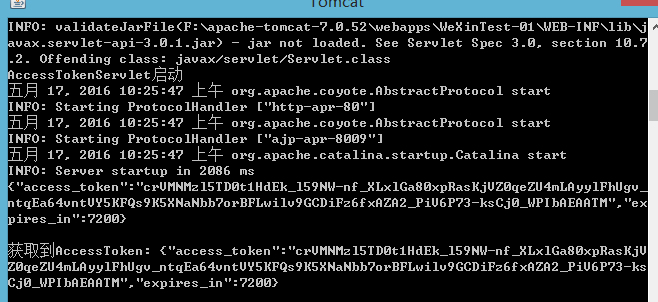
完成后部署运行,运行结果如下:
二、接受微信服务器发送的信息并回复
从微信公众平台接口接收消息指南中可以了解到,当用户向公众帐号发消息时,微信服务器会将消息通过POST方式提交给我们在接口配置信息中填写的URL,而我们就需要在URL所指向的请求处理类WxServlet的doPost方法中接收消息和处理消息
@Override
protected void doPost(HttpServletRequest request, HttpServletResponse response) throws ServletException, IOException {
request.setCharacterEncoding("UTF-8");
response.setCharacterEncoding("UTF-8");
String result = "";
try {
Map<String, String> map = WxMsgUtil.parseXml(request);
WxMessage msg = (WxMessage) BeanUtil.map2Bean(WxMessage.class, map);
System.out.println("用户发送的信息:"+msg.toString());
WxMessage resultMsg = WxMsgUtil.buildRepeatMsg(msg);
result = BeanUtil.bean2Xml(resultMsg, null);
System.out.println("回复的信息:"+result);
if(result.equals("")){
result = "处理异常";
}
} catch (Exception e) {
e.printStackTrace();
System.out.println("发生异常:"+e.getMessage());
}
response.getWriter().write(result);
}
WxMessage
package com.feng.web.model;
public class WxMessage {
public static enum MessageType {
TEXT, // 文本消息
IMAGE, // 图片消息
VOICE, // 语音消息
VIDEO, // 视频消息
SHORTVIDEO, // 小视频消息
LOCATION, // 地理位置消息
LINK, // 链接消息
EVENT// 事件消息
}
private String ToUserName;
private String FromUserName;
private String CreateTime;
private String MsgType;// text image voice video shortvideo location link
private String MsgId;// 消息id,64位整型
// text
private String Content;
// // image voice video:
// private String MediaId;// 媒体id,可以调用多媒体文件下载接口拉取数据。
// // image特有字段
// private String PicUrl;// 图片链接
// // voice特有字段
// private String Format;// 语音格式,如amr,speex等
// // video shortvideo特有字段
// private String ThumbMediaId;// 视频消息缩略图的媒体id,可以调用多媒体文件下载接口拉取数据。
private Image Image;
private Voice Voice;
private Video Video;
private Music Music;
// location 特有字段
private String Location_X;// 地理位置维度
private String Location_Y;// 地理位置经度
private String Scale;// 地图缩放大小
private String Label;// 地理位置信息
// link 特有字段
private String Title;// 消息标题
private String Description;// 消息描述
private String Url;// 消息链接
public Image getImage() {
return Image;
}
public void setImage(Image image) {
Image = image;
}
public Voice getVoice() {
return Voice;
}
public void setVoice(Voice voice) {
Voice = voice;
}
public Video getVideo() {
return Video;
}
public void setVideo(Video video) {
Video = video;
}
public Music getMusic() {
return Music;
}
public void setMusic(Music music) {
Music = music;
}
public String getToUserName() {
return ToUserName;
}
public void setToUserName(String toUserName) {
ToUserName = toUserName;
}
public String getFromUserName() {
return FromUserName;
}
public void setFromUserName(String fromUserName) {
FromUserName = fromUserName;
}
public String getCreateTime() {
return CreateTime;
}
public void setCreateTime(String createTime) {
CreateTime = createTime;
}
public String getMsgType() {
return MsgType;
}
public void setMsgType(String msgType) {
MsgType = msgType;
}
public String getContent() {
return Content;
}
public void setContent(String content) {
Content = content;
}
public String getMsgId() {
return MsgId;
}
public void setMsgId(String msgId) {
MsgId = msgId;
}
public String getLocation_X() {
return Location_X;
}
public void setLocation_X(String location_X) {
Location_X = location_X;
}
public String getLocation_Y() {
return Location_Y;
}
public void setLocation_Y(String location_Y) {
Location_Y = location_Y;
}
public String getScale() {
return Scale;
}
public void setScale(String scale) {
Scale = scale;
}
public String getLabel() {
return Label;
}
public void setLabel(String label) {
Label = label;
}
public String getTitle() {
return Title;
}
public void setTitle(String title) {
Title = title;
}
public String getDescription() {
return Description;
}
public void setDescription(String description) {
Description = description;
}
public String getUrl() {
return Url;
}
public void setUrl(String url) {
Url = url;
}
public static class Image{
String mediaId;
public String getMediaId() {
return mediaId;
}
public void setMediaId(String mediaId) {
this.mediaId = mediaId;
}
}
public static class Voice{
String mediaId;
public String getMediaId() {
return mediaId;
}
public void setMediaId(String mediaId) {
this.mediaId = mediaId;
}
}
public static class Video{
String mediaId;
String title;
String description;
public String getMediaId() {
return mediaId;
}
public void setMediaId(String mediaId) {
this.mediaId = mediaId;
}
public String getTitle() {
return title;
}
public void setTitle(String title) {
this.title = title;
}
public String getDescription() {
return description;
}
public void setDescription(String description) {
this.description = description;
}
}
public static class Music{
String title;
String description;
String MusicUrl;
String HQMusicUrl;
String ThumbMediaId;
public String getTitle() {
return title;
}
public void setTitle(String title) {
this.title = title;
}
public String getDescription() {
return description;
}
public void setDescription(String description) {
this.description = description;
}
public String getMusicUrl() {
return MusicUrl;
}
public void setMusicUrl(String musicUrl) {
MusicUrl = musicUrl;
}
public String getHQMusicUrl() {
return HQMusicUrl;
}
public void setHQMusicUrl(String hQMusicUrl) {
HQMusicUrl = hQMusicUrl;
}
public String getThumbMediaId() {
return ThumbMediaId;
}
public void setThumbMediaId(String thumbMediaId) {
ThumbMediaId = thumbMediaId;
}
}
@Override
public String toString() {
return "WxMessage [ToUserName=" + ToUserName + ", FromUserName="
+ FromUserName + ", CreateTime=" + CreateTime + ", MsgType="
+ MsgType + ", MsgId=" + MsgId + ", Content=" + Content
+ ", Image=" + Image + ", Voice=" + Voice + ", Video=" + Video
+ ", Music=" + Music + ", Location_X=" + Location_X
+ ", Location_Y=" + Location_Y + ", Scale=" + Scale
+ ", Label=" + Label + ", Title=" + Title + ", Description="
+ Description + ", Url=" + Url + "]";
}
}
WxConfig
package com.feng.web.model;
public class WxConfig {
public static String ImageMediaId = "1JcIX4cVYVjASjx-dv8yaJ8MIElTYSev8CoQ1rTLhwkTsxnM2n1v0zxBF1bEGir0";
public static String VoiceMediaId = "Tr8zTacwl7kDUuF6c7IrAvmfWDkXcLmBCPJ7AApVKPL7rNeXV0TYUTS5Ne__uISd";
public static String VideoMediaId = "YsgYy0KT1Mz0X9P1v5jxJttjockBgUNKn2z0_yz4l_KI5FhhTWBHJalTOe-CZ8Ig";
//http请求方式: POST/FORM,需使用https
public static final String UPLOAD_MEDIA = "https://api.weixin.qq.com/cgi-bin/media/upload";
//http请求方式: GET,https调用
public static final String DOWNLOAD_MEDIA = "http://file.api.weixin.qq.com/cgi-bin/media/get?access_token=%s&media_id=%s";
}
下面是我自己写的一些工具类:
WxMsgUtil
package com.feng.web.service.util;
import java.io.IOException;
import java.io.InputStream;
import java.text.DateFormat;
import java.text.SimpleDateFormat;
import java.util.Date;
import java.util.HashMap;
import java.util.Iterator;
import java.util.List;
import java.util.Map;
import java.util.Set;
import javax.servlet.http.HttpServletRequest;
import org.dom4j.Document;
import org.dom4j.DocumentException;
import org.dom4j.Element;
import org.dom4j.io.SAXReader;
import com.feng.web.model.WxConfig;
import com.feng.web.model.WxMessage;
import com.feng.web.model.WxMessage.Image;
import com.feng.web.model.WxMessage.MessageType;
import com.feng.web.model.WxMessage.Voice;
public class WxMsgUtil {
public static WxMessage buildRepeatMsg(WxMessage msg){
WxMessage result = new WxMessage();
result.setFromUserName(msg.getToUserName());
result.setToUserName(msg.getFromUserName());
result.setCreateTime(getUtcTime());
result = buildTestMsg(result, msg.getContent());
return result;
}
private static WxMessage buildTestMsg(WxMessage result, String content) {
if(content.equals("文本")){
result.setContent("Hi!");
result.setMsgType(MessageType.TEXT.name());
}else if(content.equals("音乐")){
Voice voice = new Voice();
voice.setMediaId(WxConfig.VoiceMediaId);
result.setVoice(voice);
result.setMsgType(MessageType.VOICE.name());
}else if(content.equals("图片")){
Image image = new Image();
image.setMediaId(WxConfig.ImageMediaId);
result.setImage(image);
result.setMsgType(MessageType.IMAGE.name());
}else{
result.setContent("请输入文本、音乐、图片");
result.setMsgType(MessageType.TEXT.name());
}
return result;
}
private static String getUtcTime() {
Date dt = new Date();// 如果不需要格式,可直接用dt,dt就是当前系统时间
DateFormat df = new SimpleDateFormat("yyyyMMddhhmm");// 设置显示格式
String nowTime = df.format(dt);
long dd = (long) 0;
try {
dd = df.parse(nowTime).getTime();
} catch (Exception e) {
}
return String.valueOf(dd);
}
/**
* 解析微信发来的请求(XML)
* @param request
* @return map
* @throws Exception
*/
@SuppressWarnings("unchecked")
public static Map<String,String> parseXml(HttpServletRequest request) {
try {
// 将解析结果存储在HashMap中
Map<String,String> map = new HashMap<String,String>();
// 从request中取得输入流
InputStream inputStream = request.getInputStream();
System.out.println("获取输入流");
// 读取输入流
SAXReader reader = new SAXReader();
Document document = reader.read(inputStream);
// 得到xml根元素
Element root = document.getRootElement();
// 得到根元素的所有子节点
List
// 遍历所有子节点
for (Element e : elementList) {
System.out.println(e.getName() + "|" + e.getText());
map.put(e.getName(), e.getText());
}
// 释放资源
inputStream.close();
inputStream = null;
return map;
} catch (IOException e1) {
e1.printStackTrace();
} catch (DocumentException e1) {
e1.printStackTrace();
}
return null;
}
public static String bean2Xml(WxMessage msg){
StringBuffer buffer = new StringBuffer();
buffer.append("
Map<String, Object> p = BeanUtil.bean2Map(msg);
Set
Iterator
while (i.hasNext()){
String key = i.next();
if(key.equals("class")){}
else {
Object value = p.get(key);
String name = key.substring(0, 1).toUpperCase() + key.substring(1);
buffer.append("<");
buffer.append(name);
buffer.append(">");
if(value == null || value.toString().equals("")){
buffer.append("");
} else {
buffer.append(value);
}
buffer.append("</");
buffer.append(name);
buffer.append(">");
}
}
buffer.append("");
return buffer.toString();
}
}
BeanUtil
package com.feng.web.service.util;
import java.beans.BeanInfo;
import java.beans.IntrospectionException;
import java.beans.Introspector;
import java.beans.PropertyDescriptor;
import java.io.StringReader;
import java.lang.reflect.Array;
import java.lang.reflect.Field;
import java.lang.reflect.InvocationTargetException;
import java.lang.reflect.Method;
import java.util.ArrayList;
import java.util.Collection;
import java.util.Collections;
import java.util.HashMap;
import java.util.List;
import java.util.Map;
import org.jdom.Document;
import org.jdom.Element;
import org.jdom.input.SAXBuilder;
import org.xml.sax.InputSource;
/**
* 需要jdom.jar
* @author fengzp
* 2016年5月17日上午10:37:26
*/
public class BeanUtil{
/**
* 把Bean转成Map
*/
public static Map<String, Object> bean2Map(Object bean) {
try {
BeanInfo beanInfo = Introspector.getBeanInfo(bean.getClass());
Map<String, Object> fields = new HashMap<String, Object>();
for (PropertyDescriptor pd : beanInfo.getPropertyDescriptors()) {
fields.put(pd.getName(), pd.getReadMethod().invoke(bean));
}
return fields;
} catch (IntrospectionException ex) {
throw new RuntimeException(ex);
} catch (IllegalArgumentException ex) {
throw new RuntimeException(ex);
} catch (IllegalAccessException ex) {
throw new RuntimeException(ex);
} catch (InvocationTargetException ex) {
throw new RuntimeException(ex);
}
}
public static Object map2Bean(Class<?> clazz, Map<String, String> map) {
return map2Bean(clazz, map, true);
}
public static Object map2Bean(Class<?> clazz, Map<String, String> map, boolean toUpper) {
try {
BeanInfo beanInfo = Introspector.getBeanInfo(clazz); // 获取类属性
Object obj = clazz.newInstance(); // 创建 JavaBean 对象
// 给 JavaBean 对象的属性赋值
PropertyDescriptor[] propertyDescriptors = beanInfo.getPropertyDescriptors();
for (int i = 0; i< propertyDescriptors.length; i++) {
PropertyDescriptor descriptor = propertyDescriptors[i];
String propertyName = descriptor.getName();
if(toUpper)
propertyName = propertyName.substring(0, 1).toUpperCase() + propertyName.substring(1);
if (map.containsKey(propertyName)) {
// 下面一句可以 try 起来,这样当一个属性赋值失败的时候就不会影响其他属性赋值。
String value = map.get(propertyName);
descriptor.getWriteMethod().invoke(obj, value);
}
}
return obj;
} catch (Exception e) {
e.printStackTrace();
System.out.println("map2bean转换异常");
}
return null;
}
public static String bean2Xml(Object obj) throws InstantiationException {
return bean2Xml(obj, null);
}
/**
* 1.bean类的属性必须有getter、setter方法
* 2.生成的xml不会设置到xml的属性
*/
@SuppressWarnings("unchecked")
public static String bean2Xml(Object obj,String root) throws InstantiationException {
//加这一句判断是为了方便递归调用,如果root为空,那么视为第一次调用,也就是xml的根
if(root==null || root.trim().equals("")){
root = "xml";
}
if(root.equalsIgnoreCase("item")){
////、!!为什么只有这个以的item的i是小写的,其他的标签都是第一个字符大写的。why
root = root.toLowerCase();
}
try {
//声明一个列表 存放需要转换成xml类的所有设计的父类
//这个地方没有涉及到属性为类的地方,应为下面的处理方法是,如果属性是类的话,就递归调用这个方法,所以没有什么需要担心的
List<Class> cl = new ArrayList
//获取对象的类
Class<?> clazz = obj.getClass();
//判断,如果父类不是Object的话把所有的类放到上面声明的list里面
String simpleName = clazz.getSimpleName();
while (!"Object".equals(simpleName)) {
cl.add(clazz);
clazz = clazz.getSuperclass();
simpleName = clazz.getSimpleName();
}
//上面是从子类开始存放的,所以这里要反转
Collections.reverse(cl);
//开始创建xml
StringBuffer xml = new StringBuffer("<"+root+">\n");
for (Class cz : cl) {
//System.out.println("list " + cz.getName());
//获取类里面声明的所有属性,之所以上面要获取父级的类,时应为这里只能获取当前类的声明方法,无法获取到集成来的方法
Field[] fs = cz.getDeclaredFields();
for (Field f : fs) {
//获取属性的类型
Class ct =f.getType();
//获取类对应的名称
String ctName = ct.getSimpleName();
String fName = f.getName();
String firstUpperName = fName.substring(0, 1).toUpperCase()+fName.substring(1);
//System.out.println();
//当然,如果类是基础类型的直接设值就可以了
if("int".equals(ctName) || "long".equals(ctName)|| "double".equals(ctName)|| "float".equals(ctName) || "char".equals(ctName)){
xml.append(getFieldXml(f,cz,obj)).append("\n");
}else if("String".equals(ctName)||"char".equals(ctName)){
xml.append(getFieldXml(f,cz,obj)).append("\n");
}else {
//如果属性不是基础类型的,则需要递归调用,也就是把上面的方法冲走一遍
//通过执行get方法,获取对象的返回值。
String methodName = "get" +firstUpperName;
Class<?>[] cnull = null;
Method m=cz.getMethod(methodName, cnull);
Object[] osnull =null;
Object reto=m.invoke(obj, osnull);
if(null!=reto){
if(reto instanceof Collection<?>){
//如果结果是集合类型,那么获取子元素继续
xml.append("<"+firstUpperName+">\n");
Collection

 浙公网安备 33010602011771号