
CMP 40HX在PVE9.0配置vGPU
在PVE9.0下CMP 40HX使用NVIDIA vGPU19.0显卡虚拟化拆分技术
本文参考文章:
- https://yangwenqing.com/archives/2729/
- https://foxi.buduanwang.vip/virtualization/pve/2815.html/
- https://alist.homelabproject.cc/foxipan/vGPU
博客的vgpu文章:
最近看了很多vGPU的文章,心里面痒痒,就想搞一块矿卡来玩玩。在选择方面考虑了P106-100、CMP 30HX 、CMP 40HX,最终选则了CMP 40HX。
如果你需要玩vGPU,百元的情况下建议选择P106-100这个比较划算特在此记录PVE9.0环境下安装vGPU的记录
显卡名称 显存大小 价格 备注 P106-100 6G 130元左右 锻炼时间过长 CMP 30HX 6G 180元左右 需要补电容 CMP 40HX 8G 300元左右 需要补电容
1.PVE系统信息
- 内核版本为6.14.8.x
root@pve:~# uname -a
Linux pve 6.14.8-2-pve #1 SMP PREEMPT_DYNAMIC PMX 6.14.8-2 (2025-07-22T10:04Z) x86_64 GNU/Linux
root@pve:~#
2.硬件配置
| 事项 | 信息 |
|---|---|
| 系统 | PVE 9.0.5 |
| 内核 | 6.14.8-2-pve |
| CPU | AMD Ryzen 7 5700X (16) @ 4.6GHz |
| 显卡 | CMP 40HX |
| vGPU驱动 | 580.82.02 |
3.BIOS设置
提前在BIOS开启以下设置
- 开启VT-d --必须开启,英特尔叫vt-d,AMD叫iommu
- 开启SRIOV
- 开启Above 4G
- 关闭安全启动
4.屏蔽自带驱动
cat << EOF >> /etc/modprobe.d/pve-blacklist.conf
# 屏蔽NVIDIA显卡
blacklist nouveau
blacklist nvidia
# 允许不安全的设备中断
options vfio_iommu_type1 allow_unsafe_interrupts=1
EOF
- 通过cat /etc/modprobe.d/pve-blacklist.conf检查文件是否写入
root@pve:~# cat /etc/modprobe.d/pve-blacklist.conf
# This file contains a list of modules which are not supported by Proxmox VE

# nvidiafb see bugreport https://bugzilla.proxmox.com/show_bug.cgi?id=701
blacklist nvidiafb

# 屏蔽NVIDIA显卡
blacklist nouveau
blacklist nvidia
# 允许不安全的设备中断
options vfio_iommu_type1 allow_unsafe_interrupts=1
root@pve:~#
5.加载内核模块
# 加载模块
cat << EOF >>/etc/modules
vfio
vfio_iommu_type1
vfio_pci
vfio_virqfd
EOF

# 更新update-initramfs
update-initramfs -u -k all
# 重启电脑
reboot
- 检查文件是否写入和重启电脑
root@pve:~# cat /etc/modules
# /etc/modules is obsolete and has been replaced by /etc/modules-load.d/.
# Please see modules-load.d(5) and modprobe.d(5) for details.
#
# Updating this file still works, but it is undocumented and unsupported.

vfio
vfio_iommu_type1
vfio_pci
vfio_virqfd
root@pve:~#
root@pve:~# update-initramfs -u -k all
root@pve:~# reboot
6.配置NVIDIA vGPU_Unlock 服务
# 创建vgpu_unlock文件夹
mkdir /etc/vgpu_unlock
# 创建profile_override.toml文件
touch /etc/vgpu_unlock/profile_override.toml
# 创建nvidia-vgpud.service.d,nvidia-vgpu-mgr.service.d启动服务
mkdir /etc/systemd/system/{nvidia-vgpud.service.d,nvidia-vgpu-mgr.service.d}
# 写入路径信息
echo -e "[Service]\nEnvironment=LD_PRELOAD=/opt/vgpu_unlock-rs/target/release/libvgpu_unlock_rs.so" > /etc/systemd/system/nvidia-vgpud.service.d/vgpu_unlock.conf
echo -e "[Service]\nEnvironment=LD_PRELOAD=/opt/vgpu_unlock-rs/target/release/libvgpu_unlock_rs.so" > /etc/systemd/system/nvidia-vgpu-mgr.service.d/vgpu_unlock.conf
# 重新加载服务
systemctl daemon-reload
# 查看配置是否写入成功
cat /etc/systemd/system/{nvidia-vgpud.service.d,nvidia-vgpu-mgr.service.d}/*
# vgpu_unlock补丁
mkdir -p /opt/vgpu_unlock-rs/target/release
cd /opt/vgpu_unlock-rs/target/release
wget -O libvgpu_unlock_rs.so https://yangwenqing.com/files/pve/vgpu/vgpu_unlock/rust/libvgpu_unlock_rs_vgpu19.so
7.安装NVIDIA vGPU_HOST 驱动
# 安装必要的组件
apt install -y build-essential dkms mdevctl pve-headers-$(uname -r)

# 下载vGPU宿主机驱动
wget https://alist.homelabproject.cc/d/foxipan/vGPU/19.1/NVIDIA-Linux-x86_64-580.82.02-vgpu-kvm-custom.run

# 安装vGPU宿主机驱动
chmod +x NVIDIA-Linux-x86_64-580.82.02-vgpu-kvm-custom.run
./NVIDIA-Linux-x86_64-580.82.02-vgpu-kvm-custom.run --dkms -m=kernel

# 重启主机
reboot

# 查看相关服务状态
systemctl status {nvidia-vgpud.service,nvidia-vgpu-mgr.service}
# 重新启动相关服务
systemctl restart {nvidia-vgpud.service,nvidia-vgpu-mgr.service}
# 停止相关服务
systemctl stop {nvidia-vgpud.service,nvidia-vgpu-mgr.service}
- 检查驱动是否成安装
root@pve:~# nvidia-smi
Wed Sep 10 22:14:58 2025
+-----------------------------------------------------------------------------------------+
| NVIDIA-SMI 580.82.02              Driver Version: 580.82.02      CUDA Version: N/A      |
+-----------------------------------------+------------------------+----------------------+
| GPU  Name                 Persistence-M | Bus-Id          Disp.A | Volatile Uncorr. ECC |
| Fan  Temp   Perf          Pwr:Usage/Cap |           Memory-Usage | GPU-Util  Compute M. |
|                                         |                        |               MIG M. |
|=========================================+========================+======================|
|   0  NVIDIA CMP 40HX                Off |   00000000:0B:00.0 Off |                  N/A |
| 16%   60C    P0              1W /  184W |      64MiB /   8192MiB |      0%      Default |
|                                         |                        |                  N/A |
+-----------------------------------------+------------------------+----------------------+

+-----------------------------------------------------------------------------------------+
| Processes:                                                                              |
|  GPU   GI   CI              PID   Type   Process name                        GPU Memory |
|        ID   ID                                                               Usage      |
|=========================================================================================|
|  No running processes found                                                             |
+-----------------------------------------------------------------------------------------+
root@pve:~# nvidia-smi  vgpu
Wed Sep 10 22:15:04 2025
+-----------------------------------------------------------------------------+
| NVIDIA-SMI 580.82.02              Driver Version: 580.82.02                 |
|---------------------------------+------------------------------+------------+
| GPU  Name                       | Bus-Id                       | GPU-Util   |
|      vGPU ID     Name           | VM ID     VM Name            | vGPU-Util  |
|=================================+==============================+============|
|  0   NVIDIA CMP 40HX            | 00000000:0B:00.0             |   0%       |
+---------------------------------+------------------------------+------------+
root@pve:~#
root@pve:~# systemctl status {nvidia-vgpud.service,nvidia-vgpu-mgr.service}
○ nvidia-vgpud.service - NVIDIA vGPU Daemon
     Loaded: loaded (/usr/lib/systemd/system/nvidia-vgpud.service; enabled; preset: enabled)
    Drop-In: /etc/systemd/system/nvidia-vgpud.service.d
             └─vgpu_unlock.conf
     Active: inactive (dead) since Wed 2025-09-10 22:19:25 CST; 1min 57s ago
 Invocation: 08be57a37b8e43299ff934073c062fbd
    Process: 793 ExecStart=/usr/bin/nvidia-vgpud (code=exited, status=0/SUCCESS)
   Main PID: 793 (code=exited, status=0/SUCCESS)
   Mem peak: 7.7M
        CPU: 815ms

Sep 10 22:19:25 pve nvidia-vgpud[793]: Encoder Capacity: 0x64
Sep 10 22:19:25 pve nvidia-vgpud[793]: BAR1 Length: 0x100
Sep 10 22:19:25 pve nvidia-vgpud[793]: Frame Rate Limiter enabled: 0x1
Sep 10 22:19:25 pve nvidia-vgpud[793]: Number of Displays: 1
Sep 10 22:19:25 pve nvidia-vgpud[793]: Max pixels: 1310720
Sep 10 22:19:25 pve nvidia-vgpud[793]: Display: width 1280, height 1024
Sep 10 22:19:25 pve nvidia-vgpud[793]: Multi-vGPU Exclusive supported: 0x1
Sep 10 22:19:25 pve nvidia-vgpud[793]: License: GRID-Virtual-Apps,3.0
Sep 10 22:19:25 pve systemd[1]: nvidia-vgpud.service: Deactivated successfully.
Sep 10 22:19:25 pve systemd[1]: Finished nvidia-vgpud.service - NVIDIA vGPU Daemon.

● nvidia-vgpu-mgr.service - NVIDIA vGPU Manager Daemon
     Loaded: loaded (/usr/lib/systemd/system/nvidia-vgpu-mgr.service; enabled; preset: enabled)
    Drop-In: /etc/systemd/system/nvidia-vgpu-mgr.service.d
             └─vgpu_unlock.conf
     Active: active (running) since Wed 2025-09-10 22:19:25 CST; 1min 57s ago
 Invocation: 3377dc53456746aaafde059c016c88cc
    Process: 1010 ExecStart=/usr/bin/nvidia-vgpu-mgr (code=exited, status=0/SUCCESS)
   Main PID: 1013 (nvidia-vgpu-mgr)
      Tasks: 1 (limit: 154297)
     Memory: 784K (peak: 2M)
        CPU: 417ms
     CGroup: /system.slice/nvidia-vgpu-mgr.service
             └─1013 /usr/bin/nvidia-vgpu-mgr

Sep 10 22:19:25 pve nvidia-vgpu-mgr[1013]: NvA081CtrlVgpuConfigGetVgpuTypeInfoParams {
                                               vgpu_type: 436,
                                               vgpu_type_info: NvA081CtrlVgpuInfo {
                                                   vgpu_type: 436,
                                                   vgpu_name: "GRID RTX6000-2B",
                                                   vgpu_class: "NVS",
                                                   vgpu_signature: [],
                                                   license: "GRID-Virtual-PC,2.0;Quadro-Virtual-DWS,5.0;GRID-Virtual-WS,2.0;GRID-Virtual-WS-Ext,2.0",
                                                   max_instance: 12,
                                                   num_heads: 4,
                                                   max_resolution_x: 5120,
                                                   max_resolution_y: 2880,
                                                   max_pixels: 18432000,
                                                   frl_config: 45,
                                                   cuda_enabled: 0,
                                                   ecc_supported: 0,
                                                   gpu_instance_size: 0,
                                                   multi_vgpu_supported: 0,
                                                   vdev_id: 0x1e301438,
                                                   pdev_id: 0x1e30,
                                                   profile_size: 0x80000000,
                                                   fb_length: 0x74000000,
                                                   gsp_heap_size: 0x0,
                                                   fb_reservation: 0xc000000,
                                                   mappable_video_size: 0x400000,
                                                   encoder_capacity: 0x64,
                                                   bar1_length: 0x100,
                                                   frl_enable: 1,
                                                   adapter_name: "GRID RTX6000-2B",
                                                   adapter_name_unicode: "GRID RTX6000-2B",
                                                   short_gpu_name_string: "TU106-A",
                                                   licensed_product_name: "NVIDIA Virtual PC",
                                                   vgpu_extra_params: [],
                                                   ftrace_enable: 0,
                                                   gpu_direct_supported: 0,
                                                   nvlink_p2p_supported: 0,
                                                   multi_vgpu_exclusive: 1,
                                                   exclusive_type: 0,
                                                   exclusive_size: 0,
                                                   gpu_instance_profile_id: 4294967295,
                                               },
                                           }
root@pve:~# mdevctl types
0000:0b:00.0
  nvidia-256
    Available instances: 24
    Device API: vfio-pci
    Name: GRID RTX6000-1Q
    Description: num_heads=4, frl_config=60, framebuffer=1024M, max_resolution=5120x2880, max_instance=24
  nvidia-257
    Available instances: 12
    Device API: vfio-pci
    Name: GRID RTX6000-2Q
    Description: num_heads=4, frl_config=60, framebuffer=2048M, max_resolution=7680x4320, max_instance=12
  nvidia-258
    Available instances: 8
    Device API: vfio-pci
    Name: GRID RTX6000-3Q
    Description: num_heads=4, frl_config=60, framebuffer=3072M, max_resolution=7680x4320, max_instance=8
  nvidia-259
    Available instances: 6
    Device API: vfio-pci
    Name: GRID RTX6000-4Q
    Description: num_heads=4, frl_config=60, framebuffer=4096M, max_resolution=7680x4320, max_instance=6
  nvidia-260
    Available instances: 4
    Device API: vfio-pci
    Name: GRID RTX6000-6Q
    Description: num_heads=4, frl_config=60, framebuffer=6144M, max_resolution=7680x4320, max_instance=4
  nvidia-261
    Available instances: 3
    Device API: vfio-pci
    Name: GRID RTX6000-8Q
    Description: num_heads=4, frl_config=60, framebuffer=8192M, max_resolution=7680x4320, max_instance=3
  nvidia-262
    Available instances: 2
    Device API: vfio-pci
    Name: GRID RTX6000-12Q
    Description: num_heads=4, frl_config=60, framebuffer=12288M, max_resolution=7680x4320, max_instance=2
  nvidia-263
    Available instances: 1
    Device API: vfio-pci
    Name: GRID RTX6000-24Q
    Description: num_heads=4, frl_config=60, framebuffer=24576M, max_resolution=7680x4320, max_instance=1
  nvidia-435
    Available instances: 24
    Device API: vfio-pci
    Name: GRID RTX6000-1B
    Description: num_heads=4, frl_config=45, framebuffer=1024M, max_resolution=5120x2880, max_instance=24
  nvidia-436
    Available instances: 12
    Device API: vfio-pci
    Name: GRID RTX6000-2B
    Description: num_heads=4, frl_config=45, framebuffer=2048M, max_resolution=5120x2880, max_instance=12
  nvidia-437
    Available instances: 24
    Device API: vfio-pci
    Name: GRID RTX6000-1A
    Description: num_heads=1, frl_config=60, framebuffer=1024M, max_resolution=1280x1024, max_instance=24
  nvidia-438
    Available instances: 12
    Device API: vfio-pci
    Name: GRID RTX6000-2A
    Description: num_heads=1, frl_config=60, framebuffer=2048M, max_resolution=1280x1024, max_instance=12
  nvidia-439
    Available instances: 8
    Device API: vfio-pci
    Name: GRID RTX6000-3A
    Description: num_heads=1, frl_config=60, framebuffer=3072M, max_resolution=1280x1024, max_instance=8
  nvidia-440
    Available instances: 6
    Device API: vfio-pci
    Name: GRID RTX6000-4A
    Description: num_heads=1, frl_config=60, framebuffer=4096M, max_resolution=1280x1024, max_instance=6
  nvidia-441
    Available instances: 4
    Device API: vfio-pci
    Name: GRID RTX6000-6A
    Description: num_heads=1, frl_config=60, framebuffer=6144M, max_resolution=1280x1024, max_instance=4
  nvidia-442
    Available instances: 3
    Device API: vfio-pci
    Name: GRID RTX6000-8A
    Description: num_heads=1, frl_config=60, framebuffer=8192M, max_resolution=1280x1024, max_instance=3
  nvidia-443
    Available instances: 2
    Device API: vfio-pci
    Name: GRID RTX6000-12A
    Description: num_heads=1, frl_config=60, framebuffer=12288M, max_resolution=1280x1024, max_instance=2
  nvidia-444
    Available instances: 1
    Device API: vfio-pci
    Name: GRID RTX6000-24A
    Description: num_heads=1, frl_config=60, framebuffer=24576M, max_resolution=1280x1024, max_instance=1
root@pve:~#
8.CMP 40HX配置
- 配置CMP BAR1大小(CMP BAR1内存只有64MB,vGPU虚拟机创建的时候会申请256M,会导致虚拟机无法启动)
root@pve:~# cat /etc/vgpu_unlock/profile_override.toml
# 配置nvidia-259重写文件
[profile.nvidia-259]
# bar1_length为64MB
bar1_length = 0x40
# 开启cuda
cuda_enabled = 1
# 解除帧数限制
frl_enabled = 0
vgpu_type = "NVS"

[profile.nvidia-257]
bar1_length = 0x40
cuda_enabled = 1
frl_enabled = 0
vgpu_type = "NVS"

# 配置VMID101虚拟机显存大小为1G
[vm.101]
framebuffer = 939524096
framebuffer_reservation = 134217728
root@pve:~#
- 如果不配置BAR1大小为64MB,会出现如下报错
root@pve:~# qm start 100
swtpm_setup: Not overwriting existing state file.
kvm: -device vfio-pci,sysfsdev=/sys/bus/mdev/devices/00000000-0000-0000-0000-000000000100,id=hostpci0,bus=ich9-pcie-port-1,addr=0x0: vfio 00000000-0000-0000-0000-000000000100: error getting device from group 32: Input/output error
Verify all devices in group 32 are bound to vfio-<bus> or pci-stub and not already in use
stopping swtpm instance (pid 3782) due to QEMU startup error

waited 10 seconds for mediated device driver finishing clean up
actively clean up mediated device with UUID 00000000-0000-0000-0000-000000000100
start failed: QEMU exited with code 1
root@pve:~#
root@pve:~#
root@pve:~# systemctl status nvidia-vgpu-mgr
● nvidia-vgpu-mgr.service - NVIDIA vGPU Manager Daemon
     Loaded: loaded (/lib/systemd/system/nvidia-vgpu-mgr.service; enabled; preset: enabled)
    Drop-In: /etc/systemd/system/nvidia-vgpu-mgr.service.d
             └─vgpu_unlock.conf
     Active: active (running) since Mon 2025-09-08 06:22:14 CST; 42s ago
    Process: 1523 ExecStart=/usr/bin/nvidia-vgpu-mgr (code=exited, status=0/SUCCESS)
   Main PID: 1524 (nvidia-vgpu-mgr)
      Tasks: 1 (limit: 154384)
     Memory: 2.0M
        CPU: 8ms
     CGroup: /system.slice/nvidia-vgpu-mgr.service
             └─1524 /usr/bin/nvidia-vgpu-mgr

Sep 08 06:22:28 pve nvidia-vgpu-mgr[1758]: notice: vmiop_log: (0x0): Virtual Device Id: 0x1e30:0x1437
Sep 08 06:22:28 pve nvidia-vgpu-mgr[1758]: notice: vmiop_log: (0x0): FRL Value: 45 FPS
Sep 08 06:22:28 pve nvidia-vgpu-mgr[1758]: notice: vmiop_log: ######## vGPU Manager Information: ########
Sep 08 06:22:28 pve nvidia-vgpu-mgr[1758]: notice: vmiop_log: Driver Version: 580.82.02
Sep 08 06:22:28 pve nvidia-vgpu-mgr[1758]: error: vmiop_log: (0x0): Guest BAR1 is of invalid length (g: 0x10000000, h: 0x04000000)
Sep 08 06:22:28 pve nvidia-vgpu-mgr[1758]: error: vmiop_log: (0x0): Failed to initialize plugin internal data for inst 0 with error 1 (Invalid BAR1 config)
Sep 08 06:22:28 pve nvidia-vgpu-mgr[1758]: error: vmiop_log: (0x0): Initialization: plugin internal data init failed error 1
Sep 08 06:22:28 pve nvidia-vgpu-mgr[1758]: error: vmiop_log: display_init failed for inst: 0
Sep 08 06:22:28 pve nvidia-vgpu-mgr[1758]: error: vmiop_env_log: (0x0): vmiope_process_configuration: plugin registration error
Sep 08 06:22:28 pve nvidia-vgpu-mgr[1758]: error: vmiop_env_log: (0x0): vmiope_process_configuration failed with 0x1f
root@pve:~#
9.搭建FASTAPI-DLS授权服务器
- 环境要求:需要安装docker运行环境
- 参考项目:(fastapi-dls)[https://github.com/starpsp/fastapi-dls]
WORKING_DIR=/opt/docker/fastapi-dls/cert
mkdir -p $WORKING_DIR
cd $WORKING_DIR
# create instance private and public key for singing JWT's
openssl genrsa -out $WORKING_DIR/instance.private.pem 2048
openssl rsa -in $WORKING_DIR/instance.private.pem -outform PEM -pubout -out $WORKING_DIR/instance.public.pem
# create ssl certificate for integrated webserver (uvicorn) - because clients rely on ssl
openssl req -x509 -nodes -days 3650 -newkey rsa:2048 -keyout  $WORKING_DIR/webserver.key -out $WORKING_DIR/webserver.crt

docker volume create dls-db
docker run -e DLS_URL=`hostname -i` -e DLS_PORT=443 -p 443:443 -v $WORKING_DIR:/app/cert -v dls-db:/app/database collinwebdesigns/fastapi-dls:latest
10.创建虚拟机
# 下载vGPU GRID驱动
https://alist.homelabproject.cc/d/foxipan/vGPU/19.1/NVIDIA-GRID-Linux-KVM-580.82.02-580.82.07-581.15.zip
# GRID补丁
https://alist.homelabproject.cc/d/foxipan/vGPU/19.1/Guest_Drivers_Patched/nvxdapix.dll
# FASTAPI-DLS下载授权文件
https://192.168.32.11/-/client-token
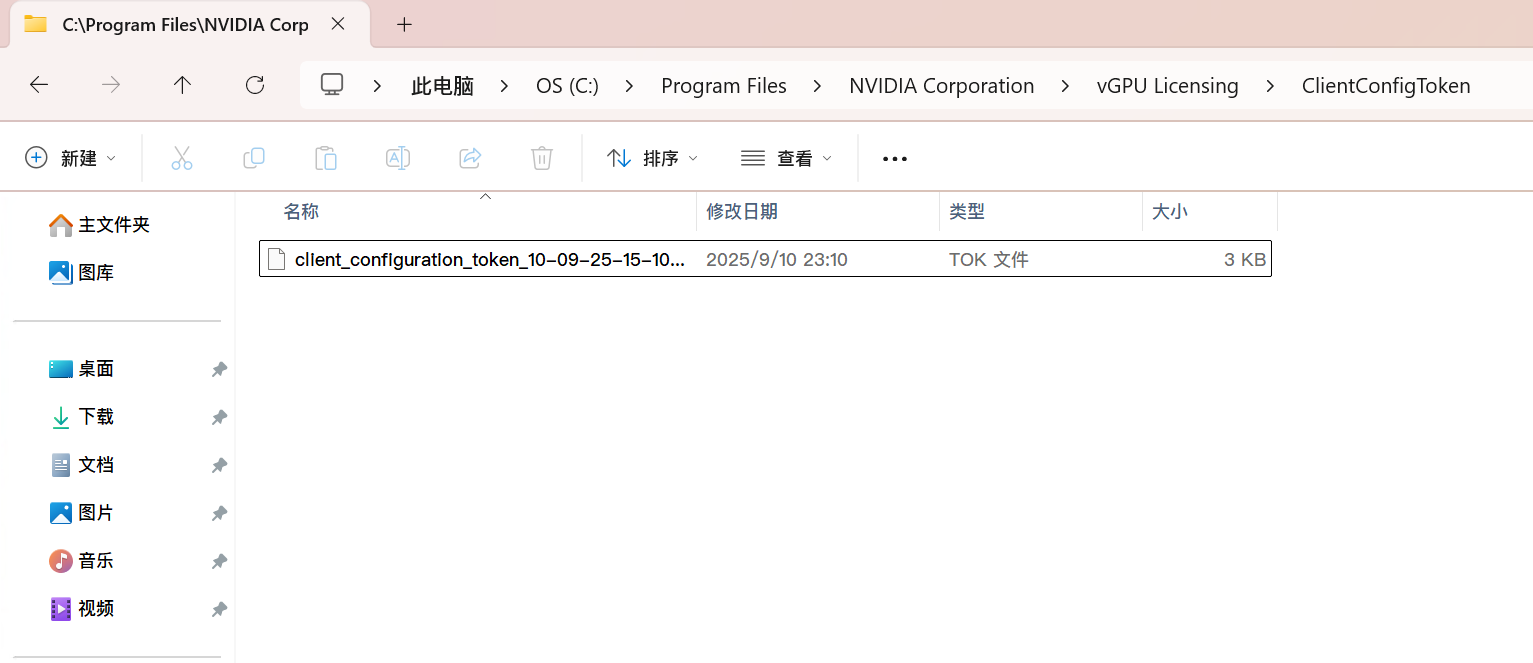
# 下载的授权文件放下面目录
C:\Program Files\NVIDIA Corporation\vGPU Licensing\ClientConfigToken
- 虚拟机创建的配置
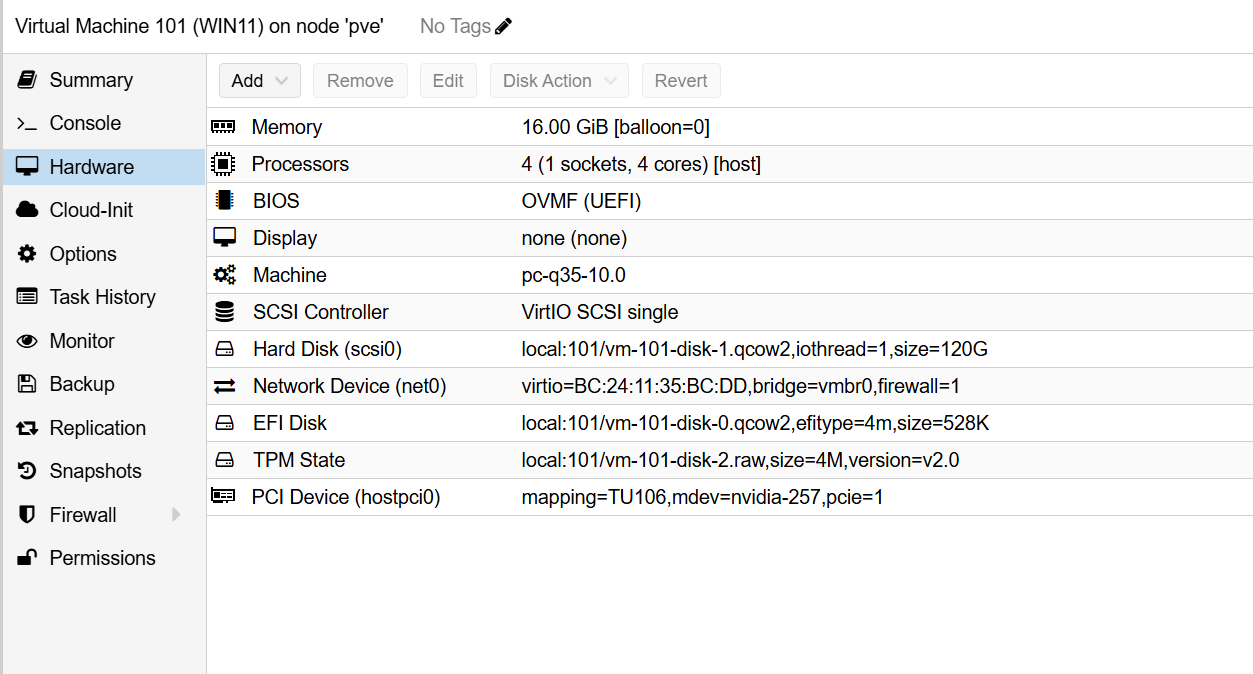
- 授权补丁(补丁放置在Display.Driver内)
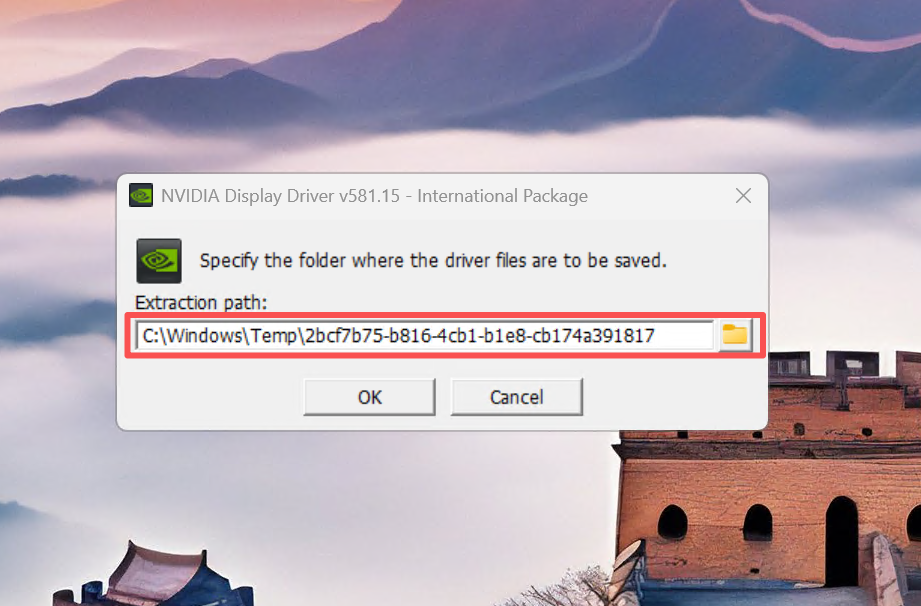
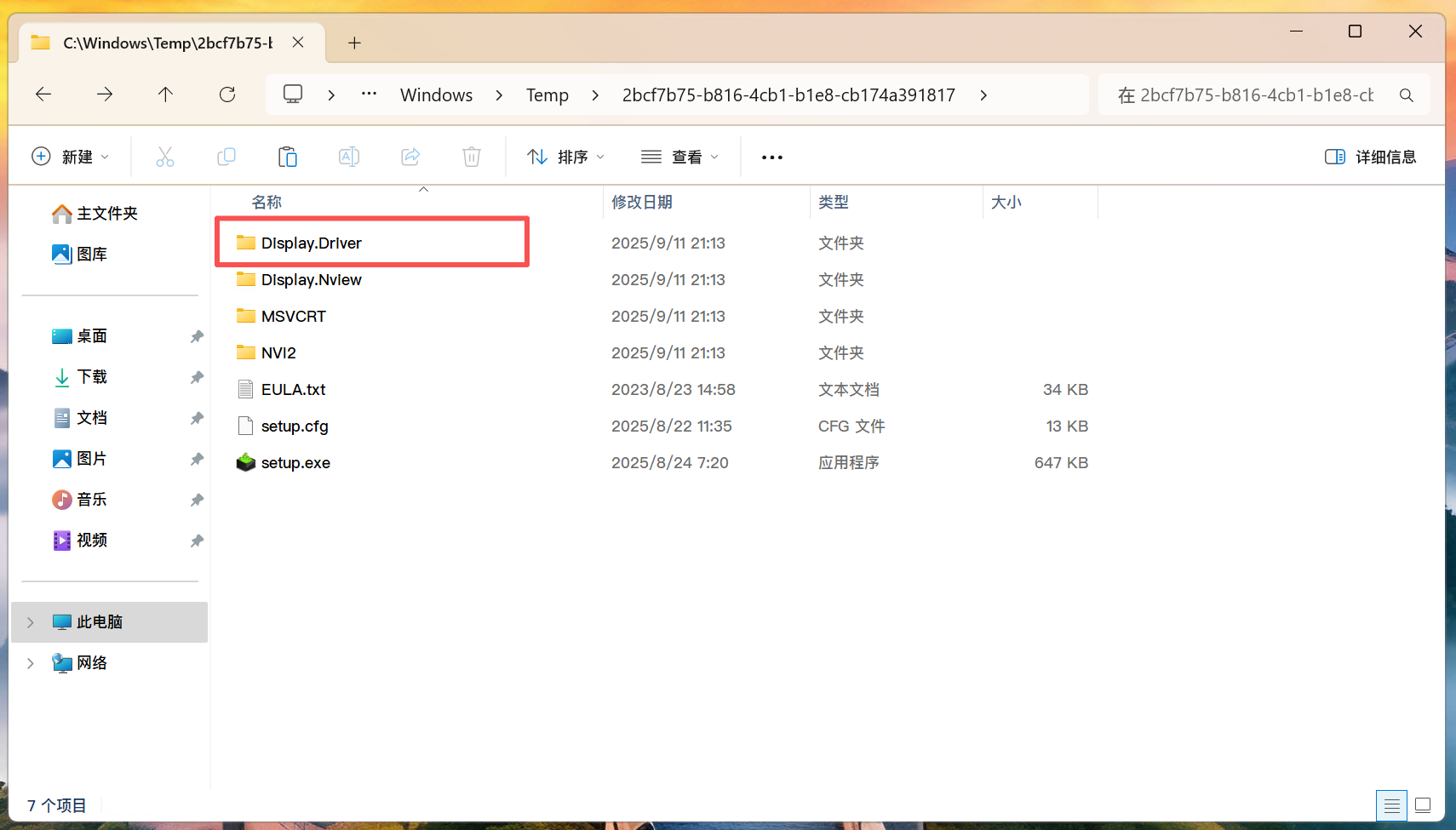
- 授权文件放置位置
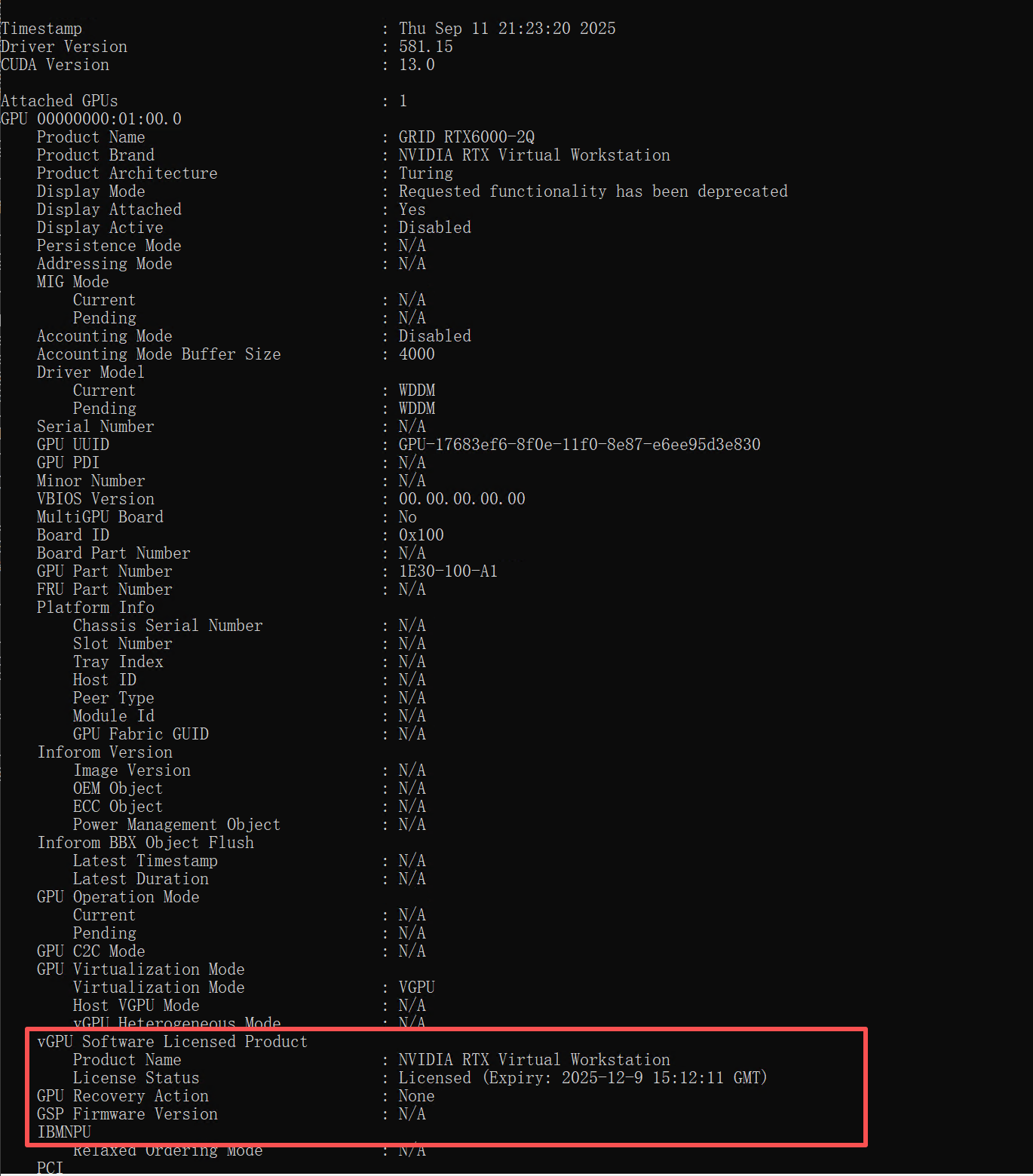
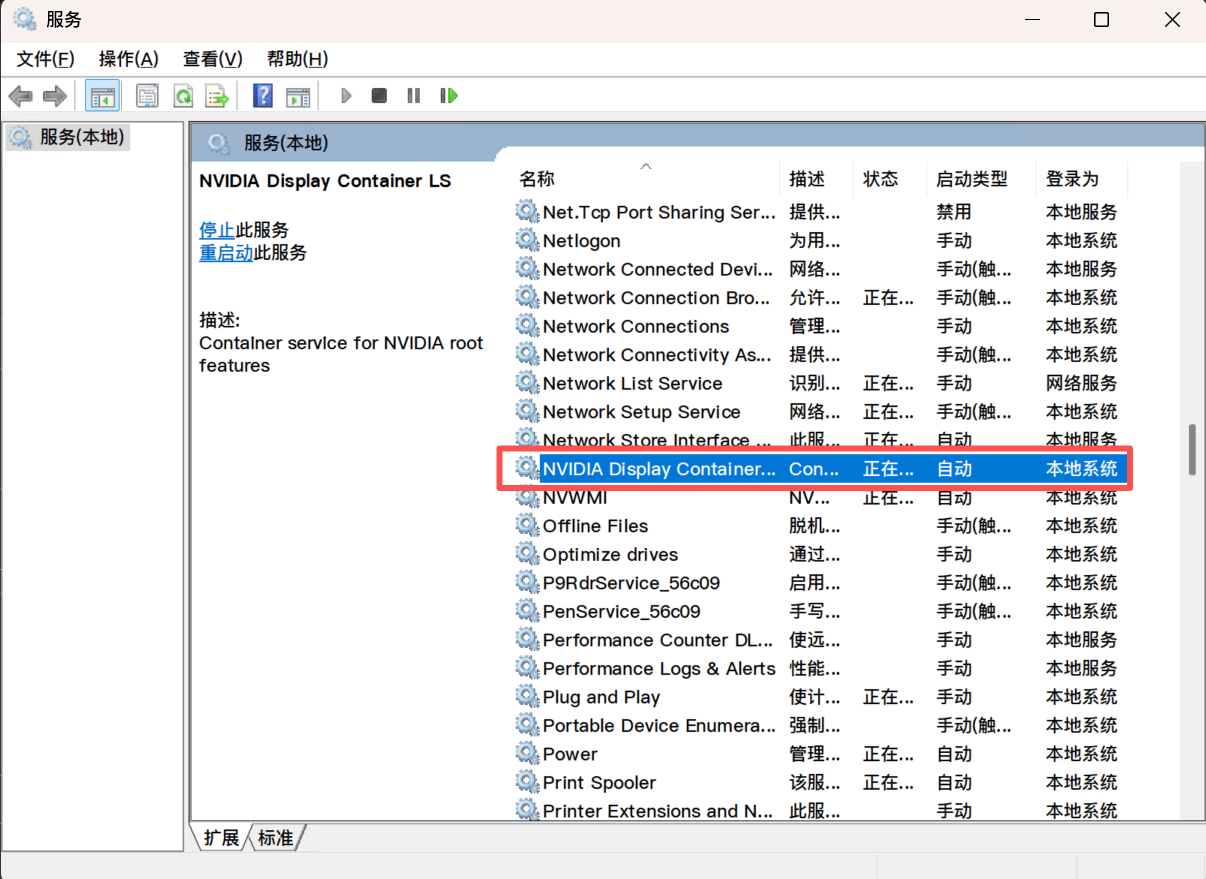
- 重启nvidia进程
- 驱动情况

11.vgpu占用情况
root@pve:~# nvidia-smi
Thu Sep 11 21:20:41 2025
+-----------------------------------------------------------------------------------------+
| NVIDIA-SMI 580.82.02              Driver Version: 580.82.02      CUDA Version: N/A      |
+-----------------------------------------+------------------------+----------------------+
| GPU  Name                 Persistence-M | Bus-Id          Disp.A | Volatile Uncorr. ECC |
| Fan  Temp   Perf          Pwr:Usage/Cap |           Memory-Usage | GPU-Util  Compute M. |
|                                         |                        |               MIG M. |
|=========================================+========================+======================|
|   0  NVIDIA CMP 40HX                On  |   00000000:0B:00.0 Off |                  N/A |
| 37%   42C    P8             24W /  184W |    1064MiB /   8192MiB |      0%      Default |
|                                         |                        |                  N/A |
+-----------------------------------------+------------------------+----------------------+

+-----------------------------------------------------------------------------------------+
| Processes:                                                                              |
|  GPU   GI   CI              PID   Type   Process name                        GPU Memory |
|        ID   ID                                                               Usage      |
|=========================================================================================|
|    0   N/A  N/A           35803    C+G   vgpu                                   1000MiB |
+-----------------------------------------------------------------------------------------+
root@pve:~#
root@pve:~# nvidia-smi vgpu
Thu Sep 11 21:26:08 2025
+-----------------------------------------------------------------------------+
| NVIDIA-SMI 580.82.02              Driver Version: 580.82.02                 |
|---------------------------------+------------------------------+------------+
| GPU  Name                       | Bus-Id                       | GPU-Util   |
|      vGPU ID     Name           | VM ID     VM Name            | vGPU-Util  |
|=================================+==============================+============|
|  0   NVIDIA CMP 40HX            | 00000000:0B:00.0             |   0%       |
|      3251634197  GRID RTX600... | 1319...  WIN11,debug-thre... |    0%      |
+---------------------------------+------------------------------+------------+
root@pve:~#

 浙公网安备 33010602011771号