

实验三 Linux系统用户管理及VIM配置
| 内容 | |
|---|---|
| 这个作业属于哪个课程 | 班级课程主页链接(点击这里) |
| 这个作业的要求在哪里 | 作业要求链接地址(点击这里) |
| 学号-姓名 | 17041515-刘聪 |
| 作业学习目标 |
(1)学习Linux系统用户管理。(2)学习vim使用及配置。 |
一、Linux用户管理
简答:Linux系统为什么应避免使用root用户登录?
操作:
(1)如何在与用户有关的三个文件中查看当前用户的信息?
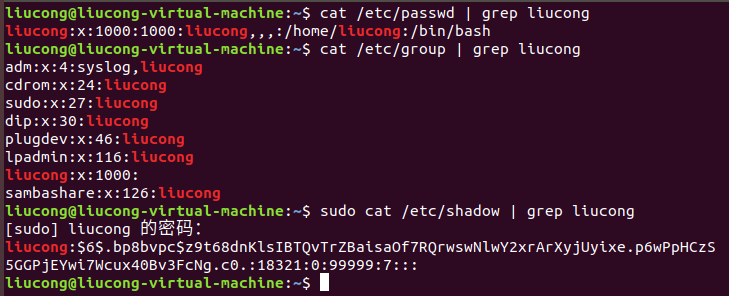
请简要描述这三个文件?
/etc/passwd 该目录文件存储的是操作系统用户信息,该文件为所有用户可见。
/etc/group 存储有关本地用户组的信息。
/etc/shadow 是在安装了shadow口令软件的系统上的shadow口令文件。
(2)用id命令查看当前用户相关信息

请简要描述输出结果?
第一条指令的结果:分别为:liucong用户id,liucong组id,liucong组名称。
第二条指令的结果:分别为:root用户id,root组id,root组名称。
(3)创建两个账号,一个账号为test,另外一个账号以大写E开头加上你自己学号尾数4位,两个账号分
别设置密码及管理员权限,账号设置完成后,切换账号简单查看信息后,删除test账号,保留另一账
号,以备后续操作。
a.创建账号

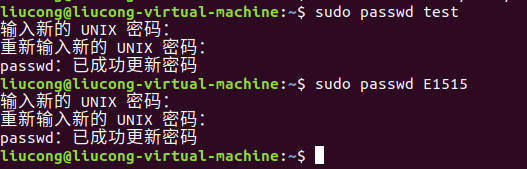
b.设置密码
c.设置权限
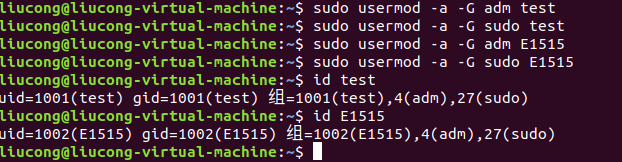
请简要描述用户组的概念?
多个有共性用户组成的能进行统一管理的组。
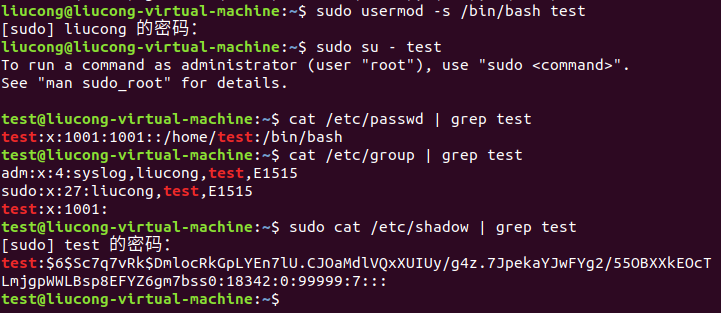
d.切换账号
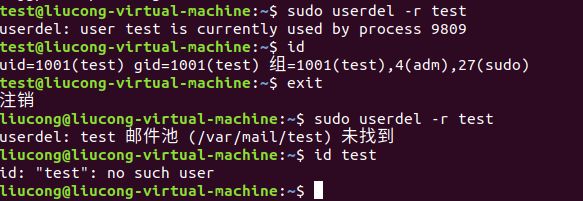
e.删除账号test
二、VIM简单配置
a.切换到保留的新创建账号

b.在用户主目录创建一个VIM配置文件.vimrc

c.打开并向文件中添加以下内容
set number "显示行号
syntax on "语法高亮
set cursorline
set ruler " 显示标尺
set showcmd " 输入的命令显示出来,看的清楚些
set scrolloff=3 " 光标移动到buffer的顶部和底部时保持3行距离
set novisualbell " 不要闪烁(不明白)
set statusline=%F%m%r%h%w\ [FORMAT=%{&ff}]\ [TYPE=%Y]\ [POS=%l,%v][%p%%]\ %{strftime(\"%d/%m/%y\ -\ %H:%M\")} "状态行显示的内容
set nocompatible "去除VIM一致性,必须"
set fencs=utf-8,ucs-bom,shift-jis,gb18030,gbk,gb2312,cp936
set termencoding=utf-8
set encoding=utf-8
set fileencoding=utf-8
"""""""""""""""""""""""""""""""""""""""""""""""""""""""""""""""""""""""""""""""""""""""""""""""""
"""""新文件标题
""""""""""""""""""""""""""""""""""""""""""""""""""""""""""""""""""""""""""""""""""""""""""""""""""
"新建.c,.h,.sh,.java文件,自动插入文件头
autocmd BufNewFile *.cpp,*.[ch],*.sh,*.java exec ":call SetTitle()"
""定义函数SetTitle,自动插入文件头
func SetTitle()
"如果文件类型为.sh文件
if &filetype == 'sh'
call setline(1,"\#########################################################################")
call append(line("."), "\# File Name: ".expand("%"))
call append(line(".")+1, "\# Author: 17041515liucong")
call append(line(".")+2, "\# mail: 654510785@qq.com ")
call append(line(".")+3, "\# Created Time: ".strftime("%c"))
call append(line(".")+4, "\#########################################################################")
call append(line(".")+5, "\#!/bin/bash")
call append(line(".")+6, "")
else
call setline(1, "/*************************************************************************")
call append(line("."), " > File Name: ".expand("%"))
call append(line(".")+1, " > Author: 17041515liucong")
call append(line(".")+2, " > Mail: 654510785@qq.com ")
call append(line(".")+3, " > Created Time: ".strftime("%c"))
call append(line(".")+4, " ************************************************************************/")
call append(line(".")+5, "")
endif
if &filetype == 'cpp'
call append(line(".")+6, "#include<iostream>")
call append(line(".")+7, "using namespace std;")
call append(line(".")+8, "")
endif
if &filetype == 'c'
call append(line(".")+6, "#include<stdio.h>")
call append(line(".")+7, "")
endif
"新建文件后,自动定位到文件末尾
autocmd BufNewFile * normal G
endfunc
""""""""""""""""""""""""""""""""""""""""""""""""""""""""""""""""""""""""""""
set autoindent " 自动缩进
set cindent
set tabstop=4 " Tab键的宽度
set softtabstop=4 " 统一缩进为4
set shiftwidth=4
set noexpandtab " 不要用空格代替制表符
set smarttab " 在行和段开始处使用制表符
set showmatch
set history=1000 " 历史记录数
set nobackup "禁止生成临时文件
set noswapfile
set ignorecase "搜索忽略大小写
set hlsearch "搜索逐字符高亮
set incsearch
set gdefault "行内替换
set langmenu=zh_CN.UTF-8 "语言设置
set helplang=cn
set laststatus=2 " 总是显示状态行
filetype on " 侦测文件类型
filetype plugin on " 载入文件类型插件
filetype indent on " 为特定文件类型载入相关缩进文件
set iskeyword+=_,$,@,%,#,- " 带有如下符号的单词不要被换行分割
set linespace=0 " 字符间插入的像素行数目
set wildmenu " 增强模式中的命令行自动完成操作
set backspace=2 " 使回格键(backspace)正常处理indent, eol, start等
set whichwrap+=<,>,h,l " 允许backspace和光标键跨越行边界
set mouse=a " 可以在buffer的任何地方使用鼠标(类似office中在工作区双击鼠标定位)
set selection=exclusive
set selectmode=mouse,key
"自动补全