


Python-csv文件&ini文件
CSV文件简介
逗号分隔值Comma-Separated Values
CSV是一个被行分隔符、列分隔符划分成行和列的文本文件
CSV不指定字符编码
行分隔符为\r\n,最后一行可以没有换行符
列分隔符常为逗号或制表符
每一行称之为一条记录record
字段可以使用双引号括起来,也可以不使用,如果字段中出现了双引号、逗号、换行符必须使用双引号括起来,如果字段的值是双引号,使用两个双引号表示一个转义。
表头可选,和字段列对齐即可。
手动生成CSV文件
from pathlib import Path


p = Path('/tmp/test/test.csv')

# if not p.parent.exists():
#     p.parent.mkdir(parents=True)

p.parent.mkdir(parents=True,exist_ok=True)

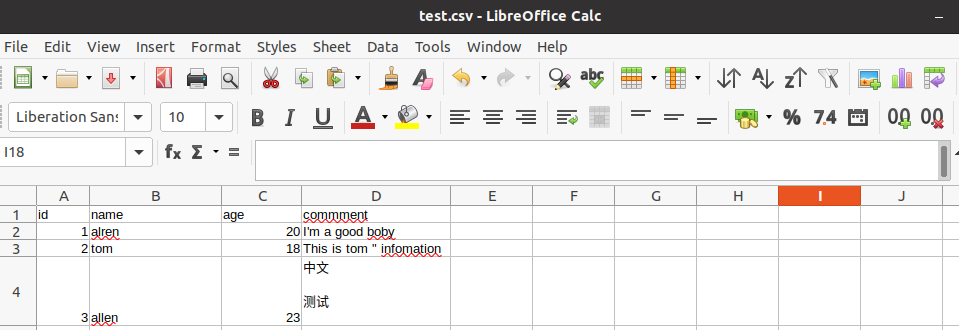
csv_body = '''\
id,name,age,commment
1,alren,20,"I'm a good boby"
2,tom,18,"This is tom "" infomation"
3,allen,23,"中文

测试
"
'''

# with p.open('w',encoding='utf-8') as f:
#     f.write(csv_body)

p.write_text(csv_body)
CSV模块
csv.reader(csvfile,dialect='execl',**fmtparams)
返回一个reader对象,是一个迭代器
默认使用execl方言 ,如下:
delimiter 列分隔符,号
lineterminator行分隔符\r\n
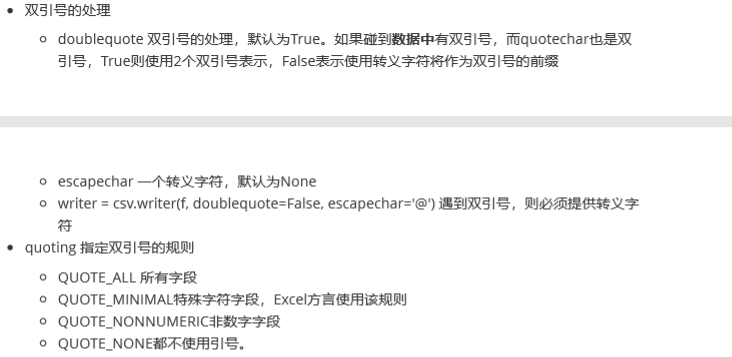
quotechar字段的引用符号,缺省为”双引号
csv.write(csvfile,dialect='execl',**fmtparams)
返回一个dictwrite的实例,主要方法有单行writerow和多行writerows
import csv


rows = [
    ('id','name','age','comment'),
    [1,'tom',20,'tom  info'],
    (3,'jerry',18,'afdfdf\t"ing'),
    'adfadfdfadf',
    ((1,),2,[3])
]

with open('/tmp/test/test.csv','w+',encoding='utf-8',newline='') as f:
    writer = csv.writer(f)
    writer.writerow(rows[0])
    print('*' * 30)
    writer.writerows(rows[1:])


with open('/tmp/test/test.csv',encoding='utf-8',newline='') as f:
    reader = csv.reader(f)
    print(next(reader))
    print('*' * 30)


    for line in reader:
        print(line)

#输出
******************************
['id', 'name', 'age', 'comment']
******************************
['1', 'tom', '20', 'tom  info']
['3', 'jerry', '18', 'afdfdf\t"ing']
['a', 'd', 'f', 'a', 'd', 'f', 'd', 'f', 'a', 'd', 'f']
['(1,)', '2', '[3]']
ini文件处理
作为配置文件,ini文件格式非常流行
[DEFAULT]
a = test

[mysql]
default-character-set=utf8

[mysqld]
datadir =/data/mysql/data
port = 3306
character-set-server=utf8
sql_mode=NO_ENGINE_SUBSTITUTION,STRICT_TRANS_TABLES
中括号里面的内容称之为section,译为节、段、区
每个section内,都是key=value形成的键值对,key称之为option选项
注意这里的DEFAULT是缺省配置段section,section名字必须大写
configparser
configparser模块的ConfigParser类就是用来操作,可以将section当成key,section存储着键值对组成的字典,可以把ini配置文件当做一个嵌套的字典,默认使用有序字典
read(filenames,encoding=None):读取ini配置文件,可以是单个文件,也可以是文件列表,可以指定文件编码
section()返回section列表,缺省section不包含在内
add_section(section_name)增加一个section
has_section(section_name)判断一个section是否存在
options(section)返回一个section的所有option,会追加缺省的option
has_option(section,option)判断section是否存在这个option
from configparser import ConfigParser

filename = '/tmp/test.ini'
newfilename = '/tmp/mysql.ini'

cfg = ConfigParser()
read_ok = cfg.read(filename)

print(read_ok) #读取文件名绝对路径
print(cfg.sections()) #返回section列表,不包含default缺省section
print(cfg.has_section('mysql'))#判断section是否存在
print(cfg.options('mysql')) #输出section mysql下的所有option,会追加DEFAULT段的option
print(cfg.has_option('mysql','default-character-set')) #判断某section下是否有某option

#输出如下
['/tmp/test.ini']
['mysql', 'mysqld']
True
['default-character-set', 'a']
True
get(section,option,*,raw=False,vars=None[,fallback]:从指定的section中取值,如果找到则返回,如果没有找到则就去DEFAULT段看看有没有。
getint(section,option,*,raw=False,vars=None[,fallback]:
getfloat(section,option,*,raw=False,vars=None[,fallback]:
getboolean(section,option,*,raw=False,vars=None[,fallback]:
上面3个方法和get一样,返回指定类型数据
items(raw=False,vars=None)
items(section,raw=False,vars=None)
没有section,则返回所有的section名字及其对象,如果指定section则返回这个指定section的键值对组成的二元组
from configparser import ConfigParser

filename = '/tmp/test.ini'
newfilename = '/tmp/mysql.ini'

cfg = ConfigParser()
read_ok = cfg.read(filename)

# print(read_ok)
# print(cfg.sections())
# print(cfg.has_section('mysql'))
# print(cfg.options('mysql'))
# print(cfg.has_option('mysql','default-character-set'))


for k,v in cfg.items():
    print(k,type(k))
    print(v,type(v))
    print(cfg.items(k))
    print()
# for k,v in cfg.items('mysqld'): #指定section
# print(k,type(k))
# print(v,type(v))
# print("~~~~~~~~~~~~~~~")
#
# print('-' * 30)
#输出如下

DEFAULT <class 'str'>
<Section: DEFAULT> <class 'configparser.SectionProxy'>
[('a', 'test')]

mysql <class 'str'>
<Section: mysql> <class 'configparser.SectionProxy'>
[('a', 'test'), ('default-character-set', 'utf8')]

mysqld <class 'str'>
<Section: mysqld> <class 'configparser.SectionProxy'>
[('a', 'test'), ('datadir', '/data/mysql/data'), ('port', '3306'), ('character-set-server', 'utf8'), ('sql_mode', 'NO_ENGINE_SUBSTITUTION,STRICT_TRANS_TABLES')]

******************************
from configparser import ConfigParser

filename = '/tmp/test.ini'
newfilename = '/tmp/mysql.ini'

cfg = ConfigParser()
read_ok = cfg.read(filename)


tmp = cfg.get('mysqld','port') #返回3306
print(type(tmp),tmp)
tmp = cfg.get('mysqld','a') #返回test,从DEFALUT配置段找
print(type(tmp),tmp)
tmp = cfg.getint('mysqld','port') #默认返回的类型为str,如需要返回int型则需要在get后面声明int
print(type(tmp),tmp)

print(cfg.get('mysqld','alren',fallback='python'))  #找不到则返回缺省值
#输出如下
<class 'str'> 3306
<class 'str'> test
<class 'int'> 3306
python
set(section,option,value):section存在的情况下,写入option=value要求option、value必须是字符串
remove_section(section):移除section及其所有的option
write(fileobject,space_around_delimiters=True):将当前config的所有内容写入fileobject中,一般open函数使用w模式。
from configparser import ConfigParser

filename = '/tmp/test.ini'
newfilename = '/tmp/mysql.ini'

cfg = ConfigParser()
read_ok = cfg.read(filename)

if cfg.has_section('test'):
    cfg.remove_section('test') #删除section

cfg.add_section('test1') #添加section
cfg.set('test1','HostPort','10081') #添加section下的option,key/value键值对
cfg.set('test1','HostNmae','dbserver')
cfg.set('test1','Host','10.12.0.1')

with open(newfilename,'w',encoding='utf-8') as f: #此处的w并不会覆盖原有内容
    cfg.write(f)
#输出
[DEFAULT]
a = test
.
.
.
.
[test1]
hostport = 10081
hostnmae = dbserver
cfg['test1']['x'] = '100' #section exists option and value not exists

cfg['test2'] = {'test2':'1000'} # section is not exists

with open(newfilename,'w',encoding='utf-8') as f:   #修改后需要再次写入
    cfg.write(f)

 浙公网安备 33010602011771号