2021启程-实习1个月的收获总结
这是我2021的第一篇博客,也算是工作了一个多月的一个总结吧
出了学校后,最大的感慨是社会和学校真的群别太大了,即使我在学校的成绩是系里第一,但真正接触到项目什么的,自己真的像一个小白
废话就不多说了,直接就上代码吧
刚进入公司的第一个星期,还比较轻松,就是看一看别人写过的,学习下写的思路,带你的人也会让你写一套增删改查,看一下你最基本的基础,像我们公司使用的SpringBoot和Mybatis Plus,写一些这些当然不在话下了
@RestController
@RequestMapping("/biz/stock/inout")
public class StockInoutController extends AbstractController{

    @Autowired
    private StockInoutService stockInoutService;

    /**
    * 分页列表
    */
    @GetMapping("/page")
    public ResultInfo page(@RequestParam Map<String, Object> params){
        PageUtils page = stockInoutService.queryPage(params);
        return ResultInfo.ok().put("page", page);
    }


    /**
    * 信息
    */
    @GetMapping("/info/{id}")
    public ResultInfo info(@PathVariable("id") String id){
        StockInout stockInout = stockInoutService.stockInoutInfo(id);
        return ResultInfo.ok().put("info", stockInout);
    }

    /**
    * 保存
    */
    @PostMapping("/save")
    public ResultInfo save(@RequestBody StockInoutDTO dto){
        stockInoutService.saveStockInout(dto);
        return ResultInfo.ok();
    }

    /**
    * 修改
    */
    @PostMapping("/update")
    public ResultInfo update(@RequestBody StockInoutDTO dto){
        stockInoutService.updateStockInout(dto);
        return ResultInfo.ok();
    }

    /**
    * 删除
    */
    @PostMapping("/delete/{id}")
    public ResultInfo delete(@PathVariable("id") String id){
        stockInoutService.deleteStockInout(id);
        return ResultInfo.ok();
    }
}
这里就分享一个Controller层的接口,相信跟过我前几篇博客的小伙伴也应该轻松拿下了
因为我们这里基本都是需要前后端一起完成的,也就是俗称的全栈,下面就是让我头皮发麻的前端(因为自己的前端基础真的很差)
这里我们公司使用的是vue+iview(因为使用的3.0版本的iview,真的很难用,相比于上一个项目所使用的element-ui,真的吐了)
<template>
  <div style="width: 100%;height: 100%;">
    <AddOrUpdate v-if="addOrUpdateVisiable" ref="addOrUpdateRef" @refreshDataList="refreshData"></AddOrUpdate>
    <Show v-if="showVisiable" ref="showRef"></Show>
      <div style="margin-bottom: 10px;overflow: hidden">
        <div style="float: left;">
          <Button v-if="showSave" type="success" icon="md-add" @click.native="handleAddOrUpdate()">新建</Button>
        </div>
        <div style="float: right;">
          <Row>
            <Tooltip content="检索" placement="top" :transfer="true">
              <Button @click="queryVisible = !queryVisible">
                <Icon type="md-search" size="18"></Icon>
              </Button>
            </Tooltip>
            <Tooltip content="导出" placement="top" :transfer="true">
              <Button v-if="showExcelExport" style="margin-left: 5px;">
                <Icon type="md-download" size="18"></Icon>
              </Button>
            </Tooltip>
            <Dropdown trigger="click" style="margin-left: 5px;" :transfer="true">
              <Tooltip content="列过滤" placement="top" :transfer="true">
                <Button>
                  <Icon type="md-apps" size="16"></Icon>
                  <Icon type="md-arrow-dropdown" size="18"></Icon>
                </Button>
              </Tooltip>
              <DropdownMenu slot="list">
                <TableColumnFilter :checkBoxList="checkBoxList" @changeColumns="changeColumns"></TableColumnFilter>
              </DropdownMenu>
            </Dropdown>
          </Row>
        </div>
      </div>
      <Table border
         size="small"
         ref="selection"
         :columns="columns"
         :data="dataList"
         :loading="dataListLoading"
         @on-selection-change="handleSelectionChange"
         @on-row-click="handleSelectOne"
         stripe>
      </Table>
      <div style="margin: 10px;overflow: hidden">
        <div style="float: right;">
          <Page
            :total="totalPage"
            size="small"
            :page-size="pageSize"
            :page-size-opts="[10,20,30,50,100]"
            :current="pageIndex"
            @on-change="handleCurrentChange"
            @on-page-size-change="handleSizeChange"
            show-elevator
            show-sizer
            show-total></Page>
        </div>
      </div>
    </Card>
  </div>
</template>

<script>
import { stockReceiveGoodsPage, deleteStockReceiveGoods } from '@/api/jxc/stockReceiveGoods'
import permMixin from '_c/ope/perm-mixin'
import propMixin from '_c/table-data/prop-mixin'
import OpeDrop from '_c/ope/ope-drop'
import TableColumnFilter from '_c/ope/table-column-filter'
import AddOrUpdate from './components/add-or-update'
import Show from './components/show'
// import { hasOneOf } from '@/libs/tools'
export default {
  name: 'stockReceiveGoods',
  mixins: [permMixin, propMixin],
  components: {
    /* eslint-disable-next-line */
    OpeDrop,
    AddOrUpdate,
    Show,
    TableColumnFilter
  },
  data () {
    return {
      // table操作权限码
      accessItem: {
        query: ['biz:stock:receive:goods:list'],
        info: ['biz:stock:receive:goods:info'],
        save: ['biz:stock:receive:goods:save'],
        update: ['biz:stock:receive:goods:update'],
        delete: ['biz:stock:receive:goods:delete']
      },
      // 查询项
      queryForm: {
        // title: ''
        no: ''
      },
      // 其他通用属性在propMixin中
      checkBoxList: [
        /* { label: 'selection', name: '复选框' }, */
        { label: 'index', name: '序号' },
        { label: 'stockReceiveId', name: '收货确认表ID' },
        { label: 'goodsId', name: '商品ID' },
        { label: 'goodsName', name: '商品名称' },,
        { label: 'price', name: '单价' },
        { label: 'count', name: '数量' },
        { label: 'total', name: '总价' },
        { label: 'unit', name: '计量单位' },
        { label: 'standard', name: '规格' },
        { label: 'model', name: '含量' },
        { label: 'memo', name: '备注' },
        { label: 'salesUnit', name: '销售单位' },
        { label: 'salesPrice', name: '销售价格' },
        { label: 'goodsTypeId', name: '商品类型ID' },
        { label: 'goodsTypeName', name: '商品类型名称' },
        { label: 'stockId', name: '仓库ID' },
        { label: 'stockName', name: '仓库名称' },
        { label: 'action', name: '操作' }
      ]
    }
  },
  created () {
    this.defColumn()
    this.getDataList()
  },
  methods: {
    defColumn () {
      this.columnsDef = {
        // selection: { type: 'selection', width: 60, align: 'center' },
        index: { type: 'index', title: '序号', width: 65, align: 'center' },
        id: { title: '', key: 'id' },
        stockReceiveId: { title: '收货确认表ID', key: 'stockReceiveId' },
        goodsId: { title: '商品ID', key: 'goodsId' },
        goodsName: { title: '商品名称', key: 'goodsName' },
        price: { title: '单价', key: 'price' },
        count: { title: '数量', key: 'count' },
        total: { title: '总价', key: 'total' },
        unit: { title: '计量单位', key: 'unit' },
        standard: { title: '规格', key: 'standard' },
        model: { title: '含量', key: 'model' },
        memo: { title: '备注', key: 'memo' },
        salesUnit: { title: '销售单位', key: 'salesUnit' },
        salesPrice: { title: '销售价格', key: 'salesPrice' },
        goodsTypeId: { title: '商品类型ID', key: 'goodsTypeId' },
        goodsTypeName: { title: '商品类型名称', key: 'goodsTypeName' },
        stockId: { title: '仓库ID', key: 'stockId' },
        stockName: { title: '仓库名称', key: 'stockName' },
        action: {
          title: '操作',
          key: 'action',
          align: 'center',
          render: (h, params) => {
            let dropdownItems = [
              // { name: 'info', method: 'handleInfo', icon: 'ios-create', showName: '详情', isShow: this.showInfo },
              { name: 'show', method: 'show', icon: 'ios-create', showName: '详情', isShow: true, color: '#515a6e' },
              { name: 'edit', method: 'addOrUpdate', icon: 'ios-create', showName: '编辑', isShow: this.showUpdate, color: '#515a6e' },
              { name: 'delete', method: 'deleteById', icon: 'ios-trash', showName: '删除', isShow: this.showDelete, color: '#ed4014' }
            ]
            return h('div', [
              h(OpeDrop, {
                props: {
                  items: dropdownItems
                },
                on: {
                  addOrUpdate: () => {
                    this.handleAddOrUpdate(params.row.id)
                    // e.stopPropagation()
                  },
                  deleteById: () => {
                    this.handleDelete(params.row.id)
                  },
                  show: () => {
                    this.showDetail(params.row.id)
                    // e.stopPropagation()
                  }
                }
              })
            ])
          }
        }
      }
    },
    getDataList () {
      // 获取table数据
      this.dataListLoading = true
      let params = {
        page: this.pageIndex,
        limit: this.pageSize,
        ...this.queryForm
      }
      stockReceiveGoodsPage(params).then(res => {
        const data = res.data
        if (data && data.code === 0) {
          this.dataList = data.page.list
          this.totalPage = data.page.totalCount
        } else {
          this.dataList = []
          this.totalPage = 0
        }
        this.dataListLoading = false
      })
    },
    // 新增、修改弹窗
    handleAddOrUpdate (id) {
      /* */
      this.addOrUpdateVisiable = true
      this.$nextTick(() => {
        this.$refs.addOrUpdateRef.init(id)
      })
    },
    // 详情
    showDetail (id) {
      /* */
      this.showVisiable = true
      this.$nextTick(() => {
        this.$refs.showRef.init(id)
        // this.$refs.showRef.showMap = true
      })
    },
    // 删除
    handleDelete (id) {
      this.dataListLoading = true
      this.$Modal.confirm({
        title: '删除操作',
        content: '确定进行删除操作 ?',
        onOk: () => {
          deleteStockReceiveGoods(id).then(res => {
            const data = res.data
            if (data && data.code === 0) {
              this.$Message.info({
                content: '操作成功',
                onClose: () => {
                  this.dataListSelections.length = 0
                  this.refreshData()
                  this.dataListLoading = false
                }
              })
            } else {
              this.$Message.error(data.msg)
              this.dataListLoading = false
            }
          })
        },
        onCancel: () => {
          /* 取消回调 */
          this.dataListLoading = false
        }
      })
    },
    // 字典翻译
    getDicNameById (id) {
      return this.$utilDic.getChildNameById(this, id)
    },
    refreshData () {
      this.getDataList()
    }
  }
}
</script>

<style scoped>

</style>
就这么一个list的显示,真的是让我愁了好几天啊
首先,那就是需要界面调用接口,将数据拿过来,然后做显示
接下来,那就是新增和详情了啊(新增和修改使用同一个界面,通过是否传了id值进行判断)
在list界面的第三行
<AddOrUpdate v-if="addOrUpdateVisiable" ref="addOrUpdateRef" @refreshDataList="refreshData"></AddOrUpdate>
使用了vue中模块化思想,和java的封装比较相似,直接调用
另一个详情界面,也和新增界面一个,使用了模块化
<Show v-if="showVisiable" ref="showRef"></Show>
小编会在后面的文字中更新为什么使用vue的模块化
下面继续说模块化,因为原来没有使用的过的原因(但是对vue有一定的基础),现在用有点别扭,还有像传值之间得问题,我真的差点崩溃了(原因自己猜...)
因为java的原因,模块化用了不到一个星期就完全适应了,现在可以很轻松得写出来(复杂业务除外),那另外的传值问题分为两个部分,一个是父组件传子组件,另一个就是子组件传父组件
首先说父传子的方式
第一种方式:
在调用组件的位置加 :type="传递的值"(type这个名字可以随便换)
<Show v-if="showVisiable" :type="传递的值"></Show>
然后在子组件中的props中进行接收
export default {
  props: {
    prop: String,
    type: {
      type: String,
      default: ''
      }
    }
使用this就可以取到值了
console.log(this.type)
当然,有个小细节要注意到
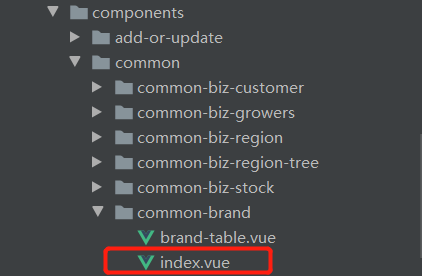
如果你得组件的目录下有index界面的话,js默认是先访问index页面的(因为这个小细节,有一个传值我被卡了2个小时,最后还是我白哥帮我走出来)(白哥,是我最钦佩的一个人,他不仅是我的大哥,也是我的老师)
下面就是另一种方式
<Show v-if="showVisiable" ref="showRef"></Show>
通过$refs去调用子组件中的方法(ref就像HTML中的id,唯一标识)
this.$refs.showRef.init()
说完了父传子
那就该开始说子传父了
因为时间的原因,这里简单说下,在子组件中要一个方法
handleNodeChange (node) {
      this.$emit('on-select', node)
      this.handleClose()
    }
当然,不一定必须是这个方法,根据业务来,但$emit是关键,第一个参数是父组件所使用的事件,只有当父组件中使用on-select才可以接收到第二个参数node中的值,当然,还可以继续加参数,根据自己所需的业务来
到这里,前端的基本功能就可以实现了
就这么一点问题,现在想想,一个月的收获确实不多,还是自己基础没有过关的原因(有些后悔当初没有早点跟白哥好好学习)
当然,收获到的这只是一个总体,还有许多的细节,像vue的生命周期,v-if和v-show的使用区别,后端部分sql语句的范式,springboot中业务的处理
如果有收获的小伙伴可以给小编一个3连,后面会持续更新

 浙公网安备 33010602011771号