


002 vue3-admin项目的目录及文件说明之index.html文件
说明
index.html 是 Vite 项目的入口 HTML 文件,它在 Vue3 + Vite + Element Plus 项目中扮演着重要角色。
基本结构
<!doctype html>
<html lang="en">
  <head>
    <meta charset="UTF-8" />
    <link rel="icon" type="image/svg+xml" href="/vite.svg" />
    <meta name="viewport" content="width=device-width, initial-scale=1.0" />
    <title>Vite + Vue + TS</title>
  </head>
  <body>
    <div id="app"></div>
    <script type="module" src="/src/main.ts"></script>
  </body>
</html>
核心元素
1 DOCTYPE 声明
<!doctype html>
2 html 元素
<html lang="zh-CN">
3 head 部分
<head>
  <meta charset="UTF-8" />
  <link rel="icon" type="image/svg+xml" href="/vite.svg" />
  <meta name="viewport" content="width=device-width, initial-scale=10" />
  <title>Vite + Vue + Element Plus</title>
</head>
meta charset
<meta charset="UTF-8" />
favicon
<link rel="icon" type="image/svg+xml" href="/vite.svg" />
viewport
<meta name="viewport" content="width=device-width, initial-scale=10" />
title
<title>Vite + Vue + Element Plus</title>
4 body 部分
<body>
  <div id="app"></div>
  <script type="module" src="/src/main.ts"></script>
</body>
挂载点
<div id="app"></div>
入口脚本
<script type="module" src="/src/main.ts"></script>
Vite 特有的特性
1 模块脚本支持
<script type="module" src="/src/main.ts"></script>
2 根目录相对路径
<script type="module" src="/src/main.ts"></script>
3 环境变量注入
高级配置示例
完整的 index.html 示例
<!doctype html>
<html lang="zh-CN">
  <head>
    <meta charset="UTF-8" />
    <link rel="icon" type="image/svg+xml" href="/vite.svg" />
    <meta name="viewport" content="width=device-width, initial-scale=10" />
    <meta name="description" content="Vue3 + Vite + Element Plus 项目" />
    <meta name="keywords" content="Vue3,Vite,Element Plus,前端" />
    <meta name="author" content="Your Name" />

    <!-- 预加载关键资源 -->
    <link rel="preload" href="/fonts/iconfontwoff2" as="font" type="font/woff2" crossorigin>

    <!-- 外部 CDN 资源 -->
    <link href="https://cdn.jsdelivr.net/npm/animate.css@411/animate.min.css" rel="stylesheet">

    <title>%VITE_APP_TITLE% - 现代化前端应用</title>
  </head>
  <body class="bg-gray-50">
    <!-- 应用挂载点 -->
    <div id="app" class="min-h-screen"></div>

    <!-- 加载动画 -->
    <div id="loading" class="fixed inset-0 flex items-center justify-center bg-white z-50">
      <div class="animate-spin rounded-full h-16 w-16 border-t-4 border-blue-500"></div>
    </div>

    <!-- 入口脚本 -->
    <script type="module" src="/src/main.ts"></script>

    <!-- 全局配置 -->
    <script>
      window.__APP_CONFIG__ = {
        apiBaseUrl: '%VITE_API_BASE_URL%',
        debug: %VITE_DEBUG%
      }
    </script>
  </body>
</html>
主要增强点:
与 Vue 应用的关系
挂载流程
关键关联代码
<div id="app"></div>
<script type="module" src="/src/main.ts"></script>
main.ts:
import { createApp } from 'vue'
import App from './App.vue'

const app = createApp(App)
app.mount('#app') // 与 index.html 中的 #app 对应
最佳实践
1 性能优化
2 SEO 优化
3 用户体验
总结
访问流程
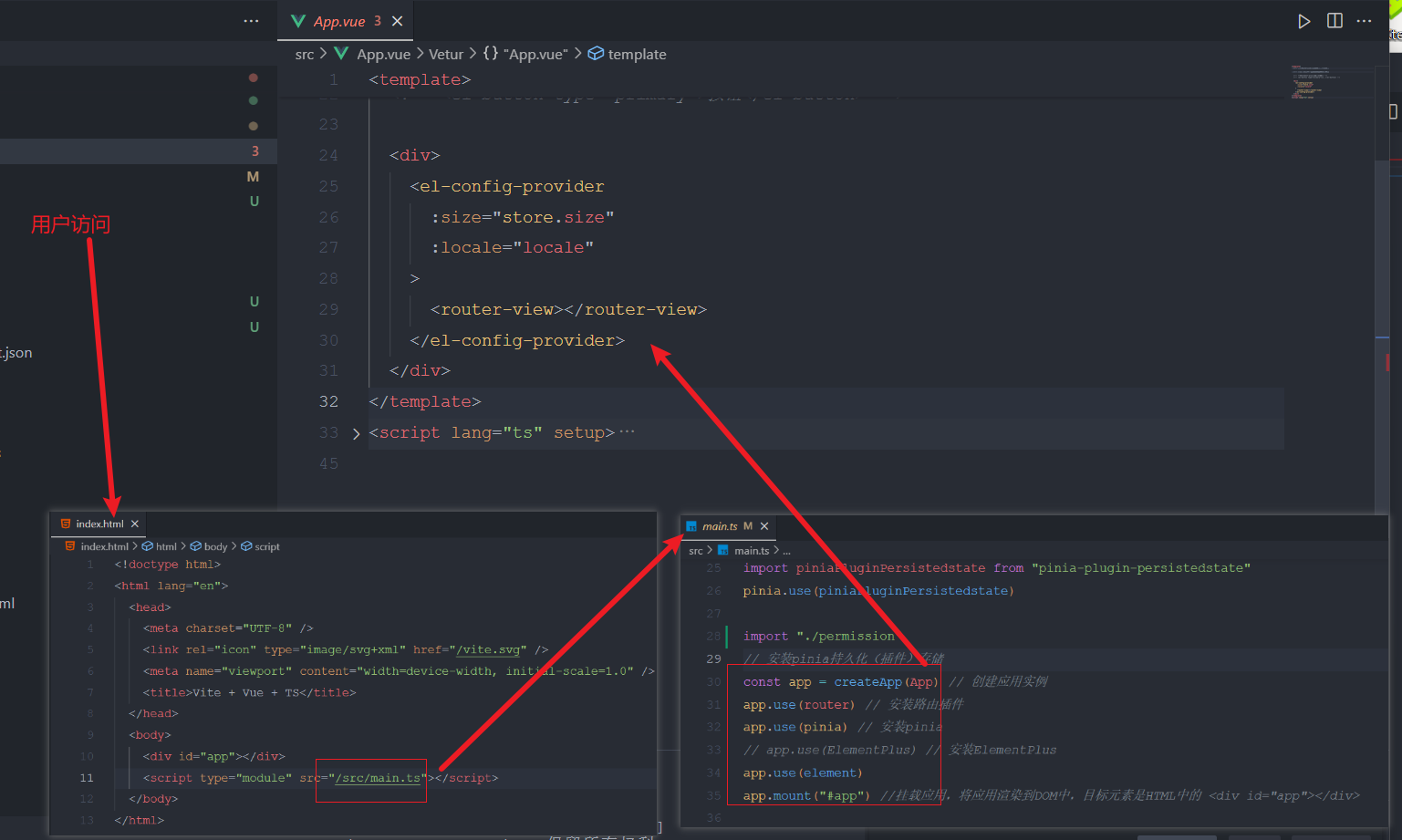
单页应用(SPA)工作原理
SPA 的基本概念
1 初始加载
2 路由切换机制
用户访问 → index.html → Vue Router 拦截 → 渲染对应组件 → 更新 #app 内容
3 具体流程
// main.ts
import { createApp } from 'vue'
import { createRouter } from 'vue-router'
import App from './App.vue'

const router = createRouter({
  history: createWebHistory(),
  routes: [
    { path: '/', component: Home },
    { path: '/about', component: About }
  ]
})

const app = createApp(App)
app.use(router)
app.mount('#app') // 始终挂载到 index.html 中的 #app 元素
路由系统工作机制
1 路由拦截
2 组件渲染
3 页面更新
<!-- App.vue -->
<template>
  <div>
    <nav>
      <router-link to="/">首页</router-link>
      <router-link to="/about">关于</router-link>
    </nav>
    <router-view /> <!-- 这里会根据路由动态渲染不同的组件 -->
  </div>
</template>
服务器配置要求
1 开发环境

 浙公网安备 33010602011771号