
java用模板生成word(docx)文档(含动态表格)
来源于: https://blog.csdn.net/weixin_70280523/article/details/128134784
生成word思路
用WPS或者office编辑好word的样式,然后另存为word xml文档,将xml翻译为FreeMarker模板,最后用java来解析FreeMarker模板并输出Docx。
编辑好需要使用的word文档
1、把需要注入的信息换成变量名称,比如几年几月用${d1}表示,全部替换后的格式如下图所示
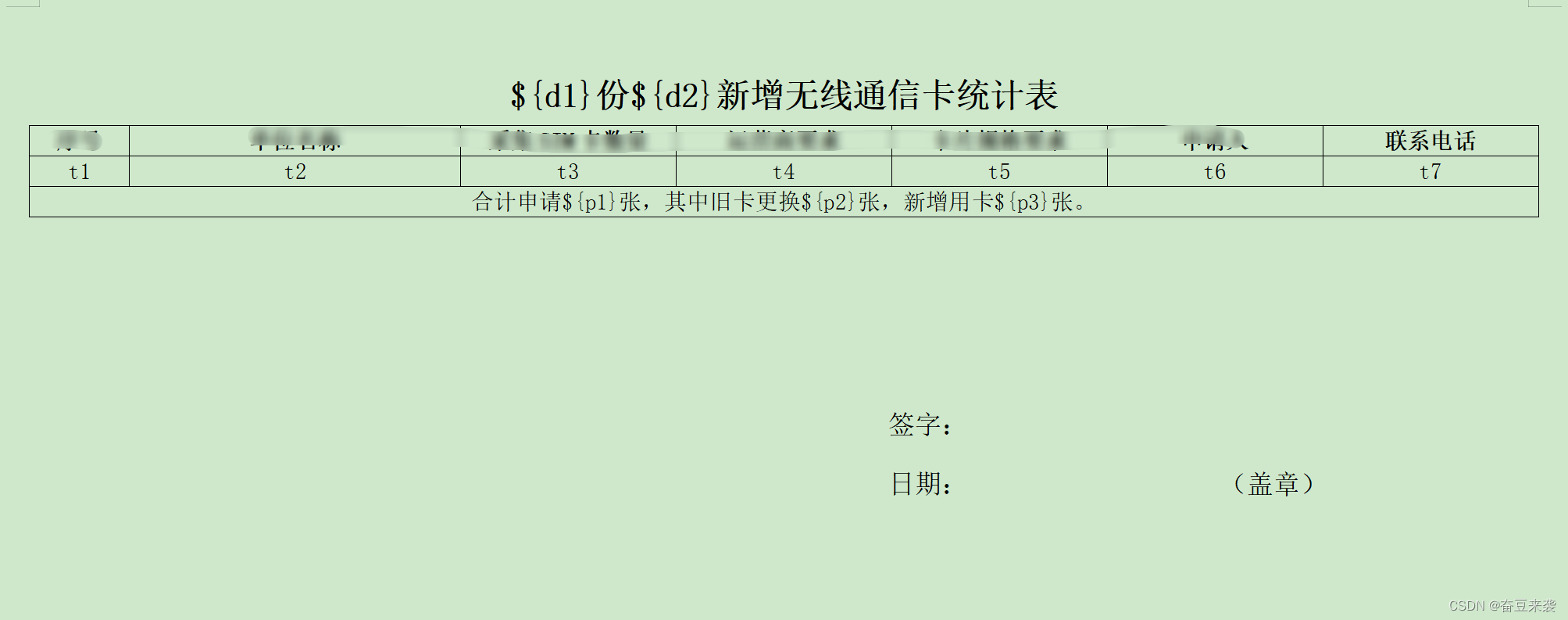
对于表头的话最好设置成每页都自动生成表头
2、替换完成后另存为word xml格式的文档,如下图

3、使用文本编辑器打开

4、xml格式化
https://c.runoob.com/front-end/710/
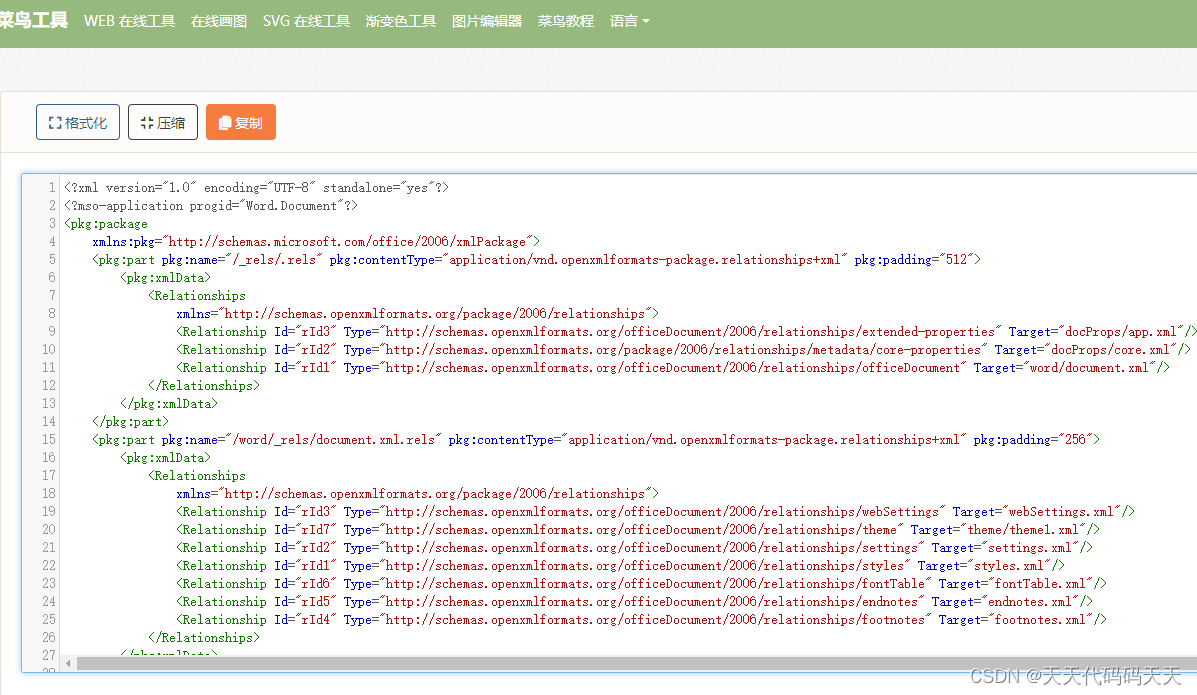
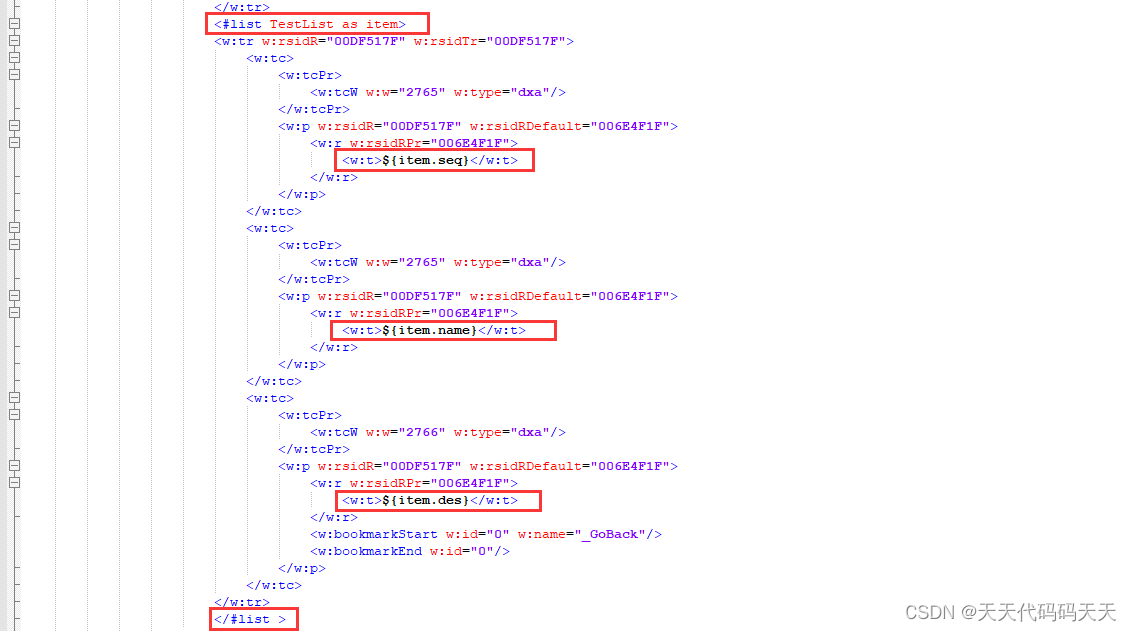
5、选定表格的动态生成范围,添加 list 标签,记得保存
<#list TestList as item>
${item.seq}
</#list>
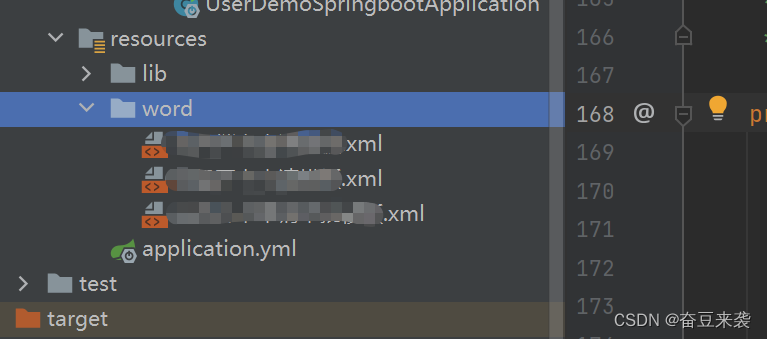
6、把改好的XML文件存放到项目的resources文件夹下,(我这里模板比较多,就自己建了一个word文件夹)
7,导入依赖
<!-- 导出word -->
<dependency>
    <groupId>org.freemarker</groupId>
    <artifactId>freemarker</artifactId>
    <version>2.3.30</version>
</dependency>
<!-- https://mvnrepository.com/artifact/e-iceblue/spire.doc.free -->
<dependency>
    <groupId>e-iceblue</groupId>
    <artifactId>spire.doc.free</artifactId>
    <version>2.7.3</version>
</dependency>
spire.doc.free这个依赖要在maven的setting配置加个仓库
<repository>
<id>e-iceblue</id>
<url>https://repo.e-iceblue.cn/repository/maven-public/</url>
</repository>
8,编写代码
control类
@GetMapping("/word02")
public void getWord02() throws Exception {
    //市级开卡数据
    ArrayList<HashMap<String, String>> list = new ArrayList<>();
    for (int i = 0; i < 3; i++) {
        HashMap<String, String> map = new HashMap<>();
        int a = i + 1;
        String s = Integer.toString(a);
        map.put("t1", s);
        map.put("t2", "666666");
        map.put("t3", "6666");
        map.put("t4", "66");
        map.put("t5", "6666");
        map.put("t6", "6666");
        map.put("t7", "66666666");
        list.add(map);
    }
    Map<String, Object> params = new HashMap<>();
    params.put("d1", "10月");
    params.put("d2", "666666");
    params.put("p1", "6666");
    params.put("p2", "6666");
    params.put("p3", "222211");
    params.put("TestList", list);

    Integer templateFileNumber = 2;
    WordUtil.createWord(params,templateFileNumber);
}
导出word工具类
/**
     * 将数据导入word模板生成word
     *
     * @param params             数据
     * @param templateFileNumber 1-模板 2-模板 3- 模板
     * @return docx临时文件的全路径
     * @throws IOException
     */
    private static String createWord(Map<String, Object> params, Integer templateFileNumber) throws IOException {
        String templateFile = null;
        //指定模板
        if (templateFileNumber == 1) {
            templateFile = "啊啊啊.xml";
        }
        if (templateFileNumber == 2) {
            templateFile = "哦哦哦.xml";
        }
        if (templateFileNumber == 3) {
            templateFile = "嗯嗯嗯.xml";
        }
        File file = null, templateFile1 = null;
        FileOutputStream fileOutputStream = null;
        Writer out = null;
        InputStream inputStream = null;
        try {
            //指定模板存放位置
            ClassPathResource tempFileResource = new ClassPathResource("word/" + templateFile);
            //创建临时文件
            file = File.createTempFile(templateFile, ".docx");
            //得到临时文件全路径  ,作为word生成的输出全路径使用
            String outputDir = file.getAbsolutePath();
            log.info("创建临时文件的路径为:{}", outputDir);

            //创建模板临时文件
            templateFile1 = File.createTempFile(templateFile, ".xml");
            fileOutputStream = new FileOutputStream(templateFile1);
            inputStream = tempFileResource.getInputStream();
            IOUtils.copy(inputStream, fileOutputStream);
            //得到临时模板文件全路径
            String templateFilePath = templateFile1.getAbsolutePath();
            log.info("创建临时文件的路径为:{}", templateFilePath);

//           new ClassPathResource("aaa").getInputStream().close();
            // 设置FreeMarker的版本和编码格式
            Configuration configuration = new Configuration();
            configuration.setDefaultEncoding("UTF-8");
            // 设置FreeMarker生成Word文档所需要的模板的路径
            configuration.setDirectoryForTemplateLoading(templateFile1.getParentFile());
            // 设置FreeMarker生成Word文档所需要的模板
            Template t = configuration.getTemplate(templateFile1.getName(), "UTF-8");

            // 创建一个Word文档的输出流
            out = new BufferedWriter(new OutputStreamWriter(new FileOutputStream(new File(outputDir)), "UTF-8"));
            //FreeMarker使用Word模板和数据生成Word文档
            t.process(params, out); //将填充数据填入模板文件并输出到目标文件
        } catch (Exception e) {
            log.error("word生成报错,错误信息{}", e.getMessage());
            e.printStackTrace();
        } finally {
            if (out != null) {
                out.flush();
                out.close();
            }
            if (inputStream != null) {
                inputStream.close();
            }
            if (fileOutputStream != null) {
                fileOutputStream.close();
            }
            if (templateFile1 != null) {
                templateFile1.delete();
            }
        }
        return file == null ? null : file.getAbsolutePath();
    }
最终会得到docx文件!!!!
用空常来坐坐
https://www.cnblogs.com/alexgl2008/

 浙公网安备 33010602011771号