


Flash Builder 4中扩展TextLayout完美支持嵌入表情传输
在我们使用Flash Builder 4开发文字处理程序,如聊天类程序、编辑器等,通常需要图文混排。在Flash Builder 4中当然最好使用TextLayout Framework。
关于图片的传输,实际上传的是图片地址,使用url的形式没什么说的,传输和接收都是一样的内容。但是在某些情况下也有个很大的弊端,比如聊天程序的表情,接收到有图片的消息就去根据图片的地址到web服务器下载图片,给web服务器造成不必要的压力。
但是如果表情文件是作为嵌入资源的呢?
使用嵌入资源可以一来可以让消息数据传输量减少,传输一个类名比较传输一个url一般来说要小;二来可以避免客户端多次对同一种表情的请求,减少Web服务器压力。
通过对TextLayout进行扩展,可以完美的支持嵌入资源的解析。
下面以理论结合实际例子的形式讨论一下这个问题。
比如,在一个TextArea中输入图文混排的内容,图片是嵌入的资源。使用TextExporter将内容转换成文本(序列化的过程)进行传输,图片的source会变成[classs 类名]。
var exporter:ITextExporter = TextConverter.getExporter(TextConverter.TEXT_LAYOUT_FORMAT);
var msg:String = exporter.export(myInputTextArea.textFlow, ConversionType.STRING_TYPE) as String;
msg可能的结果是:
<TextFlow fontFamily="宋体" fontSize="12" whiteSpaceCollapse="preserve" xmlns="http://ns.adobe.com/textLayout/2008"><p><span>我是图片之前的文本</span><img height="24" width="24" source="[class Em_em001]"/><span>我是图片之后的文本</span></p>< /TextFlow>
以上代码中的[class Em_em001]表示Em是一个类,em001是类的一个嵌入资源:
package
{
[Bindable]
public class Em
{
[Embed(source="assets/001.gif")]
public static var em001:Class;
}
}
随便提醒一下Em类请放在默认包中,具体原因见本篇最后。从数据量上考虑,类名也尽量短些吧。
当消息传到另一个客户端的时候,就需要对表情进行解析。
使用TextFlowUtil.importFromString(valus:String)将传输过来的文本转换成TextFlow对象。
问题就出在这里,[classs Em_em001]这里是作为字符串传过来的,默认解析方式也是会当成字符串。也就是说把[classs Em_em001]当成了一个url,当然也就解析不出来了。
修改flashx.textLayout.conversion包的createInlineGraphicFromXML方法如下:
public function createInlineGraphicFromXML(xmlToParse:XML):InlineGraphicElement
{
var imgElem:InlineGraphicElement = new InlineGraphicElement();
parseStandardFlowElementAttributes(imgElem,xmlToParse,_ilgElementFormatImporters);
if (_ilgFormatImporter.result)
{
var source:String = _ilgFormatImporter.result["source"];
var className:String = getClassName(source);
if(className!=null)
imgElem.source = getDefinitionByName(className) as Class;
else
imgElem.source = source;
// if not defined then let InlineGraphic set its own default
imgElem.height = InlineGraphicElement.heightPropertyDefinition.setHelper(imgElem.height,_ilgFormatImporter.result["height"]);
imgElem.width = InlineGraphicElement.widthPropertyDefinition.setHelper(imgElem.width,_ilgFormatImporter.result["width"]);
/* We don't support rotation yet because of bugs in the player. */
// imgElem.rotation = InlineGraphicElement.heightPropertyDefinition.setHelper(imgElem.rotation,_ilgFormatImporter.result["rotation"]);
imgElem.float = InlineGraphicElement.floatPropertyDefinition.setHelper(imgElem.float,_ilgFormatImporter.result["float"]);
}
return imgElem;
}
getDefinitionByName方法类似于C#中的Activator.CreateInstance。然后增加一个从字符串中提取类名的方法:
private function getClassName(source:String):String
{
var regex:RegExp=/^\[class ([a-zA-Z_].\w+)\]$/;
var result:Array = source.match(regex);
if(result!=null&&result.length==2)
{
return result[1];
}
return null;
}
重新编译textLayout就可以了。至于怎么重新编译textlayout,就不属于本篇的范畴了,写本篇内容时我也还不知道,后来去查资料觉得很麻烦,就把官方的textLayout中的一些类提取出来了(没有任何授权限制)。
补充一下表情类为什么要放在默认包中呢,
就算如果Em是在com包,但是TextConverter也还是会将Em.em001转换成[class Em_em001]而不是[class com::Em_em001]。
也就是说包名被丢弃了。为了传输到另一端能被正确解析出来,我们还是把Em类放在默认包吧。
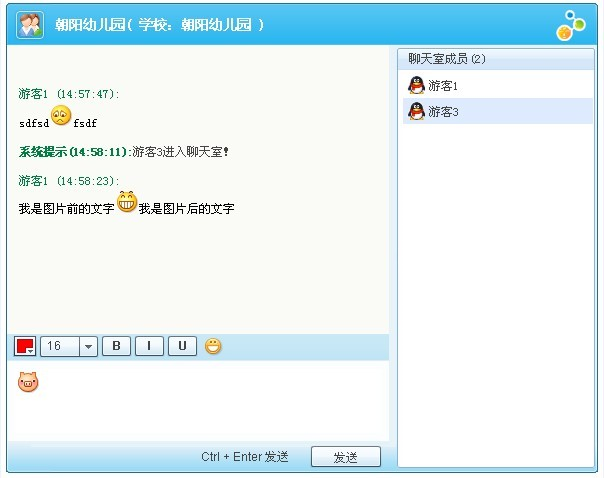
“我是图片前的文字【表情】我是图片后的文字”这段消息,就在输入框输入,发送到服务器,由服务器会传回来的(这不是废话么)。
另:截用了QQ的界面作为背景,表示感谢。

 浙公网安备 33010602011771号