
支付宝沙箱
第一步:配置Config类
public class Config
{
// 应用ID,您的APPID
public static string AppId = "2021000122603387";
// 支付宝网关
public static string Gatewayurl = "https://openapi.alipaydev.com/gateway.do";
// 商户私钥,您的原始格式RSA私钥
public static string PrivateKey = "";
// 支付宝公钥,查看地址:https://openhome.alipay.com/platform/appDaily.htm?tab=info 对应APPID下的支付宝公钥。
public static string AlipayPublicKey = "";
// 签名方式
public static string SignType = "RSA2";
// 编码格式
public static string CharSet = "UTF-8";
}
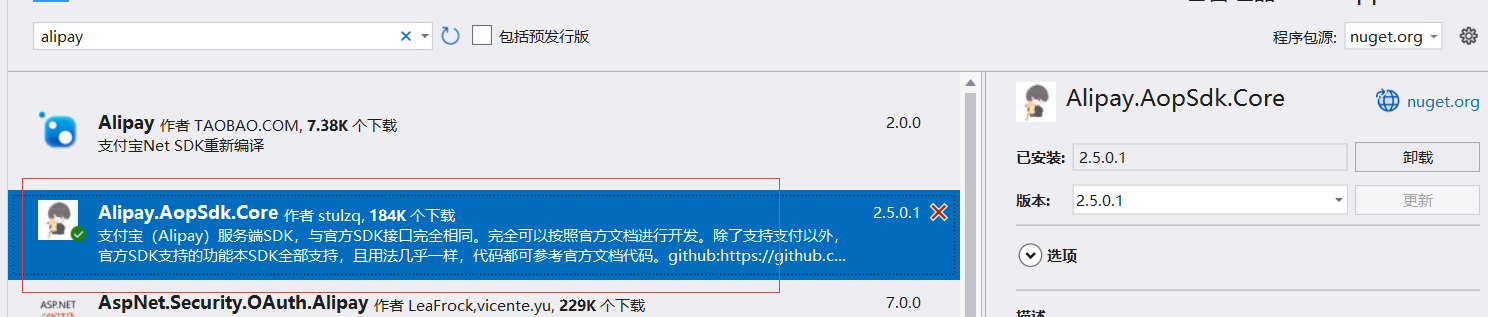
第二部:引用Newget包 Alipay.AopSdk.Core
第三步 : 在Api编写接口方法
[HttpGet]
public IActionResult AliPay()
{
DefaultAopClient client = new DefaultAopClient(WebApplication1.config.Config.Gatewayurl, Config.AppId, Config.PrivateKey, "json", "1.0", Config.SignType,Config.AlipayPublicKey, Config.CharSet, false);
// 外部订单号,商户网站订单系统中唯一的订单号(雪花Id生成)
var worker = new IdWorker(1, 1);
string out_trade_no = worker.NextId().ToString();
// 订单名称
string subject = "测试商品";
// 付款金额
string total_amount = "0.1";
// 商品描述
string body = "无描述";
// 组装业务参数model
AlipayTradePagePayModel model = new AlipayTradePagePayModel();
model.Body = body;
model.Subject = subject;
model.TotalAmount = total_amount;
model.OutTradeNo = out_trade_no;
model.ProductCode = "FAST_INSTANT_TRADE_PAY";
AlipayTradePagePayRequest request = new AlipayTradePagePayRequest();
// 设置同步回调地址
request.SetReturnUrl("");
// 设置异步通知接收地址
request.SetNotifyUrl("");
// 将业务model载入到request
request.SetBizModel(model);
AlipayTradePagePayResponse response = null;
try
{
response = client.PageExecute(request, null, "post");
//Response.Write(response.Body);
}
catch (Exception exp)
{
throw exp;
}
return Ok(response.Body);
}
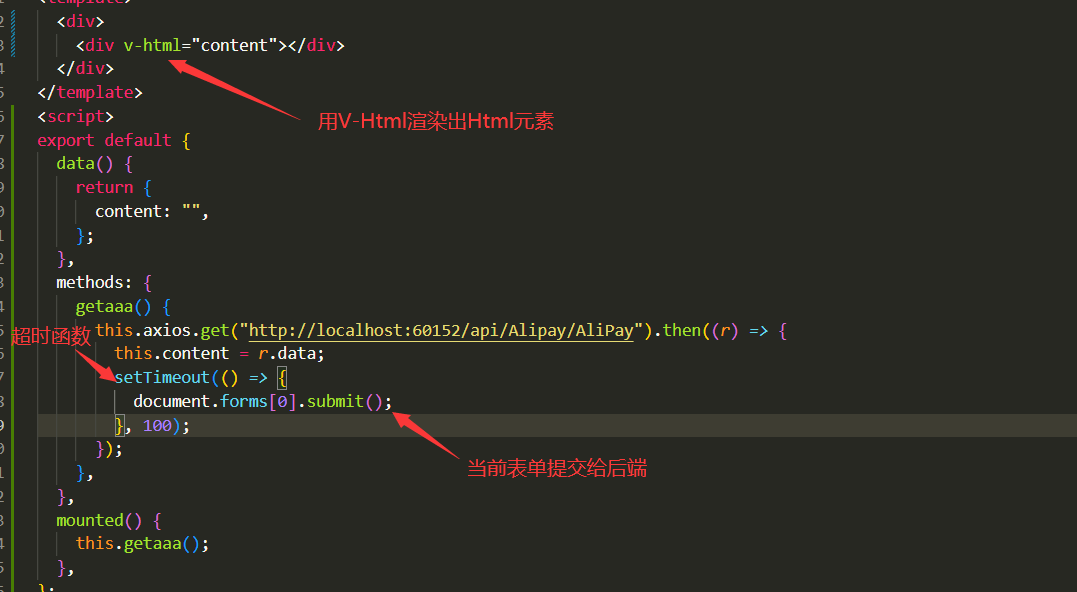
第四步: 前端Vue调用

 浙公网安备 33010602011771号