

船志健康项目-预约管理-套餐管理4
一、图片存储方案
见随笔:https://www.cnblogs.com/ajing2018/p/19275096
将QiniuUtils工具类放在health_common工程中,后续会使用到。
二、新增套餐
1. 需求分析
套餐其实就是检查组的集合,例如有一个套餐为“入职体检套餐”,这个体检套餐可以包括多个检查组: 一般检查、血常规、尿常规、肝功三项等。所以在添加套餐时需要选择这个套餐包括的检查组。
套餐对应的实体类为Setmeal,对应的数据表为t_setmeal。套餐和检查组为多对多关系,所以需要中间 表t_setmeal_checkgroup进行关联。
2. 完善页面
套餐管理页面对应的是setmeal.html页面,根据产品设计的原型已经完成了页面基本结构的编写,现在 需要完善页面动态效果。
2.1 弹出新增窗口
页面中已经提供了新增窗口,只是出于隐藏状态。只需要将控制展示状态的属性dialogFormVisible改为 true接口显示出新增窗口。点击新建按钮时绑定的方法为handleCreate,所以在handleCreate方法中 修改dialogFormVisible属性的值为true即可。同时为了增加用户体验度,需要每次点击新建按钮时清空 表单输入项。
由于新增套餐时还需要选择此套餐包含的检查组,所以新增套餐窗口分为两部分信息:基本信息和检查 组信息,如下图:
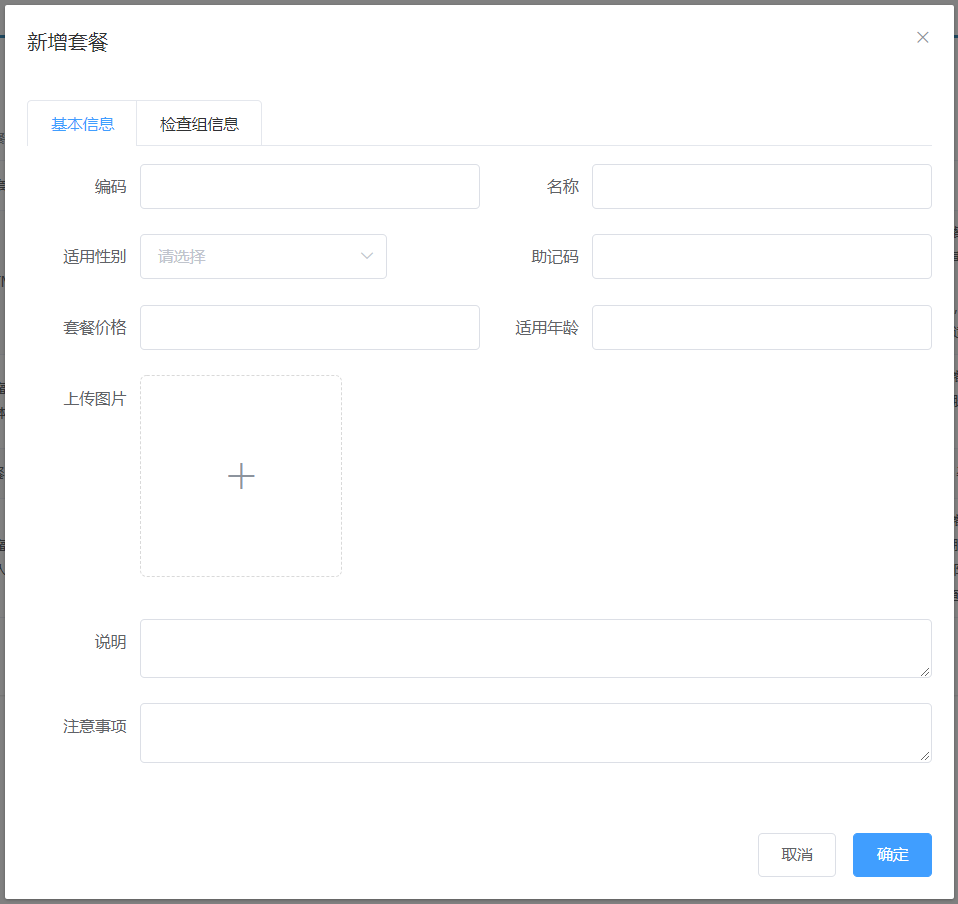
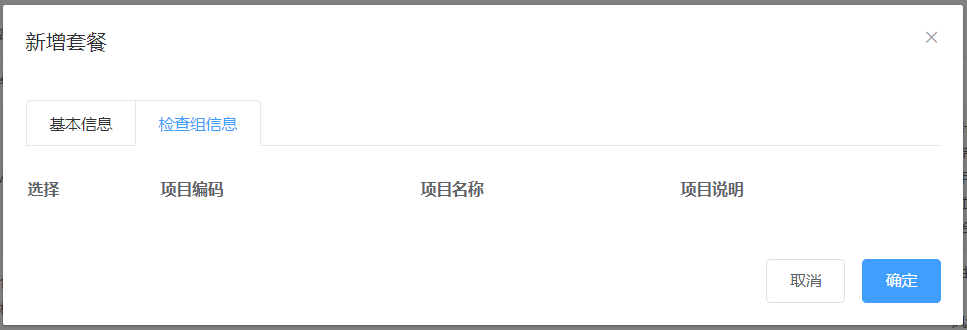
新建按钮绑定单击事件,对应的处理函数为handleCreate
<el-button type="primary" class="butT" @click="handleCreate()">新建</el-button>
                // 重置表单
                resetForm() {
                    this.formData = {};
                    this.activeName = "first";
                    this.checkgroupIds = [];
                    this.imageUrl = null;
                }
                // 弹出添加窗口
                handleCreate() {
                    this.dialogFormVisible = true;
                    this.resetForm();
                }
2.2 动态展示检查组列表
现在虽然已经完成了新增窗口的弹出,但是在检查组信息标签页中需要动态展示所有的检查组信息列表 数据,并且可以进行勾选。具体操作步骤如下:
(1)定义模型数据 vue-data中数据
tableData:[],//添加表单窗口中检查组列表数据
checkgroupIds:[],//添加表单窗口中检查组复选框对应id
(2)动态展示检查组列表数据,数据来源于上面定义的tableData模型数据
                                            <table class="datatable">
                                                <thead>
                                                <tr>
                                                    <th>选择</th>
                                                    <th>项目编码</th>
                                                    <th>项目名称</th>
                                                    <th>项目说明</th>
                                                </tr>
                                                </thead>
                                                <tbody>
                                                <tr v-for="c in tableData">
                                                    <td>
                                                        <input :id="c.id" v-model="checkgroupIds" type="checkbox" :value="c.id">
                                                    </td>
                                                    <td><label :for="c.id">{{c.code}}</label></td>
                                                    <td><label :for="c.id">{{c.name}}</label></td>
                                                    <td><label :for="c.id">{{c.remark}}</label></td>
                                                </tr>
                                                </tbody>
                                            </table>
(3)完善handleCreate方法,发送ajax请求查询所有检查组数据并将结果赋值给tableData模型数据用 于页面表格展示
                // 弹出添加窗口
                handleCreate() {
                    this.dialogFormVisible = true;
                    this.resetForm();
                    //发送ajax请求,查询所有的检查组数据,转为json展示到当前新增窗口中
                    axios.get("/checkgroup/findAll.do").then((res)=>{
                       if(res.data.flag){
                           this.tableData = res.data.data;
                       } else{
                           this.$message.error(res.data.message);
                       }
                    });
                }
(4)分别在CheckGroupController、CheckGroupService、CheckGroupServiceImpl、 CheckGroupDao、CheckGroupDao.xml中扩展方法查询所有检查组数据
CheckGroupController:
    @RequestMapping("/findAll")
    public Result findAll(){
        try{
            List<CheckGroup> list = checkGroupService.findAll();
            return new Result(true,MessageConstant.QUERY_CHECKGROUP_SUCCESS,list);
        }catch (Exception e){
            e.printStackTrace();
            return new Result(false,MessageConstant.QUERY_CHECKGROUP_FAIL);
        }
    }
CheckGroupService:
public List<CheckGroup> findAll();
CheckGroupServiceImpl:
    @Override
    public List<CheckGroup> findAll() {
        return checkGroupDao.findAll();
    }
CheckGroupDao:
public List<CheckGroup> findAll();
CheckGroupDao.xml:
    <select id="findAll" resultType="com.itheima.pojo.CheckGroup">
        select * from t_checkgroup
    </select>
2.3 图片上传并预览
此处使用的是ElementUI提供的上传组件el-upload,提供了多种不同的上传效果,上传成功后可以进行预览。
实现步骤:
(1)定义模型数据vue-data中,用于后面上传文件的图片预览:
autoUpload:true,//自动上传
imageUrl:null,//模型数据,用于上传图片完成后图片预览
(2)定义上传组件:
                                                        <!--
                                                          el-upload:上传组件
                                                          action:上传的提交地址
                                                          auto-upload:选中文件后是否自动上传true/false
                                                          name:上传文件的名称,服务端可以根据名称获得上传的文件对象
                                                          show-file-list:是否显示已上传文件列表true/false
                                                          on-success:文件上传成功时的钩子
                                                          before-upload:上传文件之前的钩子,参数为上传的文件file,若返回false或者返回Promise且被reject,则停止上传。可用来限制用户上传的图片格式和大小
                                                        -->
                                                        <el-upload
                                                                class="avatar-uploader"
                                                                action="/setmeal/upload.do"
                                                                :auto-upload="autoUpload"
                                                                name="imgFile"
                                                                :show-file-list="false"
                                                                :on-success="handleAvatarSuccess"
                                                                :before-upload="beforeAvatarUpload">
                                                            <!--用于上传成功图片预览-->
                                                            <img v-if="imageUrl" :src="imageUrl" class="avatar">
                                                            <!--用于展示上传+图标-->
                                                            <i v-else class="el-icon-plus avatar-uploader-icon"></i>
                                                        </el-upload>
(3)定义对应的钩子函数:
                //文件上传成功后的钩子,response为服务端上传文件返回的值,file为当前上传的文件封装成的js对象
                handleAvatarSuccess(response, file) {
                    //为模型数据imageUrl赋值,用于页面图片预览,七牛云域名+七牛云文件名
                    this.imageUrl = "http://smxzg7not.hd-bkt.clouddn.com/"+response.data;
                    this.$message({//elementui自己发起的请求才能用response.message
                        message: response.message,
                        type: response.flag ? 'success' : 'error'
                    });
                    //设置模型数据(图片名称),后续提交ajax请求时会提交到后台最终保存到数据库
                    this.formData.img = response.data;
                }

                //上传图片之前执行
                beforeAvatarUpload(file) {
                  //使用file.name的后缀名进行判断比较可靠
                  const isJPG = file.type === 'image/jpeg';//不可靠,excel
                  const isLt2M = file.size / 1024 / 1024 < 2;
                  if (!isJPG) {
                    this.$message.error('上传套餐图片只能是 JPG 格式!');
                  }
                  if (!isLt2M) {
                    this.$message.error('上传套餐图片大小不能超过 2MB!');
                  }
                  return isJPG && isLt2M;
                }
(4)创建SetmealController,接收上传的文件
package com.itheima.controller;

import com.alibaba.dubbo.config.annotation.Reference;
import com.itheima.constant.MessageConstant;
import com.itheima.constant.RedisConstant;
import com.itheima.entity.PageResult;
import com.itheima.entity.QueryPageBean;
import com.itheima.entity.Result;
import com.itheima.pojo.Setmeal;
import com.itheima.service.SetmealService;
import com.itheima.utils.QiniuUtils;
import org.springframework.beans.factory.annotation.Autowired;
import org.springframework.web.bind.annotation.RequestBody;
import org.springframework.web.bind.annotation.RequestMapping;
import org.springframework.web.bind.annotation.RequestParam;
import org.springframework.web.bind.annotation.RestController;
import org.springframework.web.multipart.MultipartFile;
import redis.clients.jedis.JedisPool;
import java.util.UUID;

/**
 * 体检套餐管理
 */
@RestController
@RequestMapping("/setmeal")
public class SetmealController {

    @Reference
    private SetmealService setmealService;

    @Autowired
    private JedisPool jedisPool;

    @RequestMapping("/upload")
    public Result upload(@RequestParam("imgFile") MultipartFile imgFile){//imgFile名字相同不需要加@RequestParam
        //获取文件后缀
        String originalFilename = imgFile.getOriginalFilename();//abasdw3sdsds.jpg
        int lastIndexOf = originalFilename.lastIndexOf(".");
        String suffix = originalFilename.substring(lastIndexOf);//.jpg
        //使用UUID随机产生文件名称,防止同名文件覆盖
        String fileName = UUID.randomUUID().toString() + suffix;//FkwPC5n0hBijDCFyKqRvFjBYbNZA.jpg
        try {

            //将文件上传到七牛云服务器
            QiniuUtils.upload2Qiniu(imgFile.getBytes(),fileName);
            //图片上传成功
            //将上传图片名称存入redis,基于redis的set集合存储
            jedisPool.getResource().sadd(RedisConstant.SETMEAL_PIC_RESOURCES,fileName);
            return new Result(true, MessageConstant.PIC_UPLOAD_SUCCESS,fileName);
        }catch (Exception e){
            //图片上传失败
            return new Result(false,MessageConstant.PIC_UPLOAD_FAIL);
        }
    }
}
注意:别忘了在spring配置文件中配置文件上传组件
springmvc.xml:
    <!--文件上传组件-->
    <bean id="multipartResolver" class="org.springframework.web.multipart.commons.CommonsMultipartResolver">
        <property name="maxUploadSize" value="104857600" />
        <property name="maxInMemorySize" value="4096" />
        <property name="defaultEncoding" value="UTF-8"/>
    </bean>
2.4 提交请求
当用户点击新增窗口中的确定按钮时发送ajax请求将数据提交到后台进行数据库操作。提交到后台的数据分为两部分:套餐基本信息(对应的模型数据为formData)和检查组id数组(对应的模型数据为 checkgroupIds)。
为确定按钮绑定单击事件,对应的处理函数为handleAdd
<el-button type="primary" @click="handleAdd()">确定</el-button>
完善handleAdd方法
                //添加
                handleAdd () {
                    axios.post("/setmeal/add.do?checkgroupIds="+this.checkgroupIds,this.formData).then((res)=>{
                        if(res.data.flag){
                            this.dialogFormVisible = false;
                            this.$message({
                                message: res.data.message,
                                type: 'success'
                            });
                        }else{
                            this.$message.error(res.data.message);
                        }
                    }).finally(()=>{
                        this.findPage();
                    });
                }
3. 后台代码
3.1 Controller 在SetmealController中增加方法
    @RequestMapping("/add")
    public Result  add(@RequestBody Setmeal setmeal,Integer[] checkgroupIds){
        try{
            setmealService.add(setmeal,checkgroupIds);
            return new Result(true, MessageConstant.ADD_SETMEAL_SUCCESS);
        }catch (Exception e){
            return new Result(false,MessageConstant.ADD_SETMEAL_FAIL);
        }
    }
3.2 服务接口
创建SetmealService接口并提供新增方法
public void add(Setmeal setmeal, Integer[] checkgroupIds);
3.3 服务实现类
创建SetmealServiceImpl服务实现类并实现新增方法
    @Override
    public void add(Setmeal setmeal, Integer[] checkgroupIds) {
        setmealDao.add(setmeal);
        setSetmealAndCheckGroup(setmeal.getId(),checkgroupIds);
        //将图片保存到Redis
        savePic2Redis(setmeal.getImg());
    }

    //绑定套餐和检查组的多对多关系
    private void setSetmealAndCheckGroup(Integer setmealId, Integer[] checkgroupIds) {
        if(checkgroupIds != null && checkgroupIds.length > 0) {
            Map<String, Integer> map = null;
            for (Integer checkgroupId : checkgroupIds) {
                map = new HashMap<>();
                map.put("setmealId", setmealId);
                map.put("checkgroupId", checkgroupId);
                setmealDao.setSetmealAndCheckGroup(map);
            }
        }
    }

    //将图片名称保存到Redis
    private void savePic2Redis(String pic){
        jedisPool.getResource().sadd(RedisConstant.SETMEAL_PIC_DB_RESOURCES,pic);
    }
3.4 Dao接口
创建SetmealDao接口并提供相关方法
    public void add(Setmeal setmeal);
    public void setSetmealAndCheckGroup(Map map);
3.5 Mapper映射文件
创建SetmealDao.xml文件并定义相关SQL语句
    <!--插入体检套餐数据-->
    <insert id="add" parameterType="com.itheima.pojo.Setmeal">
        <!--通过mybatis框架提供的selectKey获得自增产生的id-->
        <selectKey resultType="java.lang.Integer" order="AFTER" keyProperty="id">
            select LAST_INSERT_ID()
        </selectKey>
        insert into t_setmeal(name,code,helpCode,sex,age,price,remark,attention,img)
        values
        (#{name},#{code},#{helpCode},#{sex},#{age},#{price},#{remark},#{attention},#{img})
    </insert>

    <!--设置体检套餐和检查组的关联关系,多对多-->
    <insert id="setSetmealAndCheckGroup" parameterType="map">
        insert into t_setmeal_checkgroup(setmeal_id,checkgroup_id)
        values
        (#{setmealId},#{checkgroupId})
    </insert>
4. 完善文件上传
前面我们已经完成了文件上传,将图片存储在了七牛云服务器中。但是这个过程存在一个问题,就是如 果用户只上传了图片而没有最终保存套餐信息到我们的数据库,这时我们上传的图片就变为了垃圾图 片。对于这些垃圾图片我们需要定时清理来释放磁盘空间。这就需要我们能够区分出来哪些是垃圾图 片,哪些不是垃圾图片。如何实现呢?
方案就是利用redis来保存图片名称,具体做法为:
1、当用户上传图片后,将图片名称保存到redis的一个Set集合中,例如集合名称为 setmealPicResources
2、当用户添加套餐后,将图片名称保存到redis的另一个Set集合中,例如集合名称为 setmealPicDbResources
3、计算setmealPicResources集合与setmealPicDbResources集合的差值,结果就是垃圾图片的名称 集合,清理这些图片即可
本小节我们先来完成前面2个环节,第3个环节(清理图片环节)在后面会通过定时任务再实现。
实现步骤:
(1)在health_backend项目中提供Spring配置文件spring-redis.xml
(2)在health_common工程中提供Redis常量类
package com.itheima.constant;

public class RedisConstant {
    //套餐图片所有图片名称
    public static final String SETMEAL_PIC_RESOURCES = "setmealPicResources";
    //套餐图片保存在数据库里的图片名称
    public static final String SETMEAL_PIC_DB_RESOURCES = "setmealPicDbResources";
}
(3)完善SetmealController,在文件上传成功后将图片名称保存到redis集合中
(4)在health_service_provider项目中提供Spring配置文件spring-redis.xml
(5)完善SetmealServiceImpl服务类,在保存完成套餐信息后将图片名称存储到redis集合中
三、体检套餐分页
1. 完善页面
1.1 定义分页相关模型数据
pagination: {//分页相关模型数据
  currentPage: 1,//当前页码
  pageSize:10,//每页显示的记录数
  total:100,//总记录数
  queryString:null//查询条件
},
dataList: [],//当前页要展示的分页列表数据
1.2 定义分页方法
在页面中提供了findPage方法用于分页查询,为了能够在setmeal.html页面加载后直接可以展示分页数据,可以在VUE提供的钩子函数created中调用findPage方法
//钩子函数,VUE对象初始化完成后自动执行
created() {
  this.findPage();
}
                //分页查询
                findPage() {
                    //发送ajax请求,提交分页相关请求参数
                    //分页参数
                    var param = {
                        currentPage:this.pagination.currentPage,//页码
                        pageSize:this.pagination.pageSize,//每页显示的记录数
                        queryString:this.pagination.queryString//查询条件
                    };
                    axios.post("/setmeal/findPage.do",param).then((res)=>{
                        //解析Controller响应回的数据,为VUE对象的模型数据赋值,基于VUE的双向绑定展示到页面
                        this.dataList = res.data.rows;
                        this.pagination.total = res.data.total;
                    });
                }
1.3 完善分页方法执行时机
除了在created钩子函数中调用findPage方法查询分页数据之外,当用户点击查询按钮或者点击分页条 中的页码时也需要调用findPage方法重新发起查询请求。
为查询按钮绑定单击事件,调用findPage方法
<el-button @click="_findPage()" class="dalfBut">查询</el-button>
                _findPage() {
                    this.findPage();
                }
为分页条组件绑定current-change事件,此事件是分页条组件自己定义的事件,当页码改变时触发,对应的处理函数为handleCurrentChange
                        <el-pagination
                            class="pagiantion"
                            @current-change="handleCurrentChange"
                            :current-page="pagination.currentPage"
                            :page-size="pagination.pageSize"
                            layout="total, prev, pager, next, jumper"
                            :total="pagination.total">
                        </el-pagination>
定义handleCurrentChange方法
                //切换页码
                handleCurrentChange(currentPage) {
                    this.pagination.currentPage = currentPage;
                    this.findPage();
                }
2. 后台代码
2.1 Controller
在SetmealController中增加分页查询方法
    //分页查询
    @RequestMapping("/findPage")
    public PageResult findPage(@RequestBody QueryPageBean queryPageBean){
        PageResult pageResult = setmealService.pageQuery(queryPageBean);
        return pageResult;
    }
2.2 服务接口
在SetmealService服务接口中扩展分页查询方法
public PageResult pageQuery(QueryPageBean queryPageBean);
2.3 服务实现类
在SetmealServiceImpl服务实现类中实现分页查询方法,基于Mybatis分页助手插件实现分页
    @Override
    public PageResult pageQuery(QueryPageBean queryPageBean) {
        PageHelper.startPage(queryPageBean.getCurrentPage(),queryPageBean.getPageSize());
        Page<Setmeal> page = setmealDao.selectByCondition(queryPageBean.getQueryString());
        return new PageResult(page.getTotal(),page.getResult());
    }
2.4 Dao接口
在SetmealDao接口中扩展分页查询方法
public Page<Setmeal> selectByCondition(String queryString);
2.5 Mapper映射文件
在SetmealDao.xml文件中增加SQL定义
    <select id="selectByCondition" parameterType="String" resultType="com.itheima.pojo.Setmeal">
        select * from t_setmeal
        <if test="value != null and value.length >0"><!--非基本数据类型必须写value,不能写code;pojo可以写code-->
            where code = #{value} or name = #{value} or helpCode = #{value}
        </if>
    </select>
四、定时清理垃圾图片
前面我们已经完成了体检套餐的管理,在新增套餐时套餐的基本信息和图片是分两次提交到后台进行操作的。也就是用户首先将图片上传到七牛云服务器,然后再提交新增窗口中录入的其他信息。如果用户只是上传了图片而没有提交录入的其他信息,此时的图片就变为了垃圾图片,因为在数据库中并没有记录它的存在。此时我们要如何处理这些垃圾图片呢?
解决方案就是通过定时任务组件定时清理这些垃圾图片。为了能够区分出来哪些图片是垃圾图片,我们 在文件上传成功后将图片保存到了一个redis集合中,当套餐数据插入到数据库后我们又将图片名称保存到了另一个redis集合中,通过计算这两个集合的差值就可以获得所有垃圾图片的名称。
本章节我们就会基于Quartz定时任务,通过计算redis两个集合的差值找出所有的垃圾图片,就可以将垃圾图片清理掉。 操作步骤:
(1)创建maven工程health_jobs,继承父工程health_parent,打包方式为war,导入Quartz等相关坐标
<?xml version="1.0" encoding="UTF-8"?>

<project xmlns="http://maven.apache.org/POM/4.0.0" xmlns:xsi="http://www.w3.org/2001/XMLSchema-instance"
         xsi:schemaLocation="http://maven.apache.org/POM/4.0.0 http://maven.apache.org/xsd/maven-4.0.0.xsd">
    <parent>
        <artifactId>health_parent</artifactId>
        <groupId>com.itheima</groupId>
        <version>1.0-SNAPSHOT</version>
    </parent>
    <modelVersion>4.0.0</modelVersion>

    <artifactId>health_jobs</artifactId>
    <packaging>war</packaging>

    <dependencies>
        <dependency>
            <groupId>com.itheima</groupId>
            <artifactId>health_interface</artifactId>
            <version>1.0-SNAPSHOT</version>
        </dependency>
        <dependency>
            <groupId>org.quartz-scheduler</groupId>
            <artifactId>quartz</artifactId>
        </dependency>
        <dependency>
            <groupId>org.quartz-scheduler</groupId>
            <artifactId>quartz-jobs</artifactId>
        </dependency>
        <dependency>
            <groupId>org.apache.poi</groupId>
            <artifactId>poi</artifactId>
            <version>3.15</version>
        </dependency>
        <dependency>
            <groupId>org.apache.poi</groupId>
            <artifactId>poi-ooxml</artifactId>
            <version>3.15</version>
        </dependency>
    </dependencies>

    <build>
        <plugins>
            <plugin>
                <groupId>org.apache.tomcat.maven</groupId>
                <artifactId>tomcat7-maven-plugin</artifactId>
                <configuration>
                    <!-- 指定端口 -->
                    <port>83</port>
                    <!-- 请求路径 -->
                    <path>/</path>
                </configuration>
            </plugin>
        </plugins>
    </build>
</project>
(2)配置web.xml
<?xml version="1.0" encoding="UTF-8"?>
<web-app
    version="4.0"
    xmlns="http://xmlns.jcp.org/xml/ns/javaee"
    xmlns:javaee="http://xmlns.jcp.org/xml/ns/javaee"
    xmlns:xml="http://www.w3.org/XML/1998/namespace"
    xmlns:xsi="http://www.w3.org/2001/XMLSchema-instance"
    xsi:schemaLocation="http://xmlns.jcp.org/xml/ns/javaee http://xmlns.jcp.org/xml/ns/javaee/web-app_4_0.xsd">

  <!--加载spring容器-->
  <context-param>
    <param-name>contextConfigLocation</param-name>
    <param-value>classpath*:applicationContext*.xml</param-value>
  </context-param>
  <listener>
    <listener-class>org.springframework.web.context.ContextLoaderListener</listener-class>
  </listener>
</web-app>
(3)配置log4j.properties
(4)配置applicationContext-redis.xml(同spring-redis.xml内容一样)
(5)配置applicationContext-jobs.xml
<?xml version="1.0" encoding="UTF-8"?> <beans xmlns="http://www.springframework.org/schema/beans" xmlns:xsi="http://www.w3.org/2001/XMLSchema-instance" xmlns:context="http://www.springframework.org/schema/context" xsi:schemaLocation="http://www.springframework.org/schema/beans http://www.springframework.org/schema/beans/spring-beans.xsd http://www.springframework.org/schema/context http://www.springframework.org/schema/context/spring-context.xsd"> <!--开启spring注解使用--> <context:annotation-config></context:annotation-config> <bean id="clearImgJob" class="com.itheima.jobs.ClearImgJob"/> <!--<!–注册自定义Job–>--> <!--<bean id="jobDemo" class="com.itheima.jobs.JobDemo"/>--> <!--注册JobDetail,作用是负责通过反射调用指定的Job--> <bean id="jobDetail" class="org.springframework.scheduling.quartz.MethodInvokingJobDetailFactoryBean"> <!--注入目标对象--> <property name="targetObject" ref="clearImgJob"/> <!--注入目标方法--> <property name="targetMethod" value="clearImg"/> </bean> <!--注册一个触发器,制定任务触发的时间--> <bean id="myTrigger" class="org.springframework.scheduling.quartz.CronTriggerFactoryBean"> <!--注入JobDetail--> <property name="jobDetail" ref="jobDetail"/> <!--指定触发的时间,基于Cron表达式--> <property name="cronExpression"> <!--<value>0 0 2 * * ?</value><!–0 0 2 * * ?表示每天2点触发一次–>--> <value>0/10 * * * * ?</value> </property> </bean> <!--注册一个统一的调度工厂,通过这个调度工厂调度任务--> <bean id="scheduler" class="org.springframework.scheduling.quartz.SchedulerFactoryBean"> <!--注入多个触发器--> <property name="triggers"> <list> <ref bean="myTrigger"/> </list> </property> </bean> </beans>
(6)创建ClearImgJob定时任务类
package com.itheima.jobs;

import com.itheima.constant.RedisConstant;
import com.itheima.utils.QiniuUtils;
import org.springframework.beans.factory.annotation.Autowired;
import redis.clients.jedis.JedisPool;
import java.util.Set;

/**
 * 自定义Job,实现定时清理垃圾图片
 */
public class ClearImgJob {

    @Autowired
    private JedisPool jedisPool;

    public void clearImg(){
        //根据redis中保存的两个set集合进行差值计算,获得垃圾图片名称集合
        Set<String> set = jedisPool.getResource().sdiff(RedisConstant.SETMEAL_PIC_RESOURCES, RedisConstant.SETMEAL_PIC_DB_RESOURCES);
        if(set != null && set.size() > 0){
            for (String picName : set) {
                //删除七牛云服务器上的图片
                QiniuUtils.deleteFileFromQiniu(picName);
                //从Redis集合中删除图片名称
                jedisPool.getResource().srem(RedisConstant.SETMEAL_PIC_RESOURCES,picName);
                System.out.println("自定义任务执行,清理垃圾图片:"+picName);
            }
        }
    }
}

 浙公网安备 33010602011771号