

船志健康项目-预约管理-检查项管理2
一、需求分析
传智健康管理系统是一款应用于健康管理机构的业务系统,实现健康管理机构工作内容可视化、患者管 理专业化、健康评估数字化、健康干预流程化、知识库集成化,从而提高健康管理师的工作效率,加强 与患者间的互动,增强管理者对健康管理机构运营情况的了解。 系统分为传智健康后台管理系统和移动端应用两部分。其中后台系统提供给健康管理机构内部人员(包 括系统管理员、健康管理师等)使用,微信端应用提供给健康管理机构的用户(体检用户)使用。 本项目功能架构图:
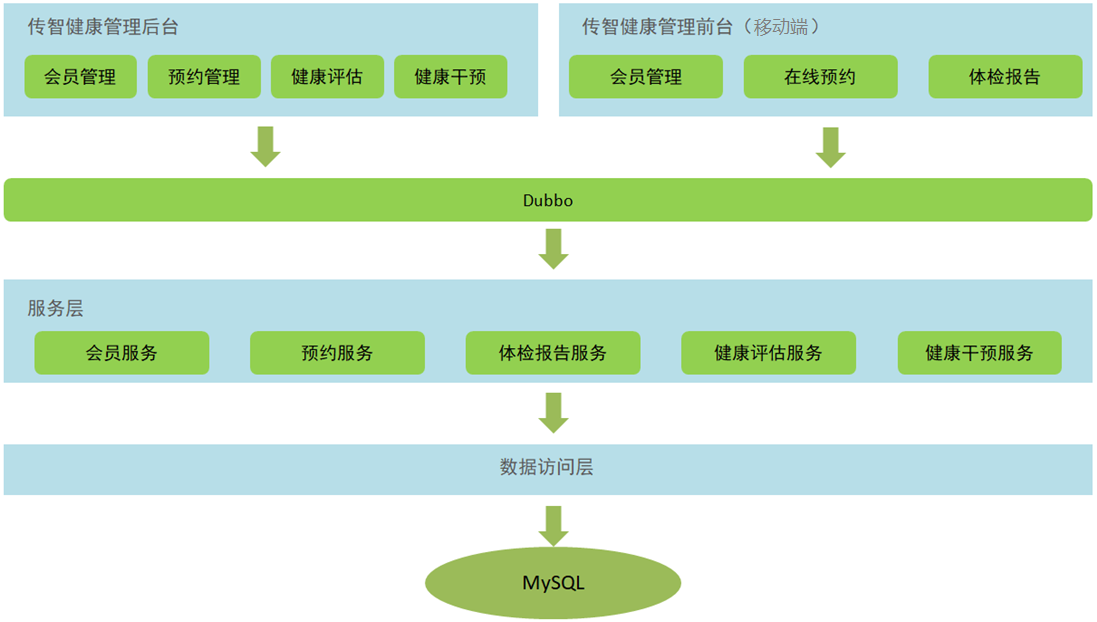
通过上面的功能架构图可以看到,传智健康后台管理系统有会员管理、预约管理、健康评估、健康干预 等功能。移动端有会员管理、体检预约、体检报告等功能。后台系统和移动端应用都会通过Dubbo调用 服务层发布的服务来完成具体的操作。本项目属于典型的SOA架构形式。 本章节完成的功能开发是预约管理功能,包括检查项管理、检查组管理、体检套餐管理、预约设置等 (参见产品原型)。预约管理属于系统的基础功能,主要就是管理一些体检的基础数据。
二、基础环境搭建
1. 导入预约管理模块数据表
操作步骤: (1)根据资料中提供的itcasthealth.pdm文件导出SQL脚本
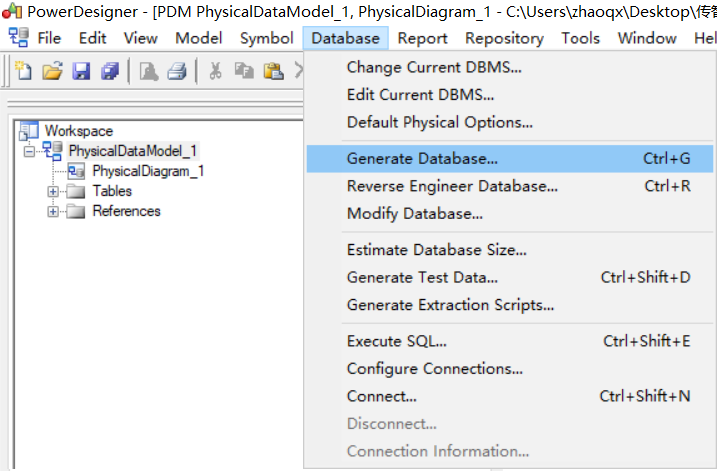
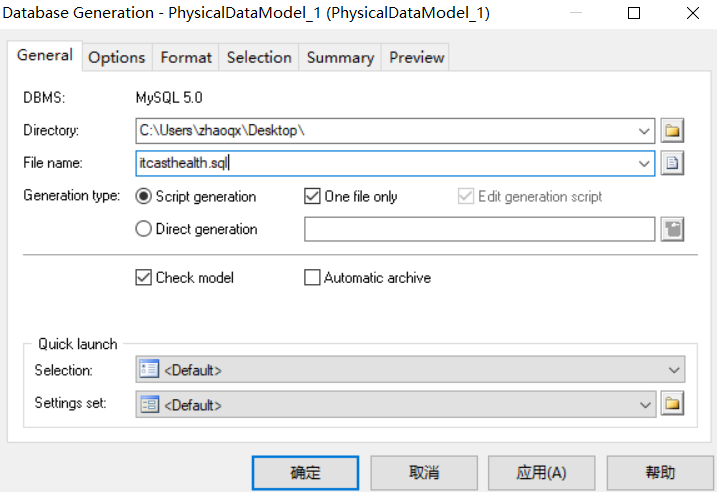
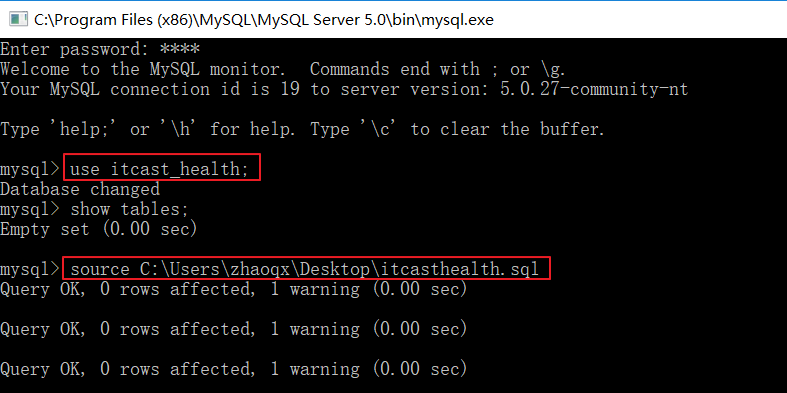
(2)创建本项目使用的数据库itcast_health
(3)将PowerDesigner导出的SQL脚本导入itcast_health数据库进行建表


CREATE TABLE `t_checkitem` (
  `id` int(11) NOT NULL AUTO_INCREMENT,
  `code` varchar(16) DEFAULT NULL,
  `name` varchar(32) DEFAULT NULL,
  `sex` char(1) DEFAULT NULL,
  `age` varchar(32) DEFAULT NULL,
  `price` float DEFAULT NULL,
  `type` char(1) DEFAULT NULL COMMENT '查检项类型,分为检查和检验两种',
  `attention` varchar(128) DEFAULT NULL,
  `remark` varchar(128) DEFAULT NULL,
  PRIMARY KEY (`id`)
) ENGINE=InnoDB AUTO_INCREMENT=106 DEFAULT CHARSET=utf8
CREATE TABLE `t_checkgroup` (
  `id` int(11) NOT NULL AUTO_INCREMENT,
  `code` varchar(32) DEFAULT NULL,
  `name` varchar(32) DEFAULT NULL,
  `helpCode` varchar(32) DEFAULT NULL,
  `sex` char(1) DEFAULT NULL,
  `remark` varchar(128) DEFAULT NULL,
  `attention` varchar(128) DEFAULT NULL,
  PRIMARY KEY (`id`)
) ENGINE=InnoDB AUTO_INCREMENT=32 DEFAULT CHARSET=utf8
CREATE TABLE `t_checkgroup_checkitem` (
  `checkgroup_id` int(11) NOT NULL DEFAULT '0',
  `checkitem_id` int(11) NOT NULL DEFAULT '0',
  PRIMARY KEY (`checkgroup_id`,`checkitem_id`),
  KEY `item_id` (`checkitem_id`),
  CONSTRAINT `group_id` FOREIGN KEY (`checkgroup_id`) REFERENCES `t_checkgroup` (`id`),
  CONSTRAINT `item_id` FOREIGN KEY (`checkitem_id`) REFERENCES `t_checkitem` (`id`)
) ENGINE=InnoDB DEFAULT CHARSET=utf8
CREATE TABLE `t_setmeal` (
  `id` int(11) NOT NULL AUTO_INCREMENT,
  `name` varchar(128) DEFAULT NULL,
  `code` varchar(8) DEFAULT NULL,
  `helpCode` varchar(16) DEFAULT NULL,
  `sex` char(1) DEFAULT NULL,
  `age` varchar(32) DEFAULT NULL,
  `price` float DEFAULT NULL,
  `remark` varchar(128) DEFAULT NULL,
  `attention` varchar(128) DEFAULT NULL,
  `img` varchar(128) DEFAULT NULL,
  PRIMARY KEY (`id`)
) ENGINE=InnoDB AUTO_INCREMENT=20 DEFAULT CHARSET=utf8
CREATE TABLE `t_setmeal_checkgroup` (
  `setmeal_id` int(11) NOT NULL DEFAULT '0',
  `checkgroup_id` int(11) NOT NULL DEFAULT '0',
  PRIMARY KEY (`setmeal_id`,`checkgroup_id`),
  KEY `checkgroup_key` (`checkgroup_id`),
  CONSTRAINT `checkgroup_key` FOREIGN KEY (`checkgroup_id`) REFERENCES `t_checkgroup` (`id`),
  CONSTRAINT `setmeal_key` FOREIGN KEY (`setmeal_id`) REFERENCES `t_setmeal` (`id`)
) ENGINE=InnoDB DEFAULT CHARSET=utf8
CREATE TABLE `t_user` (
  `id` int(11) NOT NULL AUTO_INCREMENT,
  `birthday` date DEFAULT NULL,
  `gender` varchar(1) DEFAULT NULL,
  `username` varchar(32) DEFAULT NULL,
  `password` varchar(256) DEFAULT NULL,
  `remark` varchar(32) DEFAULT NULL,
  `station` varchar(1) DEFAULT NULL,
  `telephone` varchar(11) DEFAULT NULL,
  PRIMARY KEY (`id`)
) ENGINE=InnoDB AUTO_INCREMENT=3 DEFAULT CHARSET=utf8
 CREATE TABLE `t_role` (
  `id` int(11) NOT NULL AUTO_INCREMENT,
  `name` varchar(32) DEFAULT NULL,
  `keyword` varchar(64) DEFAULT NULL,
  `description` varchar(128) DEFAULT NULL,
  PRIMARY KEY (`id`)
) ENGINE=InnoDB AUTO_INCREMENT=9 DEFAULT CHARSET=utf8
CREATE TABLE `t_user_role` (
  `user_id` int(11) NOT NULL,
  `role_id` int(11) NOT NULL,
  PRIMARY KEY (`user_id`,`role_id`),
  KEY `FK_Reference_8` (`role_id`),
  CONSTRAINT `FK_Reference_7` FOREIGN KEY (`user_id`) REFERENCES `t_user` (`id`),
  CONSTRAINT `FK_Reference_8` FOREIGN KEY (`role_id`) REFERENCES `t_role` (`id`)
) ENGINE=InnoDB DEFAULT CHARSET=utf8
CREATE TABLE `t_menu` (
  `id` int(11) NOT NULL AUTO_INCREMENT,
  `name` varchar(128) DEFAULT NULL,
  `linkUrl` varchar(128) DEFAULT NULL,
  `path` varchar(128) DEFAULT NULL,
  `priority` int(11) DEFAULT NULL,
  `icon` varchar(64) DEFAULT NULL,
  `description` varchar(128) DEFAULT NULL,
  `parentMenuId` int(11) DEFAULT NULL,
  `level` int(11) DEFAULT NULL,
  PRIMARY KEY (`id`),
  KEY `FK_Reference_13` (`parentMenuId`),
  CONSTRAINT `FK_Reference_13` FOREIGN KEY (`parentMenuId`) REFERENCES `t_menu` (`id`)
) ENGINE=InnoDB AUTO_INCREMENT=23 DEFAULT CHARSET=utf8
CREATE TABLE `t_member` (
  `id` int(11) NOT NULL AUTO_INCREMENT,
  `fileNumber` varchar(32) DEFAULT NULL,
  `name` varchar(32) DEFAULT NULL,
  `sex` varchar(8) DEFAULT NULL,
  `idCard` varchar(18) DEFAULT NULL,
  `phoneNumber` varchar(11) DEFAULT NULL,
  `regTime` date DEFAULT NULL,
  `password` varchar(32) DEFAULT NULL,
  `email` varchar(32) DEFAULT NULL,
  `birthday` date DEFAULT NULL,
  `remark` varchar(128) DEFAULT NULL,
  PRIMARY KEY (`id`)
) ENGINE=InnoDB AUTO_INCREMENT=100 DEFAULT CHARSET=utf8
CREATE TABLE `t_role_menu` (
  `role_id` int(11) NOT NULL,
  `menu_id` int(11) NOT NULL,
  PRIMARY KEY (`role_id`,`menu_id`),
  KEY `FK_Reference_10` (`menu_id`),
  CONSTRAINT `FK_Reference_10` FOREIGN KEY (`menu_id`) REFERENCES `t_menu` (`id`),
  CONSTRAINT `FK_Reference_9` FOREIGN KEY (`role_id`) REFERENCES `t_role` (`id`)
) ENGINE=InnoDB DEFAULT CHARSET=utf8
 CREATE TABLE `t_role_permission` (
  `role_id` int(11) NOT NULL,
  `permission_id` int(11) NOT NULL,
  PRIMARY KEY (`role_id`,`permission_id`),
  KEY `FK_Reference_12` (`permission_id`),
  CONSTRAINT `FK_Reference_11` FOREIGN KEY (`role_id`) REFERENCES `t_role` (`id`),
  CONSTRAINT `FK_Reference_12` FOREIGN KEY (`permission_id`) REFERENCES `t_permission` (`id`)
) ENGINE=InnoDB DEFAULT CHARSET=utf8
 CREATE TABLE `t_order` (
  `id` int(11) NOT NULL AUTO_INCREMENT,
  `member_id` int(11) DEFAULT NULL COMMENT '员会id',
  `orderDate` date DEFAULT NULL COMMENT '约预日期',
  `orderType` varchar(8) DEFAULT NULL COMMENT '约预类型 电话预约/微信预约',
  `orderStatus` varchar(8) DEFAULT NULL COMMENT '预约状态(是否到诊)',
  `setmeal_id` int(11) DEFAULT NULL COMMENT '餐套id',
  PRIMARY KEY (`id`),
  KEY `key_member_id` (`member_id`),
  KEY `key_setmeal_id` (`setmeal_id`),
  CONSTRAINT `key_member_id` FOREIGN KEY (`member_id`) REFERENCES `t_member` (`id`),
  CONSTRAINT `key_setmeal_id` FOREIGN KEY (`setmeal_id`) REFERENCES `t_setmeal` (`id`)
) ENGINE=InnoDB AUTO_INCREMENT=15 DEFAULT CHARSET=utf8
CREATE TABLE `t_ordersetting` (
  `id` int(11) NOT NULL AUTO_INCREMENT,
  `orderDate` date DEFAULT NULL COMMENT '约预日期',
  `number` int(11) DEFAULT NULL COMMENT '可预约人数',
  `reservations` int(11) DEFAULT NULL COMMENT '已预约人数',
  PRIMARY KEY (`id`)
) ENGINE=InnoDB AUTO_INCREMENT=17 DEFAULT CHARSET=utf8
CREATE TABLE `t_permission` (
  `id` int(11) NOT NULL AUTO_INCREMENT,
  `name` varchar(32) DEFAULT NULL,
  `keyword` varchar(64) DEFAULT NULL,
  `description` varchar(128) DEFAULT NULL,
  PRIMARY KEY (`id`)
) ENGINE=InnoDB AUTO_INCREMENT=27 DEFAULT CHARSET=utf8
2. 导入预约管理模块实体类
将资料中提供的POJO实体类复制到health_common工程中。
(1)检查项CheckItem
package com.itheima.pojo;

import java.io.Serializable;

/**
 * 检查项
 */
public class CheckItem implements Serializable {
    //最好用包装数据类型,不要用基础数据类型int
    private Integer id;//主键
    private String code;//项目编码
    private String name;//项目名称
    private String sex;//适用性别
    private String age;//适用年龄(范围),例如:20-50
    private Float price;//价格,近似值,企业不会用Float和Double,用的是BigDecimal big = new BigDecimal(0.9);
    private String type;//检查项类型,分为检查和检验两种类型
    private String remark;//项目说明
    private String attention;//注意事项

    public Integer getId() {
        return id;
    }

    public void setId(Integer id) {
        this.id = id;
    }

    public String getCode() {
        return code;
    }

    public void setCode(String code) {
        this.code = code;
    }

    public String getName() {
        return name;
    }

    public void setName(String name) {
        this.name = name;
    }

    public String getSex() {
        return sex;
    }

    public void setSex(String sex) {
        this.sex = sex;
    }

    public String getAge() {
        return age;
    }

    public void setAge(String age) {
        this.age = age;
    }

    public String getRemark() {
        return remark;
    }

    public void setRemark(String remark) {
        this.remark = remark;
    }

    public String getAttention() {
        return attention;
    }

    public void setAttention(String attention) {
        this.attention = attention;
    }

    public Float getPrice() {
        return price;
    }

    public void setPrice(Float price) {
        this.price = price;
    }

    public String getType() {
        return type;
    }

    public void setType(String type) {
        this.type = type;
    }
}
(2)检查组CheckGroup
package com.itheima.pojo;

import java.io.Serializable;
import java.util.List;

/**
 * 检查组
 */
public class CheckGroup implements Serializable {
    private Integer id;//主键
    private String code;//编码
    private String name;//名称
    private String helpCode;//助记
    private String sex;//适用性别
    private String remark;//介绍
    private String attention;//注意事项
    private List<CheckItem> checkItems;//一个检查组合包含多个检查项

    public List<CheckItem> getCheckItems() {
        return checkItems;
    }

    public void setCheckItems(List<CheckItem> checkItems) {
        this.checkItems = checkItems;
    }

    public Integer getId() {
        return id;
    }

    public void setId(Integer id) {
        this.id = id;
    }

    public String getCode() {
        return code;
    }

    public void setCode(String code) {
        this.code = code;
    }

    public String getName() {
        return name;
    }

    public void setName(String name) {
        this.name = name;
    }

    public String getHelpCode() {
        return helpCode;
    }

    public void setHelpCode(String helpCode) {
        this.helpCode = helpCode;
    }

    public String getSex() {
        return sex;
    }

    public void setSex(String sex) {
        this.sex = sex;
    }

    public String getRemark() {
        return remark;
    }

    public void setRemark(String remark) {
        this.remark = remark;
    }

    public String getAttention() {
        return attention;
    }

    public void setAttention(String attention) {
        this.attention = attention;
    }
}
(3)会员Member
package com.itheima.pojo;

import java.io.Serializable;
import java.util.Date;

/**
 * 会员
 */
public class Member implements Serializable{
    private Integer id;//主键
    private String fileNumber;//档案号
    private String name;//姓名
    private String sex;//性别
    private String idCard;//身份证号
    private String phoneNumber;//手机号
    private Date regTime;//注册时间
    private String password;//登录密码
    private String email;//邮箱
    private Date birthday;//出生日期
    private String remark;//备注

    public Integer getId() {
        return id;
    }

    public void setId(Integer id) {
        this.id = id;
    }

    public String getFileNumber() {
        return fileNumber;
    }

    public void setFileNumber(String fileNumber) {
        this.fileNumber = fileNumber;
    }

    public String getName() {
        return name;
    }

    public void setName(String name) {
        this.name = name;
    }

    public String getSex() {
        return sex;
    }

    public void setSex(String sex) {
        this.sex = sex;
    }

    public String getIdCard() {
        return idCard;
    }

    public void setIdCard(String idCard) {
        this.idCard = idCard;
    }

    public String getPhoneNumber() {
        return phoneNumber;
    }

    public void setPhoneNumber(String phoneNumber) {
        this.phoneNumber = phoneNumber;
    }

    public Date getRegTime() {
        return regTime;
    }

    public void setRegTime(Date regtime) {
        this.regTime = regtime;
    }

    public String getPassword() {
        return password;
    }

    public void setPassword(String password) {
        this.password = password;
    }

    public String getEmail() {
        return email;
    }

    public void setEmail(String email) {
        this.email = email;
    }

    public Date getBirthday() {
        return birthday;
    }

    public void setBirthday(Date birthday) {
        this.birthday = birthday;
    }

    public String getRemark() {
        return remark;
    }

    public void setRemark(String remark) {
        this.remark = remark;
    }
}
(4)菜单Menu
package com.itheima.pojo;

import java.io.Serializable;
import java.util.*;

/**
 * 菜单
 */
public class Menu implements Serializable{
    private Integer id;
    private String name; // 菜单名称
    private String linkUrl; // 访问路径
    private String path;//菜单项所对应的路由路径
    private Integer priority; // 优先级(用于排序)
    private String description; // 描述
    private String icon;//图标
    private Set<Role> roles = new HashSet<Role>(0);//角色集合
    private List<Menu> children = new ArrayList<>();//子菜单集合
    private Integer parentMenuId;//父菜单id

    public Integer getId() {
        return id;
    }

    public void setId(Integer id) {
        this.id = id;
    }

    public String getName() {
        return name;
    }

    public void setName(String name) {
        this.name = name;
    }

    public String getLinkUrl() {
        return linkUrl;
    }

    public void setLinkUrl(String linkUrl) {
        this.linkUrl = linkUrl;
    }

    public String getPath() {
        return path;
    }

    public void setPath(String path) {
        this.path = path;
    }

    public Integer getPriority() {
        return priority;
    }

    public void setPriority(Integer priority) {
        this.priority = priority;
    }

    public String getDescription() {
        return description;
    }

    public void setDescription(String description) {
        this.description = description;
    }

    public Set<Role> getRoles() {
        return roles;
    }

    public void setRoles(Set<Role> roles) {
        this.roles = roles;
    }

    public List<Menu> getChildren() {
        return children;
    }

    public void setChildren(List<Menu> children) {
        this.children = children;
    }

    public String getIcon() {
        return icon;
    }

    public void setIcon(String icon) {
        this.icon = icon;
    }

    public Integer getParentMenuId() {
        return parentMenuId;
    }

    public void setParentMenuId(Integer parentMenuId) {
        this.parentMenuId = parentMenuId;
    }
}
(5)体检预约信息Order
package com.itheima.pojo;

import java.io.Serializable;
import java.util.Date;

/**
 * 体检预约信息
 */
public class Order implements Serializable{
    public static final String ORDERTYPE_TELEPHONE = "电话预约";
    public static final String ORDERTYPE_WEIXIN = "微信预约";
    public static final String ORDERSTATUS_YES = "已到诊";
    public static final String ORDERSTATUS_NO = "未到诊";
    private Integer id;
    private Integer memberId;//会员id
    private Date orderDate;//预约日期
    private String orderType;//预约类型 电话预约/微信预约
    private String orderStatus;//预约状态(是否到诊)
    private Integer setmealId;//体检套餐id

    public Order() {
    }

    public Order(Integer id) {
        this.id = id;
    }

    public Order(Integer memberId, Date orderDate, String orderType, String orderStatus, Integer setmealId) {
        this.memberId = memberId;
        this.orderDate = orderDate;
        this.orderType = orderType;
        this.orderStatus = orderStatus;
        this.setmealId = setmealId;
    }

    public Order(Integer id, Integer memberId, Date orderDate, String orderType, String orderStatus, Integer setmealId) {
        this.id = id;
        this.memberId = memberId;
        this.orderDate = orderDate;
        this.orderType = orderType;
        this.orderStatus = orderStatus;
        this.setmealId = setmealId;
    }

    public Integer getId() {
        return id;
    }

    public void setId(Integer id) {
        this.id = id;
    }

    public Integer getMemberId() {
        return memberId;
    }

    public void setMemberId(Integer memberId) {
        this.memberId = memberId;
    }

    public Date getOrderDate() {
        return orderDate;
    }

    public void setOrderDate(Date orderDate) {
        this.orderDate = orderDate;
    }

    public String getOrderType() {
        return orderType;
    }

    public void setOrderType(String orderType) {
        this.orderType = orderType;
    }

    public String getOrderStatus() {
        return orderStatus;
    }

    public void setOrderStatus(String orderStatus) {
        this.orderStatus = orderStatus;
    }

    public Integer getSetmealId() {
        return setmealId;
    }

    public void setSetmealId(Integer setmealId) {
        this.setmealId = setmealId;
    }
}
(6)预约设置OrderSetting
package com.itheima.pojo;

import java.io.Serializable;
import java.util.Date;

/**
 * 预约设置
 */
public class OrderSetting implements Serializable{
    private Integer id ;
    private Date orderDate;//预约设置日期
    private int number;//可预约人数
    private int reservations ;//已预约人数

    public OrderSetting() {
    }

    public OrderSetting(Date orderDate, int number) {
        this.orderDate = orderDate;
        this.number = number;
    }

    public Integer getId() {
        return id;
    }

    public void setId(Integer id) {
        this.id = id;
    }

    public Date getOrderDate() {
        return orderDate;
    }

    public void setOrderDate(Date orderDate) {
        this.orderDate = orderDate;
    }

    public int getNumber() {
        return number;
    }

    public void setNumber(int number) {
        this.number = number;
    }

    public int getReservations() {
        return reservations;
    }

    public void setReservations(int reservations) {
        this.reservations = reservations;
    }

    @Override
    public String toString() {
        return "OrderSetting{" +
                "id=" + id +
                ", orderDate=" + orderDate +
                ", number=" + number +
                ", reservations=" + reservations +
                '}';
    }
}
(7)权限Permission
package com.itheima.pojo;

import java.io.Serializable;
import java.util.HashSet;
import java.util.Set;

/**
 * 权限
 */
public class Permission implements Serializable{
    private Integer id;
    private String name; // 权限名称
    private String keyword; // 权限关键字,用于权限控制
    private String description; // 描述
    private Set<Role> roles = new HashSet<Role>(0);

    public Integer getId() {
        return id;
    }

    public void setId(Integer id) {
        this.id = id;
    }

    public String getName() {
        return name;
    }

    public void setName(String name) {
        this.name = name;
    }

    public String getKeyword() {
        return keyword;
    }

    public void setKeyword(String keyword) {
        this.keyword = keyword;
    }

    public String getDescription() {
        return description;
    }

    public void setDescription(String description) {
        this.description = description;
    }

    public Set<Role> getRoles() {
        return roles;
    }

    public void setRoles(Set<Role> roles) {
        this.roles = roles;
    }
}
(8)角色Role
package com.itheima.pojo;

import java.io.Serializable;
import java.util.HashSet;
import java.util.LinkedHashSet;
import java.util.Set;

/**
 * 角色
 */
public class Role implements Serializable {
    private Integer id;
    private String name; // 角色名称
    private String keyword; // 角色关键字,用于权限控制
    private String description; // 描述
    private Set<User> users = new HashSet<User>(0);
    private Set<Permission> permissions = new HashSet<Permission>(0);
    private LinkedHashSet<Menu> menus = new LinkedHashSet<Menu>(0);

    public Integer getId() {
        return id;
    }

    public void setId(Integer id) {
        this.id = id;
    }

    public String getName() {
        return name;
    }

    public void setName(String name) {
        this.name = name;
    }

    public String getKeyword() {
        return keyword;
    }

    public void setKeyword(String keyword) {
        this.keyword = keyword;
    }

    public String getDescription() {
        return description;
    }

    public void setDescription(String description) {
        this.description = description;
    }

    public Set<User> getUsers() {
        return users;
    }

    public void setUsers(Set<User> users) {
        this.users = users;
    }

    public Set<Permission> getPermissions() {
        return permissions;
    }

    public void setPermissions(Set<Permission> permissions) {
        this.permissions = permissions;
    }

    public LinkedHashSet<Menu> getMenus() {
        return menus;
    }

    public void setMenus(LinkedHashSet<Menu> menus) {
        this.menus = menus;
    }
}
(9)体检套餐Setmeal
package com.itheima.pojo;

import java.io.Serializable;
import java.util.List;

/**
 * 体检套餐
 */
public class Setmeal implements Serializable {
    private Integer id;
    private String name;
    private String code;
    private String helpCode;
    private String sex;//套餐适用性别:0不限 1男 2女
    private String age;//套餐适用年龄
    private Float price;//套餐价格
    private String remark;
    private String attention;
    private String img;//套餐对应图片存储路径
    private List<CheckGroup> checkGroups;//体检套餐对应的检查组,多对多关系

    public List<CheckGroup> getCheckGroups() {
        return checkGroups;
    }
    public void setCheckGroups(List<CheckGroup> checkGroups) {
        this.checkGroups = checkGroups;
    }
    public Integer getId() {
        return id;
    }

    public void setId(Integer id) {
        this.id = id;
    }

    public String getName() {
        return name;
    }

    public void setName(String name) {
        this.name = name;
    }

    public String getCode() {
        return code;
    }

    public void setCode(String code) {
        this.code = code;
    }

    public String getHelpCode() {
        return helpCode;
    }

    public void setHelpCode(String helpCode) {
        this.helpCode = helpCode;
    }

    public String getSex() {
        return sex;
    }

    public void setSex(String sex) {
        this.sex = sex;
    }

    public String getAge() {
        return age;
    }

    public void setAge(String age) {
        this.age = age;
    }

    public Float getPrice() {
        return price;
    }

    public void setPrice(Float price) {
        this.price = price;
    }

    public String getRemark() {
        return remark;
    }

    public void setRemark(String remark) {
        this.remark = remark;
    }

    public String getAttention() {
        return attention;
    }

    public void setAttention(String attention) {
        this.attention = attention;
    }

    public String getImg() {
        return img;
    }

    public void setImg(String img) {
        this.img = img;
    }
}
(10)用户User
package com.itheima.pojo;

import java.io.Serializable;
import java.util.Date;
import java.util.HashSet;
import java.util.Set;

/**
 * 用户
 */
public class User implements Serializable{
    private Integer id; // 主键
    private Date birthday; // 生日
    private String gender; // 性别
    private String username; // 用户名,唯一
    private String password; // 密码
    private String remark; // 备注
    private String station; // 状态
    private String telephone; // 联系电话
    private Set<Role> roles = new HashSet<Role>(0);//对应角色集合

    public Integer getId() {
        return id;
    }

    public void setId(Integer id) {
        this.id = id;
    }

    public Date getBirthday() {
        return birthday;
    }

    public void setBirthday(Date birthday) {
        this.birthday = birthday;
    }

    public String getGender() {
        return gender;
    }

    public void setGender(String gender) {
        this.gender = gender;
    }

    public String getUsername() {
        return username;
    }

    public void setUsername(String username) {
        this.username = username;
    }

    public String getPassword() {
        return password;
    }

    public void setPassword(String password) {
        this.password = password;
    }

    public String getRemark() {
        return remark;
    }

    public void setRemark(String remark) {
        this.remark = remark;
    }

    public String getStation() {
        return station;
    }

    public void setStation(String station) {
        this.station = station;
    }

    public String getTelephone() {
        return telephone;
    }

    public void setTelephone(String telephone) {
        this.telephone = telephone;
    }

    public Set<Role> getRoles() {
        return roles;
    }

    public void setRoles(Set<Role> roles) {
        this.roles = roles;
    }

    @Override
    public String toString() {
        return "User{" +
                "id=" + id +
                ", birthday=" + birthday +
                ", gender='" + gender + '\'' +
                ", username='" + username + '\'' +
                ", password='" + password + '\'' +
                ", remark='" + remark + '\'' +
                ", station='" + station + '\'' +
                ", telephone='" + telephone + '\'' +
                ", roles=" + roles +
                '}';
    }
}
3. 导入项目所需公共资源
项目开发过程中一般会提供一些公共资源,供多个模块或者系统来使用。
本章节我们导入的公共资源有:
(1)返回消息常量类MessageConstant,放到health_common工程中
package com.itheima.constant;

/**
 * 消息常量
 */
public class MessageConstant {
    public static final String DELETE_CHECKITEM_FAIL = "删除检查项失败";
    public static final String DELETE_CHECKITEM_SUCCESS = "删除检查项成功";
    public static final String ADD_CHECKITEM_SUCCESS = "新增检查项成功";
    public static final String ADD_CHECKITEM_FAIL = "新增检查项失败";
    public static final String EDIT_CHECKITEM_FAIL = "编辑检查项失败";
    public static final String EDIT_CHECKITEM_SUCCESS = "编辑检查项成功";
    public static final String QUERY_CHECKITEM_SUCCESS = "查询检查项成功";
    public static final String QUERY_CHECKITEM_FAIL = "查询检查项失败";
    public static final String UPLOAD_SUCCESS = "上传成功";
    public static final String ADD_CHECKGROUP_FAIL = "新增检查组失败";
    public static final String ADD_CHECKGROUP_SUCCESS = "新增检查组成功";
    public static final String DELETE_CHECKGROUP_FAIL = "删除检查组失败";
    public static final String DELETE_CHECKGROUP_SUCCESS = "删除检查组成功";
    public static final String QUERY_CHECKGROUP_SUCCESS = "查询检查组成功";
    public static final String QUERY_CHECKGROUP_FAIL = "查询检查组失败";
    public static final String EDIT_CHECKGROUP_FAIL = "编辑检查组失败";
    public static final String EDIT_CHECKGROUP_SUCCESS = "编辑检查组成功";
    public static final String PIC_UPLOAD_SUCCESS = "图片上传成功";
    public static final String PIC_UPLOAD_FAIL = "图片上传失败";
    public static final String ADD_SETMEAL_FAIL = "新增套餐失败";
    public static final String ADD_SETMEAL_SUCCESS = "新增套餐成功";
    public static final String IMPORT_ORDERSETTING_FAIL = "批量导入预约设置数据失败";
    public static final String IMPORT_ORDERSETTING_SUCCESS = "批量导入预约设置数据成功";
    public static final String GET_ORDERSETTING_SUCCESS = "获取预约设置数据成功";
    public static final String GET_ORDERSETTING_FAIL = "获取预约设置数据失败";
    public static final String ORDERSETTING_SUCCESS = "预约设置成功";
    public static final String ORDERSETTING_FAIL = "预约设置失败";
    public static final String ADD_MEMBER_FAIL = "新增会员失败";
    public static final String ADD_MEMBER_SUCCESS = "新增会员成功";
    public static final String DELETE_MEMBER_FAIL = "删除会员失败";
    public static final String DELETE_MEMBER_SUCCESS = "删除会员成功";
    public static final String EDIT_MEMBER_FAIL = "编辑会员失败";
    public static final String EDIT_MEMBER_SUCCESS = "编辑会员成功";
    public static final String TELEPHONE_VALIDATECODE_NOTNULL = "手机号和验证码都不能为空";
    public static final String LOGIN_SUCCESS = "登录成功";
    public static final String VALIDATECODE_ERROR = "验证码输入错误";
    public static final String QUERY_ORDER_SUCCESS = "查询预约信息成功";
    public static final String QUERY_ORDER_FAIL = "查询预约信息失败";
    public static final String QUERY_SETMEALLIST_SUCCESS = "查询套餐列表数据成功";
    public static final String QUERY_SETMEALLIST_FAIL = "查询套餐列表数据失败";
    public static final String QUERY_SETMEAL_SUCCESS = "查询套餐数据成功";
    public static final String QUERY_SETMEAL_FAIL = "查询套餐数据失败";
    public static final String SEND_VALIDATECODE_FAIL = "验证码发送失败";
    public static final String SEND_VALIDATECODE_SUCCESS = "验证码发送成功";
    public static final String SELECTED_DATE_CANNOT_ORDER = "所选日期不能进行体检预约";
    public static final String ORDER_FULL = "预约已满";
    public static final String HAS_ORDERED = "已经完成预约,不能重复预约";
    public static final String ORDER_SUCCESS = "预约成功";
    public static final String GET_USERNAME_SUCCESS = "获取当前登录用户名称成功";
    public static final String GET_USERNAME_FAIL = "获取当前登录用户名称失败";
    public static final String GET_MENU_SUCCESS = "获取当前登录用户菜单成功";
    public static final String GET_MENU_FAIL = "获取当前登录用户菜单失败";
    public static final String GET_MEMBER_NUMBER_REPORT_SUCCESS = "获取会员统计数据成功";
    public static final String GET_MEMBER_NUMBER_REPORT_FAIL = "获取会员统计数据失败";
    public static final String GET_SETMEAL_COUNT_REPORT_SUCCESS = "获取套餐统计数据成功";
    public static final String GET_SETMEAL_COUNT_REPORT_FAIL = "获取套餐统计数据失败";
    public static final String GET_BUSINESS_REPORT_SUCCESS = "获取运营统计数据成功";
    public static final String GET_BUSINESS_REPORT_FAIL = "获取运营统计数据失败";
    public static final String GET_SETMEAL_LIST_SUCCESS = "查询套餐列表数据成功";
    public static final String GET_SETMEAL_LIST_FAIL = "查询套餐列表数据失败";
}
(2)返回结果Result和PageResult类,放到health_common工程中
package com.itheima.entity;

import java.io.Serializable;

/**
 * 封装返回结果
 */
public class Result implements Serializable{
    private boolean flag;//执行结果,true为执行成功 false为执行失败
    private String message;//返回结果信息,主要用于页面提示信息
    private Object data;//返回数据
    public Result(boolean flag, String message) {
        super();
        this.flag = flag;
        this.message = message;
    }

    public Result(boolean flag, String message, Object data) {
        this.flag = flag;
        this.message = message;
        this.data = data;
    }

    public boolean isFlag() {
        return flag;
    }
    public void setFlag(boolean flag) {
        this.flag = flag;
    }
    public String getMessage() {
        return message;
    }
    public void setMessage(String message) {
        this.message = message;
    }

    public Object getData() {
        return data;
    }

    public void setData(Object data) {
        this.data = data;
    }

    @Override
    public String toString() {
        return "Result{" +
                "flag=" + flag +
                ", message='" + message + '\'' +
                ", data=" + data +
                '}';
    }
}
package com.itheima.entity;

import java.io.Serializable;
import java.util.List;

/**
 * 分页结果封装对象
 */
public class PageResult implements Serializable{
    private Long total;//总记录数
    private List rows;//当前页结果
    public PageResult(Long total, List rows) {
        super();
        this.total = total;
        this.rows = rows;
    }
    public Long getTotal() {
        return total;
    }
    public void setTotal(Long total) {
        this.total = total;
    }
    public List getRows() {
        return rows;
    }
    public void setRows(List rows) {
        this.rows = rows;
    }

    @Override
    public String toString() {
        return "PageResult{" +
                "total=" + total +
                ", rows=" + rows +
                '}';
    }
}
(3)封装查询条件的QueryPageBean类,放到health_common工程中
package com.itheima.entity;

import java.io.Serializable;

/**
 * 封装查询条件
 */
public class QueryPageBean implements Serializable{
    private Integer currentPage;//页码
    private Integer pageSize;//每页记录数
    private String queryString;//查询条件

    public Integer getCurrentPage() {
        return currentPage;
    }

    public void setCurrentPage(Integer currentPage) {
        this.currentPage = currentPage;
    }

    public Integer getPageSize() {
        return pageSize;
    }

    public void setPageSize(Integer pageSize) {
        this.pageSize = pageSize;
    }

    public String getQueryString() {
        return queryString;
    }

    public void setQueryString(String queryString) {
        this.queryString = queryString;
    }

    @Override
    public String toString() {
        return "QueryPageBean{" +
                "currentPage=" + currentPage +
                ", pageSize=" + pageSize +
                ", queryString='" + queryString + '\'' +
                '}';
    }
}
(4)html、js、css、图片等静态资源,放到health_backend工程中
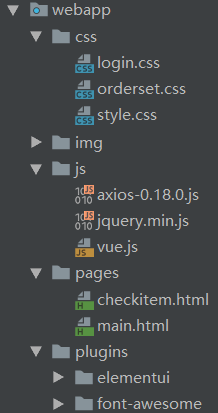
注意:后续随着项目开发还会陆续导入其他一些公共资源。
三、新增检查项
1. 完善页面 检查项管理页面对应的是checkitem.html页面,根据产品设计的原型已经完成了页面基本结构的编写, 现在需要完善页面动态效果。
1.1 弹出新增窗口
页面中已经提供了新增窗口,只是处于隐藏状态。只需要将控制展示状态的属性dialogFormVisible改为 true就可以显示出新增窗口。
新建按钮绑定的方法为handleCreate,所以在handleCreate方法中修改dialogFormVisible属性的值为 true即可。同时为了增加用户体验度,需要每次点击新建按钮时清空表单输入项。
                // 重置表单
                resetForm() {
                    this.formData = {};
                    //解决校验规则没有清除的bug
                    this.$refs['dataAddForm'].resetFields();
                },
                // 弹出添加窗口
                handleCreate() {
                    this.dialogFormVisible = true;
                    this.resetForm();
                }
1.2 输入校验-vue data中
rules: {//校验规则
                    code: [{ required: true, message: '项目编码为必填项', trigger: 'blur' }],
                    name: [{ required: true, message: '项目名称为必填项', trigger: 'blur' }]
                }
1.3 提交表单数据
点击新增窗口中的确定按钮时,触发handleAdd方法,所以需要在handleAdd方法中进行完善。
                handleAdd () {
                    //校验表单输入项是否合法
                    this.$refs['dataAddForm'].validate((valid)=>{
                        //alert(valid);//valid是校验结果true/false
                        if(valid){
                            //表单数据校验通过,发送ajax请求将表单数据提交到后台
                            // console.log(this.formData);//调试可以拿到表单里的数据
                            //response.data={data:{},flag:true,message='成功'}
                            axios.post("/checkitem/add.do",this.formData).then(response=>{

                                //判断后台返回的flag值,true表示添加操作成功,false为添加操作失败
                                if(response.data.flag){//执行成功
                                    //隐藏新增窗口
                                    this.dialogFormVisible = false;
                                    //新增成功后,重新调用分页查询方法,查询出最新的数据
                                    this.findPage();
                                    //弹出提示信息
                                    this.$message({
                                        message: response.data.message,
                                        type: 'success'
                                    });
                                }else {//执行失败
                                    this.$message.error(response.data.message);
                                }
                            });
                        }else {
                            this.$message.error("表单数据校验失败");
                            return false;//快速结束
                        }
                    });
                }
2. 后台代码
2.1 Controller
在health_backend工程中创建CheckItemController
package com.itheima.controller;

import com.alibaba.dubbo.config.annotation.Reference;
import com.itheima.constant.MessageConstant;
import com.itheima.entity.PageResult;
import com.itheima.entity.QueryPageBean;
import com.itheima.entity.Result;
import com.itheima.pojo.CheckItem;
import com.itheima.service.CheckItemService;
import org.springframework.security.access.prepost.PreAuthorize;
import org.springframework.web.bind.annotation.*;
import java.util.List;

/**
 * 检查项管理
 */
@RestController
@RequestMapping("/checkitem")
public class CheckItemController {

    @Reference //到zookeeper注册中心查找服务
    private CheckItemService checkItemService;

    //新增检查项
    @RequestMapping(value = "/add",method = RequestMethod.POST)
    public Result add(@RequestBody CheckItem checkItem){
        try{
            checkItemService.add(checkItem);
        }catch (Exception e){
            e.printStackTrace();
            return new Result(false, MessageConstant.ADD_CHECKITEM_FAIL);
        }
        return new Result(true,MessageConstant.ADD_CHECKITEM_SUCCESS);
    }

}
2.2 服务接口
在health_interface工程中创建CheckItemService接口
package com.itheima.service;

import com.itheima.entity.PageResult;
import com.itheima.entity.QueryPageBean;
import com.itheima.pojo.CheckItem;
import java.util.List;

/**
 * 检查项服务接口
 */
public interface CheckItemService {
    public void add(CheckItem checkItem);
}
2.3 服务实现类
在health_service_provider工程中创建CheckItemServiceImpl实现类
package com.itheima.service.impl;

import com.alibaba.dubbo.config.annotation.Service;
import com.github.pagehelper.Page;
import com.github.pagehelper.PageHelper;
import com.itheima.dao.CheckItemDao;
import com.itheima.entity.PageResult;
import com.itheima.entity.QueryPageBean;
import com.itheima.pojo.CheckItem;
import com.itheima.service.CheckItemService;
import org.springframework.beans.factory.annotation.Autowired;
import org.springframework.transaction.annotation.Transactional;
import java.util.List;

@Service(interfaceClass = CheckItemService.class)
@Transactional
public class CheckItemServiceImpl implements CheckItemService {

    //注入DAO对象
    @Autowired
    private CheckItemDao checkItemDao;

    //新增检查项
    @Override
    public void add(CheckItem checkItem) {
        checkItemDao.add(checkItem);
    }
}
2.4 Dao接口
在health_service_provider工程中创建CheckItemDao接口,本项目是基于Mybatis的Mapper代理技术 实现持久层操作,故只需要提供接口和Mapper映射文件,无须提供实现类
package com.itheima.dao;

import com.github.pagehelper.Page;
import com.itheima.pojo.CheckItem;
import java.util.List;

/**
 * 持久层Dao接口
 */
public interface CheckItemDao {
    public void add(CheckItem checkItem);
}
2.5 Mapper映射文件
在health_service_provider工程中创建CheckItemDao.xml映射文件,需要和CheckItemDao接口在同 一目录下(com.itheima.dao.CheckItemDao.xml)
<?xml version="1.0" encoding="UTF-8" ?>
<!DOCTYPE mapper PUBLIC "-//mybatis.org//DTD Mapper 3.0//EN" "http://mybatis.org/dtd/mybatis-3-mapper.dtd" >
<mapper namespace="com.itheima.dao.CheckItemDao">
    <!--插入检查项数据-->
    <insert id="add" parameterType="com.itheima.pojo.CheckItem">
        insert into t_checkitem(code,name,sex,age,price,type,remark,attention) values (#{code},#{name},#{sex},#{age},#{price},#{type},#{remark},#{attention})
    </insert>
</mapper>
四、检查项分页
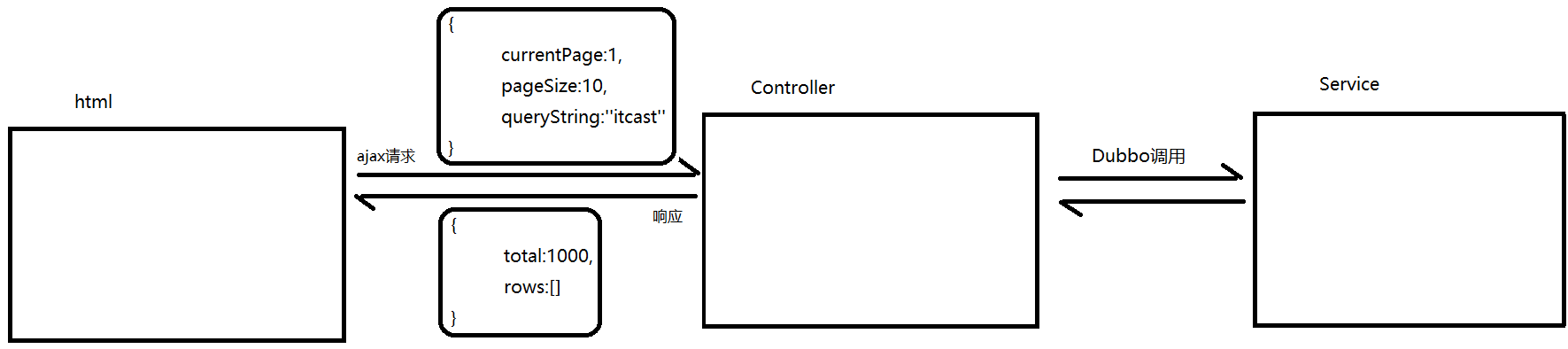
本项目所有分页功能都是基于ajax的异步请求来完成的,请求参数和后台响应数据格式都使用json数据格式。
请求参数包括页码、每页显示记录数、查询条件。
请求参数的json格式为:{currentPage:1,pageSize:10,queryString:''itcast''}
后台响应数据包括总记录数、当前页需要展示的数据集合。
响应数据的json格式为:{total:1000,rows:[]}
如下图:
1. 完善页面
1.1 定义分页相关模型数据
pagination: {//分页相关模型数据
  currentPage: 1,//当前页码
  pageSize:10,//每页显示的记录数
  total:0,//总记录数
  queryString:null//查询条件
},
dataList: [],//当前页要展示的分页列表数据
1.2 定义分页方法
在页面中提供了findPage方法用于分页查询,为了能够在checkitem.html页面加载后直接可以展示分页数据,可以在VUE提供的钩子函数created中调用findPage方法
//钩子函数,VUE对象初始化完成后自动执行
created() {
  this.findPage();
}
                //分页查询
                findPage() {
                    //发送ajax请求,提交分页相关请求参数
                    //分页参数
                    var param = {
                        currentPage:this.pagination.currentPage,//页码
                        pageSize:this.pagination.pageSize,//每页显示的记录数
                        queryString:this.pagination.queryString//查询条件
                    };
                    //请求后台
                    axios.post("/checkitem/findPage.do",param).then((response)=> {
                        //解析Controller响应回的数据,为模型数据赋值,基于VUE的双向绑定展示到页面
                        this.dataList = response.data.rows;
                        this.pagination.total = response.data.total;
                    }).catch((r)=>{
                        this.showMessage(r);
                    });

                }
                //权限不足提示
                showMessage(r){
                    if(r == 'Error: Request failed with status code 403'){
                        //权限不足
                        this.$message.error('无访问权限');
                        return;
                    }else{
                        this.$message.error('未知错误');
                        return;
                    }
                }
1.3 完善分页方法执行时机
除了在created钩子函数中调用findPage方法查询分页数据之外,当用户点击查询按钮或者点击分页条中的页码时也需要调用findPage方法重新发起查询请求。
为查询按钮绑定单击事件,调用findPage方法
<el-button @click="_findPage()" class="dalfBut">查询</el-button>

                //解决分页查询bug
                _findPage(){
                    this.pagination.currentPage = 1;
                    this.findPage();
                }
为分页条组件绑定current-change事件,此事件是分页条组件自己定义的事件,当页码改变时触发,对应的处理函数为handleCurrentChange
<el-pagination
               class="pagiantion"
               @current-change="handleCurrentChange"
               :current-page="pagination.currentPage"
               :page-size="pagination.pageSize"
               layout="total, prev, pager, next, jumper"
               :total="pagination.total">
</el-pagination>
定义handleCurrentChange方法
//切换页码
handleCurrentChange(currentPage) {
  //currentPage为切换后的页码,设置最新的页面
  this.pagination.currentPage = currentPage;
  this.findPage();
}
2. 后台代码
2.1 Controller
在CheckItemController中增加分页查询方法
    //检查项分页查询
    @PreAuthorize("hasAuthority('CHECKITEM_QUERY')")//权限校验
    @RequestMapping("/findPage")
    public PageResult findPage(@RequestBody QueryPageBean queryPageBean){
        PageResult pageResult = checkItemService.pageQuery(queryPageBean);
        return pageResult;
    }
2.2 服务接口
在CheckItemService服务接口中扩展分页查询方法
public PageResult pageQuery(QueryPageBean queryPageBean);
2.3 服务实现类
在CheckItemServiceImpl服务实现类中实现分页查询方法,基于Mybatis分页助手插件实现分页
    //条件分页查询
    @Override
    public PageResult pageQuery(QueryPageBean queryPageBean) {
        //分页查询,基于mybatis框架提供的分页助手插件完成
        PageHelper.startPage(queryPageBean.getCurrentPage(),queryPageBean.getPageSize());
        Page<CheckItem> page = checkItemDao.selectByCondition(queryPageBean.getQueryString());
        long total = page.getTotal();
        List<CheckItem> rows = page.getResult();
        return new PageResult(total,rows);
    }
2.4 Dao接口
在CheckItemDao接口中扩展分页查询方法
public Page<CheckItem> selectByCondition(String queryString);
2.5 Mapper映射文件
在CheckItemDao.xml文件中增加SQL定义
    <!--根据条件进行查询-->
    <select id="selectByCondition" parameterType="String" resultType="com.itheima.pojo.CheckItem">
        select * from t_checkitem
        <if test="value != null and value.length >0"><!--必须写value,不能写code-->
            where code = #{value} or name = #{value}
        </if>
    </select>
五、删除检查项
1. 完善页面
为了防止用户误操作,点击删除按钮时需要弹出确认删除的提示,用户点击取消则不做任何操作,用户 点击确定按钮再提交删除请求。
1.1 绑定单击事件 需要为删除按钮绑定单击事件,并且将当前行数据作为参数传递给处理函数
<el-button type="danger" size="mini" @click="handleDelete(scope.row)">删除</el-button>
1.2 弹出确认操作提示、点击确认发送请求
用户点击删除按钮会执行handleDelete方法,此处需要完善handleDelete方法,弹出确认提示信息。 ElementUI提供了$confirm方法来实现确认提示信息弹框效果;
如果用户点击确定按钮就需要发送ajax请求,并且将当前检查项的id作为参数提交到后台进行删除操作
                // 删除
                handleDelete(row) {//row其实是一个json对象,json对象的结构为{}
                    // alert(row.id);
                    this.$confirm("确认删除当前选中记录吗?","提示",{
                        type:'warning'
                    }).then(()=>{
                        //点击确定按钮,发送ajax请求,将检查项交给Controller进行处理
                        // alert('用户点击的是确定按钮');
                        axios.get("/checkitem/delete.do?id="+row.id).then((response)=>{
                            if(response.data.flag){
                                //删除成功
                                this.$message({
                                    message: response.data.message,
                                    type: 'success'
                                });
                                //调用分页,获取最新分页数据
                                this.findPage();
                            }else{
                                //删除失败
                                this.$message.error(response.data.message);
                            }
                        }).catch((r)=>{
                            this.showMessage(r);
                        });
                    }).catch(() => {
                        //点击取消按钮
                        // alert("用户点击的是取消按钮")
                        this.$message({
                            message: "操作已取消",
                            type: 'info'
                        });
                    });
                }
2. 后台代码
2.1 Controller
在CheckItemController中增加删除方法
    //删除检查项
    @RequestMapping("/delete")
    @PreAuthorize("hasAuthority('CHECKITEM_DELETE')")   //权限校验
    public Result delete(Integer id){
        try{
            checkItemService.delete(id);
        }catch (Exception e){
            e.printStackTrace();
            return new Result(false, MessageConstant.DELETE_CHECKITEM_FAIL);
        }
        return new Result(true,MessageConstant.DELETE_CHECKITEM_SUCCESS);
    }
2.2 服务接口
在CheckItemService服务接口中扩展删除方法
public void delete(Integer id);
2.3 服务实现类
注意:不能直接删除,需要判断当前检查项是否和检查组关联,如果已经和检查组进行了关联则不允许删除
    //根据ID删除检查项
    @Override
    public void delete(Integer id) {
        //判断当前检查项是否已经关联到检查组
        long count = checkItemDao.findCountByCheckItemId(id);
        if(count > 0 ){
            //当前检查项已经被关联到检查组,不允许删除
            throw new RuntimeException("当前检查项已经关联了其他的检查组,不能删除");
        }
        checkItemDao.delete(id);
    }
2.4 Dao接口
在CheckItemDao接口中扩展方法findCountByCheckItemId和delete
public long findCountByCheckItemId(Integer id);
public void delete(Integer id);
2.5 Mapper映射文件
在CheckItemDao.xml中扩展SQL语句
    <!--根据检查项ID统计数据量-->
    <select id="findCountByCheckItemId" parameterType="int" resultType="long">
        select count(*) from t_checkgroup_checkitem where checkitem_id = #{checkitem_id}
    </select>

    <delete id="delete" parameterType="int">
        delete from t_checkitem where id = #{id}
    </delete>
六、编辑检查项
1. 完善页面
用户点击编辑按钮时,需要弹出编辑窗口并且将当前记录的数据进行回显,用户修改完成后点击确定按钮将修改后的数据提交到后台进行数据库操作。
1.1 绑定单击事件
需要为编辑按钮绑定单击事件,并且将当前行数据作为参数传递给处理函数
<el-button type="primary" size="mini" @click="handleUpdate(scope.row)">编辑</el-button>
1.2 弹出编辑窗口回显数据
当前页面中的编辑窗口已经提供好了,默认处于隐藏状态。在handleUpdate方法中需要将编辑窗口展示出来,并且需要发送ajax请求查询当前检查项数据用于回显
                // 弹出编辑窗口
                handleUpdate(row) {
                    // alert(row.id);
                    this.resetForm();
                    //发送ajax请求获取检查项信息,回显数据
                    axios.get("/checkitem/findById.do?id="+row.id).then((res)=>{
                        if(res.data.flag){
                            //弹出编辑窗口
                            this.dialogFormVisible4Edit = true;
                            //进行回显,基于VUE的数据绑定实现v-model
                            this.formData = res.data.data;
                        }else {
                            //查询失败,弹出提示
                            // this.$message.error("获取数据失败,请刷新当前页面");
                            this.$message.error(res.data.message);
                        }
                    }).catch(()=>{

                    })
                }
1.3 发送请求
在编辑窗口中修改完成后,点击确定按钮需要提交请求,所以需要为确定按钮绑定事件并提供处理函数 handleEdit
<el-button type="primary" @click="handleEdit()">确定</el-button>
                //编辑
                handleEdit() {
                    //表单校验
                    this.$refs['dataEditForm'].validate((valid)=>{
                        if(valid){
                            //表单校验通过,可以提交数据
                            axios.post("/checkitem/edit.do",this.formData).then((res)=>{
                                if(res.data.flag){//执行成功
                                    this.$message({
                                        message: res.data.message,
                                        type: "success"
                                    });
                                }else{//执行失败
                                    this.$message.error(res.data.message);
                                }
                            }).finally(()=>{
                                //不管成功还是失败,都调用分页查询方法
                                this.findPage();
                                //隐藏编辑窗口
                                this.dialogFormVisible4Edit = false;
                            });
                        }else{
                            //表单校验不通过
                            this.$message.error("表单数据校验失败");
                            return false;
                        }
                    });
                }
2. 后台代码
2.1 Controller
在CheckItemController中增加编辑方法
    //根据ID查询
    @GetMapping("/findById")
    public Result findById(Integer id){
        try{
            CheckItem checkItem = checkItemService.findById(id);
            return new Result(true,MessageConstant.QUERY_CHECKITEM_SUCCESS,checkItem);
        }catch (Exception e){
            e.printStackTrace();
            return new Result(false,MessageConstant.QUERY_CHECKITEM_FAIL);
        }
    }

    @PostMapping("/edit")
    public Result edit(@RequestBody CheckItem checkItem){
        try{
            checkItemService.edit(checkItem);
        }catch (Exception e){
            return new Result(false,MessageConstant.EDIT_CHECKITEM_FAIL);
        }
        return new Result(true,MessageConstant.EDIT_CHECKITEM_SUCCESS);
    }
2.2 服务接口
在CheckItemService服务接口中扩展编辑方法
public CheckItem findById(Integer id);
public void edit(CheckItem checkItem);
2.3 服务实现类
在CheckItemServiceImpl实现类中实现编辑方法
    @Override
    public CheckItem findById(Integer id) {
        CheckItem checkItem = checkItemDao.findById(id);
        return checkItem;
    }

    @Override
    public void edit(CheckItem checkItem) {
        checkItemDao.edit(checkItem);
    }
2.4 Dao接口
在CheckItemDao接口中扩展edit方法
public CheckItem findById(Integer id);
public void edit(CheckItem checkItem);
2.5 Mapper映射文件
在CheckItemDao.xml中扩展SQL语句
    <select id="findById" parameterType="int" resultType="com.itheima.pojo.CheckItem">
        select * from t_checkitem where id = #{id}
    </select>

    <update id="edit" parameterType="com.itheima.pojo.CheckItem">
        update t_checkitem
        <set>
            <if test="code != null">
                code = #{code},
            </if>
            <if test="name != null">
                name = #{name},
            </if>
            <if test="sex != null">
                sex = #{sex},
            </if>
            <if test="age != null">
                age = #{age},
            </if>
            <if test="price != null">
                price = #{price},
            </if>
            <if test="type != null">
                type = #{type},
            </if>
            <if test="remark != null">
                remark = #{remark},
            </if>
            <if test="attention != null">
                attention = #{attention},
            </if>
        </set>
        where id = #{id}
    </update>

 浙公网安备 33010602011771号