
gitlab安装(二)
gitlab简介
gitlab是一个用于仓库管理系统的开源项目。使用git作为代码管理工具,并在此基础上搭建起来的web服务。可通过web界面进行访问公开的或私人的项目。它拥有与gitlab类似的功能,能够浏览源代码,管理权限和注释。可以管理团队对仓库的访问,它非常易于浏览提交过的代码并提供一个历史文件库。团队成员可以利用内置的简单聊天程序(wall)进行交流。它还提供了一个代码片段收集功能可以轻松实现代码复用。
常用的网站:
官网:https://about.gitlab.com/
国内镜像:https://mirrors.tuna.tsinghua.edu.cn/gitlab-ce/yum/
安装环境:
1)centos 6或者7
2)2G内存(实验) 生产(至少4G)
3)安装包:gitlab-ce-10.2.2-ce
4)禁用防火墙,关闭selinux
https://about.gitlab.com/installation/ #git官网
安装依赖
[root@gitlab ~]# yum install -y curl policycoreutils-python openssh-server
下载gitlab安装包
[root@gitlab ~]# wget https://mirrors.tuna.tsinghua.edu.cn/gitlab-ce/yum/el7/gitlab-ce-10.2.2-ce.0.el7.x86_64.rpm --no-check-certificate
rpm安装gitlab软件包
[root@gitlab ~]# rpm -ivh gitlab-ce-10.2.2-ce.0.el7.x86_64.rpm
warning: gitlab-ce-10.2.2-ce.0.el7.x86_64.rpm: Header V4 RSA/SHA1 Signature, key ID f27eab47: NOKEY
Preparing...                          ################################# [100%]
Updating / installing...
   1:gitlab-ce-10.2.2-ce.0.el7        ################################# [100%]
修改gitlab的配置文件,更改url地址为本地IP地址
[root@gitlab ~]# vim /etc/gitlab/gitlab.rb
external_url 'http://10.0.0.7'
重新进行配置
[root@gitlab ~]# gitlab-ctl reconfigure
/opt/gitlab/             # gitlab的程序安装目录
/var/opt/gitlab          # gitlab目录数据目录
/var/opt/gitlab/git-data # 存放仓库数据
查看目前gitlab所有服务运行状态
[root@gitlab ~]# gitlab-ctl status
run: gitaly: (pid 12632) 346s; run: log: (pid 12344) 382s
run: gitlab-monitor: (pid 12649) 346s; run: log: (pid 12483) 370s
run: gitlab-workhorse: (pid 12621) 347s; run: log: (pid 12298) 396s
run: logrotate: (pid 12326) 388s; run: log: (pid 12325) 388s
run: nginx: (pid 12309) 394s; run: log: (pid 12308) 394s
run: node-exporter: (pid 12395) 376s; run: log: (pid 12394) 376s
run: postgres-exporter: (pid 12676) 345s; run: log: (pid 12550) 361s
run: postgresql: (pid 12078) 430s; run: log: (pid 12077) 430s
run: prometheus: (pid 12663) 345s; run: log: (pid 12519) 363s
run: redis: (pid 12017) 436s; run: log: (pid 12016) 436s
run: redis-exporter: (pid 12505) 364s; run: log: (pid 12504) 364s
run: sidekiq: (pid 12281) 402s; run: log: (pid 12280) 402s
run: unicorn: (pid 12243) 403s; run: log: (pid 12242) 403s
nginx: #静态web服务器
gitlab-workhorse: #轻量级的反向代理服务器
logrotate: #日志文件管理工具
postgresql: #数据库
redis: #缓存数据库
sidekiq: #用于在后台执行队列任务(异步执行)。(Ruby)
unicorn: An HTTP server for Rack applications,GitLab Rails应用是托管在这个服务器上面的。(Ruby Web Server,主要使用Ruby编写)
gitlab-ctl stop # 停止gitlab服务
gitlab-ctl stop nginx # 单独停止某个服务
gitlab-ctl tail # 查看所有服务的日志
通过浏览器访问gitlab http://本机IP地址
修改gitlab的密码 最少8位
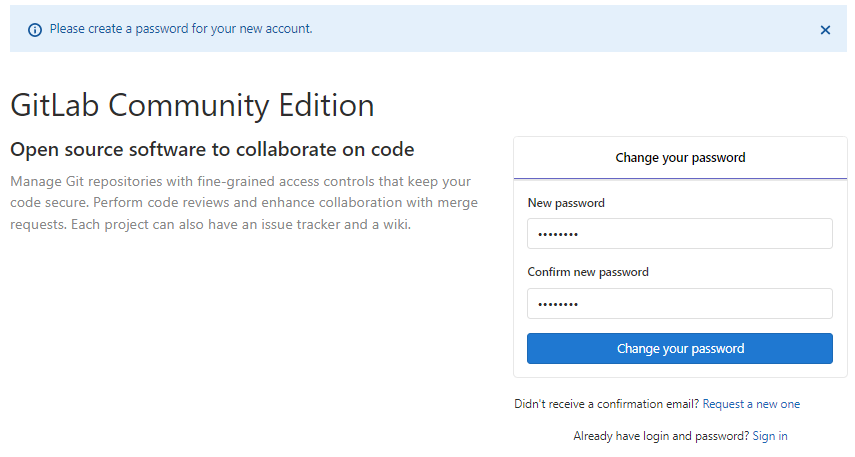
使用默认用户登录 root 12345678

 浙公网安备 33010602011771号