
vue实例配置--mixin
mixin :
简述:在 Vue 开发中,你是否曾在多个组件中编写过相同的逻辑?本文带你深入 Vue Mixin,从基础使用到高级技巧,彻底解决代码复用难题。
介绍
混入文件,提取组件实例中复用的逻辑
使用步骤
分为创建、使用两步
创建mixin文件
mixins.js 【与src同级】
export const myMixin = {
	methods : {
		introduceSelf(){
			alert("你好,我是" + this.name)
		}
	}
}
全局使用
// App.vue文件
<template>
  <div id="app">
    <button @click="introduceSelf">介绍一下自己</button>
  </div>
</template>

<script>
import Vue from "vue";
// 引入混入文件中的函数
import {myMixin} from "../mixins"
// 全局注册
Vue.mixin(myMixin)

export default {
  name: "App",
  data(){
    return {
      name : "aitty"
    }
  }
};
</script>

局部使用
<template>
  <div id="app">
    <button @click="introduceSelf">介绍一下自己</button>
  </div>
</template>

<script>
// 引入混入文件中的函数
import {myMixin} from "../mixins"

export default {
  name: "App",
  data(){
    return {
      name : "aitty"
    }
  },
  mixins:[myMixin]
};
</script>
多个 Mixin
创建mixin文件
mixins.js
export const myMixin = {
	methods : {
		introduceSelf(){
			alert("你好,我是" + this.name)
		}
	}
}

export const myMixin2 = {
    methods:{
        introduceSlefPro(){
            alert("你好,我是" + this.name + ",我的银行卡号码是.....")
        }
    }
}
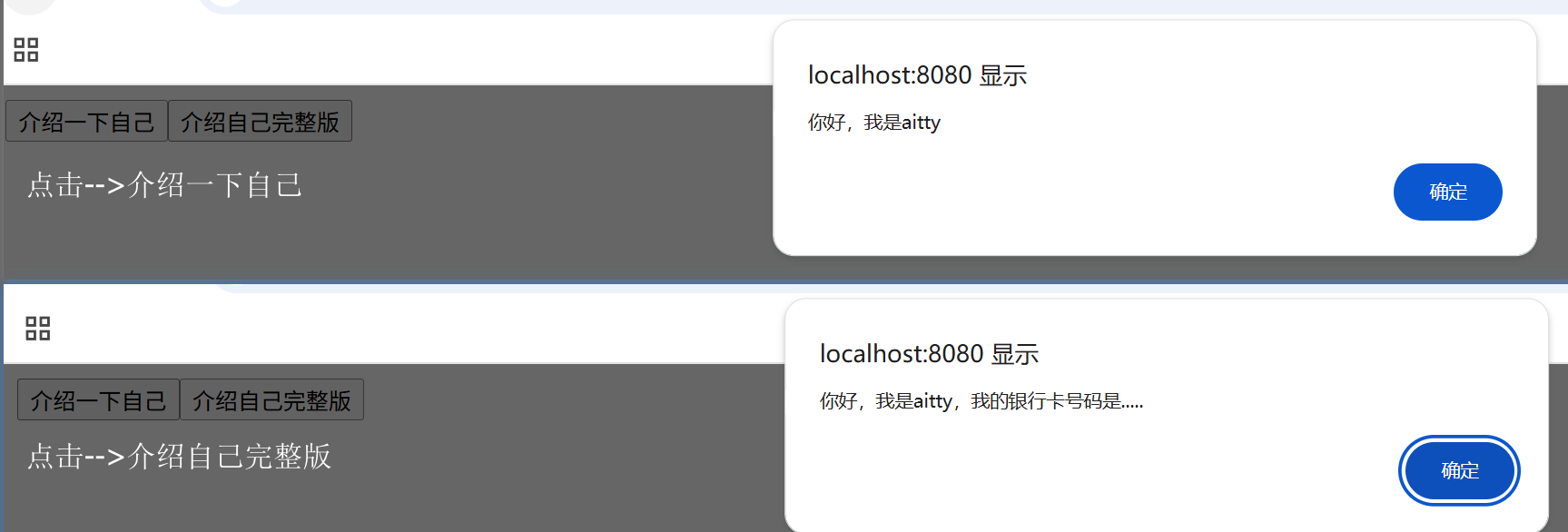
全局注册
<template>
  <div id="app">
    <button @click="introduceSelf">介绍一下自己</button>
    <button @click="introduceSlefPro">介绍自己完整版</button>
  </div>
</template>

<script>
import Vue from "vue";
// 引入混入文件中的函数
import {myMixin,myMixin2} from "../mixins"
Vue.mixin(myMixin)
Vue.mixin(myMixin2)

export default {
  name: "App",
  data(){
    return {
      name : "aitty"
    }
  }
};
</script>
更简洁的写法
<template>
  <div id="app">
    <button @click="introduceSelf">介绍一下自己</button>
    <button @click="introduceSlefPro">介绍自己完整版</button>
  </div>
</template>

<script>
import Vue from "vue";
// 引入混入文件中的函数
import {myMixin,myMixin2} from "../mixins"
// 更简洁的写法
[myMixin,myMixin2].forEach(mixin => Vue.mixin(mixin))

export default {
  name: "App",
  data(){
    return {
      name : "aitty"
    }
  }
};
</script>
局部注册
<template>
  <div id="app">
    <button @click="introduceSelf">介绍一下自己</button>
    <button @click="introduceSlefPro">介绍自己完整版</button>
  </div>
</template>

<script>
// 引入混入文件中的函数
import {myMixin,myMixin2} from "../mixins"

export default {
  name: "App",
  data(){
    return {
      name : "aitty"
    }
  },
  mixins:[myMixin,myMixin2]
};
</script>
注意:局部注册时,mixins 后面永远是一个数组,即使只有一个 mixin 也要写成 [myMixin]。
补充
mixin文件里,不止能使用办法,还能使用生命周期钩子,过滤器,计算属性等
- 生命周期钩子
- 数据(data)
- 办法(methods)
- 计算属性(computed)
- 侦听器(watch)
- 过滤器(filters)-- vue2
- 组件/指令等(vue2)
mixins.js
// mixins.js
export const userMixin = {
    data() {
      return {
        userName: '默认用户',
        loginTime: null
      }
    },

    computed: {
      userInfo() {
        return `用户: ${this.userName}`
      },
      isLoggedIn() {
        return this.loginTime !== null
      }
    },

    methods: {
      login(name) {
        this.userName = name
        this.loginTime = new Date()
      },
      logout() {
        this.userName = '默认用户'
        this.loginTime = null
      }
    },

    created() {
      console.log('用户mixin已创建')
    },

    mounted() {
      console.log('用户mixin已挂载')
    },

    filters: {
      formatTime(value) {
        if (!value) return '未登录'
        return value.toLocaleString()
      }
    }
  }
App.vue
<template>
  <div>
    <p>{{ userInfo }}</p>
    <p>登录时间: {{ loginTime | formatTime }}</p>
    <button @click="login('张三')">登录</button>
    <button @click="logout">退出</button>
  </div>
</template>

<script>
import { userMixin } from "../mixins";

export default {
  name: "App",
  mixins: [userMixin],
  mounted() {
    // 组件和mixin的钩子都会调用
    console.log("组件已挂载");
  },
};
</script>

冲突
当 mixin 和组件中的选项重复时,通常以组件为主
- 数据对象(data)- 组件优先
- 办法/计算属性/侦听器 - 组件优先
- 生命周期钩子 - 两者都执行
- 对象选项(components,directives)- 合并
数据对象(以组件为主)
mixins.js
export const myMixin = {
  data() {
    return {
      message: '来自mixin',
      count: 0
    }
  }
}
App.vue
<template>
  <div>
    <p>{{ message }}</p>
    <p>{{ count }}</p>
  </div>
</template>

<script>
import { myMixin } from "../mixins";

export default {
  name: "App",
  data(){
    return{
      message:"来自App组件",
      count : 1
    }
  },
  mixins: [myMixin]
};
</script>

办法/计算属性/侦听器(以组件为主)
mixins.js
export const myMixin = {
  methods: {
    sayHello() {
      console.log('Hello from mixin')
    }
  },
  computed: {
    fullName() {
      return 'Mixin Name'
    }
  }
}
App.vue
<template>
  <div>
    <p>{{ fullName }}</p>
    <button @click="sayHello">打招呼</button>
  </div>
</template>

<script>
import { myMixin } from "../mixins";

export default {
  name : "App",
  mixins: [myMixin],
  methods: {
    sayHello() {  // ✅ 覆盖 mixin 的 sayHello
      console.log('Hello from component')
    }
  },
  computed: {
    fullName() {  // ✅ 覆盖 mixin 的 fullName
      return 'Component Name'
    }
  }
}
</script>

生命周期钩子(两者都执行)
mixins.js
export const myMixin = {
  created() {
    console.log('Mixin created')  // 1. 先执行
  }
}
App.vue
<template>
  <div></div>
</template>

<script>
import { myMixin } from "../mixins";

export default {
  name : "App",
  mixins: [myMixin],
  created() {
    console.log('Component created')  // 2. 后执行
  }
}
</script>
控制台输出
Mixin created
main.js:15 Component created
对象选项(components、directives) - 合并
mixins.js
import AComponent from './src/components/AComponent.vue'
import BComponent from './src/components/BComponent.vue'

export const myMixin = {
  components: {
    AComponent,
    BComponent
  }
}
App.vue
<template>
  <div id="app">
    <AComponent></AComponent>
    <BComponent></BComponent>
    <CComponent></CComponent>
  </div>
</template>

<script>
import { myMixin } from "../mixins";
import DifferentComponentB from "./components/DifferentComponentB";
import CComponent from "./components/CComponent";

export default {
  name : "App",
  mixins: [myMixin],
  components: {
    BComponent: DifferentComponentB,
    CComponent // ✅ 合并到最终对象
}
}
</script>
AComponent.vue
<template>
    <h1>我是A组件</h1>
</template>

<script>
export default {
  name: "AComponent"
}
</script>
BComponent.vue
<template>
    <h1>我是B组件</h1>
</template>

<script>
export default {
  name: "BComponent"
}
</script>
DifferentComponentB.vue
<template>
    <h1>我是B组件--DifferentComponentB</h1>
</template>

<script>
export default {
  name: "DifferentComponentB"
}
</script>
CComponent.vue
<template>
    <global-component></global-component>
</template>

<script>
export default {
    name: "ChildComponent"
}
</script>


 浙公网安备 33010602011771号