
VSCode 报错,Unable to start debugging.(后面内容看图)
 今天用vs code 写 c++时,调试的时候,突然蹦出这个错误
今天用vs code 写 c++时,调试的时候,突然蹦出这个错误
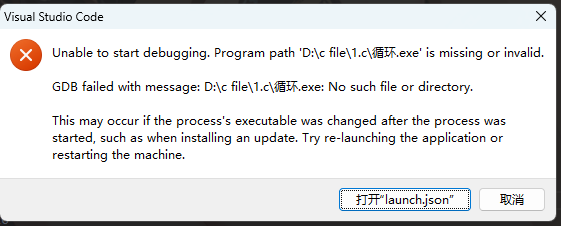
之前我也以为是lanch.json的配置出错了但我并未更改我的配置啊,经过漫长的百度的之后,发现了原来是文件名不能设置为“中文”。。。。
真的服了,以后再也不偷懒了。。。然后 我也意识到备份的重要性,下面给出lanch.jason 、tasks.json 和 c_cpp_properties.json 的代码,以备不时之需。注意path每台电脑是不一
lanch.json
{
    // Use IntelliSense to learn about possible attributes.
    // Hover to view descriptions of existing attributes.
    // For more information, visit: https://go.microsoft.com/fwlink/?linkid=830387
    "version": "0.2.0",
    "configurations": [

        {
            "name": "(gdb) Launch",
            "preLaunchTask": "g++ build active file",//调试前执行的任务,就是之前配置的tasks.json中的label字段
            "type": "cppdbg",//配置类型,只能为cppdbg
            "request": "launch",//请求配置类型,可以为launch(启动)或attach(附加)
            "program": "${fileDirname}\\${fileBasenameNoExtension}.exe",//调试程序的路径名称
            "args": [],//调试传递参数
            "stopAtEntry": false,
            "cwd": "${workspaceFolder}",
            "environment": [],
            "externalConsole": true,//true显示外置的控制台窗口,false显示内置终端
            "MIMode": "gdb",
            "miDebuggerPath": "D:\\MinGW\\mingw64\\bin\\gdb.exe",
            "setupCommands": [
                {
                    "description": "Enable pretty-printing for gdb",
                    "text": "-enable-pretty-printing",
                    "ignoreFailures": true
                }
            ]
        }
    ]
}
tasks.json
{
	"version": "2.0.0",
	"tasks": [
		{
			"type": "cppbuild",
			"label": "g++ build active file",
			"command": "D:/MinGW/mingw64/bin/g++.exe",
			"args": [
				"-fdiagnostics-color=always",
				"-g",
				"${file}",
				"-o",
				"${fileDirname}\\${fileBasenameNoExtension}.exe",
				"-fexec-charset=GBK"
			],
			"options": {
				"cwd": "D:/MinGW/mingw64/bin"
			},
			"problemMatcher": [
				"$gcc"
			],
			"group": {
				"kind": "test",
				"isDefault": true
			},
			"detail": "编译器: D:/MinGW/mingw64/bin/g++.exe"
		}
	]
}
c_cpp_properties.json
{
    "configurations": [
        {
            "name": "Win32",
            "includePath": [
                "${workspaceFolder}/**"
            ],
            "defines": [
                "_DEBUG",
                "UNICODE",
                "_UNICODE"
            ],
            "compilerPath": "D:/MinGW/mingw64/bin/g++.exe",
            "cStandard": "c17",
            "cppStandard": "c++17",
            "intelliSenseMode": "windows-gcc-x64",
            "compilerArgs": [
                "-fexec-charset=GBK"
            ]
        }
    ],
    "version": 4
}

 浙公网安备 33010602011771号