
RabbitMQ学习(二)
1.模型图
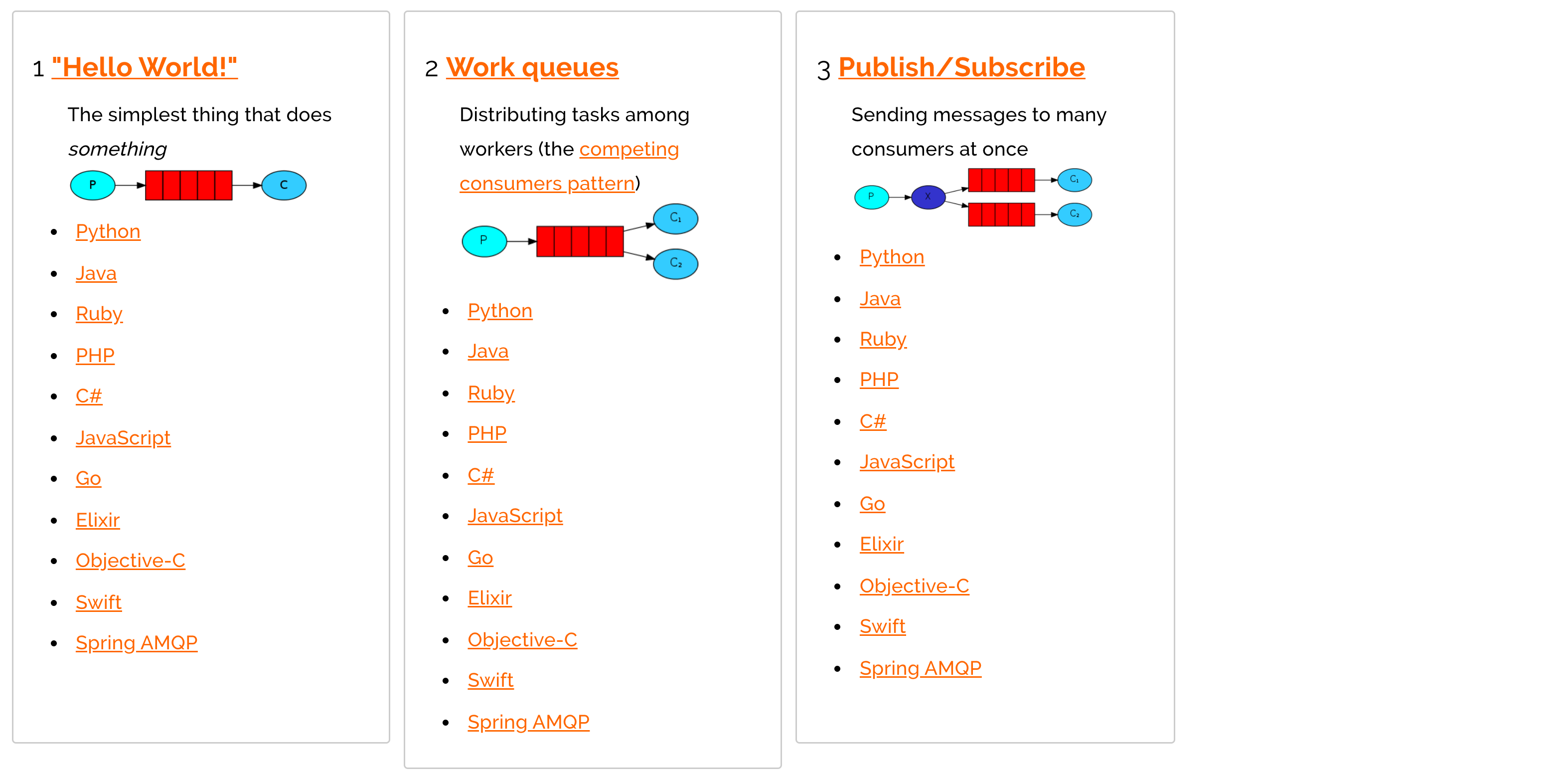
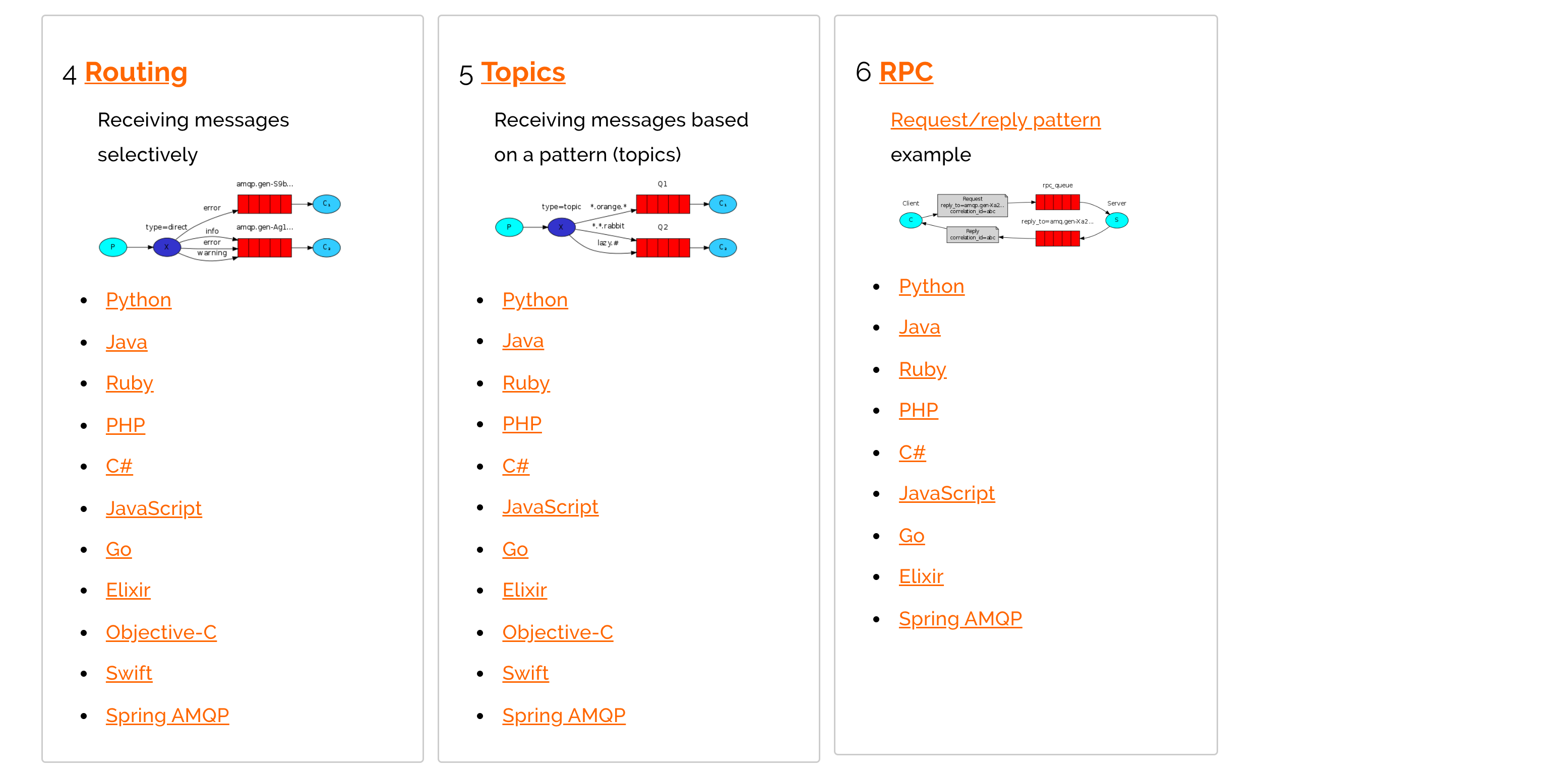
2. 例子与概述
2.1 hello(直连)
点对点的

-
P:生产者,也就是要发送消息的程序
-
C:消费者:消息的接受者,会一直等待消息到来。
-
queue:消息队列,图中红色部分。类似一个邮箱,可以缓存消息;生产者向其中投递消息,消费者从其中取出消息。
-
生产者
Channel channel = null;
        Connection connection = null;
        try {
            ConnectionFactory factory = RabbitMQClient.getInstance();
            connection = factory.newConnection();
            channel = connection.createChannel();
            //创建通道
            String queue = "hello";
            //参数1: 是否持久化  参数2:是否独占队列 参数3:是否自动删除  参数4:其他属性
            channel.queueDeclare(queue, true, false, false, null);
            //参数1:交换机
            //参数2:队列
            //参数3:额外设置,
            for (int i = 0; i < 300; i++) {
                channel.basicPublish("", queue, MessageProperties.PERSISTENT_TEXT_PLAIN, ("work rabbitmq-" + i).getBytes());
            }
        } catch (Exception e) {
            System.out.println(e.getMessage());
        } finally {
            RabbitMQClient.close(channel, connection);
        }
- 消费者
        try {
            ConnectionFactory factory = RabbitMQClient.getInstance();
            Connection connection = factory.newConnection();
            Channel channel = connection.createChannel();
            //创建通道
            String queue = "hello";
            //参数1: 是否持久化  参数2:是否独占队列 参数3:是否自动删除  参数4:其他属性
            channel.queueDeclare(queue, true, false, false, null);
            //参数1: 队列名称
            //开始消费的自动确认机制
            //回调方法
            channel.basicConsume(queue, false, new DefaultConsumer(channel) {
                //最后一个参数是拿到的参数
                @Override
                public void handleDelivery(String consumerTag, Envelope envelope, AMQP.BasicProperties properties, byte[] body) throws IOException {
                    System.out.println("body = " + new String(body));
                    channel.basicAck(envelope.getDeliveryTag(), false);
                }
            });
        } catch (Exception e) {
            System.out.println(e.getMessage());
        }
2.2 work(work queue)
Work queues,也被称为(Task queues),任务模型。当消息处理比较耗时的时候,可能生产消息的速度会远远大于消息的消费速度。长此以往,消息就会堆积越来越多,无法及时处理。此时就可以使用work 模型:让多个消费者绑定到一个队列,共同消费队列中的消息。队列中的消息一旦消费,就会消失,因此任务是不会被重复执行的。

- P:生产者:任务的发布者
- C1:消费者-1,领取任务并且完成任务,假设完成速度较慢
- C2:消费者-2:领取任务并完成任务,假设完成速度快
总结:默认情况下,RabbitMQ将按顺序将每个消息发送给下一个使用者。平均而言,每个消费者都会收到相同数量的消息。这种分发消息的方式称为循环。
这里就需要注意下RabbitMQ的消息确认机制
Doing a task can take a few seconds. You may wonder what happens if one of the consumers starts a long task and dies with it only partly done. With our current code, once RabbitMQ delivers a message to the consumer it immediately marks it for deletion. In this case, if you kill a worker we will lose the message it was just processing. We'll also lose all the messages that were dispatched to this particular worker but were not yet handled.
But we don't want to lose any tasks. If a worker dies, we'd like the task to be delivered to another worker.
一般来说,消费资源是可以多条消费的,但是这里就会出现一个问题,那就是一旦消费者宕机了,
那么消息就会丢失,所以需要一条一条处理,或者一次处理5条,但是只处理了3条,这时候,又消费
了5条数据,之前的数据自动确认就删除了
因此:
# 每次只处理一条
channel.basicQos(1);

# 关闭自动机制
 channel.basicConsume(queue, false, new DefaultConsumer(channel)
# 手动确认

 channel.basicAck(envelope.getDeliveryTag(), false);
2.3 fanout(广播)

在广播模式下,消息发送流程是这样的:
-
可以有多个消费者
-
每个 消费者有自己的queue(队列)
-
每个 队列都要绑定到Exchange(交换机)
-
生产者发送的消息,只能发送到交换机,交换机来决定要发给哪个队列,生产者无法决定。
-
交换机把消息发送给绑定过的所有队列
-
队列的消费者都能拿到消息。实现一条消息被多个消费者消费
-
生产者
Channel channel = null;
        Connection connection = null;
        try {
            ConnectionFactory factory = RabbitMQClient.getInstance();
            connection = factory.newConnection();
            //创建通道
            channel = connection.createChannel();
            //声明交换机
            String virtualHost = "logs";
            channel.exchangeDeclare(virtualHost, "fanout");
            //参数1:交换机
            //参数2:队列
            //参数3:额外设置,
            for (int i = 0; i < 5; i++) {
                channel.basicPublish(virtualHost, "", MessageProperties.PERSISTENT_TEXT_PLAIN, ("fanout rabbitmq-" + i).getBytes());
            }
        } catch (Exception e) {
            System.out.println(e.getMessage());
        } finally {
            RabbitMQClient.close(channel, connection);
        }
- 消费者
 try {
            ConnectionFactory factory = RabbitMQClient.getInstance();
            Connection connection = factory.newConnection();
            Channel channel = connection.createChannel();
            //创建通道
            String virtualHost = "logs";
            //绑定交换机
            channel.exchangeDeclare(virtualHost, "fanout");
            //创建临时队列
            String queueName = channel.queueDeclare().getQueue();
            //将临时队列绑定exchange
            //参数1:队列,参数二: 交换机
            channel.queueBind(queueName, virtualHost, "");
            //参数1: 是否持久化  参数2:是否独占队列 参数3:是否自动删除  参数4:其他属性
            channel.basicConsume(queueName, true, new DefaultConsumer(channel) {
                //最后一个参数是拿到的参数
                @Override
                public void handleDelivery(String consumerTag, Envelope envelope, AMQP.BasicProperties properties, byte[] body) throws IOException {
                    System.out.println("body2 = " + new String(body));
                }
            });
        } catch (Exception e) {
            System.out.println(e.getMessage());
        }
2.4 direct(路由)
在Fanout模式中,一条消息,会被所有订阅的队列都消费。但是,在某些场景下,我们希望不同的消息被不同的队列消费。这时就要用到Direct类型的Exchange。
在Direct模型下:
- 队列与交换机的绑定,不能是任意绑定了,而是要指定一个
RoutingKey(路由key) - 消息的发送方在 向 Exchange发送消息时,也必须指定消息的
RoutingKey。 - Exchange不再把消息交给每一个绑定的队列,而是根据消息的
Routing Key进行判断,只有队列的Routingkey与消息的Routing key完全一致,才会接收到消息
![]()

图解:
-
P:生产者,向Exchange发送消息,发送消息时,会指定一个routing key。
-
X:Exchange(交换机),接收生产者的消息,然后把消息递交给 与routing key完全匹配的队列
-
C1:消费者,其所在队列指定了需要routing key 为 error 的消息
-
C2:消费者,其所在队列指定了需要routing key 为 info、error、warning 的消息
-
生产者
Channel channel = null;
        Connection connection = null;
        try {
            ConnectionFactory factory = RabbitMQClient.getInstance();
            connection = factory.newConnection();
            //创建通道
            channel = connection.createChannel();
            //声明交换机
            String virtualHost = "logs_direct";
            //路由key
            String routingKey = "info";
            channel.exchangeDeclare(virtualHost, "direct");
            //参数1:交换机
            //参数2:队列
            //参数3:额外设置,
            for (int i = 0; i < 5; i++) {
                channel.basicPublish(virtualHost, routingKey, MessageProperties.PERSISTENT_TEXT_PLAIN, ("fanout rabbitmq-" + i).getBytes());
            }
        } catch (Exception e) {
            System.out.println(e.getMessage());
        } finally {
            RabbitMQClient.close(channel, connection);
        }
- 消费者
try {
            ConnectionFactory factory = RabbitMQClient.getInstance();
            Connection connection = factory.newConnection();
            Channel channel = connection.createChannel();
            //创建通道
            String virtualHost = "logs_direct";
            //绑定交换机
            channel.exchangeDeclare(virtualHost, "direct");
            //创建临时队列
            String queueName = channel.queueDeclare().getQueue();
            //将临时队列绑定exchange,并绑定路由key
            //参数1:队列,参数二: 交换机
            channel.queueBind(queueName, virtualHost, "info");
            channel.queueBind(queueName, virtualHost, "error");
            channel.queueBind(queueName, virtualHost, "warn");
            //参数1: 是否持久化  参数2:是否独占队列 参数3:是否自动删除  参数4:其他属性
            channel.basicConsume(queueName, true, new DefaultConsumer(channel) {
                //最后一个参数是拿到的参数
                @Override
                public void handleDelivery(String consumerTag, Envelope envelope, AMQP.BasicProperties properties, byte[] body) throws IOException {
                    System.out.println("body1 = " + new String(body));
                }
            });
        } catch (Exception e) {
            System.out.println(e.getMessage());
        }
2.5 topic(动态路由)
Topic类型的Exchange与Direct相比,都是可以根据RoutingKey把消息路由到不同的队列。只不过Topic类型Exchange可以让队列在绑定Routing key 的时候使用通配符!这种模型Routingkey 一般都是由一个或多个单词组成,多个单词之间以”.”分割,例如: item.insert

使用
# 统配符
		* (star) can substitute for exactly one word.    匹配不多不少恰好1个词
		# (hash) can substitute for zero or more words.  匹配一个或多个词
# 如:
		audit.#    匹配audit.irs.corporate或者 audit.irs 等
    audit.*   只能匹配 audit.irs
- 生产者
Channel channel = null;
        Connection connection = null;
        try {
            ConnectionFactory factory = RabbitMQClient.getInstance();
            connection = factory.newConnection();
            //创建通道
            channel = connection.createChannel();
            //声明交换机
            String virtualHost = "logs_direct";
            //路由key
            String routingKey = "info";
            channel.exchangeDeclare(virtualHost, "direct");
            //参数1:交换机
            //参数2:队列
            //参数3:额外设置,
            for (int i = 0; i < 5; i++) {
                channel.basicPublish(virtualHost, routingKey, MessageProperties.PERSISTENT_TEXT_PLAIN, ("fanout rabbitmq-" + i).getBytes());
            }
        } catch (Exception e) {
            System.out.println(e.getMessage());
        } finally {
            RabbitMQClient.close(channel, connection);
        }
- 消费者
try {
            ConnectionFactory factory = RabbitMQClient.getInstance();
            Connection connection = factory.newConnection();
            Channel channel = connection.createChannel();
            //创建通道
            String virtualHost = "logs_direct";
            //绑定交换机
            channel.exchangeDeclare(virtualHost, "direct");
            //创建临时队列
            String queueName = channel.queueDeclare().getQueue();
            //将临时队列绑定exchange,并绑定路由key
            //参数1:队列,参数二: 交换机
            channel.queueBind(queueName, virtualHost, "info");
            channel.queueBind(queueName, virtualHost, "error");
            channel.queueBind(queueName, virtualHost, "warn");
            //参数1: 是否持久化  参数2:是否独占队列 参数3:是否自动删除  参数4:其他属性
            channel.basicConsume(queueName, true, new DefaultConsumer(channel) {
                //最后一个参数是拿到的参数
                @Override
                public void handleDelivery(String consumerTag, Envelope envelope, AMQP.BasicProperties properties, byte[] body) throws IOException {
                    System.out.println("body1 = " + new String(body));
                }
            });
        } catch (Exception e) {
            System.out.println(e.getMessage());
        }
springboot整合

 浙公网安备 33010602011771号