

10.mysql-主从服务-M-S+M-M+M-S-S
MySQL主从服务
MySQL Replication
Replication介绍
Replication可以实现将数据从一台数据库服务器(master)复制到一或多台数据库服务器(slave)
默认情况下属于异步复制,无需维持长连接
通过配置,可以复制所有的库或者几个库,甚至库中的一些表
是MySQL内建的,本身自带的
Replication原理
简单的说就是master将数据库的改变写入二进制日志,slave同步这些二进制日志,并根据这些二进制日志进行数据操作
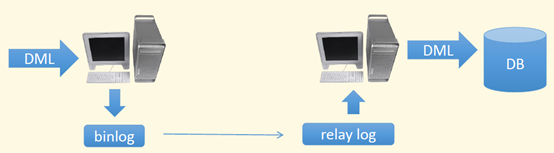
DML:SQL操作语句,update, insert,delete
Relay log :中继日志
Replication作用
1、Fail Over 故障切换
2、Backup Server 备份服务,无法对SQL语句执行产生的故障恢复(使用SQL语句删除时,主从都将删除。)
3、High Performance高性能,可以多台slave,实现读写分离
Replication如何工作
示例图:
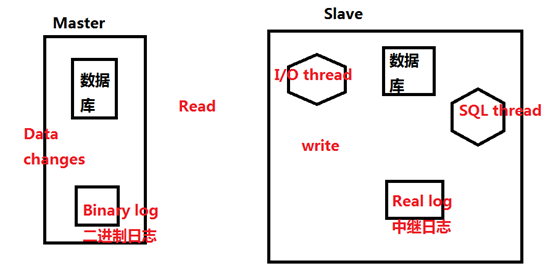
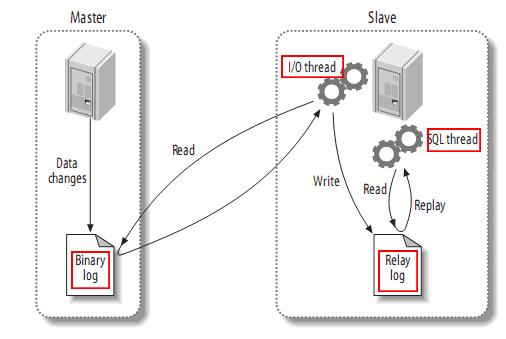
mysql主从复制中:
第一步:master记录二进制日志。在每个事务更新数据完成之前,master在二进制日志记录这些改变。MySQL将事务写入二进制日志,即使事务中的语句都是交叉执行的。在事件写入二进制日志完成后,master通知存储引擎提交事务。
第二步:slave将master的binary log拷贝到它自己的中继日志。首先,slave开始一个工作线程——I/O线程。I/O线程在master上打开一个普通的连接,然后开始binlog dump process。Binlog dump process从master的二进制日志中读取事件,如果已经执行完master产生的所有文件,它会睡眠并等待master产生新的事件。I/O线程将这些事件写入中继日志。
第三步:SQL slave thread(SQL从线程)处理该过程的最后一步。SQL线程从中继日志读取事件,并重新执行其中的事件而更新slave的数据,使其与master中的数据一致。
注意:首先Master服务中会将改变数据的记录(date changes)存放到二进制日志(Binary log)中。Slave服务中I/O thread将会从Master的二进制日志(Binary log)中拉去记录(这些记录就是SQL语句)并同步到中继日志(Real log)中。再由SQL thread将中继日志记录执行一遍,由此数据从master中同步到slave中。
主从同步,是从服务器或中继服务器从主服务器中抓取二进制日志的。
Replication常见方案
One master and Muti salve 一主多备

一般用来做读写分离的,master写,其他slave读,这种架构最大问题I/O压力集中
在Master上<多台同步影响IO>
M-S-S
使用一台slave作为中继,分担Master的压力,slave中继需要开启bin-log,并配置log-slave-updates
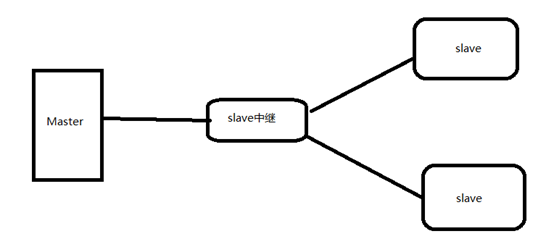
Slave中继可使用Black-hole存储引擎,不会把数据存储到磁盘,只记录二进制日志
M-M 双主互备 (互为主从)
很多人误以为这样可以做到MySQL负载均衡,实际没什么好处,每个服务器需要做同样的同步更新,破坏了事物的隔离性和数据的一致性
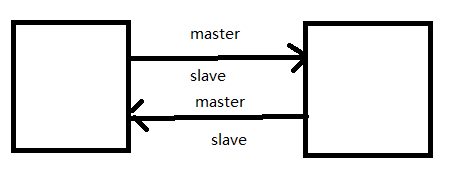
M-M-M
监控三台机器互相做对方的master
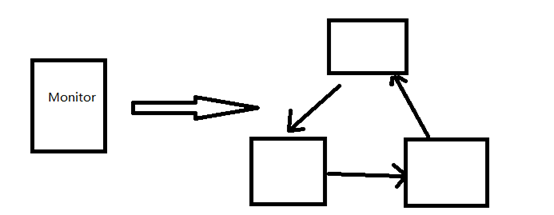
天生的缺陷:复制延迟,slave上同步要慢于master,如果大并发的情况那延迟更严重
Mysql在5.6已经自身可以实现fail over故障切换
One slave Muti master 一从对多主
好处:节省成本,将多个master数据自动化整合
缺陷:对库和表数据的修改较多
部署mysql主从同步(M-S模型)
只能从master中同步到slave中,不能从slave中同步到master上。
准备环境
|
主机名 |
IP |
系统/MySQL版本 |
角色 |
|
root@131-server ~ |
192.168.234.131 |
CentOS7.6/5.7.30 |
Master |
|
root@130-client ~ |
192.168.234.130 |
CentOS7.6/5.7.30 |
slave |
模式:C/S架构
端口3306
master服务器
创建数据库及表
[root@131-server ~]# mysql -uroot –p
mysql> create database server_db;
Query OK, 1 row affected (0.01 sec)
mysql> use master_db;
Database changed
mysql> create table server_tb(id int(5), name varchar(20), age int(5), gender enum('W','M') default 'M');
Query OK, 0 rows affected, 2 warnings (0.02 sec)
配置slave授权并刷新权限
[root@131-server ~]# mysql -uroot -p
Enter password:
告诉master它可以被某个用户、某个地址或地址段的slave抓取二进制日志。
mysql> grant replication slave on *.* to 'slave'@'192.168.234.130' identified by "3edc#EDC";
Query OK, 0 rows affected, 1 warning (0.00 sec)
sql> flush privileges;
Query OK, 0 rows affected (0.00 sec)
注意:在mysql8.0.20中此授权语句不能使用。
解释:
*.*:表示某个数据库下的某个表;*.*表示所有数据库下的所有表
'slave'@'192.168.234.130':slave表示从服务器端的拷贝二进制日志的用户名;192.168.234.130表示从服务器地址,也可以是地址段如:192.168.234.%。
identified by "3edc#EDC":表示为从服务器端拷贝二进制日志的用户名设置密码。
修改master中/etc/my.cnf配置文件
[root@131-server ~]# vim /etc/my.cnf
在文件最后根据需求添加:
#master_slave
#定义master服务的二进制名称
log-bin=mysql-bin-master
#启用数据库的ID,ID号不能重复.
server-id=1
#设置需要同步的数据库(如果要同步多个库,可将binlog-do-db此行写多次。一般生产环境只同步一个数据库。)
binlog-do-db=server_db
#设置不需要同步的数据库(不能同步mysql这个库,因为每个mysql的权限设置都不一致,如果同步将会出现错误!)
binlog-ignore-db=mysql
其他选项:
#控制数据库的binlog刷到磁盘上去,0 不控制,性能最好,1每次事物提交都会刷到日志文件中,性能最差,最安全
sync_binlog=1
#binlog日志格式,mysql默认采用statement,建议使用mixed
binlog_format=mixed
#binlog过期清理时间
expire_logs_days=7
#binlog每个日志文件大小
max_binlog_size=100m
#binlog缓存值大小
binlog_cache_size=4m
#最大binlog缓存值
max_binlog_cache_size=512m
#自增值的偏移量
auto-increment-offset=1
#自增值的自增量
auto-increment-increment=1
#跳过从数据库错误
slave-skip-errors=all
重启mysql服务使/etc/my.cnf配置生效
[root@131-server ~]# systemctl restart mysqld
查看master状态
mysql> show master status \G
*************************** 1. row ***************************
File: mysql-bin-master.000001
Position: 154
Binlog_Do_DB: master_db
Binlog_Ignore_DB: mysql
Executed_Gtid_Set:
1 row in set (0.00 sec)
开启二进制日志同步
默认情况二进制日志同步是自动开启的,保险起见可以再次开启。
mysql> set sql_log_bin=on;
Query OK, 0 rows affected (0.01 sec)
关闭二进制日志同步
mysql> set sql_log_bin=off;
Query OK, 0 rows affected (0.00 sec)
查看二进制日志状态
mysql> show binlog events \G
*************************** 1. row ***************************
Log_name: mysql-bin-master.000001
Pos: 4
Event_type: Format_desc
Server_id: 1
End_log_pos: 123
Info: Server ver: 5.7.30-log, Binlog ver: 4
*************************** 2. row ***************************
Log_name: mysql-bin-master.000001
Pos: 123
Event_type: Previous_gtids
Server_id: 1
End_log_pos: 154
Info:
2 rows in set (0.00 sec)
从master中导出数据库
做主从同步前,需要保持master与slave两者数据一致。
[root@131-server ~]# mysqldump -uroot -p -B server_db > server_db.sql
[root@131-server ~]# scp server_db.sql root@192.168.234.130:/root
The authenticity of host '192.168.234.130 (192.168.234.130)' can't be established.
ECDSA key fingerprint is SHA256:aWS4iiSS+zdq8KnQoQTWGgfbrOkzXLzq1hVIQIsmqPU.
ECDSA key fingerprint is MD5:65:e6:cb:b1:e7:92:de:6e:9e:f7:79:d5:2d:88:09:bb.
Are you sure you want to continue connecting (yes/no)? yes
root@192.168.234.130's password:
server_db.sql 100% 2043 1.1MB/s 00:00
[root@131-server ~]#
slave服务器
测试slave能否登录master
[root@130-client ~]# mysql -uslave -p -h192.168.234.131
Enter password:
Welcome to the MySQL monitor. Commands end with ; or \g.
Your MySQL connection id is 4
Server version: 5.7.30-log MySQL Community Server (GPL)
Copyright (c) 2000, 2020, Oracle and/or its affiliates. All rights reserved.
Oracle is a registered trademark of Oracle Corporation and/or its
affiliates. Other names may be trademarks of their respective
owners.
Type 'help;' or '\h' for help. Type '\c' to clear the current input statement.
mysql>
如果不能登录成功,可能是没有刷新权限表。
master服务器中刷新权限表;
mysql> flush privileges;
Query OK, 0 rows affected (0.01 sec)
在slave中导入数据库
[root@130-client ~]# mysql -uroot -p
Enter password:
Welcome to the MySQL monitor. Commands end with ; or \g.
Your MySQL connection id is 3
Server version: 5.7.30 MySQL Community Server (GPL)
Copyright (c) 2000, 2020, Oracle and/or its affiliates. All rights reserved.
Oracle is a registered trademark of Oracle Corporation and/or its
affiliates. Other names may be trademarks of their respective
owners.
Type 'help;' or '\h' for help. Type '\c' to clear the current input statement.
mysql> source /root/server_db.sql
Query OK, 0 rows affected (0.00 sec)
Query OK, 0 rows affected (0.00 sec)
Query OK, 0 rows affected (0.00 sec)
Query OK, 0 rows affected (0.00 sec)
Query OK, 0 rows affected (0.00 sec)
Query OK, 0 rows affected (0.00 sec)
修改slave中/etc/my.cnf配置文件
slave中无须配置二进制日志,如果做中继slave时必须配置log-bin=mysql-bin-slave
#slave_master
#启用数据库的ID,ID号不能重复.
server-id=2
重启mysql服务使/etc/my.cnf配置生效
[root@130-client ~]# systemctl restart mysqld
将主从同步账号密码写入数据库,并刷新权限
root@130-client ~]# mysql -uroot -p
Enter password:
告诉slave,它的master地址、用户名、密码。
mysql> change master to master_host='192.168.234.131',master_user='slave',master_password='3edc#EDC';
Query OK, 0 rows affected, 2 warnings (0.01 sec)
开启slave服务
mysql> start slave;
Query OK, 0 rows affected (0.00 sec)
关闭slave服务
mysql> stop slave;
Query OK, 0 rows affected (0.00 sec)
开启二进制日志同步功能
mysql> set sql_log_bin=on;
Query OK, 0 rows affected (0.00 sec)
查看主从同步状态
mysql> show slave status\G
*************************** 1. row ***************************
Slave_IO_State: Waiting for master to send event
Master_Host: 192.168.234.131 #master地址
Master_User: slave #master用户名
Master_Port: 3306 #master端口
Connect_Retry: 60
Master_Log_File: mysql-bin-master.000008
Read_Master_Log_Pos: 154
Relay_Log_File: 130-client-relay-bin.000009
Relay_Log_Pos: 381
Relay_Master_Log_File: mysql-bin-master.000008
Slave_IO_Running: Yes #物理通信状态
Slave_SQL_Running: Yes #SQL同步状态
Replicate_Do_DB:
Replicate_Ignore_DB:
Replicate_Do_Table:
Replicate_Ignore_Table:
Replicate_Wild_Do_Table:
Replicate_Wild_Ignore_Table:
Last_Errno: 0
Last_Error:
Skip_Counter: 0
Exec_Master_Log_Pos: 154
Relay_Log_Space: 820
Until_Condition: None
Until_Log_File:
Until_Log_Pos: 0
Master_SSL_Allowed: No
Master_SSL_CA_File:
Master_SSL_CA_Path:
Master_SSL_Cert:
Master_SSL_Cipher:
Master_SSL_Key:
Seconds_Behind_Master: 0
Master_SSL_Verify_Server_Cert: No
Last_IO_Errno: 0 #如有错误将在此处显示
Last_IO_Error:
Last_SQL_Errno: 0
Last_SQL_Error:
Replicate_Ignore_Server_Ids:
Master_Server_Id: 1
Master_UUID: 995efba9-4803-11eb-bcdc-000c2922b449
Master_Info_File: /var/lib/mysql/master.info
SQL_Delay: 0
SQL_Remaining_Delay: NULL
Slave_SQL_Running_State: Slave has read all relay log; waiting for more updates
Master_Retry_Count: 86400
Master_Bind:
Last_IO_Error_Timestamp:
Last_SQL_Error_Timestamp:
Master_SSL_Crl:
Master_SSL_Crlpath:
Retrieved_Gtid_Set:
Executed_Gtid_Set:
Auto_Position: 0
Replicate_Rewrite_DB:
Channel_Name:
Master_TLS_Version:
1 row in set (0.00 sec)
插入数据测试
master
mysql> insert into server_tb values(3,'wangquanzizhan',27,'M');
Query OK, 1 row affected (0.00 sec)
mysql> select * from server_tb where id=3;
+------+----------------+------+--------+
| id | name | age | gender |
+------+----------------+------+--------+
| 3 | wangquanzizhan | 27 | M |
+------+----------------+------+--------+
1 row in set (0.00 sec)
slave
mysql> select * from server_tb where id=3;
+------+----------------+------+--------+
| id | name | age | gender |
+------+----------------+------+--------+
| 3 | wangquanzizhan | 27 | M |
+------+----------------+------+--------+
1 row in set (0.00 sec)
排错思路
1.master/slave中二进制日志同步功能没有开启。
2.iptables防火墙的端口策略没有开放。
3.对应的master/slave的IP地址填写错误。
4.master/slave的数据库表结构不一致。
部署mysql主主双向主从同步(M-M模型)
master与slave双向同步。
准备环境
|
主机名 |
IP |
系统/MySQL版本 |
角色 |
|
root@131-server ~ |
192.168.234.131 |
CentOS7.6/5.7.30 |
Master |
|
root@130-client ~ |
192.168.234.130 |
CentOS7.6/5.7.30 |
slave |
模式:C/S架构
端口3306
131-server添加配置
创建数据库即表
[root@131-server ~]# mysql -uroot -p
Enter password:
Welcome to the MySQL monitor. Commands end with ; or \g.
Your MySQL connection id is 8
Server version: 5.7.30 MySQL Community Server (GPL)
Copyright (c) 2000, 2020, Oracle and/or its affiliates. All rights reserved.
Oracle is a registered trademark of Oracle Corporation and/or its
affiliates. Other names may be trademarks of their respective
owners.
Type 'help;' or '\h' for help. Type '\c' to clear the current input statement.
mysql> create database msdata;
Query OK, 1 row affected (0.00 sec)
mysql> use msdata;
Database changed
mysql> create table mstable (id int(5),name varchar(20));
Query OK, 0 rows affected (0.08 sec)
配置slave授权并刷新权限
告诉131,它的二进制日志可以被130地址的wangbin用户抓取。
mysql> grant replication slave on *.* to 'wangbin'@'192.168.234.130' identified by '3edc#EDC';
Query OK, 0 rows affected, 1 warning (0.00 sec)
mysql> flush privileges;
Query OK, 0 rows affected (0.01 sec)
修改/etc/my.cnf配置文件
[root@131-server ~]# vim /etc/my.cnf
添加如下内容
#master-master
log-bin = mysql-bin-master
server-id = 110
binlog-do-db = msdata
binlog-ignore-db = mysql
重启mysql使/etc/my.cnf配置文件生效
[root@131-server ~]# systemctl restart mysqld
130-client添加配置
必须使两个服务器的mysql为同一版本,表结构一致。
131中导出数据库并传入130
[root@131-server ~]# mysqldump -uroot -p -B msdata > msdata.sql
Enter password:
[root@131-server ~]# scp msdata.sql root@192.168.234.130:/root
The authenticity of host '192.168.234.130 (192.168.234.130)' can't be established.
ECDSA key fingerprint is SHA256:aWS4iiSS+zdq8KnQoQTWGgfbrOkzXLzq1hVIQIsmqPU.
ECDSA key fingerprint is MD5:65:e6:cb:b1:e7:92:de:6e:9e:f7:79:d5:2d:88:09:bb.
Are you sure you want to continue connecting (yes/no)? yes
Warning: Permanently added '192.168.234.130' (ECDSA) to the list of known hosts.
root@192.168.234.130's password:
msdata.sql 100% 1950 933.9KB/s 00:00
130数据库导入
[root@130-client ~]# mysql -uroot -p
Enter password:
Welcome to the MySQL monitor. Commands end with ; or \g.
Your MySQL connection id is 6
Server version: 5.7.30 MySQL Community Server (GPL)
Copyright (c) 2000, 2020, Oracle and/or its affiliates. All rights reserved.
Oracle is a registered trademark of Oracle Corporation and/or its
affiliates. Other names may be trademarks of their respective
owners.
Type 'help;' or '\h' for help. Type '\c' to clear the current input statement.
mysql> source /root/msdata.sql
Query OK, 0 rows affected (0.00 sec)
Query OK, 0 rows affected (0.00 sec)
Query OK, 0 rows affected (0.00 sec)
配置slave授权并刷新权限
告诉130,它的二进制日志可以被131地址的changmengka用户抓取。
mysql> grant replication slave on *.* to 'changmengka'@'192.168.234.131' identified by '4rfv$RFV';
Query OK, 0 rows affected, 1 warning (0.00 sec)
mysql> flush privileges;
Query OK, 0 rows affected (0.01 sec)
修改/etc/my.cnf配置文件
[root@130-client ~]# vim /etc/my.cnf
添加如下内容:
#master-master
log-bin = mysql-bin-slave
server-id = 120
binlog-do-db = msdata
binlog-ignore-db = mysql
重启mysql使/etc/my.cnf配置文件生效
[root@130-client ~]# systemctl restart mysqld
131-server添加配置
将主从同步账号密码写入数据库,并刷新权限
告诉131,它的master地址是130,用户是130上的changmengka
change master to master_host='192.168.234.130',master_user='changmengka',master_password='4rfv$RFV';
Query OK, 0 rows affected, 2 warnings (0.01 sec)
mysql> flush privileges;
Query OK, 0 rows affected (0.00 sec)
查看master状态
mysql> show master status \G
*************************** 1. row ***************************
File: mysql-master.000001
Position: 154
Binlog_Do_DB: msdata
Binlog_Ignore_DB: mysql
Executed_Gtid_Set:
1 row in set (0.00 sec)
开启slave功能
mysql> start slave;
Query OK, 0 rows affected (0.00 sec)
查看slave状态
mysql> show slave status \G
*************************** 1. row ***************************
Slave_IO_State: Waiting for master to send event
Master_Host: 192.168.234.130
Master_User: changmengka
Master_Port: 3306
Connect_Retry: 60
Master_Log_File: mysql-slave.000001
Read_Master_Log_Pos: 306
Relay_Log_File: 131-server-relay-bin.000002
Relay_Log_Pos: 523
Relay_Master_Log_File: mysql-slave.000001
Slave_IO_Running: Yes
Slave_SQL_Running: Yes
Replicate_Do_DB:
Replicate_Ignore_DB:
Replicate_Do_Table:
Replicate_Ignore_Table:
Replicate_Wild_Do_Table:
Replicate_Wild_Ignore_Table:
Last_Errno: 0
Last_Error:
Skip_Counter: 0
Exec_Master_Log_Pos: 306
Relay_Log_Space: 735
Until_Condition: None
Until_Log_File:
Until_Log_Pos: 0
Master_SSL_Allowed: No
Master_SSL_CA_File:
Master_SSL_CA_Path:
Master_SSL_Cert:
Master_SSL_Cipher:
Master_SSL_Key:
Seconds_Behind_Master: 0
Master_SSL_Verify_Server_Cert: No
Last_IO_Errno: 0
Last_IO_Error:
Last_SQL_Errno: 0
Last_SQL_Error:
Replicate_Ignore_Server_Ids:
Master_Server_Id: 120
Master_UUID: c9d20b75-4803-11eb-b4f6-000c2908cb00
Master_Info_File: /var/lib/mysql/master.info
SQL_Delay: 0
SQL_Remaining_Delay: NULL
Slave_SQL_Running_State: Slave has read all relay log; waiting for more updates
Master_Retry_Count: 86400
Master_Bind:
Last_IO_Error_Timestamp:
Last_SQL_Error_Timestamp:
Master_SSL_Crl:
Master_SSL_Crlpath:
Retrieved_Gtid_Set:
Executed_Gtid_Set:
Auto_Position: 0
Replicate_Rewrite_DB:
Channel_Name:
Master_TLS_Version:
1 row in set (0.00 sec)
130-client添加配置
将主从同步账号密码写入数据库,并刷新权限
告诉130,它的master地址是131,用户是131上的wangbin
mysql> change master to master_host='192.168.234.131',master_user='wangbin',master_password='3edc#EDC';
Query OK, 0 rows affected, 2 warnings (0.01 sec)
mysql> flush privileges;
Query OK, 0 rows affected (0.00 sec)
查看master状态
mysql> show master status \G
*************************** 1. row ***************************
File: mysql-slave.000001
Position: 306
Binlog_Do_DB: msdata
Binlog_Ignore_DB: mysql
Executed_Gtid_Set:
1 row in set (0.00 sec)
开启slave功能
mysql> start slave;
Query OK, 0 rows affected (0.00 sec)
查看slave状态
mysql> show slave status \G
*************************** 1. row ***************************
Slave_IO_State: Waiting for master to send event
Master_Host: 192.168.234.131
Master_User: wangbin
Master_Port: 3306
Connect_Retry: 60
Master_Log_File: mysql-master.000001
Read_Master_Log_Pos: 154
Relay_Log_File: 130-client-relay-bin.000002
Relay_Log_Pos: 373
Relay_Master_Log_File: mysql-master.000001
Slave_IO_Running: Yes
Slave_SQL_Running: Yes
Replicate_Do_DB:
Replicate_Ignore_DB:
Replicate_Do_Table:
Replicate_Ignore_Table:
Replicate_Wild_Do_Table:
Replicate_Wild_Ignore_Table:
Last_Errno: 0
Last_Error:
Skip_Counter: 0
Exec_Master_Log_Pos: 154
Relay_Log_Space: 585
Until_Condition: None
Until_Log_File:
Until_Log_Pos: 0
Master_SSL_Allowed: No
Master_SSL_CA_File:
Master_SSL_CA_Path:
Master_SSL_Cert:
Master_SSL_Cipher:
Master_SSL_Key:
Seconds_Behind_Master: 0
Master_SSL_Verify_Server_Cert: No
Last_IO_Errno: 0
Last_IO_Error:
Last_SQL_Errno: 0
Last_SQL_Error:
Replicate_Ignore_Server_Ids:
Master_Server_Id: 110
Master_UUID: 995efba9-4803-11eb-bcdc-000c2922b449
Master_Info_File: /var/lib/mysql/master.info
SQL_Delay: 0
SQL_Remaining_Delay: NULL
Slave_SQL_Running_State: Slave has read all relay log; waiting for more updates
Master_Retry_Count: 86400
Master_Bind:
Last_IO_Error_Timestamp:
Last_SQL_Error_Timestamp:
Master_SSL_Crl:
Master_SSL_Crlpath:
Retrieved_Gtid_Set:
Executed_Gtid_Set:
Auto_Position: 0
Replicate_Rewrite_DB:
Channel_Name:
Master_TLS_Version:
1 row in set (0.00 sec)
插入数据测试
在131上insert into数据,在130上select数据
131上
mysql> use msdata
Reading table information for completion of table and column names
You can turn off this feature to get a quicker startup with -A
Database changed
mysql> insert into mstable values(1,'wangbin');
Query OK, 1 row affected (0.00 sec)
mysql> select * from mstable;
+------+---------+
| id | name |
+------+---------+
| 1 | wangbin |
+------+---------+
1 row in set (0.00 sec)
130上
mysql> use msdata
Reading table information for completion of table and column names
You can turn off this feature to get a quicker startup with -A
Database changed
mysql> select * from mstable;
+------+---------+
| id | name |
+------+---------+
| 1 | wangbin |
+------+---------+
1 row in set (0.01 sec)
在130上insert into数据,在131上select数据
130上
mysql> insert into mstable values(2,'changmengka');
Query OK, 1 row affected (0.00 sec)
mysql> select * from mstable;
+------+-------------+
| id | name |
+------+-------------+
| 1 | wangbin |
| 2 | changmengka |
+------+-------------+
2 rows in set (0.00 sec)
131上
mysql> select * from mstable;
+------+-------------+
| id | name |
+------+-------------+
| 1 | wangbin |
| 2 | changmengka |
+------+-------------+
2 rows in set (0.00 sec)
排错思路
1.网络不通
2.账户密码错误
3.防火墙
4.mysql配置文件问题
5.连接服务器时语法
6.主服务器mysql权限
部署mysql一主一中继一从主从同步(M-S-S)
一台为主,一台为中继,一台为从,中继同步。
环境准备
|
主机名 |
IP |
系统/MySQL版本 |
角色 |
|
root@131-server ~ |
192.168.234.131 |
CentOS7.6/5.7.30 |
Master |
|
root@130-client ~ |
192.168.234.130 |
CentOS7.6/5.7.30 |
Slave |
|
root@129-relay ~ |
192.168.234.129 |
CentOS7.6/5.7.30 |
Relay |
131-server
创建数据库及表
[root@131-server ~]# mysql -uroot -p
Enter password:
Welcome to the MySQL monitor. Commands end with ; or \g.
Your MySQL connection id is 8
Server version: 5.7.30 MySQL Community Server (GPL)
Copyright (c) 2000, 2020, Oracle and/or its affiliates. All rights reserved.
Oracle is a registered trademark of Oracle Corporation and/or its
affiliates. Other names may be trademarks of their respective
owners.
Type 'help;' or '\h' for help. Type '\c' to clear the current input statement.
mysql> create database mssdata;
Query OK, 1 row affected (0.01 sec)
mysql> use mssdata;
Database changed
mysql> create table msstable(id int(5), name varchar(20));
Query OK, 0 rows affected (0.03 sec)
配置slave授权并刷新权限
告诉131,它的二进制日志可以被129的chang用户抓取。
mysql> grant replication slave on *.* to 'chang'@'192.168.234.129' identified by '4rfv$RFV';
Query OK, 0 rows affected, 1 warning (0.00 sec)
mysql> flush privileges;
Query OK, 0 rows affected (0.01 sec)
修改/etc/my.cnf配置文件
[root@131-server ~]# vim /etc/my.cnf
添加如下内容
#M-S-S
server-id = 110
binlog-do-db = mssdata
binlog-ignore-db = mysql
log-bin = mysql-bin-master
sync-binlog = 1
binlog-format = row
重启mysql服务使/etc/my.cnf配置文件生效
[root@131-server ~]# systemctl restart mysqld
拷贝数据库
需要确保master、relay、slave三个服务的mysql版本一致、表结构一致。
[root@131-server ~]# mysqldump -uroot -p -B mssdata > mssdata.sql
Enter password:
[root@131-server ~]# scp mssdata.sql root@192.168.234.129:/root
The authenticity of host '192.168.234.129 (192.168.234.129)' can't be established.
ECDSA key fingerprint is SHA256:aWS4iiSS+zdq8KnQoQTWGgfbrOkzXLzq1hVIQIsmqPU.
ECDSA key fingerprint is MD5:65:e6:cb:b1:e7:92:de:6e:9e:f7:79:d5:2d:88:09:bb.
Are you sure you want to continue connecting (yes/no)? yes
Warning: Permanently added '192.168.234.129' (ECDSA) to the list of known hosts.
root@192.168.234.129's password:
mssdata.sql 100% 1961 185.7KB/s 00:00
[root@131-server ~]# scp mssdata.sql root@192.168.234.130:/root
The authenticity of host '192.168.234.130 (192.168.234.130)' can't be established.
ECDSA key fingerprint is SHA256:aWS4iiSS+zdq8KnQoQTWGgfbrOkzXLzq1hVIQIsmqPU.
ECDSA key fingerprint is MD5:65:e6:cb:b1:e7:92:de:6e:9e:f7:79:d5:2d:88:09:bb.
Are you sure you want to continue connecting (yes/no)? yes
Warning: Permanently added '192.168.234.130' (ECDSA) to the list of known hosts.
root@192.168.234.130's password:
mssdata.sql 100% 1961 213.7KB/s 00:00
129-relay
修改/etc/my.cnf配置文件
[root@129-relay ~]# vim /etc/my.cnf
添加如下内容
#M-S-S
server-id = 120
log-bin = mysql-bin-relay
log-slave-updates = 1
binlog-format = row
重启mysql服务使/etc/my.cnf配置文件生效
[root@129-relay ~]# systemctl restart mysqld
导入数据库
[root@129-relay ~]# mysql -uroot -p
Enter password:
Welcome to the MySQL monitor. Commands end with ; or \g.
Your MySQL connection id is 7
Server version: 5.7.30 MySQL Community Server (GPL)
Copyright (c) 2000, 2020, Oracle and/or its affiliates. All rights reserved.
Oracle is a registered trademark of Oracle Corporation and/or its
affiliates. Other names may be trademarks of their respective
owners.
Type 'help;' or '\h' for help. Type '\c' to clear the current input statement.
mysql> source /root/mssdata.sql
Query OK, 0 rows affected (0.00 sec)
Query OK, 0 rows affected (0.00 sec)
Query OK, 0 rows affected (0.00 sec)
Query OK, 0 rows affected (0.00 sec)
关闭slave
mysql> stop slave;
Query OK, 0 rows affected, 1 warning (0.00 sec)
将主从同步账号密码写入数据库并刷新权限
告诉129,它的master是131,用户时131上的chang
mysql> change master to master_host='192.168.234.131',master_user='chang',master_password='4rfv$RFV';
Query OK, 0 rows affected, 2 warnings (0.01 sec)
mysql> flush privileges;
Query OK, 0 rows affected (0.00 sec)
开启slave
mysql> start slave;
Query OK, 0 rows affected (0.00 sec)
配置slave授权并刷新权限
告诉129,它的二进制日志可以被130的meng用户抓取
mysql> grant replication slave on *.* to 'meng'@'192.168.234.130' identified by '5tgb%TGB';
Query OK, 0 rows affected, 1 warning (0.00 sec)
mysql> flush privileges;
Query OK, 0 rows affected (0.00 sec)
查看slave状态
mysql> show slave status \G
*************************** 1. row ***************************
Slave_IO_State: Waiting for master to send event
Master_Host: 192.168.234.131
Master_User: chang
Master_Port: 3306
Connect_Retry: 60
Master_Log_File: mysql-master.000001
Read_Master_Log_Pos: 154
Relay_Log_File: 129-relay-relay-bin.000002
Relay_Log_Pos: 373
Relay_Master_Log_File: mysql-master.000001
Slave_IO_Running: Yes
Slave_SQL_Running: Yes
Replicate_Do_DB:
Replicate_Ignore_DB:
Replicate_Do_Table:
Replicate_Ignore_Table:
Replicate_Wild_Do_Table:
Replicate_Wild_Ignore_Table:
Last_Errno: 0
Last_Error:
Skip_Counter: 0
Exec_Master_Log_Pos: 154
Relay_Log_Space: 584
Until_Condition: None
Until_Log_File:
Until_Log_Pos: 0
Master_SSL_Allowed: No
Master_SSL_CA_File:
Master_SSL_CA_Path:
Master_SSL_Cert:
Master_SSL_Cipher:
Master_SSL_Key:
Seconds_Behind_Master: 0
Master_SSL_Verify_Server_Cert: No
Last_IO_Errno: 0
Last_IO_Error:
Last_SQL_Errno: 0
Last_SQL_Error:
Replicate_Ignore_Server_Ids:
Master_Server_Id: 110
Master_UUID: 995efba9-4803-11eb-bcdc-000c2922b449
Master_Info_File: /var/lib/mysql/master.info
SQL_Delay: 0
SQL_Remaining_Delay: NULL
Slave_SQL_Running_State: Slave has read all relay log; waiting for more updates
Master_Retry_Count: 86400
Master_Bind:
Last_IO_Error_Timestamp:
Last_SQL_Error_Timestamp:
Master_SSL_Crl:
Master_SSL_Crlpath:
Retrieved_Gtid_Set:
Executed_Gtid_Set:
Auto_Position: 0
Replicate_Rewrite_DB:
Channel_Name:
Master_TLS_Version:
1 row in set (0.00 sec)
关闭中继的查询
如果不需要在中继器上查询数据库,可以进行关闭。
mysql> set sql_log_bin=off;
Query OK, 0 rows affected (0.00 sec)
mysql> alter table msstable engine=blackhole;
Query OK, 1 row affected (0.01 sec)
Records: 1 Duplicates: 0 Warnings: 0
mysql> set sql_log_bin=on;
Query OK, 0 rows affected (0.00 sec)
130-client
修改/etc/my.cnf配置文件
[root@130-client ~]# vim /etc/my.cnf
添加如下内容
#M-S-S
server-id = 130
log-bin = mysql-bin-slave
binlog-format = row
重启mysql服务使/etc/my.cnf配置文件生效
[root@130-client ~]# systemctl restart mysqld
导入数据库
[root@130-client ~]# mysql -uroot -p
Enter password:
Welcome to the MySQL monitor. Commands end with ; or \g.
Your MySQL connection id is 2
Server version: 5.7.30-log MySQL Community Server (GPL)
Copyright (c) 2000, 2020, Oracle and/or its affiliates. All rights reserved.
Oracle is a registered trademark of Oracle Corporation and/or its
affiliates. Other names may be trademarks of their respective
owners.
Type 'help;' or '\h' for help. Type '\c' to clear the current input statement.
mysql> source /root/mssdata.sql
Query OK, 0 rows affected (0.01 sec)
Query OK, 0 rows affected (0.00 sec)
Query OK, 0 rows affected (0.00 sec)
Query OK, 0 rows affected (0.00 sec)
关闭slave
mysql> stop slave;
Query OK, 0 rows affected, 1 warning (0.00 sec)
将主从同步账号密码写入数据库并刷新权限
mysql> change master to master_host='192.168.234.129',master_user='meng',master_password='5tgb%TGB';
Query OK, 0 rows affected, 2 warnings (0.02 sec)
mysql> flush privileges;
Query OK, 0 rows affected (0.00 sec)
开启slave
mysql> start slave;
Query OK, 0 rows affected (0.00 sec)
查看slave状态
mysql> show slave status \G
*************************** 1. row ***************************
Slave_IO_State: Waiting for master to send event
Master_Host: 192.168.234.129
Master_User: meng
Master_Port: 3306
Connect_Retry: 60
Master_Log_File: mysql-relay.000001
Read_Master_Log_Pos: 755
Relay_Log_File: 130-client-relay-bin.000002
Relay_Log_Pos: 972
Relay_Master_Log_File: mysql-relay.000001
Slave_IO_Running: Yes
Slave_SQL_Running: Yes
Replicate_Do_DB:
Replicate_Ignore_DB:
Replicate_Do_Table:
Replicate_Ignore_Table:
Replicate_Wild_Do_Table:
Replicate_Wild_Ignore_Table:
Last_Errno: 0
Last_Error:
Skip_Counter: 0
Exec_Master_Log_Pos: 755
Relay_Log_Space: 1184
Until_Condition: None
Until_Log_File:
Until_Log_Pos: 0
Master_SSL_Allowed: No
Master_SSL_CA_File:
Master_SSL_CA_Path:
Master_SSL_Cert:
Master_SSL_Cipher:
Master_SSL_Key:
Seconds_Behind_Master: 0
Master_SSL_Verify_Server_Cert: No
Last_IO_Errno: 0
Last_IO_Error:
Last_SQL_Errno: 0
Last_SQL_Error:
Replicate_Ignore_Server_Ids:
Master_Server_Id: 120
Master_UUID: 5c01fa2f-48bd-11eb-b5a0-000c2958b5d5
Master_Info_File: /var/lib/mysql/master.info
SQL_Delay: 0
SQL_Remaining_Delay: NULL
Slave_SQL_Running_State: Slave has read all relay log; waiting for more updates
Master_Retry_Count: 86400
Master_Bind:
Last_IO_Error_Timestamp:
Last_SQL_Error_Timestamp:
Master_SSL_Crl:
Master_SSL_Crlpath:
Retrieved_Gtid_Set:
Executed_Gtid_Set:
Auto_Position: 0
Replicate_Rewrite_DB:
Channel_Name:
Master_TLS_Version:
1 row in set (0.00 sec)
插入数据测试
未关闭中继器显示查询
131上
mysql> insert into msstable values(1,'wangbin');
Query OK, 1 row affected (0.00 sec)
mysql> select * from msstable;
+------+---------+
| id | name |
+------+---------+
| 1 | wangbin |
+------+---------+
1 row in set (0.00 sec)
129上
mysql> select * from msstable;
+------+---------+
| id | name |
+------+---------+
| 1 | wangbin |
+------+---------+
1 row in set (0.00 sec)
130上
mysql> select * from msstable;
+------+---------+
| id | name |
+------+---------+
| 1 | wangbin |
+------+---------+
1 row in set (0.00 sec)
关闭中继器显示查询
131上
mysql> insert into msstable values(2,'changmengka');
Query OK, 1 row affected (0.00 sec)
mysql> select * from msstable;
+------+-------------+
| id | name |
+------+-------------+
| 1 | wangbin |
| 2 | changmengka |
+------+-------------+
2 rows in set (0.00 sec)
129上
mysql> select * from msstable;
Empty set (0.00 sec)
130上
mysql> select * from msstable;
+------+-------------+
| id | name |
+------+-------------+
| 1 | wangbin |
| 2 | changmengka |
+------+-------------+
2 rows in set (0.00 sec)

 浙公网安备 33010602011771号