

19.xfs文件系统的备份和恢复
xfs文件系统的备份和恢复
XFS提供了xfsdump和xfsrestore工具协助备份XFS文件系统中的数据。xfsdump按iNode顺序备份XFS文件系统。
centos7选择xfs格式作为默认的文件系统,不再使用以前的ext,但仍支持ext4。
xfs文件系统专为大数据产生,每个单个文件系统最大可以支持8eb,单个文件可以支持16tb,不仅数据量大,而且扩展性高。还可以通过xfsdump和xfsrestore来备份和恢复备份。
与传统的UNIX文件系统不同,XFS不需要再备份前被卸载;对使用中的XFS文件系统做备份可以保证镜像的一致性。XFS的备份和恢复的过程是可以被中断然后继续的,无须冻结文件系统。xfsdump甚至提供了搞性能的多线程备份操作,它能把一次dump拆分成多个数据流,每个数据流可以被发往不同的目的地。
xfsdump的备份几把有两种:
0级别:完全备份
1到9级别:增量备份
扩展:
完全备份:每次都把指定的备份目录完整的复制一遍,不管目录下的文件有没有变化;
增量备份:每次将之前(第一次、第二次、直到前一次)做过备份之后,如果有变化的文件再进行备份;
差异备份:每次都将第一次完整备份以来,有变化的文件进行备份;
环境准备
添加一块磁盘。
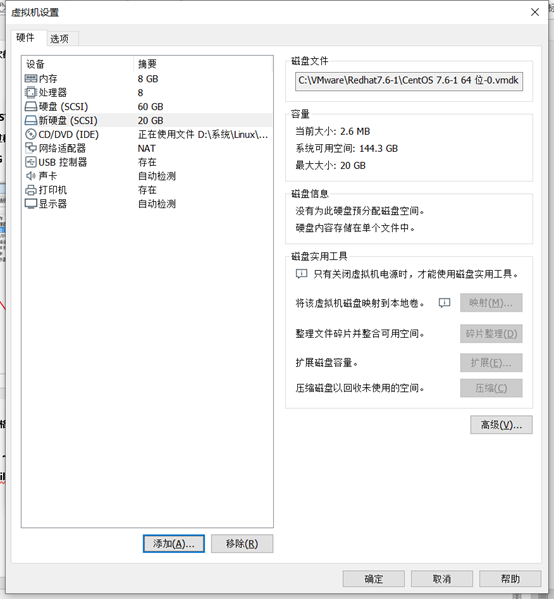
格式化分区
[root@localhost ~]# fdisk /dev/sdb
Welcome to fdisk (util-linux 2.23.2).
Changes will remain in memory only, until you decide to write them.
Be careful before using the write command.
Device does not contain a recognized partition table
Building a new DOS disklabel with disk identifier 0xa51eb332.
Command (m for help): n #n表示创建一个新的分区
Partition type:
p primary (0 primary, 0 extended, 4 free) #创建主分区
e extended #创建拓展分区
Select (default p): p #p表示创建一个主分区
Partition number (1-4, default 1):
First sector (2048-41943039, default 2048):
Using default value 2048
Last sector, +sectors or +size{K,M,G} (2048-41943039, default 41943039): +19G
#+19指定分区大小
Partition 1 of type Linux and of size 19 GiB is set
Command (m for help): p #p表示打印分区表
Disk /dev/sdb: 21.5 GB, 21474836480 bytes, 41943040 sectors
Units = sectors of 1 * 512 = 512 bytes
Sector size (logical/physical): 512 bytes / 512 bytes
I/O size (minimum/optimal): 512 bytes / 512 bytes
Disk label type: dos
Disk identifier: 0xa51eb332
Device Boot Start End Blocks Id System
/dev/sdb1 2048 39847935 19922944 83 Linux
Command (m for help): w #w表示保存配置
The partition table has been altered!
Calling ioctl() to re-read partition table.
Syncing disks.
[root@localhost ~]# ls /dev/sdb1
/dev/sdb1
[root@localhost ~]#
fdisk /dev/sdb下的帮助
Command (m for help): m
Command action
a toggle a bootable flag
#a表示设置可引导标签
b edit bsd disklabel
#b表示编辑 bsd 磁盘标签
c toggle the dos compatibility flag
#c表示设置 DOS 操作系统兼容标记
d delete a partition
#d表示删除一个分区
g create a new empty GPT partition table
G create an IRIX (SGI) partition table
l list known partition types
#l表示显示已知的文件系统类型,82为 Linxu swap 分区,83 为 Linux 分区
m print this menu
#m表示显示帮助菜单
n add a new partition
#n表示新建分区
o create a new empty DOS partition table
#o表示建立空白 DOS 分区表
p print the partition table
#p表示显示分区列表
q quit without saving changes
#q表示不保存退出
s create a new empty Sun disklabel
#s表示新建空白 SUN 磁盘标签
t change a partition's system id
#t表示改变一个分区的系统 ID
u change display/entry units
#u表示改变显示记录单位
v verify the partition table
#v表示验证分区表
w write table to disk and exit
#w表示保存退出
x extra functionality (experts only)
#x表示附加功能(仅专家)
格式化分区并进行挂载
[root@localhost ~]# mkfs.xfs /dev/sdb1
meta-data=/dev/sdb1 isize=512 agcount=4, agsize=1245184 blks
= sectsz=512 attr=2, projid32bit=1
= crc=1 finobt=0, sparse=0
data = bsize=4096 blocks=4980736, imaxpct=25
= sunit=0 swidth=0 blks
naming =version 2 bsize=4096 ascii-ci=0 ftype=1
log =internal log bsize=4096 blocks=2560, version=2
= sectsz=512 sunit=0 blks, lazy-count=1
realtime =none extsz=4096 blocks=0, rtextents=0
[root@localhost ~]# mkdir /sdb1
[root@localhost ~]# mount /dev/sdb1 /sdb1/
准备备份测试文件
[root@localhost ~]# cd /sdb1/
[root@localhost sdb1]# cp /etc/passwd ./
[root@localhost sdb1]# mkdir dir_test
[root@localhost sdb1]# touch dir_test/file_test
[root@localhost sdb1]# tree
.
├── dir_test
│ └── file_test
└── passwd
1 directory, 2 file
安装xfsdump
如果没有xfsdump功能,可以自行安装
[root@localhost sdb1]# yum -y install xfsdump
备份
第一步
备份整个分区
作用:备份整个分区功能就像虚机的快照,服务器被黑后可以进行快速恢复。
语法:xfsdump -f 备份存放位置/备份名称 要备份路径或设备文件
注意:备份的路径不能写成/sdb1/,可以写成/sdb1。就是路径后不能加“/”。
备份过程:
[root@localhost sdb1]# xfsdump -f ~/Desktop/dump_date /dev/sdb1
xfsdump: using file dump (drive_simple) strategy
xfsdump: version 3.1.7 (dump format 3.0) - type ^C for status and control
============================= dump label dialog ==============================
please enter label for this dump session (timeout in 300 sec)
-> dump_sdb1 #指定备份会话标签
session label entered: "dump_sdb1"
--------------------------------- end dialog ---------------------------------
xfsdump: level 0 dump of localhost.localdomain:/sdb1
xfsdump: dump date: Wed Dec 2 11:43:07 2020
xfsdump: session id: 2919651e-379b-4eee-8d8b-a3c0d637d860
xfsdump: session label: "dump_sdb1"
xfsdump: ino map phase 1: constructing initial dump list
xfsdump: ino map phase 2: skipping (no pruning necessary)
xfsdump: ino map phase 3: skipping (only one dump stream)
xfsdump: ino map construction complete
xfsdump: estimated dump size: 25856 bytes
xfsdump: /var/lib/xfsdump/inventory created
============================= media label dialog =============================
please enter label for media in drive 0 (timeout in 300 sec)
-> sdb1 #指定设备标签,就是对要备份的设备做一个描述
media label entered: "sdb1"
--------------------------------- end dialog ---------------------------------
xfsdump: creating dump session media file 0 (media 0, file 0)
xfsdump: dumping ino map
xfsdump: dumping directories
xfsdump: dumping non-directory files
xfsdump: ending media file
xfsdump: media file size 24560 bytes
xfsdump: dump size (non-dir files) : 2592 bytes
xfsdump: dump complete: 19 seconds elapsed
xfsdump: Dump Summary:
xfsdump: stream 0 /root/Desktop/dump_date OK (success)
xfsdump: Dump Status: SUCCESS
第二步
指定备份时免交互操作
作用:指定备份时免交互操作,方便后期做定时备份。
语法:xfsdump –f 备份存放位置/备份名称 要备份路径或设备文件 -L标签 –M 说明
举例:
[root@localhost ~]# xfsdump -f ~/Desktop/dump_date /sdb1 -L dump_mian_jiao_hu -M ying_pan
xfsdump: using file dump (drive_simple) strategy
xfsdump: version 3.1.7 (dump format 3.0) - type ^C for status and control
xfsdump: level 0 dump of localhost.localdomain:/sdb1
xfsdump: dump date: Wed Dec 2 13:05:29 2020
xfsdump: session id: 24c9b9b5-27cb-4caa-ac69-e18e3aa7fdb4
xfsdump: session label: "dump_mian_jiao_hu"
xfsdump: ino map phase 1: constructing initial dump list
xfsdump: ino map phase 2: skipping (no pruning necessary)
xfsdump: ino map phase 3: skipping (only one dump stream)
xfsdump: ino map construction complete
xfsdump: estimated dump size: 25856 bytes
xfsdump: positioned at media file 0: dump 0, stream 0
xfsdump: ERROR: media contains valid xfsdump but does not support append
xfsdump: dump size (non-dir files) : 0 bytes
xfsdump: NOTE: dump interrupted: 0 seconds elapsed: may resume later using -R option
xfsdump: Dump Summary:
xfsdump: stream 0 /root/Desktop/dump_date ERROR (operator error or resource exhaustion)
xfsdump: Dump Status: INTERRUPT
参数:
-L:xfsdump 记录每次备份的session标头,这里可以填写针对此文件系统的简易说明。
-M:xfsdump可以记录存储媒体的标头,这里可以填写此媒体的简易说明。
-s 文件路径:只对指定的文件进行备份,-s指定时路径写的是相对路径(-s可以是文件或目录)
语法:xfsdump –f 备份存放位置/备份名称 –s 相对路径/文件或目录 磁盘路径 -L标签 –M 说明
举例:
[root@localhost ~]# xfsdump -f /home/dump_new -s dir_test/file_test /sdb1 -L file_dump -M sdb1_file
xfsdump: using file dump (drive_simple) strategy
xfsdump: version 3.1.7 (dump format 3.0) - type ^C for status and control
xfsdump: WARNING: most recent level 0 dump was interrupted, but not resuming that dump since resume (-R) option not specified
xfsdump: level 0 dump of localhost.localdomain:/sdb1
xfsdump: dump date: Wed Dec 2 20:53:33 2020
xfsdump: session id: 88a69d85-3dca-4070-8acb-363dd143906f
xfsdump: session label: "file_dump"
xfsdump: ino map phase 1: constructing initial dump list
xfsdump: ino map phase 2: skipping (no pruning necessary)
xfsdump: ino map phase 3: skipping (only one dump stream)
xfsdump: ino map construction complete
xfsdump: estimated dump size: 21440 bytes
xfsdump: creating dump session media file 0 (media 0, file 0)
xfsdump: dumping ino map
xfsdump: dumping directories
xfsdump: dumping non-directory files
xfsdump: ending media file
xfsdump: media file size 21680 bytes
xfsdump: dump size (non-dir files) : 0 bytes
xfsdump: dump complete: 0 seconds elapsed
xfsdump: Dump Summary:
xfsdump: stream 0 /home/dump_new OK (success)
xfsdump: Dump Status: SUCCESS
查看备份信息与内容
[root@localhost mnt]# cd /var/lib/xfsdump/inventory/
[root@localhost inventory]# ls
2961bf24-6f30-4f55-947f-faa56491c09e.InvIndex a41a638b-da68-4d27-95b4-b57baaddb058.StObj fstab
[root@localhost Desktop]# xfsdump -I
file system 0:
fs id: 2961bf24-6f30-4f55-947f-faa56491c09e
session 0:
mount point: localhost.localdomain:/sdb1
device: localhost.localdomain:/dev/sdb1
time: Wed Dec 2 21:05:40 2020
session label: "test_dump"
session id: 6c0a0c1c-7d5b-4171-a773-90aac0359357
level: 0
resumed: NO
subtree: NO
streams: 1
stream 0:
pathname: /root/Desktop/test_dump
start: ino 0 offset 0
end: ino 0 offset 0
interrupted: YES
media files: 0
xfsdump: Dump Status: SUCCESS
恢复数据
删除数据
[root@localhost Desktop]# cd /sdb1/
[root@localhost sdb1]# ls
dir_test passwd
[root@localhost sdb1]# rm -rf *
[root@localhost sdb1]#
恢复数据
语法:xfsrestore –f 要恢复文件的路径/备份名称 文件恢复后存放的路径
举例:
[root@localhost sdb1]# xfsrestore -f ~/Desktop/test_dump /sdb1/
xfsrestore: using file dump (drive_simple) strategy
xfsrestore: version 3.1.7 (dump format 3.0) - type ^C for status and control
xfsrestore: searching media for dump
xfsrestore: examining media file 0
xfsrestore: dump description:
xfsrestore: hostname: localhost.localdomain
xfsrestore: mount point: /sdb1
xfsrestore: volume: /dev/sdb1
xfsrestore: session time: Wed Dec 2 21:04:06 2020
xfsrestore: level: 0
xfsrestore: session label: "test_dump"
xfsrestore: media label: "test_dump"
xfsrestore: file system id: 2961bf24-6f30-4f55-947f-faa56491c09e
xfsrestore: session id: 23e7730c-daba-40cd-a12e-443e2f3fe73e
xfsrestore: media id: ac5e2311-63be-428c-ae29-7f82ff0ada90
xfsrestore: searching media for directory dump
xfsrestore: reading directories
xfsrestore: 2 directories and 3 entries processed
xfsrestore: directory post-processing
xfsrestore: restoring non-directory files
xfsrestore: restore complete: 0 seconds elapsed
xfsrestore: Restore Summary:
xfsrestore: stream 0 /root/Desktop/test_dump OK (success)
xfsrestore: Restore Status: SUCCESS
查看恢复情况
[root@localhost sdb1]# ls
dir_test passwd
恢复单个文件
语法:xfsrestore –f 要恢复文件的路径/备份名称 –s 要恢复的路径/文件 文件恢复后存放的路径
举例:
[root@localhost sdb1]# xfsrestore -f ~/Desktop/test_new -s dir_test/file_test ~/Desktop/test_dir/
xfsrestore: using file dump (drive_simple) strategy
xfsrestore: version 3.1.7 (dump format 3.0) - type ^C for status and control
xfsrestore: searching media for dump
xfsrestore: examining media file 0
xfsrestore: dump description:
xfsrestore: hostname: localhost.localdomain
xfsrestore: mount point: /sdb1
xfsrestore: volume: /dev/sdb1
xfsrestore: session time: Wed Dec 2 21:16:12 2020
xfsrestore: level: 0
xfsrestore: session label: "file_dump_test"
xfsrestore: media label: "file_dump"
xfsrestore: file system id: 2961bf24-6f30-4f55-947f-faa56491c09e
xfsrestore: session id: 7adb2690-c8c6-474d-b357-60a5f8cddab9
xfsrestore: media id: e2d73491-a187-4758-a782-e4a275245273
xfsrestore: using online session inventory
xfsrestore: searching media for directory dump
xfsrestore: reading directories
xfsrestore: 2 directories and 3 entries processed
xfsrestore: directory post-processing
xfsrestore: restoring non-directory files
xfsrestore: restore complete: 0 seconds elapsed
xfsrestore: Restore Summary:
xfsrestore: stream 0 /root/Desktop/test_new OK (success)
xfsrestore: Restore Status: SUCCESS
恢复单个目录
语法:xfsrestore –f 要恢复文件的路径/备份名称 –s 要恢复的目录 目录恢复后存放的路径
举例:
[root@localhost sdb1]# xfsrestore -f ~/Desktop/test_new -s dir_test ~/Desktop/test_dir/
xfsrestore: using file dump (drive_simple) strategy
xfsrestore: version 3.1.7 (dump format 3.0) - type ^C for status and control
xfsrestore: searching media for dump
xfsrestore: examining media file 0
xfsrestore: dump description:
xfsrestore: hostname: localhost.localdomain
xfsrestore: mount point: /sdb1
xfsrestore: volume: /dev/sdb1
xfsrestore: session time: Wed Dec 2 21:16:12 2020
xfsrestore: level: 0
xfsrestore: session label: "file_dump_test"
xfsrestore: media label: "file_dump"
xfsrestore: file system id: 2961bf24-6f30-4f55-947f-faa56491c09e
xfsrestore: session id: 7adb2690-c8c6-474d-b357-60a5f8cddab9
xfsrestore: media id: e2d73491-a187-4758-a782-e4a275245273
xfsrestore: using online session inventory
xfsrestore: searching media for directory dump
xfsrestore: reading directories
xfsrestore: 2 directories and 3 entries processed
xfsrestore: directory post-processing
xfsrestore: restoring non-directory files
xfsrestore: restore complete: 0 seconds elapsed
xfsrestore: Restore Summary:
xfsrestore: stream 0 /root/Desktop/test_new OK (success)
xfsrestore: Restore Status: SUCCESS
使用xfsdump的限制
- xfsdump不支持没有挂载的文件系统备份!只能备份已挂载的文件系统。
- xfsdump必须使用root的权限才能操作(涉及文件系统的关系)
- xfsdump只能备份XFS文件系统
- xfsdump备份下来的数据只能让xfsrestore解析
- xfsdump是透过文件系统的UUID来分辨各个备份文档的,因此不能备份具有相同UUID的文件系统
查看文件系统的UUID:
[root@localhost sdb1]# blkid
/dev/sda3: UUID="dec77a47-26dd-4686-a209-66c35dbc9395" TYPE="xfs"
/dev/sda1: UUID="855a2439-afad-4943-aa2f-fc1c8e1caba5" TYPE="xfs"
/dev/sda2: UUID="76aa7e90-e32e-4d3a-8ead-20da21664365" TYPE="swap"
/dev/sdb1: UUID="2961bf24-6f30-4f55-947f-faa56491c09e" TYPE="xfs"
/dev/sr0: UUID="20
增量备份
增量备份是指在一次全备份或上一次增量备份后,以后每次的备份只需要备份与前一次相比增加或者被修改的文件。就是说,第一次增量备份的对象是进行全备后,所产生的增加和修改的文件;第二次增量备份的对象是进行第一次增量备份后,所产生的增加和修改的文件,以此类推。
优点:
没有重复的备份数据,因此备份的数据量不大,备份所需要的时间很短。
缺点:
数据恢复相对比较麻烦,它需要上一次全备和所有增量备份的内容才能够完全恢复成功,并且他们必须沿着从全备份到依次增量备份的时间顺序逐个反推恢复,因此可能会延长恢复时间。
准备环境
[root@localhost ~]# cd /sdb1/
[root@localhost sdb1]# touch test{1..50}.txt
[root@localhost sdb1]# mkdir dir_test{1..10}
第一步
全备份
[root@localhost sdb1]# xfsdump -f ~/Desktop/dump_dir/dump_full /sdb1 -L dump_first -M ying_pan
xfsdump: using file dump (drive_simple) strategy
xfsdump: version 3.1.7 (dump format 3.0) - type ^C for status and control
xfsdump: level 0 dump of localhost.localdomain:/sdb1
xfsdump: dump date: Wed Dec 2 21:51:50 2020
xfsdump: session id: 068f93c2-72dc-4fdc-8fae-8cf4e27647db
xfsdump: session label: "dump_first"
xfsdump: ino map phase 1: constructing initial dump list
xfsdump: ino map phase 2: skipping (no pruning necessary)
xfsdump: ino map phase 3: skipping (only one dump stream)
xfsdump: ino map construction complete
xfsdump: estimated dump size: 104000 bytes
xfsdump: creating dump session media file 0 (media 0, file 0)
xfsdump: dumping ino map
xfsdump: dumping directories
xfsdump: dumping non-directory files
xfsdump: ending media file
xfsdump: media file size 104136 bytes
xfsdump: dump size (non-dir files) : 0 bytes
xfsdump: dump complete: 0 seconds elapsed
xfsdump: Dump Summary:
xfsdump: stream 0 /root/Desktop/dump_dir/dump_full OK (success)
xfsdump: Dump Status: SUCCESS
第二步
增量备份
增加新数据:
[root@localhost sdb1]# cd dir_test1
[root@localhost dir_test1]# touch file{1..100}.txt
第一次增量备份
[root@localhost sdb1]# xfsdump -l 1 -f ~/Desktop/dump_dir/dump_full_1 /sdb1 -L dump_secnd -M ying_pan
xfsdump: using file dump (drive_simple) strategy
xfsdump: version 3.1.7 (dump format 3.0) - type ^C for status and control
xfsdump: level 1 incremental dump of localhost.localdomain:/sdb1 based on level 0 dump begun Wed Dec 2 21:51:50 2020
xfsdump: dump date: Wed Dec 2 21:53:14 2020
xfsdump: session id: ce06ffd7-5ff1-4001-b7ff-d78b5b9fc116
xfsdump: session label: "dump_secnd"
xfsdump: ino map phase 1: constructing initial dump list
xfsdump: ino map phase 2: pruning unneeded subtrees
xfsdump: ino map phase 3: skipping (only one dump stream)
xfsdump: ino map construction complete
xfsdump: estimated dump size: 53120 bytes
xfsdump: creating dump session media file 0 (media 0, file 0)
xfsdump: dumping ino map
xfsdump: dumping directories
xfsdump: dumping non-directory files
xfsdump: ending media file
xfsdump: media file size 55216 bytes
xfsdump: dump size (non-dir files) : 0 bytes
xfsdump: dump complete: 0 seconds elapsed
xfsdump: Dump Summary:
xfsdump: stream 0 /root/Desktop/dump_dir/dump_full_1 OK (success)
xfsdump: Dump Status: SUCCESS
第二次增量备份
增加新数据:
[root@localhost sdb1]# cd dir_test2
[root@localhost dir_test2]# touch files{1..100}.sh
[root@localhost sdb1]# xfsdump -l 2 -f ~/Desktop/dump_dir/dump_full_2 /sdb1 -L dump_therd -M ying_pan
xfsdump: using file dump (drive_simple) strategy
xfsdump: version 3.1.7 (dump format 3.0) - type ^C for status and control
xfsdump: level 2 incremental dump of localhost.localdomain:/sdb1 based on level 1 dump begun Wed Dec 2 21:53:14 2020
xfsdump: dump date: Wed Dec 2 21:54:42 2020
xfsdump: session id: 9cbcd5e3-090f-4a85-88bd-511ba9dbbe6a
xfsdump: session label: "dump_therd"
xfsdump: ino map phase 1: constructing initial dump list
xfsdump: ino map phase 2: pruning unneeded subtrees
xfsdump: ino map phase 3: skipping (only one dump stream)
xfsdump: ino map construction complete
xfsdump: estimated dump size: 53120 bytes
xfsdump: creating dump session media file 0 (media 0, file 0)
xfsdump: dumping ino map
xfsdump: dumping directories
xfsdump: dumping non-directory files
xfsdump: ending media file
xfsdump: media file size 55216 bytes
xfsdump: dump size (non-dir files) : 0 bytes
xfsdump: dump complete: 0 seconds elapsed
xfsdump: Dump Summary:
xfsdump: stream 0 /root/Desktop/dump_dir/dump_full_2 OK (success)
xfsdump: Dump Status: SUCCESS
备份的级别
0级表示完全备份
1-9级表示增量备份
数据恢复
步骤
首先恢复完全备份
其次恢复增量备份
恢复增量备份有两种情况:
- 恢复最后一次增量备份,如果两次增量备份都是1级备份,那么只要恢复最后一个增量备份就可以。
- 如果第一次做的是1级备份,第二次做的2级备份,那么在恢复数据时需要先恢复完全备份,然后依次恢复1级备份、2级备份、3级备份……
举例
先恢复完全备份
[root@localhost sdb1]# xfsrestore -f ~/Desktop/dump_dir/dump_full /sdb1/
xfsrestore: using file dump (drive_simple) strategy
xfsrestore: version 3.1.7 (dump format 3.0) - type ^C for status and control
xfsrestore: searching media for dump
xfsrestore: examining media file 0
xfsrestore: dump description:
xfsrestore: hostname: localhost.localdomain
xfsrestore: mount point: /sdb1
xfsrestore: volume: /dev/sdb1
xfsrestore: session time: Wed Dec 2 21:51:50 2020
xfsrestore: level: 0
xfsrestore: session label: "dump_first"
xfsrestore: media label: "ying_pan"
xfsrestore: file system id: 2961bf24-6f30-4f55-947f-faa56491c09e
xfsrestore: session id: 068f93c2-72dc-4fdc-8fae-8cf4e27647db
xfsrestore: media id: d5608383-22f9-4b96-b98b-1c2b28fd02e4
xfsrestore: using online session inventory
xfsrestore: searching media for directory dump
xfsrestore: reading directories
xfsrestore: 11 directories and 260 entries processed
xfsrestore: directory post-processing
xfsrestore: restoring non-directory files
xfsrestore: restore complete: 0 seconds elapsed
xfsrestore: Restore Summary:
xfsrestore: stream 0 /root/Desktop/dump_dir/dump_full OK (success)
xfsrestore: Restore Status: SUCCESS
恢复1级增量备份
[root@localhost sdb1]# xfsrestore -f ~/Desktop/dump_dir/dump_full_1 /sdb1/
xfsrestore: using file dump (drive_simple) strategy
xfsrestore: version 3.1.7 (dump format 3.0) - type ^C for status and control
xfsrestore: searching media for dump
xfsrestore: examining media file 0
xfsrestore: dump description:
xfsrestore: hostname: localhost.localdomain
xfsrestore: mount point: /sdb1
xfsrestore: volume: /dev/sdb1
xfsrestore: session time: Wed Dec 2 21:53:14 2020
xfsrestore: level: 1
xfsrestore: session label: "dump_secnd"
xfsrestore: media label: "ying_pan"
xfsrestore: file system id: 2961bf24-6f30-4f55-947f-faa56491c09e
xfsrestore: session id: ce06ffd7-5ff1-4001-b7ff-d78b5b9fc116
xfsrestore: media id: e2952195-1df0-4619-a498-486c07d95ab5
xfsrestore: using online session inventory
xfsrestore: searching media for directory dump
xfsrestore: reading directories
xfsrestore: 2 directories and 160 entries processed
xfsrestore: directory post-processing
xfsrestore: restoring non-directory files
xfsrestore: restore complete: 0 seconds elapsed
xfsrestore: Restore Summary:
xfsrestore: stream 0 /root/Desktop/dump_dir/dump_full_1 OK (success)
xfsrestore: Restore Status: SUCCESS
恢复2级增量备份
[root@localhost sdb1]# xfsrestore -f ~/Desktop/dump_dir/dump_full_2 /sdb1/
xfsrestore: using file dump (drive_simple) strategy
xfsrestore: version 3.1.7 (dump format 3.0) - type ^C for status and control
xfsrestore: searching media for dump
xfsrestore: examining media file 0
xfsrestore: dump description:
xfsrestore: hostname: localhost.localdomain
xfsrestore: mount point: /sdb1
xfsrestore: volume: /dev/sdb1
xfsrestore: session time: Wed Dec 2 21:54:42 2020
xfsrestore: level: 2
xfsrestore: session label: "dump_therd"
xfsrestore: media label: "ying_pan"
xfsrestore: file system id: 2961bf24-6f30-4f55-947f-faa56491c09e
xfsrestore: session id: 9cbcd5e3-090f-4a85-88bd-511ba9dbbe6a
xfsrestore: media id: 7a65ac19-a7c1-433e-a7e9-95ec814057ba
xfsrestore: using online session inventory
xfsrestore: searching media for directory dump
xfsrestore: reading directories
xfsrestore: 2 directories and 160 entries processed
xfsrestore: directory post-processing
xfsrestore: restoring non-directory files
xfsrestore: restore complete: 0 seconds elapsed
xfsrestore: Restore Summary:
xfsrestore: stream 0 /root/Desktop/dump_dir/dump_full_2 OK (success)
xfsrestore: Restore Status: SUCCESS

 浙公网安备 33010602011771号