

android端和Struts2服务器端通信,交互信息,参数采用JSON,使用了HttpClient与HttpPost类
首先是Struts端的程序,采用Struts2.1.6
1:web.xml的配置,主要是配置Struts2的filter
1     <filter>
2         <filter-name>struts2</filter-name>
3         <filter-class>org.apache.struts2.dispatcher.ng.filter.StrutsPrepareAndExecuteFilter</filter-class>
4     </filter>
5
6     <filter-mapping>
7         <filter-name>struts2</filter-name>
8         <url-pattern>/*</url-pattern>
9     </filter-mapping>
2:struts.xml的内容:
1 <package name="testjson" extends="json-default">
2         <action name="getjson" class="com.capinfotech.json.JSONAction" method="json">
3            <result type="json" />
4         </action>
5     </package>
3:JSONAciton的内容为:
 1 package com.capinfotech.json;
 2
 3 import java.io.IOException;
 4 import java.util.HashMap;
 5 import java.util.Map;
 6
 7 import javax.servlet.http.HttpServletRequest;
 8 import javax.servlet.http.HttpServletResponse;
 9
10 import net.sf.json.JSONArray;
11 import net.sf.json.JSONObject;
12
13 import org.apache.struts2.interceptor.ServletRequestAware;
14 import org.apache.struts2.interceptor.ServletResponseAware;
15
16 import com.opensymphony.xwork2.ActionSupport;
17
18 public class JSONAction extends ActionSupport implements ServletRequestAware, ServletResponseAware{
19
20     private static final long serialVersionUID = -989477296829078690L;
21
22     private HttpServletRequest request;
23     private HttpServletResponse response;
24     private String format;
25
26     public String getFormat() {
27         return format;
28     }
29
30     public void setFormat(String format) {
31         this.format = format;
32     }
33
34     public void setServletRequest(HttpServletRequest request) {
35         this.request = request;
36     }
37
38     public void setServletResponse(HttpServletResponse response) {
39         this.response = response;
40     }
41
42     public void json() {
43                 JSONArray jsonArray = new JSONArray();
44
45                 JSONObject jsonObject = new JSONObject();
46                 jsonObject.put("id", 1);
47                 jsonObject.put("title", "哈利波特");
48                 jsonObject.put("timelength", 89);
49
50                 JSONObject jsonObject1 = new JSONObject();
51                 jsonObject1.put("id", 2);
52                 jsonObject1.put("title", "速度与激情");
53                 jsonObject1.put("timelength", 120);
54
55                 JSONObject jsonObject2 = new JSONObject();
56                 jsonObject2.put("id", 3);
57                 jsonObject2.put("title", "变形金刚3");
58                 jsonObject2.put("timelength", 100);
59
60                 jsonArray.add(0, jsonObject);
61                 jsonArray.add(1, jsonObject1);
62                 jsonArray.add(2, jsonObject2);
63
64                 try {
65                     this.response.setCharacterEncoding("UTF-8");
66                     this.response.getWriter().write(jsonArray.toString());
67                 } catch (IOException e) {
68                     e.printStackTrace();
69                 }
70         }
71 }
4:运行效果为如下图:

5:运行注意事项,当Struts2中使用JSON时,一定要添加够JSON使用的包,否则会出错,要添加的包如下:
ezmorph-1.0.6.jar
commons-lang 2.4
commons-beanutils 1.7.0
commons-collections 3.2
commons-logging 1.1.1
Android端的程序和配置
1:androidmanifest.xml的内容为:
 1 <?xml version="1.0" encoding="utf-8"?>
 2 <manifest xmlns:android="http://schemas.android.com/apk/res/android"
 3       package="cn.capinfotech.json"
 4       android:versionCode="1"
 5       android:versionName="1.0">
 6     <application android:icon="@drawable/icon" android:label="@string/app_name">
 7         <activity android:name=".MainActivity"
 8                   android:label="@string/app_name">
 9             <intent-filter>
10                 <action android:name="android.intent.action.MAIN" />
11                 <category android:name="android.intent.category.LAUNCHER" />
12             </intent-filter>
13         </activity>
14
15     </application>
16     <uses-sdk android:minSdkVersion="8" />
17     <uses-permission android:name="android.permission.INTERNET" />
18
19 </manifest>
2:main.xml的内容主要是定义了ListView用来显示最新的电影咨询
 1 <?xml version="1.0" encoding="utf-8"?>
 2 <LinearLayout xmlns:android="http://schemas.android.com/apk/res/android"
 3     android:orientation="vertical"
 4     android:layout_width="fill_parent"
 5     android:layout_height="fill_parent"
 6     >
 7
 8 <ListView
 9     android:id="@+id/videos"
10     android:layout_width="fill_parent"
11     android:layout_height="fill_parent"
12    />
13 </LinearLayout>
3:item.xml的内容,主要用来定义ListView里每个元素的显示方式
 1 <?xml version="1.0" encoding="utf-8"?>
 2 <LinearLayout
 3   xmlns:android="http://schemas.android.com/apk/res/android"
 4   android:layout_width="fill_parent"
 5   android:layout_height="fill_parent">
 6 <TextView
 7   android:layout_width="250dip"
 8   android:layout_height="wrap_content"
 9   android:id="@+id/title"
10 />
11
12 <TextView
13   android:layout_width="fill_parent"
14   android:layout_height="wrap_content"
15   android:id="@+id/timelength"
16 />
17
18 </LinearLayout>
4:定义了一个实体类Video
 1 package com.capinfotech.model;
 2
 3 public class Video {
 4
 5     private Integer id;
 6     private String name;
 7     private Integer time;
 8
 9     public Video() {
10
11     }
12
13     public Video(Integer id, String name, Integer time) {
14         super();
15         this.id = id;
16         this.name = name;
17         this.time = time;
18     }
19
20     public Integer getId() {
21         return id;
22     }
23
24     public void setId(Integer id) {
25         this.id = id;
26     }
27
28     public String getName() {
29         return name;
30     }
31
32     public void setName(String name) {
33         this.name = name;
34     }
35
36     public Integer getTime() {
37         return time;
38     }
39
40     public void setTime(Integer time) {
41         this.time = time;
42     }
43
44 }
5:MainActivity的内容
 1 package cn.capinfotech.json;
 2
 3 import java.net.URI;
 4 import java.util.ArrayList;
 5 import java.util.HashMap;
 6 import java.util.List;
 7
 8 import org.apache.http.HttpEntity;
 9 import org.apache.http.HttpResponse;
10 import org.apache.http.client.HttpClient;
11 import org.apache.http.client.methods.HttpPost;
12 import org.apache.http.impl.client.DefaultHttpClient;
13 import org.apache.http.util.EntityUtils;
14 import org.json.JSONArray;
15 import org.json.JSONObject;
16
17 import android.app.Activity;
18 import android.os.Bundle;
19 import android.util.Log;
20 import android.widget.ListView;
21 import android.widget.SimpleAdapter;
22 import android.widget.Toast;
23
24 public class MainActivity extends Activity {
25      private static final String TAG = "MainActivity";
26      private List<HashMap<String, Object>> videos = null;
27      private HashMap<String, Object> video = null;
28
29      private ListView listView = null;
30      private static String url = "http://10.0.2.2:8088/Struts2_sxt/getjson.action";
31
32     @Override
33     public void onCreate(Bundle savedInstanceState) {
34         super.onCreate(savedInstanceState);
35         setContentView(R.layout.main);
36
37         listView = (ListView)findViewById(R.id.videos);
38         getPDAServerData(url);
39
40     }
41
42     private void getPDAServerData(String url) {
43             HttpClient client = new DefaultHttpClient();
44             //提拱默认的HttpClient实现
45             HttpPost request;
46             try {
47                 request = new HttpPost(new URI(url));
48                 HttpResponse response = client.execute(request);
49                 // 判断请求是否成功
50                 if (response.getStatusLine().getStatusCode() == 200) { //200表示请求成功
51                     HttpEntity entity = response.getEntity();
52                     if (entity != null) {
53                         String out = EntityUtils.toString(entity, "UTF-8");
54                         Log.i(TAG, out);
55
56                         JSONArray jsonArray = new JSONArray(out);
57
58                         videos = new ArrayList<HashMap<String, Object>>();
59                         for(int i = 0; i<jsonArray.length(); i++) {
60                             JSONObject jsonObject = (JSONObject) jsonArray.get(i);
61                             int id = jsonObject.getInt("id");
62                             String name = jsonObject.getString("title");
63                             int timelength = jsonObject.getInt("timelength");
64
65                             video = new HashMap<String, Object>();
66                             video.put("id", id);
67                             video.put("name", name);
68                             video.put("timelength", "时长为:" + timelength);
69
70                             videos.add(video);
71                         }
72
73                         SimpleAdapter adapter = new SimpleAdapter(this, videos, R.layout.item,
74                                                                new String[]{"name", "timelength"},
75                                                                new int[]{R.id.title, R.id.timelength}
76                                                  );
77                         listView.setAdapter(adapter);
78
79                     }
80                 }
81             } catch(Exception e) {
82                 e.printStackTrace();
83                 Log.e(TAG, e.toString());
84                 Toast.makeText(MainActivity.this, "获取数据失败", Toast.LENGTH_LONG).show();
85             }
86     }
87 }
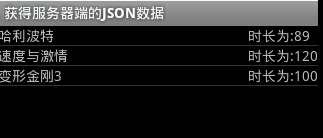
6:程序界面效果图

 浙公网安备 33010602011771号