
# 🔧 基于 Swift 微调 InternLM 实现论文分类任务 —— 全流程复现指南
本文详细介绍如何使用 ModelScope Swift 框架,基于 InternLM2.5 模型进行低秩适配(LoRA)微调,完成 ArXiv 论文分类任务。涵盖环境配置、数据准备、训练执行、权重合并、推理部署与效果评估等全流程内容,并结合重要参数进行详细技术解释。
🧱 一、环境准备
本项目基于 Intern Studio 的在线开发环境进行部署。推荐使用配置:
- 镜像:
Cuda12.2-conda - GPU:30% A100
- Python 版本:3.10+
✅ 创建虚拟环境
conda create -n ms-swift python=3.10 -y
conda activate ms-swift
pip install ms-swift -U
pip install wandb
📦 二、数据准备
项目使用的 Arxiv 数据集已提前处理好,可直接下载使用:
pip install modelscope
modelscope download --dataset JimmyMa99/smartflow-arxiv-dataset --local_dir ./datasets/train
🧪 三、模型训练
📍 训练类型:LoRA(Low-Rank Adaptation)
LoRA 是一种轻量化参数高效微调方法,仅在部分矩阵权重中引入可学习的低秩更新,从而大幅减少训练资源需求。
🔍 LoRA 进行Post-pretraining
使用LoRA进行预训练时,目标是通过海量无标注通用数据(如网页、书籍等)学习语言的基础结构和广泛知识。此时,LoRA的低秩矩阵主要帮助模型在通用特征提取阶段进行参数优化。
在Post-pretraining阶段,模型可能通过LoRA调整部分参数,以增强对领域数据的理解,同时避免完全重新训练大模型的高成本。
📦 训练数据
数据集包含 575 ArXiv 论文的标题、摘要和分类标签等信息。以及格式化为 jsonl 格式,便于模型训练。
{"messages": [{"role": "assistant", "content": "This is a paper with ID 0711.3691, titled \"Outilex, plate-forme logicielle de traitement de textes \\'ecrits\", submitted by Eric Laporte. The authors are Olivier Blanc (IGM-LabInfo), Matthieu Constant (IGM-LabInfo), Eric Laporte (IGM-LabInfo).\nThe paper belongs to the cs.CL category and is published in Dans Verbum ex machina. Proceedings of TALN - Outilex, plate-forme\n logicielle de traitement de textes \\'ecrits, Louvain : Belgique (2006). The latest version is v2, created on November 27, 2007. No DOI information available. No license information available.\n\nAbstract:\nThe Outilex software platform, which will be made available to research, development and industry, comprises software components implementing all the fundamental operations of written text processing: processing without lexicons, exploitation of lexicons and grammars, language resource management. All data are structured in XML formats, and also in more compact formats, either readable or binary, whenever necessary; the required format converters are included in the platform; the grammar formats allow for combining statistical approaches with resource-based approaches. Manually constructed lexicons for French and English, originating from the LADL, and of substantial coverage, will be distributed with the platform under LGPL-LR license."}]}
📁 配置文件:config/internlm_2-5b-lora.sh
运行方式:
conda activate ms-swift
bash config/internlm_2-5b-lora.sh
🔍 训练脚本解析核心参数
swift sft \
    --model ./internlm2_5-7b-chat \
    --train_type lora \
    --dataset './datasets/train/swift_formatted_pretrain_data.jsonl' \
    --torch_dtype bfloat16 \
    --num_train_epochs 15 \
    --per_device_train_batch_size 12 \
    --learning_rate 5e-5 \
    --warmup_ratio 0.1 \
    --split_dataset_ratio 0.2 \
    --lora_rank 8 \
    --lora_alpha 32 \
    --use_chat_template false \
    --target_modules all-linear \
    --gradient_accumulation_steps 2 \
    --save_steps 50 \
    --save_total_limit 5 \
    --gradient_checkpointing_kwargs '{"use_reentrant": false}' \
    --logging_steps 20 \
    --max_length 1024 \
    --output_dir ./swift_output/InternLM2_5-7B-Lora \
    --dataloader_num_workers 256 \
    --model_author AAAAzheng \
    --model_name InternLM2_5-7B-Lora \
    > "$LOG_FILE" 2>&1 &
重要参数说明
| 参数 | 说明 | 作用 |
|---|---|---|
--torch_dtype |
PyTorch 数据类型 | bfloat16 表示使用半精度浮点数,适合大模型训练 |
--num_train_epochs |
训练轮数 | 训练数据集的迭代次数,建议设置为 15 |
--per_device_train_batch_size |
每个设备的训练批次大小 | 根据显存大小调整 |
--learning_rate |
学习率 | 控制模型参数更新的步长 |
--warmup_ratio |
学习率预热比例 | 训练初期的学习率逐渐增加,避免过大更新 |
--split_dataset_ratio |
数据集划分比例 | 训练集和验证集的划分比例 |
--lora_rank |
LoRA 的秩 | 控制 LoRA 的参数量 |
--lora_alpha |
LoRA 的 alpha 值 | 控制 LoRA 的学习率 |
--use_chat_template |
是否使用聊天模板 | 设置为 false 以适应论文分类任务 |
--target_modules |
目标模块 | 设置LoRA应用的层 |
--gradient_accumulation_steps |
梯度累积步数 | 在显存不足时使用 |
训练过程
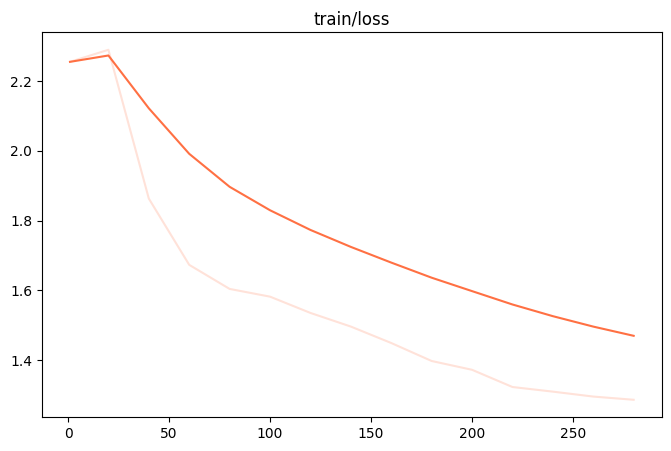
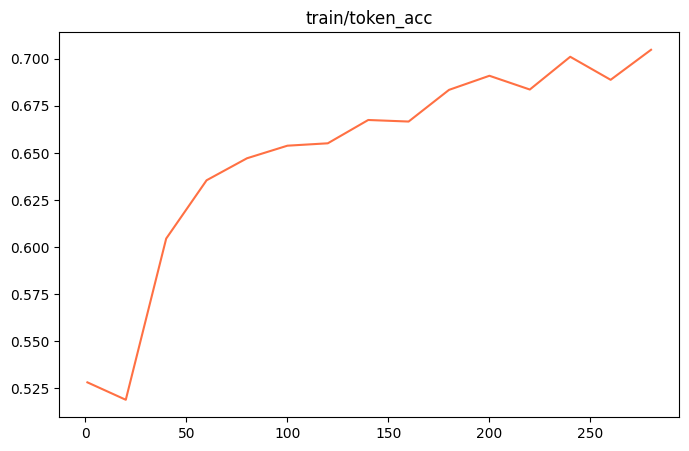
训练过程会输出日志信息,包含训练进度、损失值等。可以通过 tail -f 命令实时查看训练日志:
训练损失
token_acc
📦 合并权重
训练结束后需将 LoRA 的 adapter 合并为标准权重:
swift export --adapters ./checkpoint-xxx --merge_lora true
经过Post-pretraining后,模型的权重会被更新为适应领域数据的状态。
🔁 四、进一步 SFT 微调
基于合并后的 checkpoint 进行全量 SFT 微调。
swift sft \
    --model ./swift_output/InternLM2_5-7B-Lora/v3-20250520-122920/checkpoint-285-merged \
    --train_type lora \
    --dataset ./datasets/train/swift_formatted_sft_train_data.jsonl \
    --torch_dtype bfloat16 \
    --num_train_epochs 10 \
    --per_device_train_batch_size 16 \
    --learning_rate 1e-4 \
    --warmup_ratio 0.1 \
    --split_dataset_ratio 0.1 \
    --lora_rank 8 \
    --lora_alpha 32 \
    --target_modules all-linear \
    --gradient_accumulation_steps 2 \
    --save_steps 10 \
    --save_total_limit 5 \
    --gradient_checkpointing_kwargs '{"use_reentrant": false}' \
    --logging_steps 5 \
    --max_length 2048 \
    --output_dir ./swift_output/InternLM2_5-7B-Lora \
    --dataloader_num_workers 128 \
    --model_author AAAAzheng \
    --model_name InternLM2_5-7B-Lora \
    > "$LOG_FILE" 2>&1 &
注意替换路径合并后的模型权重位置和新格式化的 jsonl 数据。
📊 五、模型效果评估(OpenCompass)
支持本地离线评估,与竞赛平台结果对齐。
📁 安装 OpenCompass
git clone https://github.com/open-compass/opencompass.git
cd opencompass
conda create -n opencompass python=3.10 -y
conda activate opencompass
pip install -e .
🛠️ 修改路径
修改 opencompass/models/huggingface.py:
# Line 681
self.model = AutoModelForCausalLM.from_pretrained(path, trust_remote_code=True, **model_kwargs)
# Line 135
tokenizer_path if tokenizer_path else path, trust_remote_code=True, **tokenizer_kwargs)
🧪 自定义评测脚本示例
from opencompass.models import HuggingFaceCausalLM

models = [dict(
    type=HuggingFaceCausalLM,
    path='/path/to/checkpoint',
    tokenizer_path='/path/to/checkpoint',
    tokenizer_kwargs=dict(padding_side='left'),
    model_kwargs=dict(device_map='auto'),
    max_seq_len=32768,
    max_out_len=16384,
    batch_size=2,
    run_cfg=dict(num_gpus=1),
)]

datasets = [{
    "path": "/path/to/test_data.csv",
    "data_type": "mcq",
    "infer_method": "gen",
}]
运行评测:
python run.py internlm3-oc_eval.py --debug
🧠 七、实战建议与技巧
| 环节 | 建议优化策略 |
|---|---|
| 数据 | 保证每条数据格式统一、标签分布均衡 |
| 参数 | learning_rate, lora_rank 可调优以适配数据规模 |
| 训练 | 增加 epoch 数可获得更优结果,注意显存限制 |

 浙公网安备 33010602011771号