css清除浮动
1、为什么清除浮动
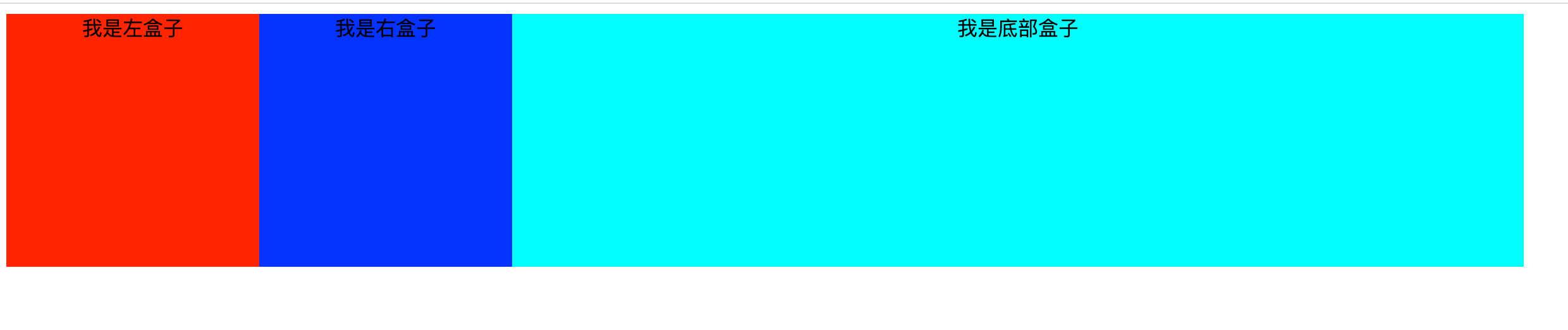
当子元素浮动时其父元素没有高度(比如列表页,父元素需要通过子元素的数量来确定高度),这时就会影响标准流父元素下面元素的布局,那么我们就需要清除浮动了。示例:
<!DOCTYPE html>
<html lang="en">

<head>
    <meta charset="UTF-8">
    <meta http-equiv="X-UA-Compatible" content="IE=edge">
    <meta name="viewport" content="width=device-width, initial-scale=1.0">
    <title>Document</title>
    <style>
        .box {
            /*父元素没有给高度*/
            width: 1200px;
            background-color: antiquewhite;
        }

        /*left和right两个子元素都设置了左浮动*/
        .left {
            float: left;
            width: 200px;
            height: 200px;
            background-color: red;
        }

        .right {
            float: left;
            width: 200px;
            height: 200px;
            background-color: blue;
        }

        .footer {
            /*box元素没有高度,且其left和right两个子元素设置了浮动,此时该底部元素会跑到left和right元素下方,且box元素高度为0*/
            width: 1200px;
            height: 200px;
            background-color: aqua;
        }
    </style>
</head>

<body>
    <div class="box clearfix">
        <div class="left"></div>
        <div class="right"></div>
    </div>
    <div class="footer"></div>
</body>

</html>
清除浮动之前页面效果如下:(由于父元素box没有设置高度,所以当子元素浮动后父元素的高度为0,也就显示不出来了)
![]() 2、清除浮动的本质
2、清除浮动的本质
 2、清除浮动的本质
清除浮动的本质就是清除浮动元素造成的影响
3、清除浮动的策略
清除浮动的策略就是闭合浮动
4、清除浮动的方式
a、额外标签法---会在浮动元素的末尾添加一个空的标签。如下:
<div style="clear:both"></div>
这种写法的优点:通俗易懂,书写方便
缺点:添加了很多无意义的标签,结构化会比较差
b、父级元素添加overflow属性
/*可以合并边框,也可以清除浮动*/
overflow:hidden
这种写法的优点:写起来比较简单
缺点:会导致溢出隐藏
c、父级元素添加after伪元素---在后面堵住盒子
.clearfix::after {
    content: "";
    display: block;
    height: 0;
    clear: both;
    visibility: hidden;
}

.clearfix {
    /*IE6、7专有*/
    *zoom: 1;
}
d、父级元素添加双伪元素---前后都堵住盒子
.clearfix:before,
.clearfix:after{
    content:"";
    display:table;
}
.clearfix:after{
    clear:both;
}
.clearfix{
    *zoom:1;
}
c、d两种写法的优点:结构清晰语义正确
缺点:存在兼容性问题,IE6-7不支持:after
完整示例:
<!DOCTYPE html>
<html lang="en">

<head>
    <meta charset="UTF-8">
    <meta http-equiv="X-UA-Compatible" content="IE=edge">
    <meta name="viewport" content="width=device-width, initial-scale=1.0">
    <title>Document</title>
    <style>
        .clearfix::before,
        .clearfix::after {
            content: "";
            display: table;
        }

        .clearfix::after {
            clear: both;
        }

        .clearfix {
            /*IE6、7专有*/
            *zoom: 1;
        }

        .box {
            width: 1200px;
            background-color: antiquewhite;
        }

        .left {
            float: left;
            width: 200px;
            height: 200px;
            background-color: red;
        }

        .right {
            float: left;
            width: 200px;
            height: 200px;
            background-color: blue;
        }

        .footer {
            width: 1200px;
            height: 200px;
            background-color: aqua;
        }
    </style>
</head>

<body>
    <div class="box clearfix">
        <div class="left">我是左盒子</div>
        <div class="right">我是右盒子</div>
    </div>
    <div class="footer">我是底部盒子</div>
</body>

</html>
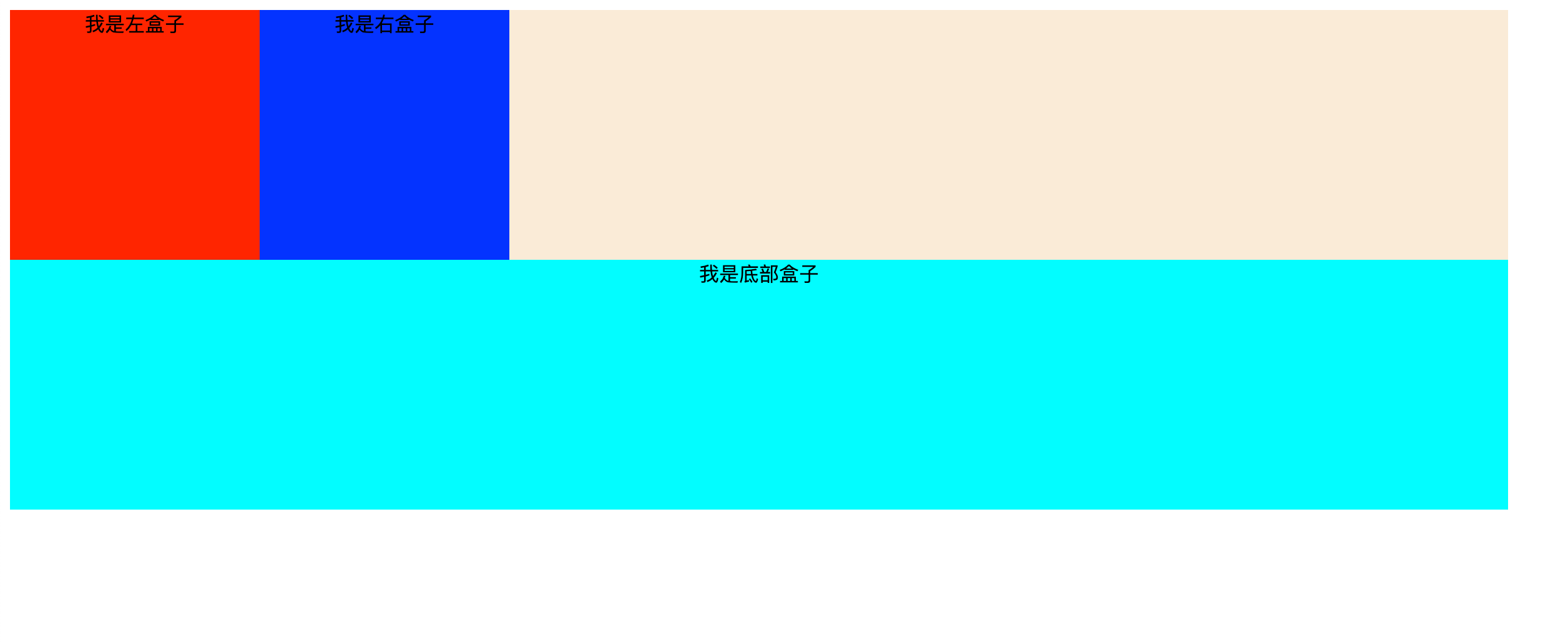
清除浮动后页面效果展示:
注:知识来源于b站黑马pink老师

 浙公网安备 33010602011771号