
react 常见api 使用(长期更新)
1、父子通信
1.1 父-子 props
父组件:
    class myPage extends React.Component {
           render() {
                return (
                  <div>
                    {/* 子组件   自定义page 是子组件要接受的属性   mypage是要传递的内容*/}
                    <TabBar page="mypage"></TabBar>
                        <div className="pd-md">
                        我是一个mypage
                      </div>
                  </div>
            );
      }
}
子组件:
class TabBarComponents extends React.Component {
  constructor(props) {
    // 继承父组件
    super(props);
    this.state = {
    // 接受父组件传的属性
      selectedTab: props.page,
    };
  }
// 然后使用 this.state.selectedTab  这个值, 这个就是mypage
....
}
1.2
子-》父
子组件:将子组件的value值 text 传递给父组件
    class Input extends Component {
        changeTitle(event) {
            // 子组件调用 父组件通过props传递过来的方法 onChangeText,将要传递的值传进方法
            this.props.onChangeText(event)
        }
        componentDidMount() {
            this.props.getParentTab(1)
        }
        render() {
          return (
            <div className="list-wrapper">
               <input type="text"  onChange={this.changeTitle.bind(this)} value={this.props.text} />
                <input type="text"  onChange={this.props.getParentTab('2')} value={this.props.text} />
            </div>
          );
        }
  }
父组件:
class myPage extends React.Component {
  constructor(props) {
    super(props);
    this.state = {newText: 'default'};
  }
  changeText(event) {
    this.setState({
      newText: event.target.value,
    })
  }
    getParentTab = (tab) => {
        console.log(tab)
    }
  render() {
    return (
      <div>
       <div className="pd-md">
          <h3>我是一个mypage</h3>
          <div>
            {this.state.newText}
            {/* 子组件 */}
            <InputCompenent onChangeText={this.changeText.bind(this)} text={this.state.newText}></InputCompenent>
            <SlideFirst className="content" getParentTab={getParentTab} />
          </div>
        </div>

      </div>
    );
  }
}
子组件通过调用 props.onChangeText 方法,将值传递进来,父组件通过 changeText 方法来接受 传递进来的值。
套路:子组件通过调用 父组件传递的方法 传值。
父组件调用子组件的方法:
父组件
onRef = (ref) => {
    this.child = ref
  }

addEtcItem = () => {
    this.child.add(); // 调用子组件的方法
  }
....
     <ChildItem
                onRef={this.onRef}
            />
子组件:
    add = () => {
      // todo
    };

componentDidMount() {

        this.props.onRef(this)

    }
说白了 也是子组件调用父组件的方法,将子组件的this 传递给父组件;
父组件使用this.child = ref 接受传进来的 子组件, 这样 父组件就可以使用 this.child.add() 方法了
hook 的写法:
https://www.cnblogs.com/muamaker/p/11647626.html
class hook 混合写法:
https://www.zoo.team/article/react-hooks-in-class-component
2、在标签上写样式的方法
{
          <div style={{
            display: this.state.hasMore ? 'none' : 'block',
            textAlign: 'center',
            borderTop: '1px solid #ddd',
            width: '80%',
            paddingTop: '15px',
            marginLeft: 'auto',
            marginRight: 'auto',
            marginBottom: '70px'
          }}>
          不要扯了,已经到底了!
          </div>
 }
3、input type="file" onchange 获取 e.target
DOM:
 <input type="file" id="uploadExcel" onChange={this.uploadFiles} className="beauty-input"/>

js:
 uploadFiles = (e) => {
    e.persist(); // 不然e.target 为null
    console.log(e)
    ....
4、create-react-app 打包部署 homepage
package.json
      "homepage": "http://mywebsite.com/relativepath",
      "homepage": "./"  .build/  这个根据具体部署环境定, 一般 取域名即可
5. 结合ant-design form 表单,自定义表单内容的获取和赋值
        onFinish = values => {
		console.log(values); // {Licence: }
	};
 ...

  ...
<Form onFinish={this.onFinish}
        initialValues={{
        Licence: '',
        prefix: '86',
      }}>
  <Form.Item name="Licence" rules={[]}>
	<Upload initialValues={[...fileListD]} />
  </Form.Item>
</<Form>
Upload 组件
        const PicturesWall = props => {
	    const [fileList, setFileList] = useState(props.initialValues);
            const handleChange = ({ fileList }) => {
		setFileList(fileList);
		props.onChange(fileList); // 核心,传值给父组件
		setLoading(true);
	    };
    	    return (
    		<div className="customized-upload">
    			<Upload
    				action=""
    				listType="picture-card"
    				fileList={fileList}
    				onPreview={handlePreview}
    				onChange={handleChange}
    				className="avatar-uploader"
    				accept="image/*"
    				// name="Image"
    			>
    				{fileList && fileList.length >= 8 ? null : uploadButton}
    			</Upload>
    		</div>
    	    );
        };
6.ant-design form initialValues 的问题
动态设置了 initialValues 默认值,但是表单数据没有更新
1.你不能用控件的 value 或 defaultValue 等属性来设置表单域的值,默认值可以用 Form 里的 initialValues 来设置。注意 initialValues 不能被 setState 动态更新,你需要用 setFieldsValue 来更新。
2.你不应该用 setState,可以使用 form.setFieldsValue 来动态改变表单值。
!!!先setState 修改 state的值,再次setFieldsValue 的值
formRef = React.createRef();
   state = {
      initdata: {}
    }

    ....

    this.setState({
        initdata: initdata
    })
    this.formRef.current.setFieldsValue({
	initdata:  initdata,
    });
    // 或者 重新设置下表单 this.formRef.current.resetFields();
  ....
    this.formRef && this.formRef.current && this.formRef.current.setFieldsValue(this.state.initdata);

  <Form
                name="basic"
                initialValues={{
					initdata:  this.state.initdata
                }}
                onFinish={this.onFinish}
                onFinishFailed={this.onFinishFailed}
                className="form-content"
                ref={this.formRef}
            >
  ...
重置表单内容的时候: this.formRef.current.resetFields(); 不奏效,
再次使用
this.formRef.current.setFieldsValue({
initdata: {},
});
重置
hook. 经过测试 可以实现 新增和编辑(多个) 在同一个 from 表单
const [form] = Form.useForm();
useEffect(() => {
    form.resetFields();
    setModalData(props.modalData);
    form.setFieldsValue(props.modalData);
  }, [props.modalData])


....

<Form {...layout} onFinish={onFinish} form={form}  initialValues={props.modalData ? modalData: null}>
参考: https://zhuanlan.zhihu.com/p/375753910
7.ant-design Form.list 使用
一下是需要的数据格式
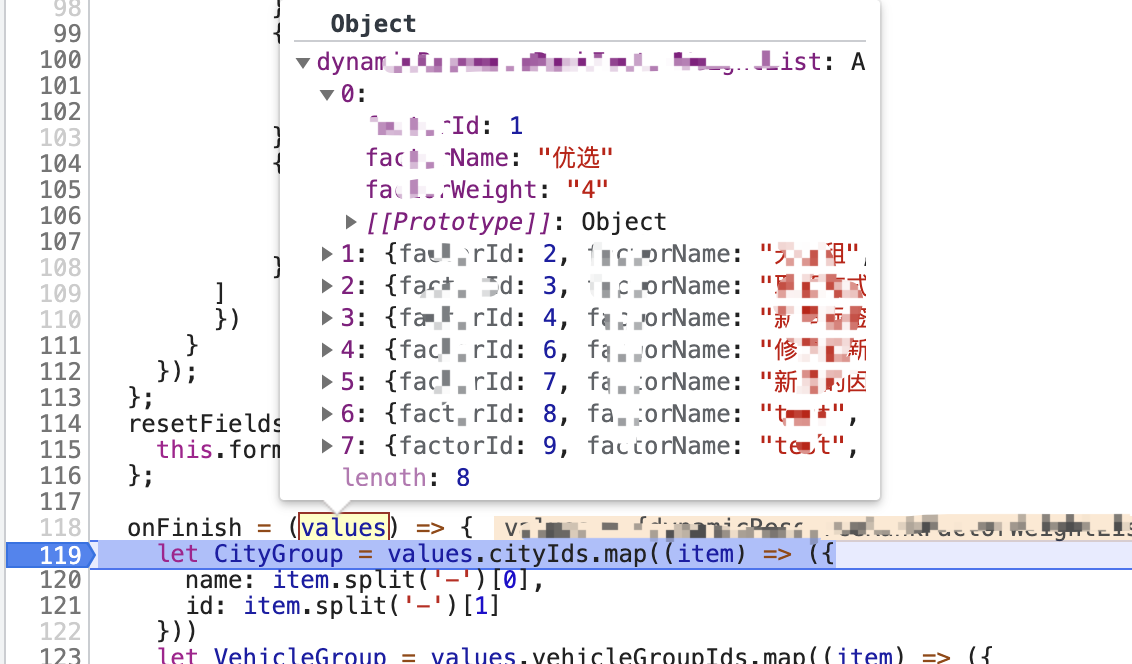
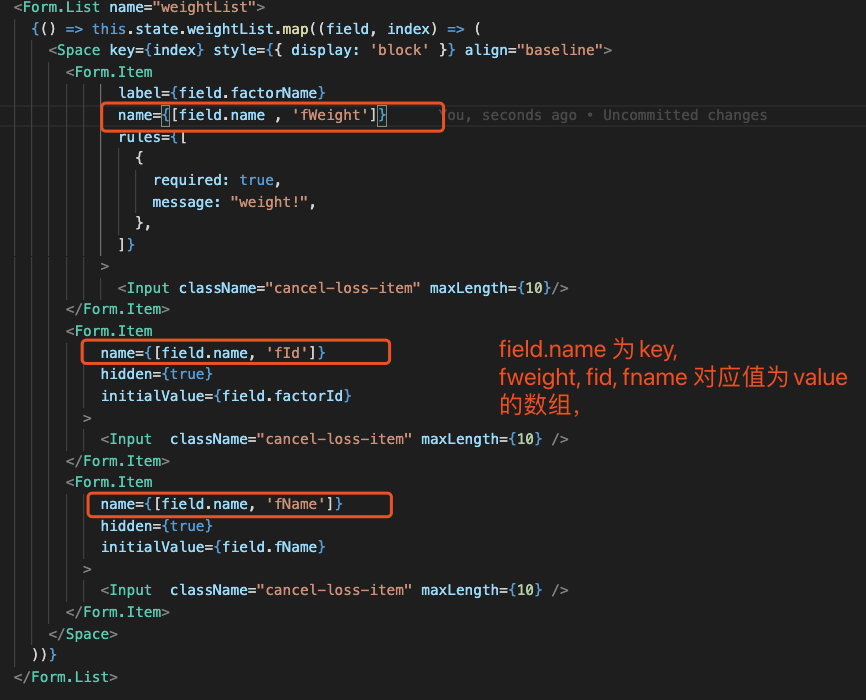
field.name 为数字递增 则
weightList = [
{fWeight: '**',fId: fId, fName: fName },
{fWeight: '**',fId: fId, fName: fName }
]
field.name 为不为数字递增切不相同 则
weightList = [
   [fName]: {fWeight: '**',fId: fId, fName: fName },
  [fName]: {fWeight: '**',fId: fId, fName: fName },
]
常见的我们都需要一个纯数组值,所以 this.state.weightList 数组里面的每个 item 有个属性name (可以是其他属性名)数字递增或者不相同
Form.Item validator 自定义校验
<Form.Item
            name={dataIndex}
            style={{ margin: 0 }}
            rules={[
              {
                required: true,
                message: ''
              },
              {
                validator: (_, _val, callback) => {
                  console.log(_val, 'item. val');
                  console.log(dataIndex);
                  // 异步校验 才用 callback
                  if (dataIndex === 'cityName') {
                    const p1 = new Promise((resolve, reject) => {
                      setTimeout(() => {
                        reject();
                      }, 200);
                    });
                    p1.then(val => console.log(val)).catch(() => {
                      callback('error message');
                    });
                  } else {
                    // 同步校验
                    if (!_val) {
                      return Promise.reject();
                    } else {
                      return Promise.resolve();
                    }
                  }
                }
              }
            ]}
          >
            {inputNode}
          </Form.Item>

 浙公网安备 33010602011771号