


做一个wcf的实例
11月份帮erp项目组开发一个通信的模块,期间本来想用remoting技术,后来考虑到同事调用的习惯就改用了微软的wcf,这个我花了3天时间看了下文档,就做了一个通信模块,由于时间问题自己也是第一次使用也不熟练,就交任务了,没想到前天同事说调用授权安全有问题,faint,一个月了都记不清楚了,嘿嘿,现在都没印象了,结果又花了2天时间从头看了下,哎,算是完工了!今天就把我配置的一些东西写出来,以防后面又不记得如何改了,我的记忆不好啊,呵呵。
首先wcf其实是老技术,是基于soa(service oriendted architecture)推出的,在2006时候微软就出现了,之前是叫indigo吧,当时就听说过,但就是没用过,我一直就是用remoting和webservice。以前在vs2005的时候是要安装wcf组件的,到了vs2008后就直接把wcf做到安装包里去了。再就是wcf其实是将remoting和ws,wseq等都集成进去了,所以现在一般用微软开发的企业通信都会用到wcf技术的。
对于wcf的技术其实很简单,就是相当于开发webservice一样,可以做分布调用等,只要写过webservice的人一定很容易写wcf通信的,只是它比webservice配置的东西稍微多点,类的方法公布时略有所不同。由于webservice的安全一般开发人都是基于soap协议的头部写点认证的,但是wcf安全方面就做的好很多,有专门的授权和协议传输安全等。记得以前资料里看过说webservice由于安全不好,后来在webservice上升级了wse吧,具体的介绍以后再聊。
现在来讲下wcf的具体操作吧:
1)wcf也是soap协议传输,所以它的数据类型一定要是可序列化的,这和webservice的要求是一样,但不同的是它在数据前面需要加属性 [DataContract]和[DataMember]、[EnumMember],如OutputObject.cs例子:
using System;
using System.Collections.Generic;
using System.Runtime.Serialization;
namespace Strong.WorkFlowInterface
{
/// <summary>
/// <font color="#000000">输出对象</font>
/// </summary>
[DataContract]
public class OutputObject {
#region constructor & destructor
public OutputObject(){
}
~OutputObject(){
}
public virtual void Dispose(){
}
#endregion
/// <summary>
/// 数据
/// </summary>
[DataMember]
public List<WFInstance> Datas { get; set; }
/// <summary>
/// 获取结果成功与否
/// </summary>
[DataMember]
public bool Result { get; set; }
}//end OutputObject
}
FlowType.cs代码,如下
using System.Runtime.Serialization;
namespace Strong.WorkFlowInterface
{
/// <summary>
/// 工作流编号
/// </summary>
[DataContract]
public enum FlowNo : int {
/// <summary>
/// 工作流编号1
/// </summary>
[EnumMember]
Type1=1,
/// <summary>
/// 工作流编号2
/// </summary>
[EnumMember]
Type2
} //end FlowType
}
WFInstance.cs代码如下
using System;
using System.Collections.Generic;
using System.Linq;
using System.Text;
using System.Runtime.Serialization;
namespace Strong.WorkFlowInterface
{
/// <summary>
/// 工作流实例对象
/// </summary>
[System.Runtime.Serialization.DataContract]
public class WFInstance //public abstract class WFInstance
{
#region constructor & destructor
public WFInstance()
{
}
~WFInstance()
{
}
#endregion
/// <summary>
/// 工作流编号
/// </summary>
// [DataMember]
public FlowNo FlowNo { get; set; }
/// <summary>
/// 工作流状态,枚举类型的不需要加DataMember标签
/// </summary>
// [DataMember]
public WFStatus Status { get; set; }
/// <summary>
/// 表单id
/// </summary>
[DataMember]
public int TableID { get; set; }
/// <summary>
/// 工作流guid
/// </summary>
[DataMember]
public string WFGuid { get; set; }
}//end WFInstance
}
注意:普通的实体类(entity)或结构体类差不多,但是枚举体就要注意下,上面的加粗的红色的地方就要留意下,公布成员属性不一样,因为枚举体本身就是值类型的是可序列话的,所以略有所不同!
(2)wcf的公布方法时和webservice也有所不同,在方法的契约接口申明地方加 [OperationContract]标签
如IWCFFacade.cs代码例子:
using System.ServiceModel;
namespace Strong.WorkFlowInterface
{
[ServiceContract(Namespace = "http://192.168.20.230:80")]
public interface IWCFFacade {
[OperationContract]
string GetCallerIdentity();
/// <summary>
/// 测试
/// </summary>
/// <param name="name"></param>
/// <returns></returns>
[OperationContract]
string HelloWorld(string name);
[OperationContract]
FlowNo OutEnumType(string name);
///
/// <param name="tabeID"></param>
/// <param name="wfGuid"></param>
[OperationContract]
OutputObject Receive(int tabeID, string wfGuid);
///
/// <param name="requestObj"></param>
[OperationContract]
bool Send(InputObject requestObj);
}//end IWCFFacade
}//end namespace Strong.WorkFlowInterface
每个向外公布的方法前面需要加OperationContract标签,webservice也需要加标签,但标签是不一样的,在开发时候注意下就行了,如果不加标签的话其他地方是无法调用的,这个和webservice是一样的。对于接口前的Namespace的值其实是要向外公布一个唯一识别的地址,但开发时候不要受影响,别误以为这个也是别人访问的网址,你看前面Namespace的含义就知道,是命名空间而已:)
(3)对接口实现的具体类WCFFacade.cs,就是实际实现的方法,代码如下:
using Strong.WorkFlowInterface;
using Strong.WorkFlow.CommunicationService;
using System;
using System.ServiceModel;
using System.IdentityModel.Selectors;
using System.Security.Permissions;
namespace Strong.WorkFlow.CommunicationService {
/// <summary>
/// 面向外服务类
/// </summary>
public class WCFFacade :IWCFFacade
{
#region constructor & destructor
public WCFFacade(){
Console.WriteLine("constructor");
}
~WCFFacade(){
}
public virtual void Dispose(){
}
#endregion
#region IWCFFacade 成员
public string GetCallerIdentity()
{
// The Windows identity of the caller can be accessed on the ServiceSecurityContext.WindowsIdentity
return OperationContext.Current.ServiceSecurityContext.WindowsIdentity.Name;
}
/// <summary>
/// 测试
/// </summary>
/// <param name="name"></param>
/// <returns></returns>
//[OperationBehavior(Impersonation = ImpersonationOption.Required)]
//[PrincipalPermission(SecurityAction.Demand, Role = "20110705-0851\\Administrator")]
public string HelloWorld(string name)
{
return "Hello wold:" + name;
}
public FlowNo OutEnumType(string name)
{
FlowNo fn = FlowNo.Type1;
return fn;
}
/// <summary>
/// 接收
/// </summary>
/// <param name="tabeID">表单id</param>
/// <param name="wfGuid">工作流guid</param>
public OutputObject Receive(int tabeID, string wfGuid)
{
OutputObject outObj = new OutputObject();
WFInstance instance = new WFInstance();
instance.WFGuid = "123456789qwertyuio";
outObj.Datas.Add(instance);
outObj.Result = true;
return outObj;
}
/// <summary>
/// 发送指令
/// </summary>
/// <param name="requestObj">传参</param>
public bool Send(InputObject requestObj)
{
return false;
}
#endregion
}//end WCFFacade
public class CustomUserNameValidator : UserNamePasswordValidator
{
// This method validates users. It allows in two users, test1 and test2
// with passwords 1tset and 2tset respectively.
// This code is for illustration purposes only and
// must not be used in a production environment because it is not secure.
public override void Validate(string userName, string password)
{
if (null == userName || null == password)
{
throw new ArgumentNullException();
}
if (!(userName == "test1" && password == "1tset") && !(userName == "test2" && password == "2tset"))
{
// This throws an informative fault to the client.
throw new FaultException("Unknown Username or Incorrect Password");
// When you do not want to throw an infomative fault to the client,
// throw the following exception.
// throw new SecurityTokenException("Unknown Username or Incorrect Password");
}
}
}
}//end namespace Strong.WorkFlow.CommunicationService
(4)wcf宿主承载方式有好几种,首先是类似webservice样利用IIS承载或window进程激活服务was承载,但我一般喜欢自承载,就是自己写过console程序开启服务,因为这样首先自己可以很清楚知道如何公布和调用,并且调用的日志也一目了然,可以用Console.WriteLine输出日志的。服务启动和关闭的类WCFService.cs,代码如下:
using System;
using System.ServiceModel;
using Strong.WorkFlow.CommunicationServiceInterface;
using Strong.WorkFlow.Common;
using System.ServiceModel.Description;
[assembly: Service("WCFService", "5ef4adab-46c6-485e-80ec-25c47375a3c2", "Strong.WorkFlow.CommunicationService.WCFService", Description = "WCF通信服务", Version = "1.0.0.0", DependedServices = "")]
namespace Strong.WorkFlow.CommunicationService {
public class WCFService:Strong.WorkFlow.Common.BaseService
{
#region member variable
private static ServiceHost serviceHost = null;
#endregion
#region constructor & destructor
public WCFService(){
}
~WCFService(){
}
public virtual void Dispose(){
this.OnStop();
}
#endregion
#region IWCFService 成员
public override void OnStart(string parameter="")
{
using (serviceHost = new ServiceHost(typeof(WCFFacade)))
{
// serviceHost.Authorization.PrincipalPermissionMode = PrincipalPermissionMode.UseWindowsGroups;
// Open the ServiceHost to create listeners and start listening for messages.
serviceHost.Open();
// The service can now be accessed.
Console.WriteLine("WCF 模块已经启动");
Console.ReadLine();
}
}
public override void OnPause()
{
throw new NotImplementedException();
}
/// <summary>
/// 关闭
/// </summary>
public override void OnStop()
{
serviceHost.Close();
}
#endregion
}//end WCFService
}//end namespace Strong.WorkFlow.CommunicationService
(5)配置的地方需要注意,如果大家用iis类似发布站点样就需要修改web.config,如果是用自主承载就需要修改App.config了,至于修改的内用是一样的,节点也是一样的。现在着重将自主承载,修改app.config了,代码如下:
<?xml version="1.0"?>
<configuration>
<startup>
<supportedRuntime version="v4.0" sku=".NETFramework,Version=v4.0"/>
</startup>
<!-- WCF 配置 开始-->
<system.serviceModel>
<services>
<service name="Strong.WorkFlow.CommunicationService.WCFFacade" behaviorConfiguration="WorkFlowFacadeBehavior">
<host>
<baseAddresses>
<add baseAddress="http://192.168.20.230:80/Service/WFFacade"/>
</baseAddresses>
</host>
<endpoint address="" binding="wsHttpBinding" contract="Strong.WorkFlowInterface.IWCFFacade"/>
<endpoint address="mex" binding="mexHttpBinding" contract="IMetadataExchange"/>
</service>
</services>
<bindings>
<wsHttpBinding>
<!--configure wsHttp binding with Transport security mode
and clientCredentialType as None-->
<binding name="AdolphBinding">
<security mode = "None">
</security>
</binding>
</wsHttpBinding>
</bindings>
<!--For debugging purposes set the includeExceptionDetailInFaults attribute to true-->
<behaviors>
<serviceBehaviors>
<behavior name="WorkFlowFacadeBehavior">
<!--<serviceCredentials>
<serviceCertificate findValue="localhost" storeLocation="LocalMachine" storeName="My" x509FindType="FindBySubjectName" />
<userNameAuthentication userNamePasswordValidationMode="Custom" customUserNamePasswordValidatorType="Strong.WorkFlow.CommunicationService.CustomUserNameValidator, service" />
</serviceCredentials>-->
<serviceMetadata httpGetEnabled="True"/>
<serviceDebug includeExceptionDetailInFaults="False"/>
</behavior>
</serviceBehaviors>
</behaviors>
</system.serviceModel>
<!-- WCF 配置 结束-->
<assemblyBinding name="模块">
<Item AssemblyPath="D:\Project\Strong.WorkFlow\06.Development\Strong.WorkFlow.CommunicationService\bin\Debug\Strong.WorkFlow.CommunicationService.dll" Parameter="" LoadingMode="Automatic" RunMode="SameAppDomain" />
</assemblyBinding>
</configuration>
(6)调用的客户端配置文件也无非2种一种是web站点调用就是配置web.config文件在把system.serviceModel节点里的内容拷贝下就可以了,如果是非b/s站点的客户端调用就是app.config了,但里面配置的内容都一样,我这里是一个console的客户端调用,那App.config例子说明:
<?xml version="1.0" encoding="utf-8"?>
<configuration>
<system.serviceModel>
<bindings>
<wsHttpBinding>
<binding name="WSHttpBinding_IWCFFacade" closeTimeout="00:01:00"
openTimeout="00:01:00" receiveTimeout="00:10:00" sendTimeout="00:01:00"
bypassProxyOnLocal="false" transactionFlow="false" hostNameComparisonMode="StrongWildcard"
maxBufferPoolSize="524288" maxReceivedMessageSize="65536"
messageEncoding="Text" textEncoding="utf-8" useDefaultWebProxy="true"
allowCookies="false">
<readerQuotas maxDepth="32" maxStringContentLength="8192" maxArrayLength="16384"
maxBytesPerRead="4096" maxNameTableCharCount="16384" />
<reliableSession ordered="true" inactivityTimeout="00:10:00"
enabled="false" />
<security mode="Message">
<transport clientCredentialType="Windows" proxyCredentialType="None"
realm="" />
<message clientCredentialType="Windows" negotiateServiceCredential="true"
algorithmSuite="Default" />
</security>
</binding>
</wsHttpBinding>
</bindings>
<client>
<endpoint address="http://192.168.20.213/Service/WFFacade" binding="wsHttpBinding"
bindingConfiguration="WSHttpBinding_IWCFFacade" contract="IWCFFacade"
name="WSHttpBinding_IWCFFacade">
<identity>
<userPrincipalName value="DIMO\Administrator" />
</identity>
</endpoint>
</client>
</system.serviceModel>
</configuration>
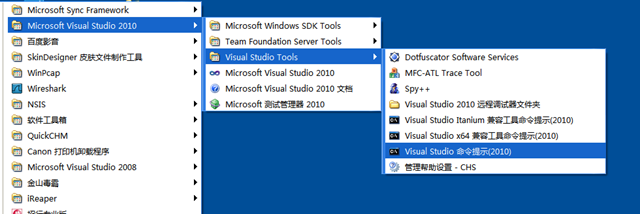
(7)调用wcf的服务可以通过代理类调用,由于都是soap传输协议,所以客户端可以借助vs的ide工具通过web服务引用的方式引用,也可以手动下载代理类和配置文件的用svcutil命令,如在开始菜单里找到vs的工具菜单,点命令提示进入类似dos的窗口输入svcutil命令,可以下载到代理类和配置文件,如下:
svcutil /out:D:\Project\Strong.WorkFlow\06.Development\Strong.WorkFlow.CommunicationServiceTest\ProxyWF.cs /config:D:\Project\Strong.WorkFlow\06.Development\Strong.WorkFlow.CommunicationServiceTest\App.config http://192.168.20.213:80/Service/WFFacade
用命令下载的比较干净简单,不至于用web引用的方式借助vs的工具下载的很多冗余的没有用的文件。
(8)对于创建wcf项目也很容易,可以利用vs工具创建wcf项目,如下图,也可以随便建立任何非wcf的web项目或应用程序的项目,但你只需要引用System.ServiceModel等类库就可以。
![clipboard[1]](http://images.cnblogs.com/cnblogs_com/adolphyuan/201202/201202071634094839.png "clipboard[1]")
CreateTime:2012/1/6 14:43

 浙公网安备 33010602011771号