

Enterprise Library
n Data Access Application Block
— 在项目中添加Data Access Application Block
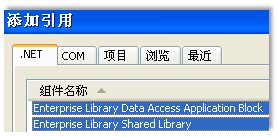
— 1.添加引用
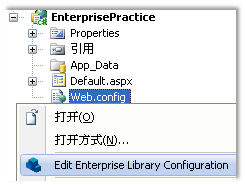
— 2.编辑Web.config
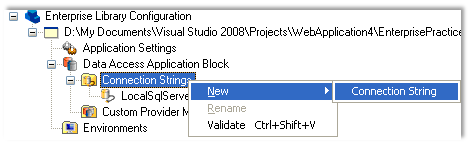

— 在代码中使用Data Access Application Block非常简单,使用DatabaseFactory可以创建一个Database对象。
Database db = DatabaseFactory.CreateDatabase("NorthwindConnection");
DbCommand cmd;
if (txtCountry.Text != string.Empty)
{
cmd = db.GetSqlStringCommand("select EmployeeID, FirstName, LastName, Country from Employees where Country=@Country");
db.AddInParameter(cmd, "@Country", DbType.String, txtCountry.Text);
}
else
{
cmd = db.GetSqlStringCommand("select EmployeeID, FirstName, LastName, Country from Employees");
}
DataSet dsEmployees = db.ExecuteDataSet(cmd);
gvEmployees.DataSource = dsEmployees.Tables[0];
gvEmployees.DataBind();
— 编译时若出错则将Web.config中name="dataConfiguration" 的那个section的type属性中的 PublicKeyToken去掉。
n Caching Application Block
— 在项目中添加Caching Application Block
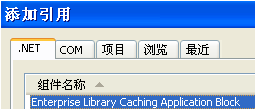
— 1.添加引用
— 编辑Web.config

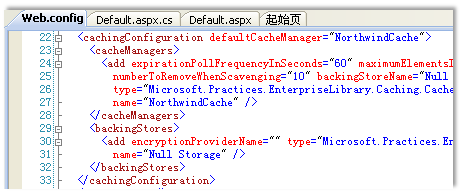
— 下面的代码对所有员工信息做了1分钟的缓存
Database db = DatabaseFactory.CreateDatabase("NorthwindConnection");
DbCommand cmd;
DataSet dsEmployees;
if (txtCountry.Text != string.Empty)
{
cmd = db.GetSqlStringCommand("select EmployeeID, FirstName, LastName, Country from Employees where Country=@Country");
db.AddInParameter(cmd, "@Country", DbType.String, txtCountry.Text);
dsEmployees = db.ExecuteDataSet(cmd);
}
else
{
cmd = db.GetSqlStringCommand("select EmployeeID, FirstName, LastName, Country from Employees");
ICacheManager cacheManager = CacheFactory.GetCacheManager("NorthwindCache");
dsEmployees = (DataSet)cacheManager["AllEmployees"];
if (dsEmployees == null)
{
dsEmployees = db.ExecuteDataSet(cmd);
AbsoluteTime expireTime = new AbsoluteTime(DateTime.Now.AddMinutes(1));
cacheManager.Add("AllEmployees", dsEmployees, CacheItemPriority.Normal,null,expireTime);
}
}
gvEmployees.DataSource = dsEmployees.Tables[0];
gvEmployees.DataBind();
— 前面的代码我们使用了CacheManager的Add方法,其中有个参数为params ICacheItemExpiration[],我们为其传递了一个AbsoluteTime对象,事实上,所有实现ICacheItemExpiration的对象均可以放入。例如:
— AbsoluteTime 绝对时间,到指定时间点释放缓存
— SlidingTime 滑动时间,设定一个存活时间长度,时间长度逐渐变小,当为0时释放缓存,在存活期间内,若再次访问该缓存,则存活时间长度恢复初始值。
— FileDependency 当某个文件被修改时缓存过期。
n Logging Application Block
— 在项目中添加Logging Application Block
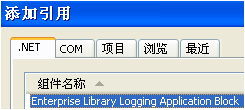
— 1.添加引用
— 2.编辑Web.config
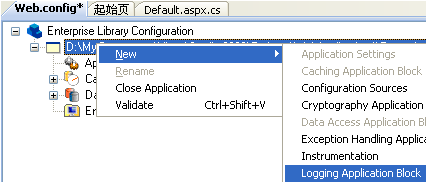
— 在代码中,新建一个LogEntry,并设置相关属性后,用Logger写入日志。
cmd = db.GetSqlStringCommand("select EmployeeID,FirstName,LastName,Country from Employees");
ICacheManager cacheManager = CacheFactory.GetCacheManager("NorthwindCache");
dsEmployees = (DataSet)cacheManager["AllEmployees"];
if (dsEmployees == null)
{
dsEmployees = db.ExecuteDataSet(cmd);
AbsoluteTime expireTime = new AbsoluteTime(DateTime.Now.AddMinutes(1));
cacheManager.Add("AllEmployees", dsEmployees, CacheItemPriority.Normal, null, expireTime);
LogEntry log = new LogEntry();
log.Severity = TraceEventType.Information;
log.Categories.Add("General");
log.Message = "缓存过期,重新获取数据并写入缓存。";
log.Title = "获取数据";
Logger.Write(log);
}
— 使用默认的配置文件会将将日志写入Windows日志查看器,也可以在Trace Listeners中新增一个Listener,例如FlatFile TraceListener ,然后Category Source中新增一个Category,并设置新增的Listener的Reference,则在代码中属于该Category的LogEntry,均会被写到文本文件中。
n Exception Handling Application Block
— 在项目中添加
— 添加引用
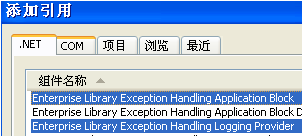
— 此处可以只选择Exception Handling Application Block ,但若要记录异常日志的话,还需要Exception Handling Logging Provider。
— 编辑Web.config
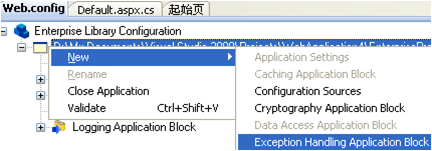
— 添加异常策略

— 在该策略下创建异常类型和异常的处理器

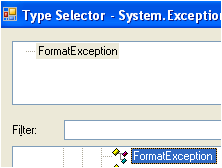
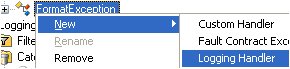
— 在代码中捕捉到异常后,可以使用ExceptionPolicy处理异常。
try
{
DateTime hireDate = DateTime.Parse(txtHireDate.Text);
//...
}
catch (FormatException ex)
{
ExceptionPolicy.HandleException(ex, "Exception Policy");
}

 浙公网安备 33010602011771号