Android快速获取视频帧
2017年短视频应用如雨后春笋般先后上线,现在的短视频App大多支持本地视频的上传以及裁剪。下面讲一讲裁剪视频时预览视频图片的快速获取方法。当选择一个视频之后,底下通常有预览图片,这就是视频帧,比如快手上传本地视频的界面如图所示
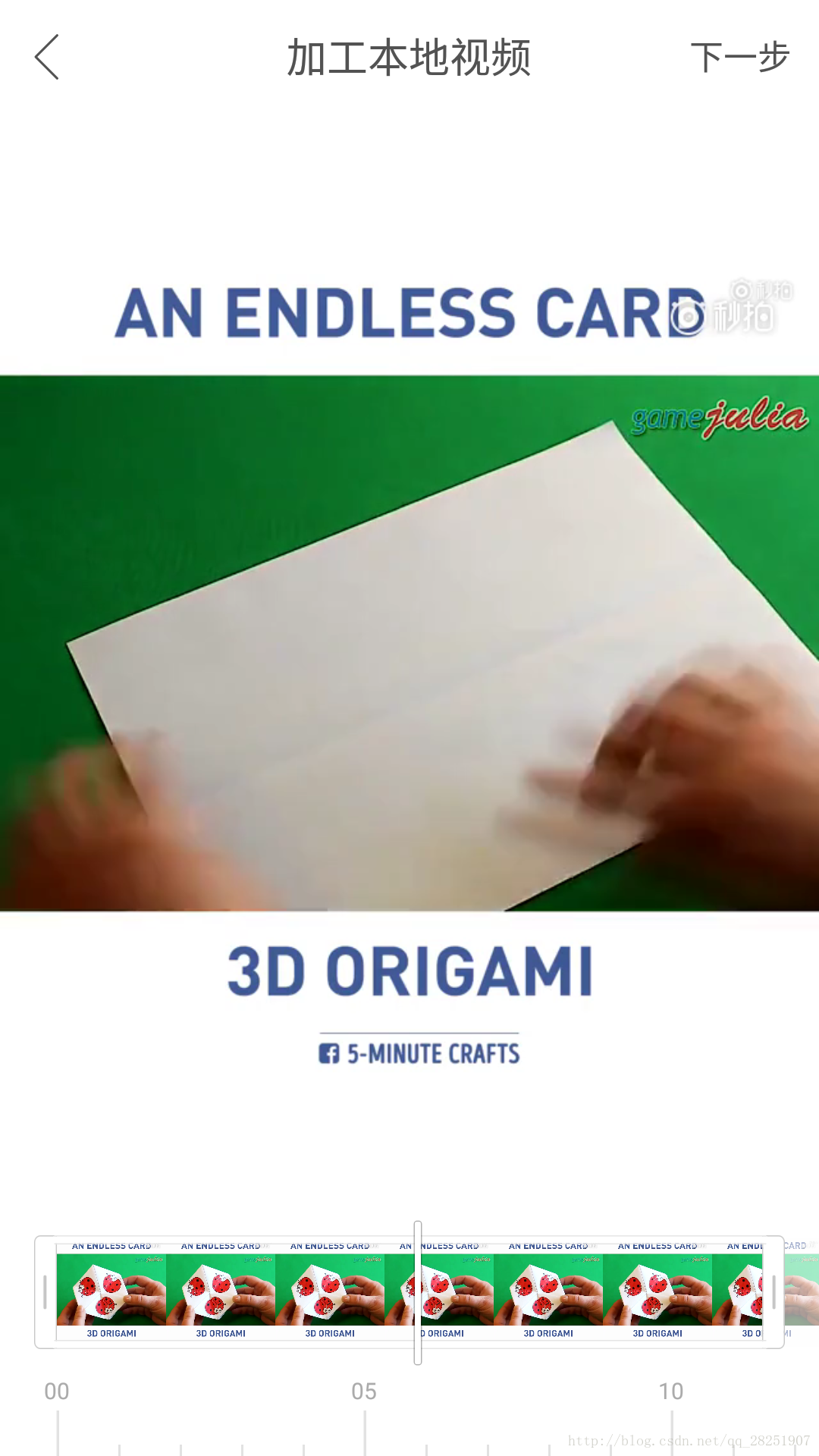
获取视频帧的方式的有很多种,比如可以直接使用ffmpeg,也可以使用Android自带的MediaMetadataRetriever来获取指定时间的图片帧,当然,可以自己设置option来指定图片是否是关键帧,也会根据option设置的不同以不同的方式寻找关键帧(我测试的结果感觉返回的都是关键帧)。
    MediaMetadataRetriever object = new MediaMetadataRetriever();
    object.setDataSource(mPath);
    //frameTime的单位为us微秒
    object.getFrameAtTime(frameTime, MediaMetadataRetriever.OPTION_CLOSEST);
OPTION一共有四个,分别是OPTION_CLOSEST、OPTION_CLOSEST_SYNC、OPTION_PREVIOUS_SYNC和OPTION_NEXT_SYNC。这些参数应该是见字识意的,但是个人测试结果即使设置成OPTION_CLOSEST返回的数据仍然是关键帧。
使用此方法很简单,但是此方法的速度比较慢,尤其当视频文件较大时,根本达不到快手这类App点进去之后立马就能将图片显示出来的速度。所以肯定有更快的实现,但是一直没有想到一个特别好的思路,后来在bigflake.com/MediaCodec中看到了一个例子才算是找到一个更快的方法,通过MediaCodec进行解码,然后通过OpenGL渲染,最后通过glReadPixels来获取图片,每一步的时间都是ms级别,整个过程应该也不慢。
下面是官方的demo
//20131122: minor tweaks to saveFrame() I/O
//20131205: add alpha to EGLConfig (huge glReadPixels speedup); pre-allocate pixel buffers;
//          log time to run saveFrame()
//20140123: correct error checks on glGet*Location() and program creation (they don't set error)
//20140212: eliminate byte swap

/**
 * Extract frames from an MP4 using MediaExtractor, MediaCodec, and GLES.  Put a .mp4 file
 * in "/sdcard/source.mp4" and look for output files named "/sdcard/frame-XX.png".
 * <p>
 * This uses various features first available in Android "Jellybean" 4.1 (API 16).
 * <p>
 * (This was derived from bits and pieces of CTS tests, and is packaged as such, but is not
 * currently part of CTS.)
 */
public class ExtractMpegFramesTest extends AndroidTestCase {
    private static final String TAG = "ExtractMpegFramesTest";
    private static final boolean VERBOSE = false;           // lots of logging

    // where to find files (note: requires WRITE_EXTERNAL_STORAGE permission)
    private static final File FILES_DIR = Environment.getExternalStorageDirectory();
    private static final String INPUT_FILE = "source.mp4";
    private static final int MAX_FRAMES = 10;       // stop extracting after this many

    /** test entry point */
    public void testExtractMpegFrames() throws Throwable {
        ExtractMpegFramesWrapper.runTest(this);
    }

    /**
     * Wraps extractMpegFrames().  This is necessary because SurfaceTexture will try to use
     * the looper in the current thread if one exists, and the CTS tests create one on the
     * test thread.
     *
     * The wrapper propagates exceptions thrown by the worker thread back to the caller.
     */
     //这儿说的很清楚,需要一个Looper。因为SurfaceTexture中的onFrameAvailable的回调需要Handler
    private static class ExtractMpegFramesWrapper implements Runnable {
        private Throwable mThrowable;
        private ExtractMpegFramesTest mTest;

        private ExtractMpegFramesWrapper(ExtractMpegFramesTest test) {
            mTest = test;
        }

        @Override
        public void run() {
            try {
                mTest.extractMpegFrames();
            } catch (Throwable th) {
                mThrowable = th;
            }
        }

        /** Entry point. */
        public static void runTest(ExtractMpegFramesTest obj) throws Throwable {
            ExtractMpegFramesWrapper wrapper = new ExtractMpegFramesWrapper(obj);
            Thread th = new Thread(wrapper, "codec test");
            th.start();
            //在自己的实现中,你唯一需要改变的就是这里的逻辑。注释就行,因为需要主线程的Looper
            th.join();
            if (wrapper.mThrowable != null) {
                throw wrapper.mThrowable;
            }
        }
    }
完成一系列的初始化操作之后开始真正的编解码操作
static void doExtract(MediaExtractor extractor, int trackIndex, MediaCodec decoder,
            CodecOutputSurface outputSurface) throws IOException {
        final int TIMEOUT_USEC = 10000;
        ByteBuffer[] decoderInputBuffers = decoder.getInputBuffers();
        MediaCodec.BufferInfo info = new MediaCodec.BufferInfo();
        int inputChunk = 0;
        int decodeCount = 0;
        long frameSaveTime = 0;

        boolean outputDone = false;
        boolean inputDone = false;
        while (!outputDone) {
            if (VERBOSE) Log.d(TAG, "loop");

            // Feed more data to the decoder.
            if (!inputDone) {
                int inputBufIndex = decoder.dequeueInputBuffer(TIMEOUT_USEC);
                if (inputBufIndex >= 0) {
                    ByteBuffer inputBuf = decoderInputBuffers[inputBufIndex];
                    // Read the sample data into the ByteBuffer.  This neither respects nor
                    // updates inputBuf's position, limit, etc.
                    int chunkSize = extractor.readSampleData(inputBuf, 0);
                    if (chunkSize < 0) {
                        // End of stream -- send empty frame with EOS flag set.
                        decoder.queueInputBuffer(inputBufIndex, 0, 0, 0L,
                                MediaCodec.BUFFER_FLAG_END_OF_STREAM);
                        inputDone = true;
                        if (VERBOSE) Log.d(TAG, "sent input EOS");
                    } else {
                        if (extractor.getSampleTrackIndex() != trackIndex) {
                            Log.w(TAG, "WEIRD: got sample from track " +
                                    extractor.getSampleTrackIndex() + ", expected " + trackIndex);
                        }
                        long presentationTimeUs = extractor.getSampleTime();
                        decoder.queueInputBuffer(inputBufIndex, 0, chunkSize,
                                presentationTimeUs, 0 /*flags*/);
                        if (VERBOSE) {
                            Log.d(TAG, "submitted frame " + inputChunk + " to dec, size=" +
                                    chunkSize);
                        }
                        inputChunk++;
                        extractor.advance();
                    }
                } else {
                    if (VERBOSE) Log.d(TAG, "input buffer not available");
                }
            }

            if (!outputDone) {
                int decoderStatus = decoder.dequeueOutputBuffer(info, TIMEOUT_USEC);
                if (decoderStatus == MediaCodec.INFO_TRY_AGAIN_LATER) {
                    // no output available yet
                    if (VERBOSE) Log.d(TAG, "no output from decoder available");
                } else if (decoderStatus == MediaCodec.INFO_OUTPUT_BUFFERS_CHANGED) {
                    // not important for us, since we're using Surface
                    if (VERBOSE) Log.d(TAG, "decoder output buffers changed");
                } else if (decoderStatus == MediaCodec.INFO_OUTPUT_FORMAT_CHANGED) {
                    MediaFormat newFormat = decoder.getOutputFormat();
                    if (VERBOSE) Log.d(TAG, "decoder output format changed: " + newFormat);
                } else if (decoderStatus < 0) {
                    fail("unexpected result from decoder.dequeueOutputBuffer: " + decoderStatus);
                } else { // decoderStatus >= 0
                    if (VERBOSE) Log.d(TAG, "surface decoder given buffer " + decoderStatus +
                            " (size=" + info.size + ")");
                    if ((info.flags & MediaCodec.BUFFER_FLAG_END_OF_STREAM) != 0) {
                        if (VERBOSE) Log.d(TAG, "output EOS");
                        outputDone = true;
                    }

                    boolean doRender = (info.size != 0);

                    // As soon as we call releaseOutputBuffer, the buffer will be forwarded
                    // to SurfaceTexture to convert to a texture.  The API doesn't guarantee
                    // that the texture will be available before the call returns, so we
                    // need to wait for the onFrameAvailable callback to fire.
                    //mediaCodec可以直接输出到surface中进行渲染
                    //初始化时调用的是decoder.configure(format, outputSurface.getSurface(), null, 0);
                    decoder.releaseOutputBuffer(decoderStatus, doRender);
                    if (doRender) {
                        if (VERBOSE) Log.d(TAG, "awaiting decode of frame " + decodeCount);
                        //等待surfaceTexture中的onFrameAvailable
                        outputSurface.awaitNewImage();
                        outputSurface.drawImage(true);

                        if (decodeCount < MAX_FRAMES) {
                            File outputFile = new File(FILES_DIR,
                                    String.format("frame-%02d.png", decodeCount));
                            long startWhen = System.nanoTime();
                            outputSurface.saveFrame(outputFile.toString());
                            frameSaveTime += System.nanoTime() - startWhen;
                        }
                        decodeCount++;
                    }
                }
            }
        }
        //other option...
    }
下面是CodecOutputSurface的具体实现
     /**
     * Holds state associated with a Surface used for MediaCodec decoder output.
     * <p>
     * The constructor for this class will prepare GL, create a SurfaceTexture,
     * and then create a Surface for that SurfaceTexture.  The Surface can be passed to
     * MediaCodec.configure() to receive decoder output.  When a frame arrives, we latch the
     * texture with updateTexImage(), then render the texture with GL to a pbuffer.
     * <p>
     * By default, the Surface will be using a BufferQueue in asynchronous mode, so we
     * can potentially drop frames.
     */
    private static class CodecOutputSurface
            implements SurfaceTexture.OnFrameAvailableListener {
            //创建EGL环境,具体可参见原始代码
            //使用EGL_PBUFFER_BIT,离屏渲染
            int[] attribList = {
                    EGL14.EGL_RED_SIZE, 8,
                    EGL14.EGL_GREEN_SIZE, 8,
                    EGL14.EGL_BLUE_SIZE, 8,
                    EGL14.EGL_ALPHA_SIZE, 8,
                    EGL14.EGL_RENDERABLE_TYPE, EGL14.EGL_OPENGL_ES2_BIT,
                    EGL14.EGL_SURFACE_TYPE, EGL14.EGL_PBUFFER_BIT,
                    EGL14.EGL_NONE
            };
            ...
            mEGLSurface = EGL14.eglCreatePbufferSurface(mEGLDisplay, configs[0], surfaceAttribs, 0);
            ...
        /**
         * Latches the next buffer into the texture.  Must be called from the thread that created
         * the CodecOutputSurface object.  (More specifically, it must be called on the thread
         * with the EGLContext that contains the GL texture object used by SurfaceTexture.)
         */
        public void awaitNewImage() {
            final int TIMEOUT_MS = 2500;

            synchronized (mFrameSyncObject) {
                while (!mFrameAvailable) {
                    try {
                        // Wait for onFrameAvailable() to signal us.  Use a timeout to avoid
                        // stalling the test if it doesn't arrive.
                        mFrameSyncObject.wait(TIMEOUT_MS);
                        if (!mFrameAvailable) {
                            // TODO: if "spurious wakeup", continue while loop
                            throw new RuntimeException("frame wait timed out");
                        }
                    } catch (InterruptedException ie) {
                        // shouldn't happen
                        throw new RuntimeException(ie);
                    }
                }
                mFrameAvailable = false;
            }

            // Latch the data.
            mTextureRender.checkGlError("before updateTexImage");
            mSurfaceTexture.updateTexImage();
        }
           /**
         * Saves the current frame to disk as a PNG image.
         */
        public void saveFrame(String filename) throws IOException {

            mPixelBuf.rewind();
            GLES20.glReadPixels(0, 0, mWidth, mHeight, GLES20.GL_RGBA, GLES20.GL_UNSIGNED_BYTE,
                mPixelBuf);

            BufferedOutputStream bos = null;
            try {
                bos = new BufferedOutputStream(new FileOutputStream(filename));
                //上面有一段话解释虽然Bitmap的Config设置为ARGB,但是copyPixelFromBuffer需要的数据就是RGBA,直接传递参数就行
                Bitmap bmp = Bitmap.createBitmap(mWidth, mHeight, Bitmap.Config.ARGB_8888);
                mPixelBuf.rewind();
                bmp.copyPixelsFromBuffer(mPixelBuf);
                //我自己测试保存至文件这一步占用了大部分的时间
                bmp.compress(Bitmap.CompressFormat.PNG, 90, bos);
                bmp.recycle();
            } finally {
                if (bos != null) bos.close();
            }
            if (VERBOSE) {
                Log.d(TAG, "Saved " + mWidth + "x" + mHeight + " frame as '" + filename + "'");
            }
        }
}
测试后发现截取一帧的时间差不多在100ms左右。但是发现获取我自己手机拍摄的视频得到的图片不对,但是我从网上下载的视频是可以的。目前还没有发现原因,如果读者知道原因,欢迎留言告知

 浙公网安备 33010602011771号