
AOP进阶案例-基于Xml
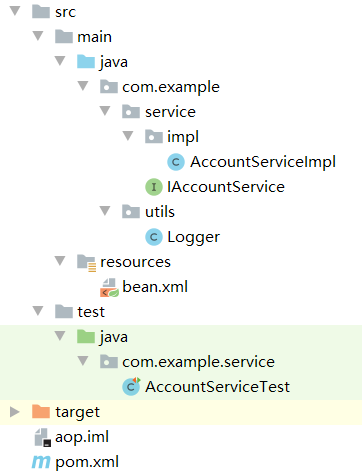
配置:
<?xml version="1.0" encoding="UTF-8"?>
<project xmlns="http://maven.apache.org/POM/4.0.0"
         xmlns:xsi="http://www.w3.org/2001/XMLSchema-instance"
         xsi:schemaLocation="http://maven.apache.org/POM/4.0.0 http://maven.apache.org/xsd/maven-4.0.0.xsd">
    <modelVersion>4.0.0</modelVersion>

    <groupId>org.example</groupId>
    <artifactId>aop</artifactId>
    <version>1.0-SNAPSHOT</version>
    <packaging>jar</packaging>

    <dependencies>
        <dependency>
            <groupId>org.springframework</groupId>
            <artifactId>spring-context</artifactId>
            <version>5.2.7.RELEASE</version>
        </dependency>
        <dependency>
            <groupId>org.aspectj</groupId>
            <artifactId>aspectjweaver</artifactId>
            <version>1.9.5</version>
        </dependency>
        <dependency>
            <groupId>junit</groupId>
            <artifactId>junit</artifactId>
            <version>4.12</version>
            <scope>test</scope>
        </dependency>
        <dependency>
            <groupId>org.springframework</groupId>
            <artifactId>spring-test</artifactId>
            <version>5.2.7.RELEASE</version>
        </dependency>
    </dependencies>

    <repositories>
        <repository>
            <id>alimaven</id>
            <name>aliyun maven</name>
            <url>http://maven.aliyun.com/nexus/content/groups/public/</url>
            <releases>
                <enabled>true</enabled>
            </releases>
            <snapshots>
                <enabled>false</enabled>
            </snapshots>
        </repository>
    </repositories>

    <properties>
        <project.build.sourceEncoding>UTF-8</project.build.sourceEncoding>
        <project.reporting.outputEncoding>UTF-8</project.reporting.outputEncoding>
        <java.version>14</java.version>
        <maven.compiler.source>14</maven.compiler.source>
        <maven.compiler.target>14</maven.compiler.target>
        <encoding>UTF-8</encoding>
    </properties>


</project>
<?xml version="1.0" encoding="UTF-8"?>
<beans xmlns="http://www.springframework.org/schema/beans"
       xmlns:xsi="http://www.w3.org/2001/XMLSchema-instance"
       xmlns:aop="http://www.springframework.org/schema/aop"
       xsi:schemaLocation="http://www.springframework.org/schema/beans
        https://www.springframework.org/schema/beans/spring-beans.xsd
        http://www.springframework.org/schema/aop
        https://www.springframework.org/schema/aop/spring-aop.xsd">
    <!--配置Spring的Ioc,把Service对象配置进来-->
    <bean id="accountService" class="com.example.service.impl.AccountServiceImpl"></bean>
    <!--spring中基于XML的AOP配置步骤
        1. 把通知类Bean也交给spring来管理
        2. 使用aop:config表明开始aop配置
        3. 使用aop:aspect标签表明配置切面
            id属性:给切面提供一个唯一标识
            ref属性:指定通知类bean的ID
        4. 在aop:aspect标签的内部使用对应的标签来配置通知类型
            我们现在示例是让printLog方法在切入点方法执行之前通知:所以是前置通知
            aop:before:标识前置通知
                method:属性:用于指定Logger类中哪个方法是前置通知
                pointcut属性:用于指定切入点表达式,该表达式的含义指的是对业务层中那些方法增强
            切入点表达式的写法:
                关键字:execution(表达式)
                表达式:
                    访问修饰符   返回值 包名.包名.包名...类名.方法名(参数列表)
                    标准的表达式写法:
                            public void com.example.service.impl.AccountServiceImpl.saveAccount()
                    全统配写法:
                            * *..*.*(..)
                    访问修饰符可以省略
                            void com.example.service.impl.AccountServiceImpl.saveAccount()
                    返回值可以使用通配符
                            * com.example.service.impl.AccountServiceImpl.saveAccount()
                    包名可以使用通配符
                            * *.*.*.*.AccountServiceImpl.saveAccount()
                    当前包及其子包 ..
                            * *..AccountServiceImpl.saveAccount()
                     类名和方法名可以使用通配符
                            * *..*.*()
                     参数列表:
                        基本类型直接写: int
                        应用类型写全限定类型:java.lang.String
                            * *..*.*(int)
                        可以使用*标识任意类型
                            * *..*.*(*)
                        可以使用..标识有无参数都行
                            * *..*.*(..)
                      实际项目中的写法:
                            * com.example.service.impl.*.*(..)
                        -->
    <!--配置Logger类-->
    <bean id="logger" class="com.example.utils.Logger"></bean>

    <!--配置AOP-->
    <aop:config>
        <!--配置切面-->
        <aop:aspect id="logAdvice" ref="logger">
            <!--前置通知-->
            <aop:before method="beforePrintLog" pointcut-ref="pt1"></aop:before>
            <!--后置通知-->
            <aop:after-returning method="afterReturningPrintLog" pointcut-ref="pt1"></aop:after-returning>
            <!--异常通知-->
            <aop:after-throwing method="afterThrowingPrintLog" pointcut-ref="pt1"></aop:after-throwing>
            <!--最终通知-->
            <aop:after method="afterPrintLog" pointcut-ref="pt1"></aop:after>
            <!--环绕通知-->
            <aop:around method="aroundPrintLog" pointcut-ref="pt1"></aop:around>

            <!--配置切入点表达式 id属性:唯一标识切入点表达式 expression属性:指定表达式内容
                aop:aspect标签内部配置只能被当前切面使用
                aop:config标签内部配置可以被所有切面使用+++++++需要写在aop:aspect标签之前
                -->
            <aop:pointcut id="pt1"  expression="execution(* com.example.service.impl.*.*(..))"/>

        </aop:aspect>
    </aop:config>
</beans>
代码:
package com.example.service;

/**
 * 账户的业务层接口
 */
public interface IAccountService {
    /**
     * 模拟保存账户
     */
    void saveAccount();

    /**
     * 模拟更新账户
     * @param i
     */
    void updateAccount(int i);

    /**
     * 模拟销毁账户
     * @return
     */
    int deleteAccount();
}
package com.example.service.impl;

import com.example.service.IAccountService;

/**
 * 账户的业务层实现类
 */
public class AccountServiceImpl implements IAccountService {
    @Override
    public void saveAccount() {
        System.out.println("执行了保存");
    }

    @Override
    public void updateAccount(int i) {
        System.out.println("执行了更新:"+i);
    }

    @Override
    public int deleteAccount() {
        System.out.println("执行了删除");
        return 0;
    }
}
package com.example.utils;

import org.aspectj.lang.ProceedingJoinPoint;

/**
 * 用于记录日志的工具类,它里面提供了公共代码
 */
public class Logger {
    /**
     * 前置通知 befor
     */
    public void beforePrintLog(){
        System.out.println("Logger.beforePrintLog");
    }
    /**
     * 后置通知 after
     */
    public void afterReturningPrintLog(){
        System.out.println("Logger.afterReturningPrintLog");
    }
    /**
     * 异常通知 throw
     */
    public void afterThrowingPrintLog(){
        System.out.println("Logger.afterThrowingPrintLog");
    }
    /**
     * 最终通知 finally
     */
    public void afterPrintLog(){
        System.out.println("Logger.afterPrintLog");
    }

    /**
     * 环绕通知:用于增强方法(pjp)
     * 问题:切入点方法未执行,通知方法在执行了
     * 解决:需要pjp.proceed方法显示调用切入点方法
     */
    public Object aroundPrintLog(ProceedingJoinPoint pjp){
        System.out.println("Logger.aroundPrintLog");
        Object rtValue=null;
        Object[] args = pjp.getArgs();
        try {
            //前置
            rtValue=pjp.proceed(args);
            //后置
        } catch (Throwable throwable) {
            //异常
            throw new RuntimeException(throwable);
        }finally {
            //最终
        }
        return rtValue;
    }
}
测试:
package com.example.service;


import org.junit.Test;
import org.junit.runner.RunWith;
import org.springframework.beans.factory.annotation.Autowired;
import org.springframework.cache.annotation.SpringCacheAnnotationParser;
import org.springframework.test.context.ContextConfiguration;
import org.springframework.test.context.junit4.SpringJUnit4ClassRunner;

@RunWith(SpringJUnit4ClassRunner.class)
@ContextConfiguration(locations = "classpath:bean.xml")
public class AccountServiceTest {

    @Autowired
    IAccountService service;

    @Test
    public void testSaveAccount(){
        service.saveAccount();
        service.updateAccount(0);
        service.deleteAccount();
    }
}

 浙公网安备 33010602011771号