
1.servlet
1.1、servlet简介
-
Servlet就是sun公司开发动态web的一门技术
-
Sun在这些API中提供一个接口叫做:Servlet,如果你想开发一个Servlet程序,只需要完成两个步骤:
-
编写一个类,实现servlet接口
-
把开发好的Java类部署到web服务器中
-
-
把实现了servlet接口的java程序叫做,Servlet
1.2、HelloServlet
-
构建一个普通的Maven项目,删掉里面的src
-
关于Maven父子工程的理解:
-
父项目中会有
-
<modules>
        <module>servlet-01</module>
</modules>-
父项目中的jar包子项目可以直接使用
-
Maven环境优化
-
修改web.xml为最新
-
将maven的结构搭建完整
-
-
编写一个Servlet程序
-
实现Servlet接口,这里我们直接继承HttpServlet
-
public class HelloServlet extends HttpServlet {
@Override
protected void doGet(HttpServletRequest req, HttpServletResponse resp) throws ServletException, IOException {
PrintWriter writer = resp.getWriter();
writer.print("Hello,Servlet");
}
@Override
protected void doPost(HttpServletRequest req, HttpServletResponse resp) throws ServletException, IOException {
super.doPost(req, resp);
}
}
-
编写Servlet的映射
为什么要映射:因为我们写的是Java程序,但是要通过浏览器访问,而浏览器需要连接web服务器,我们需要在web服务器中注册我们呢写的servlet,还需要给他一个浏览器的访问路径。
-
配置Tomcat
-
启动项目

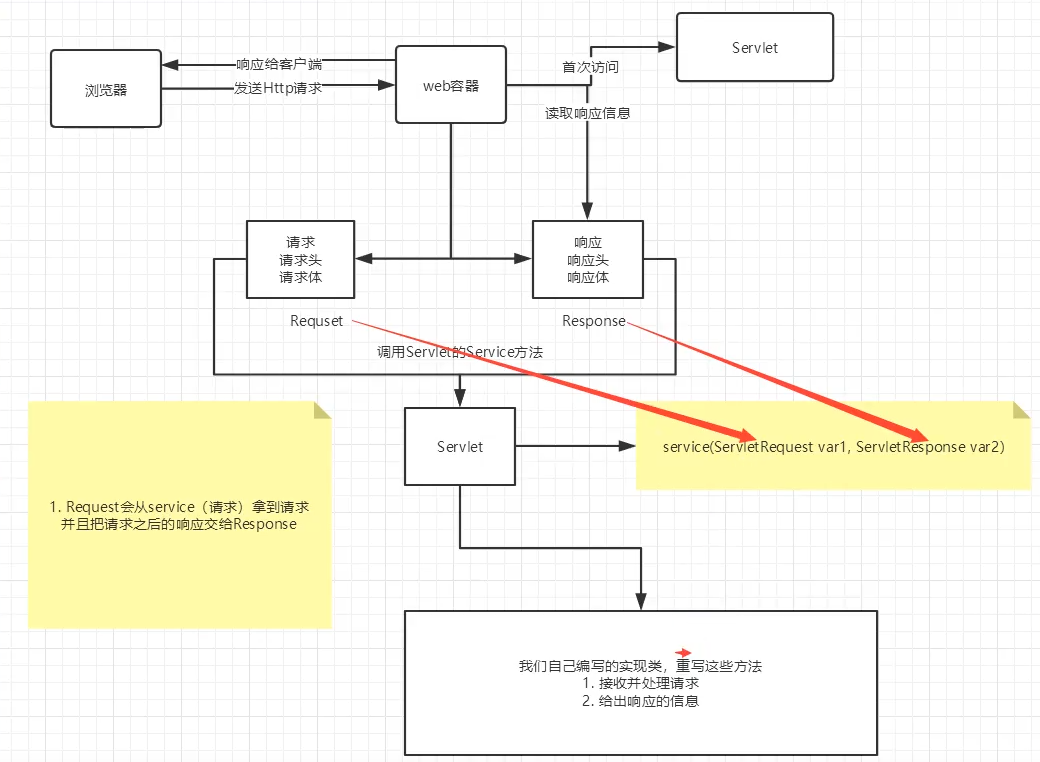
1.3 servlet运行原理
1.4 Mapping
-
一个请求可以指定一个映射路径
<servlet-mapping> <servlet-name>hello</servlet-name> <url-pattern>/hello</url-pattern> </servlet-mapping> -
一个servlet可以指定多个映射路径
<servlet-mapping> <servlet-name>hello</servlet-name> <url-pattern>/hello</url-pattern> </servlet-mapping> <servlet-mapping> <servlet-name>hello</servlet-name> <url-pattern>/hello1</url-pattern> </servlet-mapping> -
一个servlet可以指定通用映射路径
<servlet-mapping> <servlet-name>hello</servlet-name> <url-pattern>/hello</url-pattern> </servlet-mapping> <servlet-mapping> <servlet-name>hello</servlet-name> <url-pattern>/hello/*</url-pattern> </servlet-mapping> -
指定一些后缀或者前缀等等。。
<servlet-mapping> <servlet-name>hello</servlet-name> <url-pattern>*.zhb</url-pattern> </servlet-mapping> -
默认的路径
<servlet-mapping>
        <servlet-name>hello</servlet-name>
        <url-pattern>*</url-pattern>
</servlet-mapping>-
优先级问题
指定了固有的映射路径优先级最高,如果找不到就会走默认的处理请求;
1.5 ServletContext
-
web容器在启动的时候,它会为每个web程序都创建一个对应的ServletContext,它代表了当前的web应用。
1、共享数据
我在servlet中保存的数据可以在另一个servlet中取出;
-
首先我们创建一个类用于存放Context
public class HelloServlet extends HttpServlet {
    @Override
    protected void doGet(HttpServletRequest req, HttpServletResponse resp) throws ServletException, IOException {
        ServletContext servletContext = this.getServletContext();
        String name = "zhb";
        servletContext.setAttribute("zhb",name);
       System.out.println("hello");
    }
}-
以上就是把定义一个字符串,name,放入ServletContext中
-
之后创建一个接收类再里面输入之前放入的名字
public class getContext extends HttpServlet {
@Override
protected void doGet(HttpServletRequest req, HttpServletResponse resp) throws ServletException, IOException {
ServletContext servletContext = this.getServletContext();
String name =(String) servletContext.getAttribute("zhb");
resp.setContentType("text/html");
resp.setCharacterEncoding("utf-8");
PrintWriter writer = resp.getWriter();
writer.print("名字:"+name);
System.out.println(servletContext);
}
}-
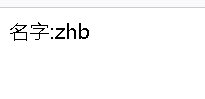
如此运行项目后,先进入第一个页面,会自动存入Context,之后进入第二个页面,将会输出。
2、获取初始化参数
<context-param>
    <param-name>url</param-name>
    <param-value>jdbc:mysql://localhost:3306/mybatis</param-value>
</context-param>
public class Dome03 extends HttpServlet {
@Override
protected void doGet(HttpServletRequest req, HttpServletResponse resp) throws ServletException, IOException {
ServletContext servletContext = this.getServletContext();
String url = servletContext.getInitParameter("url");
resp.getWriter().print(url);
}
}3、请求转发
public class Dome04 extends HttpServlet {
@Override
protected void doGet(HttpServletRequest req, HttpServletResponse resp) throws ServletException, IOException {
    ServletContext servletContext = this.getServletContext();
    RequestDispatcher requestDispatcher = servletContext.getRequestDispatcher("/url");//转发的请求路径
    requestDispatcher.forward(req,resp);//调用forword实现请求转发
}
}
4、读取资源文件
properties
-
在java目录下新建properties
-
在resources目录下新建properties
发现:都被打包到了同一目录下,classes,我们称这个路径为classpath
思路:需要一个文件流
userName = zhb
password = 123456
public class Dome05 extends HttpServlet {
@Override
protected void doGet(HttpServletRequest req, HttpServletResponse resp) throws ServletException, IOException {
InputStream is = this.getServletContext().getResourceAsStream("/WEB-INF/classes/db.properties");
Properties properties = new Properties();
properties.load(is);
String userName = properties.getProperty("userName");
String password = properties.getProperty("password");
resp.getWriter().print(userName+":"+password );
}
}访问测试结果:

2、HttpServletResponse
web服务器接收到客户端的HTTP请求,针对这个请求,分别创建一个代表请求的HttpServletRequest对象,代表响应的一个HttpServletResponse
-
如果要获取客户端请求过来的参数:找HttpServletRequest
-
如果要给客户端响应一些信息,找HttpServletResponse
1.1、简单分类
负责向浏览器发送数据分类
public ServletOutputStream getOutputStream() throws IOException;
public PrintWriter getWriter() throws IOException;
负责向浏览器发送响应头的方法
public void setCharacterEncoding(String charset);
public void setContentLength(int len);
public void setContentType(String type);
void setDateHeader(String var1, long var2);
void addDateHeader(String var1, long var2);
void setHeader(String var1, String var2);
void addHeader(String var1, String var2);
void setIntHeader(String var1, int var2);
void addIntHeader(String var1, int var2);
int SC_CONTINUE = 100;
int SC_SWITCHING_PROTOCOLS = 101;
int SC_OK = 200;
int SC_CREATED = 201;
int SC_ACCEPTED = 202;
int SC_NON_AUTHORITATIVE_INFORMATION = 203;
int SC_NO_CONTENT = 204;
int SC_RESET_CONTENT = 205;
int SC_PARTIAL_CONTENT = 206;
int SC_MULTIPLE_CHOICES = 300;
int SC_MOVED_PERMANENTLY = 301;
int SC_MOVED_TEMPORARILY = 302;
int SC_FOUND = 302;
int SC_SEE_OTHER = 303;
int SC_NOT_MODIFIED = 304;
int SC_USE_PROXY = 305;
int SC_TEMPORARY_REDIRECT = 307;
int SC_BAD_REQUEST = 400;
int SC_UNAUTHORIZED = 401;
int SC_PAYMENT_REQUIRED = 402;
int SC_FORBIDDEN = 403;
int SC_NOT_FOUND = 404;
int SC_METHOD_NOT_ALLOWED = 405;
int SC_NOT_ACCEPTABLE = 406;
int SC_PROXY_AUTHENTICATION_REQUIRED = 407;
int SC_REQUEST_TIMEOUT = 408;
int SC_CONFLICT = 409;
int SC_GONE = 410;
int SC_LENGTH_REQUIRED = 411;
int SC_PRECONDITION_FAILED = 412;
int SC_REQUEST_ENTITY_TOO_LARGE = 413;
int SC_REQUEST_URI_TOO_LONG = 414;
int SC_UNSUPPORTED_MEDIA_TYPE = 415;
int SC_REQUESTED_RANGE_NOT_SATISFIABLE = 416;
int SC_EXPECTATION_FAILED = 417;
int SC_INTERNAL_SERVER_ERROR = 500;
int SC_NOT_IMPLEMENTED = 501;
int SC_BAD_GATEWAY = 502;
int SC_SERVICE_UNAVAILABLE = 503;
int SC_GATEWAY_TIMEOUT = 504;
int SC_HTTP_VERSION_NOT_SUPPORTED = 505;
1.2、常见应用
-
向浏览器输出消息
-
下载文件
public class FileServlet extends HttpServlet {
    @Override
    protected void doGet(HttpServletRequest req, HttpServletResponse resp) throws ServletException, IOException {
//1. 要获取下载文件的路径
        String realPath = "D:\\idea\\java\\javaWeb-02-\\response\\target\\classes\\image.jpg";
        System.out.println("下载的文件夹:"+realPath);
//2. 下载的文件名是什么
        String fileName = realPath.substring(realPath.lastIndexOf("\\")+1);
//3. 设置想办法让浏览器能够支持下载我们需要的东西
        resp.setHeader("Content-disposition","attachment;filename"+ fileName);
//4. 获取下载文件的输入流
        FileInputStream fileInputStream = new FileInputStream(realPath);
//5. 创建缓冲区
        int len = 0;
        byte[] buffer = new byte[1024];
//6. 获取OutputStream对象
        ServletOutputStream out = resp.getOutputStream();
//7. 将FileOutputStream流写入到buffer缓冲区
        while ((len = fileInputStream.read(buffer))>0 ){
             out.write(buffer,0,len);
        }
        fileInputStream.close();
        out.close();
//8. 使用OutputStream将缓冲区的数据输出到客户端
    }
}
1.3、验证码功能
public class ImageServlet extends HttpServlet {
    @Override
    protected void doGet(HttpServletRequest req, HttpServletResponse resp) throws ServletException, IOException {
        //如何让浏览器5秒自动刷新一次
        resp.setHeader("refresh","3");
        //在内存中创建一个图片
        BufferedImage image = new BufferedImage(100,20,BufferedImage.TYPE_INT_RGB);
        //得到图片
        Graphics2D g = (Graphics2D) image.getGraphics(); //笔
        //设置图片的背景颜色
        g.setColor(Color.WHITE);
        g.fillRect(0,0,100,20);
        //给图片写数据
        g.setColor(Color.BLUE) ;
        g.setFont(new Font(null,Font.BOLD,20));
        g.drawString(makeNum(),0,20);
        //告诉浏览器 这个请求用图片的方式打开
        resp.setContentType("image/jpeg");
        //让网站不再缓存
        resp.setDateHeader("expires",-1);
        resp.setHeader("Cache-Control","no-cache");
        resp.setHeader("Pragma","no-cache");
        //把图片给浏览器
        ImageIO.write(image, "jpg",resp.getOutputStream());
    }
    //生成随机数
    private  String makeNum(){
        Random random = new Random();
      String num = random.nextInt(99999999)+"";
      StringBuilder sb = new StringBuilder();
        for (int i = 0; i < 8-num.length() ; i++) {
            sb.append(0);
        }
        return num;
    }
}
 浙公网安备 33010602011771号