
RecyclerView ItemDecoration 实现分组吸顶效果
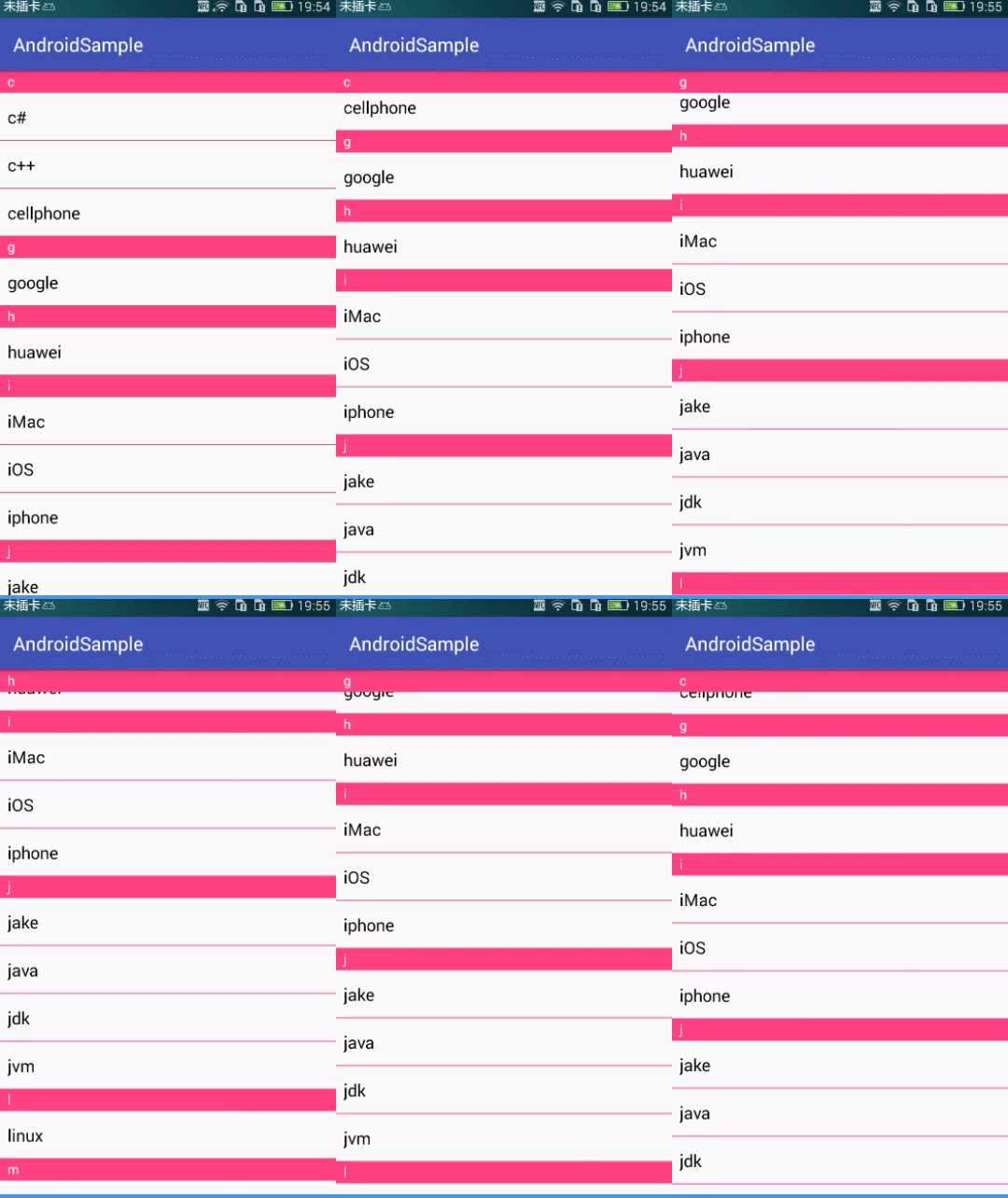
本文实现的吸顶效果为:
简介
我们都知道 ListView 添加分割线可以通过在布局文件中添加 android:divider 属性即可,但是 RecyclerView 并没有提供那样的属性。如若需要使用分割线,则需要使用其他的方式实现:
-
给 RecyclerView item 设置 margin : 首先将布局文件中的 RecyclerView 背景设置成分割线的颜色(如黑色),itemView 的背景颜色设置成白色,然后在 onCreateViewHolder() 中为 itemView 设置 top / bottom margin;
<!--布局文件--> <android.support.v7.widget.RecyclerView android:id="@+id/recycler_view" android:layout_width="match_parent" android:layout_height="match_parent" android:background="#000" />- 1
- 2
- 3
- 4
- 5
- 6
// RecyclerAdapter.java @Override public RecyclerView.ViewHolder onCreateViewHolder(ViewGroup parent, int viewType) { View itemView = inflater.inflate(R.layout.item_recycler_view, parent, false); RecyclerView.LayoutParams layoutParams = (RecyclerView.LayoutParams) itemView.getLayoutParams(); layoutParams.bottomMargin = 50; // 为方便观察,设置一个很大的间距 itemView.setLayoutParams(layoutParams); return new ItemViewHolder(itemView); }- 1
- 2
- 3
- 4
- 5
- 6
- 7
- 8
- 9
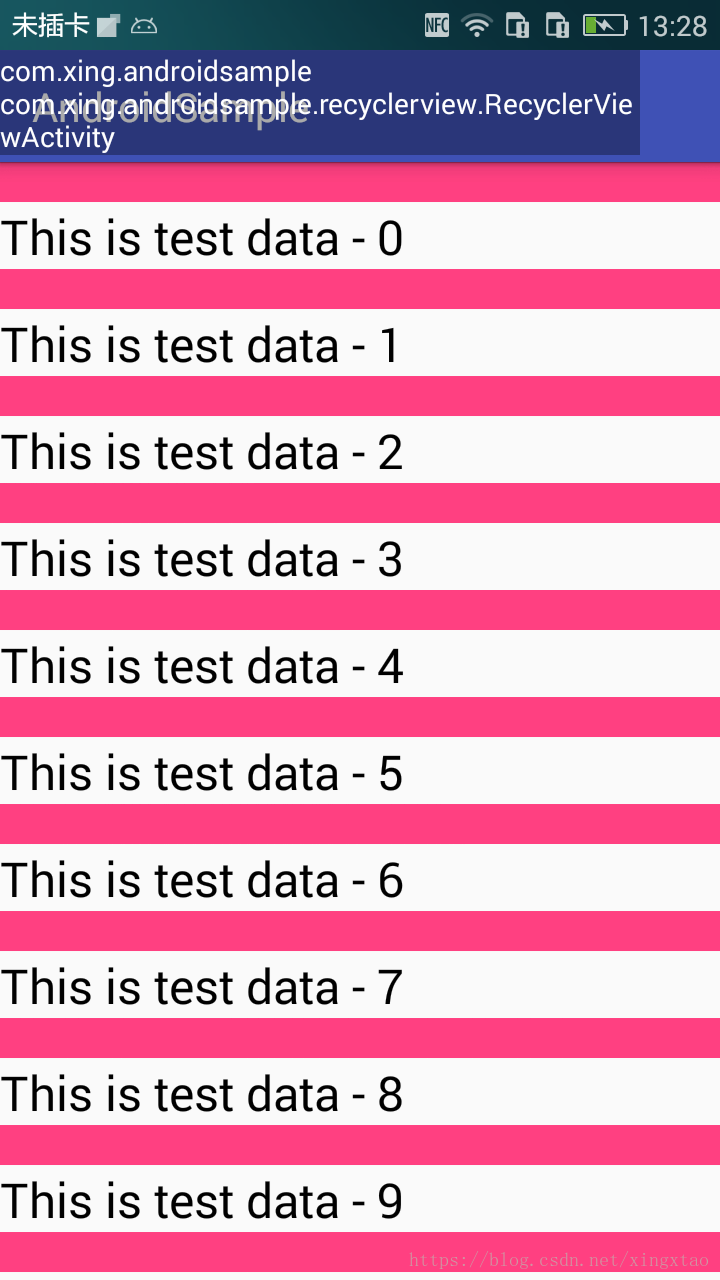
可以看到上面效果图:这种实现方式第一个 item 或者 最后一个 item(如上图 最后一个 item) 都会存在 分割线。同时也会增加不必要的背景设置,从而导致过度绘制。
. 2 自定义 ItemDecoration;
RecyclerView.ItemDecoration 的使用主要涉及到以下三个函数:
void getItemOffsets(Rect outRect, View view, RecyclerView parent, RecyclerView.State state)
void onDraw(Canvas canvas, RecyclerView parent, RecyclerView.State state)
void onDrawOver(Canvas canvas, RecyclerView parent, RecyclerView.State state)- 1
- 2
- 3
ItemDecoration 实现常规分割线
一般的,对于列表添加分割线,第一个 itemView 顶部和最后一个 itemView 底部是不需要分割线的,以下代码实现这种效果。
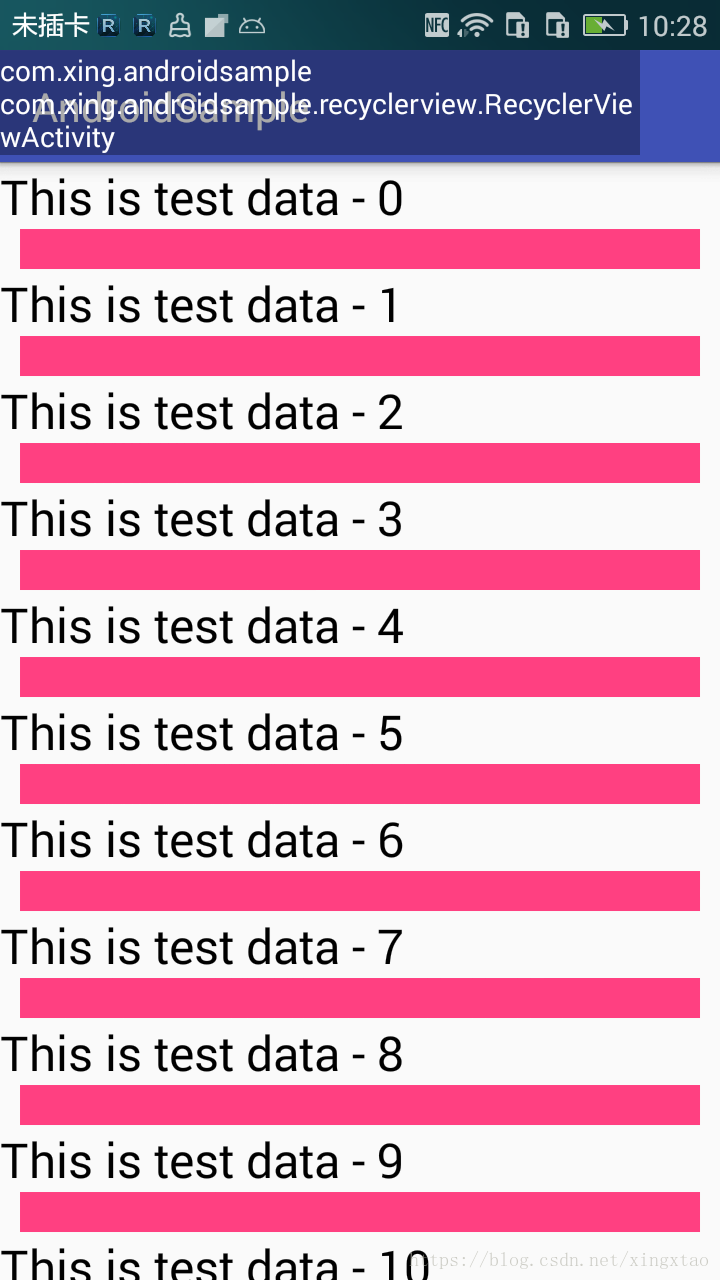
继承自 RecyclerView.ItemDecoration 类,在 onDraw() 中给 itemView 的顶部绘制一个矩形,第一个 itemView 没有绘制(我们通过 getChildAdapterPosition() 方法获取第 1 个 itemView 的索引,而不是直接使用 for 循环中的 i = 0,因为 i=0 是表示当前屏幕中第一个可见的 itemView 的索引)
public class DividerItemDecoration extends RecyclerView.ItemDecoration {

    private static final String TAG = "DividerItemDecoration";

    private Context context;

    private int dividerHeight;

    private int dividerPaddingLeft;

    private int dividerPaddingRight;

    private Paint paint;

    public DividerItemDecoration(Context context) {
        this.context = context;
        dividerHeight = dp2Px(20);
        dividerPaddingLeft = dp2Px(10);
        dividerPaddingRight = dp2Px(10);
        initPaint();
    }

    private void initPaint() {
        paint = new Paint(Paint.ANTI_ALIAS_FLAG);
        paint.setColor(context.getResources().getColor(R.color.colorAccent));
        paint.setStyle(Paint.Style.FILL);
    }

    @Override
    public void getItemOffsets(Rect outRect, View view, RecyclerView parent, RecyclerView.State state) {
        super.getItemOffsets(outRect, view, parent, state);
        // 不是第一个 item 才设置 top
        if (parent.getChildAdapterPosition(view) != 0) {
            outRect.top = dividerHeight;
        }
        Log.d(TAG, "getItemOffsets: left = " + outRect.left + ",top = " + outRect.top + ",right = " + outRect.right
                + ", bottom = " + outRect.bottom);


    }


    @Override
    public void onDraw(Canvas canvas, RecyclerView parent, RecyclerView.State state) {
        super.onDraw(canvas, parent, state);
        // 获取当前屏幕可见 item 数量,而不是 RecyclerView 所有的 item 数量
        int childCount = parent.getChildCount();
        for (int i = 0; i < childCount; i++) {
            View view = parent.getChildAt(i);
            int childAdapterPosition = parent.getChildAdapterPosition(view);
            // 第一个 itemview 不需要绘制
            if (childAdapterPosition == 0) {
                continue;
            }
            // 由于分割线是绘制在每一个 itemview 的顶部,所以分割线矩形 rect.bottom = itemview.top,
            // rect.top = itemview.top - dividerHeight
            int bottom = view.getTop();
            int top = bottom - dividerHeight;
            int left = parent.getPaddingLeft();
            int right = parent.getPaddingRight();
            Log.d(TAG, "onDraw: top = " + top + ",bottom = " + bottom);
            // 考虑 divider 左右 padding
            canvas.drawRect(new Rect(left + dividerPaddingLeft, top,
                    view.getWidth() - right - dividerPaddingRight, bottom), paint);
        }
    }

    @Override
    public void onDrawOver(Canvas canvas, RecyclerView parent, RecyclerView.State state) {
        super.onDrawOver(canvas, parent, state);

    }


    private int dp2Px(int dpValue) {
        return (int) TypedValue.applyDimension(TypedValue.COMPLEX_UNIT_DIP, dpValue, context.getResources().getDisplayMetrics());
    }
}
- 1
- 2
- 3
- 4
- 5
- 6
- 7
- 8
- 9
- 10
- 11
- 12
- 13
- 14
- 15
- 16
- 17
- 18
- 19
- 20
- 21
- 22
- 23
- 24
- 25
- 26
- 27
- 28
- 29
- 30
- 31
- 32
- 33
- 34
- 35
- 36
- 37
- 38
- 39
- 40
- 41
- 42
- 43
- 44
- 45
- 46
- 47
- 48
- 49
- 50
- 51
- 52
- 53
- 54
- 55
- 56
- 57
- 58
- 59
- 60
- 61
- 62
- 63
- 64
- 65
- 66
- 67
- 68
- 69
- 70
- 71
- 72
- 73
- 74
- 75
- 76
- 77
- 78
- 79
吸顶效果分割线
(1) 观察其他 App 中的列表吸顶效果,发现 第一个 itemView 的顶部也是有分割线的,因此,我们首先需要将 RecyclerView 的 第一个 itemView 改成含有 分割线的。
 @Override
    public void getItemOffsets(Rect outRect, View view, RecyclerView parent, RecyclerView.State state) {
        super.getItemOffsets(outRect, view, parent, state);
        // 不是第一个 item 才设置 top
//        if (parent.getChildAdapterPosition(view) != 0) {
        outRect.top = dividerHeight;
//        }
        Log.d(TAG, "getItemOffsets: left = " + outRect.left + ",top = " + outRect.top + ",right = " + outRect.right
                + ", bottom = " + outRect.bottom);


    }


    @Override
    public void onDraw(Canvas canvas, RecyclerView parent, RecyclerView.State state) {
        super.onDraw(canvas, parent, state);
        // 获取当前屏幕可见 item 数量,而不是 RecyclerView 所有的 item 数量
        int childCount = parent.getChildCount();
        for (int i = 0; i < childCount; i++) {
            View view = parent.getChildAt(i);
            int childAdapterPosition = parent.getChildAdapterPosition(view);
//            // 第一个 itemview 不需要绘制
//            if (childAdapterPosition == 0) {
//                continue;
//            }
            // 由于分割线是绘制在每一个 itemview 的顶部,所以分割线矩形 rect.bottom = itemview.top,
            // rect.top = itemview.top - dividerHeight
            int bottom = view.getTop();
            int top = bottom - dividerHeight;
            int left = parent.getPaddingLeft();
            int right = parent.getPaddingRight();
            Log.d(TAG, "onDraw: top = " + top + ",bottom = " + bottom);
            canvas.drawRect(left + dividerPaddingLeft, top,
                    view.getWidth() - right - dividerPaddingRight, bottom, paint);
        }
}- 1
- 2
- 3
- 4
- 5
- 6
- 7
- 8
- 9
- 10
- 11
- 12
- 13
- 14
- 15
- 16
- 17
- 18
- 19
- 20
- 21
- 22
- 23
- 24
- 25
- 26
- 27
- 28
- 29
- 30
- 31
- 32
- 33
- 34
- 35
- 36
- 37
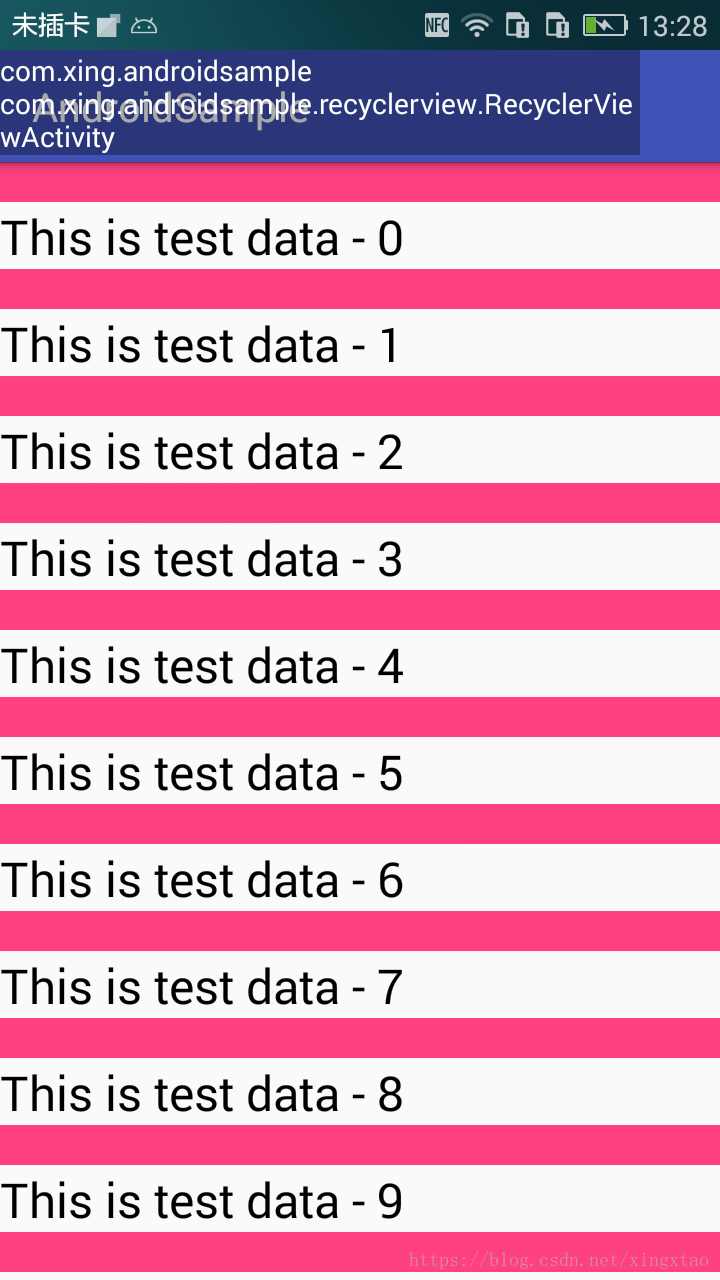
(2) 在 RecyclerView 顶部添加一个固定的分割线,向上滚动时,当前屏幕第一个可见 itemView 的 bottom 开始小于分割线高度时,第二个 itemView 的分割线将第一个 itemView 分割线挤出屏幕,第二个 itemView 的分割线充当顶部固定的分割线。
@Override
    public void onDrawOver(Canvas canvas, RecyclerView parent, RecyclerView.State state) {
        super.onDrawOver(canvas, parent, state);
        View firstVisibleView = parent.getChildAt(0);
        int left = parent.getPaddingLeft();
        int right = firstVisibleView.getWidth() - parent.getPaddingRight();
        // 第一个itemview(firstVisibleView) 的 bottom 值小于分割线高度,分割线随着 recyclerview 滚动,
        // 分割线top固定不变,bottom=firstVisibleView.bottom
        if (firstVisibleView.getBottom() <= dividerHeight) {
            canvas.drawRect(left, 0, right, firstVisibleView.getBottom(), topDividerPaint);
        } else {
            canvas.drawRect(left, 0, right, dividerHeight, topDividerPaint);
        }
}- 1
- 2
- 3
- 4
- 5
- 6
- 7
- 8
- 9
- 10
- 11
- 12
- 13
- 14
(3) 在分组分割线上绘制 分组文字。
完整代码 DividerItemDecoration.java:
public class DividerItemDecoration extends RecyclerView.ItemDecoration {

    private static final String TAG = "DividerItemDecoration";

    private Context context;

    private int groupDividerHeight;     // 分组分割线高度

    private int itemDividerHeight;     // 分组内item分割线高度

    private int dividerPaddingLeft;    // 分割线左间距

    private int dividerPaddingRight;   // 分割线右间距

    private Paint dividerPaint;     // 绘制分割线画笔

    private Paint textPaint;        // 绘制文字画笔

    private Paint topDividerPaint;


    public DividerItemDecoration(Context context, OnGroupListener listener) {
        this.context = context;
        this.listener = listener;
        groupDividerHeight = dp2Px(24);
        itemDividerHeight = dp2Px(1);
        initPaint();
    }

    private void initPaint() {
        dividerPaint = new Paint(Paint.ANTI_ALIAS_FLAG);
        dividerPaint.setColor(context.getResources().getColor(R.color.colorAccent));
        dividerPaint.setStyle(Paint.Style.FILL);


        topDividerPaint = new Paint(Paint.ANTI_ALIAS_FLAG);
        topDividerPaint.setColor(Color.parseColor("#9924f715"));
        topDividerPaint.setStyle(Paint.Style.FILL);


        textPaint = new Paint(Paint.ANTI_ALIAS_FLAG);
        textPaint.setColor(Color.WHITE);
        textPaint.setTextSize(sp2Px(14));

    }

    @Override
    public void getItemOffsets(Rect outRect, View view, RecyclerView parent, RecyclerView.State state) {
        super.getItemOffsets(outRect, view, parent, state);
//        // 不是第一个 item 才设置 top
////        if (parent.getChildAdapterPosition(view) != 0) {
//        outRect.top = groupDividerHeight;
////        }
//        Log.d(TAG, "getItemOffsets: left = " + outRect.left + ",top = " + outRect.top + ",right = " + outRect.right
//                + ", bottom = " + outRect.bottom);

        int position = parent.getChildAdapterPosition(view);
        // 获取组名
        String groupName = getGroupName(position);
        if (groupName == null) {
            return;
        }
        if (position == 0 || isGroupFirst(position)) {
            outRect.top = groupDividerHeight;
        } else {
            outRect.top = dp2Px(1);
        }
    }


    @Override
    public void onDraw(Canvas canvas, RecyclerView parent, RecyclerView.State state) {
        super.onDraw(canvas, parent, state);
        // getChildCount() 获取的是当前屏幕可见 item 数量,而不是 RecyclerView 所有的 item 数量
        int childCount = parent.getChildCount();
        for (int i = 0; i < childCount; i++) {
            View childView = parent.getChildAt(i);
            // 获取当前itemview在adapter中的索引
            int childAdapterPosition = parent.getChildAdapterPosition(childView);
            /**
             * 由于分割线是绘制在每一个 itemview 的顶部,所以分割线矩形 rect.bottom = itemview.top,
             * rect.top = itemview.top - groupDividerHeight
             */
            int bottom = childView.getTop();
            int left = parent.getPaddingLeft();
            int right = parent.getPaddingRight();
            if (isGroupFirst(childAdapterPosition)) {   // 是分组第一个,则绘制分组分割线
                int top = bottom - groupDividerHeight;
                Log.d(TAG, "onDraw: top = " + top + ",bottom = " + bottom);
                // 绘制分组分割线矩形
                canvas.drawRect(left + dividerPaddingLeft, top,
                        childView.getWidth() - right - dividerPaddingRight, bottom, dividerPaint);
                // 绘制分组分割线中的文字
                float baseLine = (top + bottom) / 2f - (textPaint.descent() + textPaint.ascent()) / 2f;
                canvas.drawText(getGroupName(childAdapterPosition), left + dp2Px(10),
                        baseLine, textPaint);
            } else {    // 不是分组中第一个,则绘制常规分割线
                int top = bottom - dp2Px(1);
                canvas.drawRect(left + dividerPaddingLeft, top,
                        childView.getWidth() - right - dividerPaddingRight, bottom, dividerPaint);
            }
        }
    }

    @Override
    public void onDrawOver(Canvas canvas, RecyclerView parent, RecyclerView.State state) {
        super.onDrawOver(canvas, parent, state);
        View firstVisibleView = parent.getChildAt(0);
        int firstVisiblePosition = parent.getChildAdapterPosition(firstVisibleView);
        String groupName = getGroupName(firstVisiblePosition);
        int left = parent.getPaddingLeft();
        int right = firstVisibleView.getWidth() - parent.getPaddingRight();
        // 第一个itemview(firstVisibleView) 的 bottom 值小于分割线高度,分割线随着 recyclerview 滚动,
        // 分割线top固定不变,bottom=firstVisibleView.bottom
        if (firstVisibleView.getBottom() <= groupDividerHeight && isGroupFirst(firstVisiblePosition + 1)) {
            canvas.drawRect(left, 0, right, firstVisibleView.getBottom(), dividerPaint);
            float baseLine = firstVisibleView.getBottom() / 2f - (textPaint.descent() + textPaint.ascent()) / 2f;
            canvas.drawText(groupName, left + dp2Px(10),
                    baseLine, textPaint);
        } else {
            canvas.drawRect(left, 0, right, groupDividerHeight, dividerPaint);
            float baseLine = groupDividerHeight / 2f - (textPaint.descent() + textPaint.ascent()) / 2f;
            canvas.drawText(groupName, left + dp2Px(10), baseLine, textPaint);
        }


    }


    private OnGroupListener listener;

    static interface OnGroupListener {

        // 获取分组中第一个文字
        String getGroupName(int position);
    }


    public String getGroupName(int position) {
        if (listener != null) {
            return listener.getGroupName(position);
        }
        return null;
    }


    /**
     * 是否是某组中第一个item
     *
     * @param position
     * @return
     */
    private boolean isGroupFirst(int position) {
        // 第一个 itemView 肯定是新的一个分组
        if (position == 0) {
            return true;
        } else {
            String preGroupName = getGroupName(position - 1);
            String groupName = getGroupName(position);
            return !TextUtils.equals(preGroupName, groupName);
        }
    }


    private int dp2Px(int dpValue) {
        return (int) TypedValue.applyDimension(TypedValue.COMPLEX_UNIT_DIP, dpValue, context.getResources().getDisplayMetrics());
    }

    private int sp2Px(int spValue) {
        return (int) TypedValue.applyDimension(TypedValue.COMPLEX_UNIT_SP, spValue, context.getResources().getDisplayMetrics());
    }
}
- 1
- 2
- 3
- 4
- 5
- 6
- 7
- 8
- 9
- 10
- 11
- 12
- 13
- 14
- 15
- 16
- 17
- 18
- 19
- 20
- 21
- 22
- 23
- 24
- 25
- 26
- 27
- 28
- 29
- 30
- 31
- 32
- 33
- 34
- 35
- 36
- 37
- 38
- 39
- 40
- 41
- 42
- 43
- 44
- 45
- 46
- 47
- 48
- 49
- 50
- 51
- 52
- 53
- 54
- 55
- 56
- 57
- 58
- 59
- 60
- 61
- 62
- 63
- 64
- 65
- 66
- 67
- 68
- 69
- 70
- 71
- 72
- 73
- 74
- 75
- 76
- 77
- 78
- 79
- 80
- 81
- 82
- 83
- 84
- 85
- 86
- 87
- 88
- 89
- 90
- 91
- 92
- 93
- 94
- 95
- 96
- 97
- 98
- 99
- 100
- 101
- 102
- 103
- 104
- 105
- 106
- 107
- 108
- 109
- 110
- 111
- 112
- 113
- 114
- 115
- 116
- 117
- 118
- 119
- 120
- 121
- 122
- 123
- 124
- 125
- 126
- 127
- 128
- 129
- 130
- 131
- 132
- 133
- 134
- 135
- 136
- 137
- 138
- 139
- 140
- 141
- 142
- 143
- 144
- 145
- 146
- 147
- 148
- 149
- 150
- 151
- 152
- 153
- 154
- 155
- 156
- 157
- 158
- 159
- 160
- 161
- 162
- 163
- 164
- 165
- 166
- 167
- 168
- 169
- 170
- 171
- 172
- 173
Activity 中调用:
public class RecyclerViewActivity extends AppCompatActivity {

    private List<String> dataList = new ArrayList();

    private RecyclerView recyclerView;

    @Override
    protected void onCreate(Bundle savedInstanceState) {
        super.onCreate(savedInstanceState);
        setContentView(R.layout.activity_recycler_view);
        recyclerView = findViewById(R.id.recycler_view);
        initData();
        LinearLayoutManager layoutManager = new LinearLayoutManager(this, LinearLayoutManager.VERTICAL, false);
        recyclerView.setLayoutManager(layoutManager);

        RecyclerAdapter adapter = new RecyclerAdapter(this, dataList);
        recyclerView.setAdapter(adapter);

        recyclerView.addItemDecoration(new DividerItemDecoration(this, new DividerItemDecoration.OnGroupListener() {
            @Override
            public String getGroupName(int position) {
                return dataList.get(position).substring(0, 1);
            }
        }));

    }

    private void initData() {
        dataList.add("java");
        dataList.add("jdk");
        dataList.add("php");
        dataList.add("c++");
        dataList.add("linux");
        dataList.add("windows");
        dataList.add("macos");
        dataList.add("red hat");
        dataList.add("python");
        dataList.add("jvm");
        dataList.add("wechat");
        dataList.add("cellphone");
        dataList.add("iphone");
        dataList.add("mouse");
        dataList.add("huawei");
        dataList.add("xiaomi");
        dataList.add("meizu");
        dataList.add("mocrosoft");
        dataList.add("google");
        dataList.add("whatsapp");
        dataList.add("iMac");
        dataList.add("c#");
        dataList.add("iOS");
        dataList.add("water");
        dataList.add("xiaohongshu");
        dataList.add("jake");
        dataList.add("zuk");


        Collections.sort(dataList);

    }


    public static void start(Context context) {
        Intent intent = new Intent(context, RecyclerViewActivity.class);
        context.startActivity(intent);
    }
}
--------------------- 本文来自 星火燎原2016 的CSDN 博客 ,全文地址请点击:https://blog.csdn.net/xingxtao/article/details/80217873?utm_source=copy

 浙公网安备 33010602011771号