
ItemDecoration固定头部(分组+分割线)
参考资料:https://www.jianshu.com/p/b46a4ff7c10a
先来张最终效果图
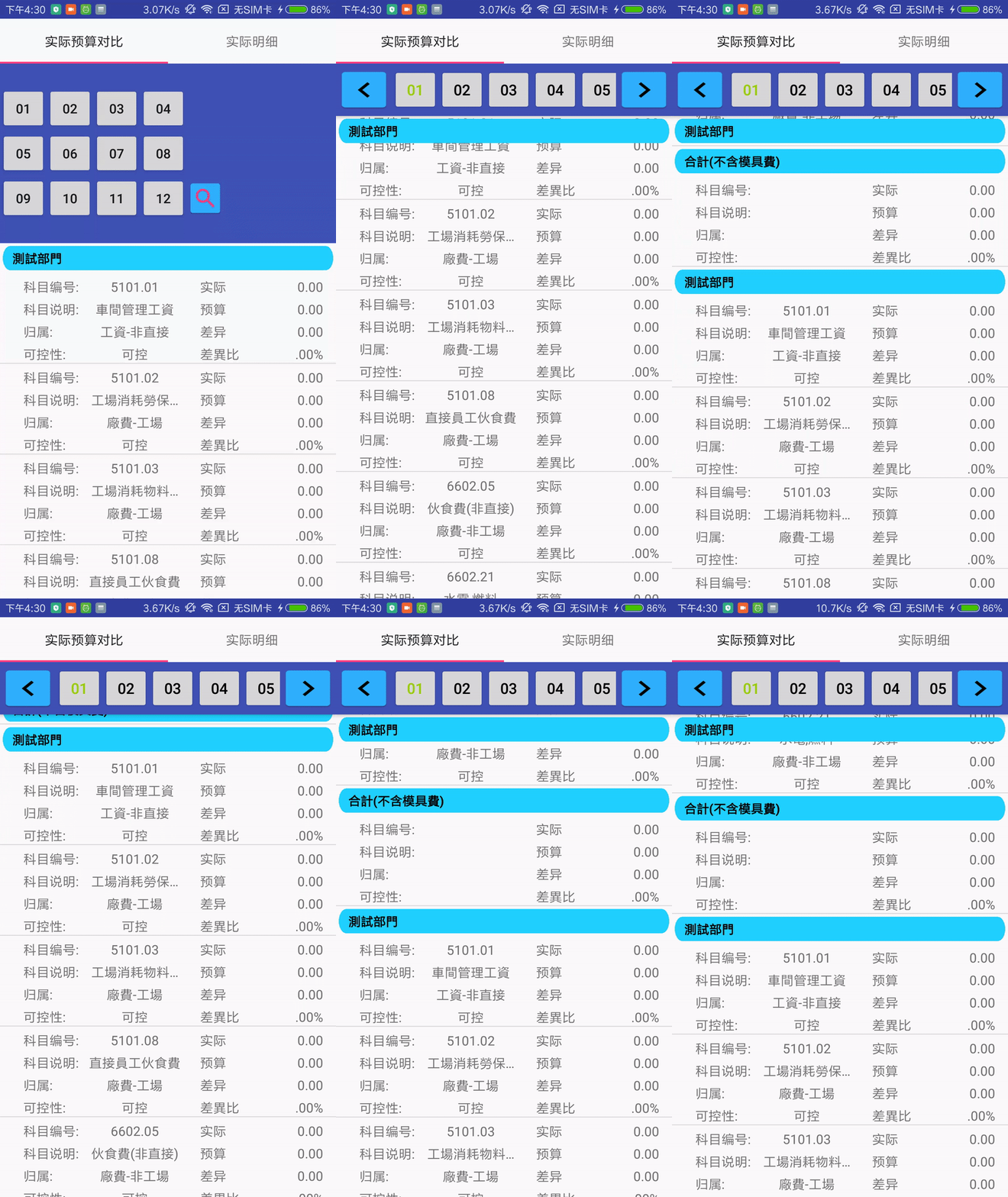
具体说明代码注释有了,这里就不说了。
-
public class BudgetContrastDataStickHeaderDecoration extends RecyclerView.ItemDecoration {
-
private Context context;
-
private Drawable drawable;
-
private StickHeaderCallBack callBack;
-
private Paint paint;
-
private TextPaint textPaint;
-
private TextPaint.FontMetrics fontMetrics;
-
-
public BudgetContrastDataStickHeaderDecoration(Context context, StickHeaderCallBack callBack) {
-
this.context = context;
-
this.callBack = callBack;
-
// 用於獲取分割線高度
-
int[] ATTRS = new int[]{android.R.attr.listDivider};
-
TypedArray typedArray = this.context.obtainStyledAttributes(ATTRS);
-
drawable = typedArray.getDrawable(0);
-
typedArray.recycle();
-
// 分組欄背景顏色
-
paint = new Paint();
-
paint.setColor(this.context.getResources().getColor(R.color.stick_header));
-
// 分組文字
-
textPaint = new TextPaint();
-
// 粗體
-
textPaint.setTypeface(Typeface.DEFAULT_BOLD);
-
// 抗鋸齒
-
textPaint.setAntiAlias(true);
-
// 字體大小
-
textPaint.setTextSize(40);
-
// 字體顏色
-
textPaint.setColor(Color.BLACK);
-
// 用於計算字體基準
-
fontMetrics = new Paint.FontMetrics();
-
textPaint.getFontMetrics(fontMetrics);
-
// 左對齊
-
textPaint.setTextAlign(Paint.Align.LEFT);
-
}
-
-
-
public void onDraw(Canvas c, RecyclerView parent, RecyclerView.State state) {
-
super.onDraw(c, parent, state);
-
c.save();
-
int left;
-
int right;
-
// 從DividerItemDecoration源碼抄來,大概為根據Padding切割畫布
-
if (parent.getClipToPadding()) {
-
left = parent.getPaddingLeft();
-
right = parent.getWidth() - parent.getPaddingRight();
-
c.clipRect(left, parent.getPaddingTop(), right,
-
parent.getHeight() - parent.getPaddingBottom());
-
} else {
-
left = 0;
-
right = parent.getWidth();
-
}
-
-
int childCount = parent.getChildCount();
-
Rect mBounds = new Rect();
-
for (int i = 0; i < childCount; i++) {
-
View child = parent.getChildAt(i);
-
//獲取itemView的範圍,這個範圍包含margin和offset,它們被保存在mBounds中
-
parent.getDecoratedBoundsWithMargins(child, mBounds);
-
int bottom = mBounds.bottom + Math.round(child.getTranslationY());
-
int top = bottom - drawable.getIntrinsicHeight();
-
drawable.setBounds(left, top, right, bottom);
-
drawable.draw(c);
-
}
-
c.restore();
-
}
-
-
-
public void onDrawOver(Canvas c, RecyclerView parent, RecyclerView.State state) {
-
super.onDrawOver(c, parent, state);
-
c.save();
-
float left;
-
float right;
-
// 從DividerItemDecoration源碼抄來,大概為根據Padding切割畫布
-
if (parent.getClipToPadding()) {
-
left = parent.getPaddingLeft();
-
right = parent.getWidth() - parent.getPaddingRight();
-
c.clipRect(left, parent.getPaddingTop(), right,
-
parent.getHeight() - parent.getPaddingBottom());
-
} else {
-
left = 0;
-
right = parent.getWidth();
-
}
-
// left、right、top、bottom實現Padding 3 的效果
-
left += context.getResources().getDimensionPixelSize(R.dimen.stick_header_padding);
-
right -= context.getResources().getDimensionPixelSize(R.dimen.stick_header_padding);
-
int childCount = parent.getChildCount();
-
for (int i = 0; i < childCount; i++) {
-
View child = parent.getChildAt(i);
-
int position = parent.getChildAdapterPosition(child);
-
String deptName = this.callBack.getDeptName(parent.getAdapter(), position);
-
if (deptName != null && deptName.length() > 0) {
-
/*
-
* 1.position=0 列表的第一個項目始終顯示固定頭部
-
* 2.分組中的第一個項目顯示固定頭部
-
* 3.不是分組中的第一個,且頂部座標已是0或者負數,表示分組中的第一個已經滾動到不可見區域,但分組中其他項目仍然顯示在屏幕上
-
* child.getBottom()+drawable.getIntrinsicHeight()>=0 底部+分隔線>=0 表示該項目還在屏幕中,繼續顯示固定表頭
-
*/
-
if (position == 0 || isFirstInGroup(parent.getAdapter(), position) || (!isFirstInGroup(parent.getAdapter(), position) && position > 0 && child.getTop() <= 0 && child.getBottom() + drawable.getIntrinsicHeight() >= 0)) {
-
// 分組欄位是VIEW的頂部座標
-
float bottom = Math.max(child.getTop(), this.context.getResources().getDimensionPixelSize(R.dimen.stick_header_height));
-
float top = bottom - this.context.getResources().getDimensionPixelSize(R.dimen.stick_header_height);
-
// 判斷下一個項目是否當前項目的分組內
-
if (position + 1 < parent.getAdapter().getItemCount() && !this.callBack.getDeptName(parent.getAdapter(), position + 1).equals(deptName)) {
-
float temp = child.getBottom() + drawable.getIntrinsicHeight() - bottom;
-
// 如果不是,判斷當前項目的底部+分割線是否小於固定頭部的底部座標
-
if (temp < 0) {
-
// 相當於移動固定頭部
-
top+=temp;
-
bottom+=temp;
-
}
-
}
-
top += context.getResources().getDimensionPixelSize(R.dimen.stick_header_padding);
-
bottom -= context.getResources().getDimensionPixelSize(R.dimen.stick_header_padding);
-
// 畫圓角方塊,rx:橢圓的短半徑,ry:橢圓的長半徑
-
c.drawRoundRect(left, top, right, bottom, 50, 80, this.paint);
-
float baseline = top + (bottom - top - fontMetrics.bottom + fontMetrics.top) / 2 - fontMetrics.top;
-
// left + 30 字體偏移,隨個人喜歡
-
c.drawText(deptName, left + 30, baseline, textPaint);
-
}
-
}
-
}
-
c.restore();
-
}
-
-
-
public void getItemOffsets(Rect outRect, View view, RecyclerView parent, RecyclerView.State state) {
-
super.getItemOffsets(outRect, view, parent, state);
-
int stickHeaderHeight = 0;
-
int position = parent.getChildAdapterPosition(view);
-
String deptName = this.callBack.getDeptName(parent.getAdapter(), position);
-
if (deptName != null && deptName.length() > 0) {
-
if (position == 0 || isFirstInGroup(parent.getAdapter(), position)) {
-
stickHeaderHeight = this.context.getResources().getDimensionPixelSize(R.dimen.stick_header_height);
-
}
-
}
-
if (drawable == null) {
-
outRect.set(0, stickHeaderHeight, 0, 0);
-
return;
-
}
-
outRect.set(0, stickHeaderHeight, 0, drawable.getIntrinsicHeight());
-
}
-
-
/**
-
* 是否分組中的第一個
-
*
-
* @param adapter RecyclerView適配器
-
* @param position 項目序號
-
* @return true or false
-
*/
-
private boolean isFirstInGroup(RecyclerView.Adapter adapter, int position) {
-
if (position == 0) {
-
return true;
-
} else {
-
String previousDeptName = this.callBack.getDeptName(adapter, position - 1);
-
String deptName = this.callBack.getDeptName(adapter, position);
-
return !deptName.equals(previousDeptName);
-
}
-
}
-
-
public interface StickHeaderCallBack {
-
String getDeptName(RecyclerView.Adapter adapter, int position);
-
}
-
}
实现的接口StickHeaderCallBack就是return一个字符串。
-
-
public String getDeptName(RecyclerView.Adapter adapter, int position) {
-
if (adapter instanceof BudgetAdapter) {
-
BudgetAdapter budgetAdapter = (BudgetAdapter) adapter;
-
return budgetAdapter.budgetItemDataList.get(position).getDept_name();
-
} else {
-
return "";
-
}
-
}
--------------------- 本文来自 msquan 的CSDN 博客 ,全文地址请点击:https://blog.csdn.net/msquan/article/details/80270302?utm_source=copy

 浙公网安备 33010602011771号