
Android电商项目 ExpandableListView(二级列表)实现购物车(高仿淘宝) demo
本篇博客来为大家讲解ExpandableListView(二级列表)来实现购物车,本人也是最近遇到了购物车的一些问题,进行一些总结。
购物车与正常的ExpandableListView的区别只不过是多了CheckBox,通过实现CheckBox的选中监听或者点击监听来改变状态去计算总价。
首先我们先来看一下购物车需要实现的逻辑(CheckBox相关)
1. 总开关(购物车布局中实现的一个CheckBox) —-> 全选/反选
2. 一级列表开关(一级列表的CheckBox) —–> 二级列表CheckBox的全选/反选
3. 当所有的一级列表的CheckBox都选中时,总开关被选中。
4. 只要有一个一级列表的CheckBox没有被选中,总开关也不会被选中。
5. 当前一级列表下所有的二级列表都被选中时,一级列表的CheckBox被选中
6. 只要当前一级列表下有一个二级列表没有被选中,一级列表的CheckBox不会被选中
7. 计算所有被选中的二级列表的价格(price*saleNum)
以上基本就是购物车的基本逻辑,可能看着有点懵,咱们来上图上代码
由于我不会制造gif动图,只能拿死图来看了,给看官道个歉。
1. 总开关(购物车布局中实现的一个CheckBox) —-> 全选/反选
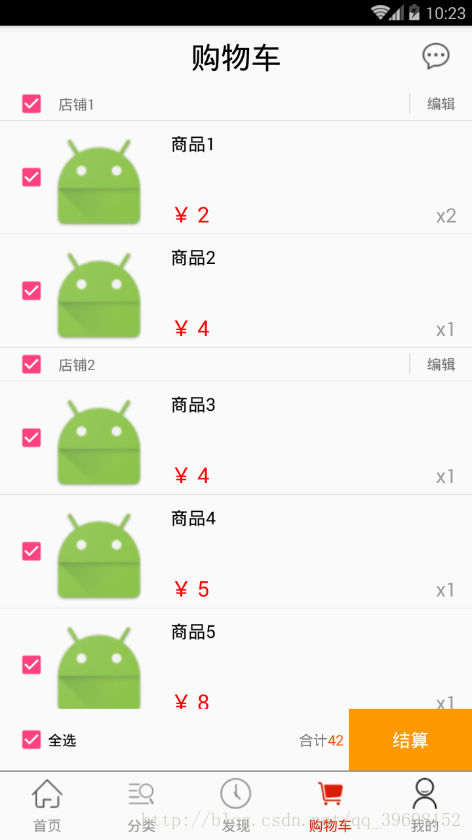
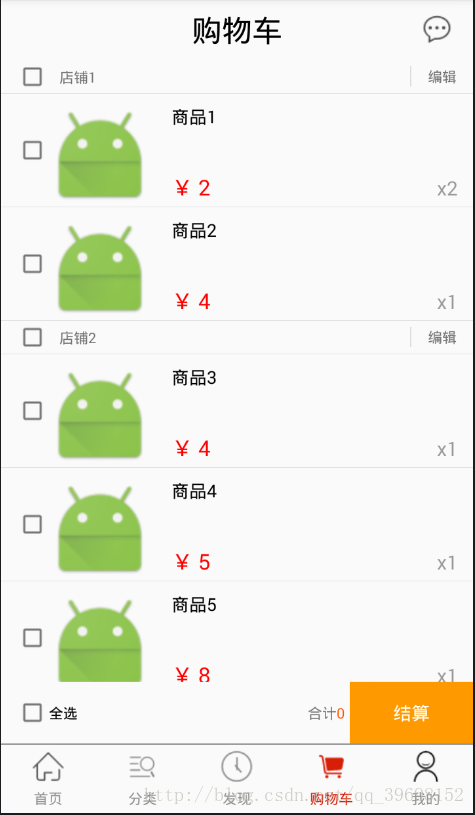
        //设置选中监听去实现全选
        gouwuche_footer_check.setOnCheckedChangeListener(new CompoundButton.OnCheckedChangeListener() {
            @Override
            public void onCheckedChanged(CompoundButton compoundButton, boolean b) {
                if(b==true)
                {
                    adapter.allCheck(true);
                }
            }
        });
        //设置点击监听去实现反选
        gouwuche_footer_check.setOnClickListener(new View.OnClickListener() {
            @Override
            public void onClick(View view) {
                //获取购物车的CheckBox的选中状态
                boolean isCheck=gouwuche_footer_check.isChecked();
                if(!isCheck)
                {
                    adapter.allCheck(false);
                }
            }
});- 1
- 2
- 3
- 4
- 5
- 6
- 7
- 8
- 9
- 10
- 11
- 12
- 13
- 14
- 15
- 16
- 17
- 18
- 19
- 20
- 21
- 22
- 23
    /*adapter适配器中的方法*/
    //全选
    public void allCheck(boolean isCheck)
    {
        //通过遍历所有的集合,修改bean类来控制CheckBox的选中状态
        for(int i=0;i<getGroupCount();i++)
        {
            ParentBean p=parentList.get(i);
            p.isCheck=isCheck;

            for(int a=0;a<getChildrenCount(i);a++)
            {
                ChildBean c=childList.get(i).get(a);
                c.isCheck=isCheck;
            }
        }
        //刷新适配器
        notifyDataSetChanged();
}- 1
- 2
- 3
- 4
- 5
- 6
- 7
- 8
- 9
- 10
- 11
- 12
- 13
- 14
- 15
- 16
- 17
- 18
- 19
为什么使用点击监听作为总开关控制反选的监听器?
如果使用选中监听实现反选的话,当我们的一级列表只要有一个不选中时,我们的总开关也不会被选中,这时会触发我们总开关的选中监听,使所有的CheckBox都变成未选中状态。
2. 一级列表开关(一级列表的CheckBox) —–> 二级列表CheckBox的全选/反选
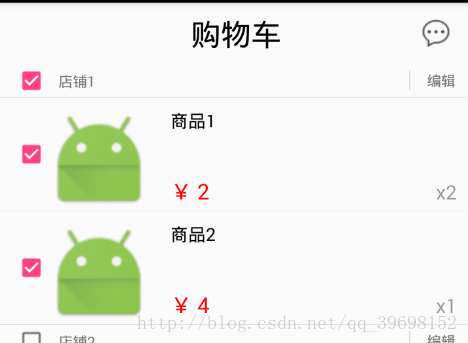
        //CheckBox添加选中监听器实现全选
        list_1.checkBox.setOnCheckedChangeListener(new CompoundButton.OnCheckedChangeListener() {
            @Override
            public void onCheckedChanged(CompoundButton compoundButton, boolean b) {
                ParentBean parentBean1= (ParentBean) list_11.checkBox.getTag();
                parentBean1.isCheck=b;
                //刷新适配器
                notifyDataSetChanged();
            }
        });
        //CheckBox添加点击监听器实现全选
        list_1.checkBox.setOnClickListener(new View.OnClickListener() {
            @Override
            public void onClick(View view) {
                boolean isCheck=((CheckBox)view).isChecked();
                if(!isCheck)
                {
                    shopCheck(false,childList.get(i));
                }
            }
});- 1
- 2
- 3
- 4
- 5
- 6
- 7
- 8
- 9
- 10
- 11
- 12
- 13
- 14
- 15
- 16
- 17
- 18
- 19
- 20
- 21
- 22
为什么使用点击监听作为一级列表开关控制反选的监听器?
原理同上
3. 当所有的一级列表的CheckBox都选中时,总开关被选中。
4. 只要有一个一级列表的CheckBox没有被选中,总开关也不会被选中。
    private void allCheckChangeFromParent()
    {
        //遍历一级列表数据
        for (ParentBean p:parentList)
        {
            //有一个未被选中,则全选按钮不会被选中
            if(!p.isCheck)
            {
                iCartView.changeCheckBtn(false);
                return;
            }
        }
        //如果都被选中,则全选按钮选中
        iCartView.changeCheckBtn(true);
}- 1
- 2
- 3
- 4
- 5
- 6
- 7
- 8
- 9
- 10
- 11
- 12
- 13
- 14
- 15
    //修改全选按钮的状态
    @Override
    public void changeCheckBtn(boolean flag) {
        gouwuche_footer_check.setChecked(flag);
}- 1
- 2
- 3
- 4
- 5
不懂接口回调的,先去百度一下接口回调怎么使用,当然,如果你是MVP框架模式的话,直接在你的View层中添加一个接口就可以了。
5. 当前一级列表下所有的二级列表都被选中时,一级列表的CheckBox被选中
6. 只要当前一级列表下有一个二级列表没有被选中,一级列表的CheckBox不会被选中
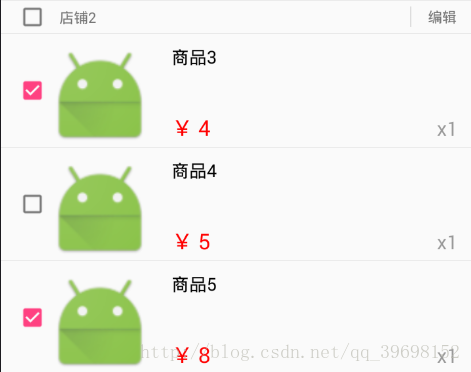
    private void childCheck(int parentPosition)
    {
        //获取一级列表的bean 来修改isCheck属性
        ParentBean parentBean=getGroup(parentPosition);

        for(int i=0;i<getChildrenCount(parentPosition);i++)
        {
            //当前的Childbean
            ChildBean bean=getChild(parentPosition,i);
            if(!bean.isCheck)
            {
                parentBean.isCheck=false;
                return;
            }
            parentBean.isCheck=true;
        }
}- 1
- 2
- 3
- 4
- 5
- 6
- 7
- 8
- 9
- 10
- 11
- 12
- 13
- 14
- 15
- 16
- 17
7. 计算所有被选中的二级列表的价格(price*saleNum)
        //CheckBox添加监听器
        list_2.checkBox.setOnCheckedChangeListener(new CompoundButton.OnCheckedChangeListener() {
            @Override
            public void onCheckedChanged(CompoundButton compoundButton, boolean b) {
                //接口回调    调用计算总价的方法
                iCartView.addPrice();
                //刷新适配器
                notifyDataSetChanged();
            }
});- 1
- 2
- 3
- 4
- 5
- 6
- 7
- 8
- 9
- 10
    //计算总价的方法
    @Override
    public void addPrice() {
        //初始化总价
        sum=0;
        //遍历所有的子集合
        for(int i=0;i<adapter.getGroupCount();i++)
        {
            for (int j=0;j<adapter.getChildrenCount(i);j++)
            {
                ChildBean child=adapter.getChild(i,j);
                //如果该对象被选中,则加上这个对象中的价钱
                if(child.isCheck)
                {
                    sum+=child.price*child.saleNum;
                }
            }
        }
        //得到总价,更新UI控件
        gouwuche_footer_price.setText(sum+"");
}- 1
- 2
- 3
- 4
- 5
- 6
- 7
- 8
- 9
- 10
- 11
- 12
- 13
- 14
- 15
- 16
- 17
- 18
- 19
- 20
- 21
同上,不懂接口回调的,先去百度一下接口回调怎么使用,当然,如果你是MVP框架模式的话,直接在你的View层中添加一个addPrice()接口就可以了。
ok,以上就是基本的购物车逻辑,其中还有一个比较重要的Bug要解决
当我的购物车数据超过屏幕显示范围后,并且我的适配器中采用了ViewHolder模式,导致超出显示范围的部分的数据不能正常的被更改
我的解决方式是利用我的CheckBox来绑定bean的数据,以后修改数据时,直接修改绑定后的bean类的数据,代码如下:
            //利用我的CheckBox绑定数据
            list_2.checkBox.setTag(childBean);

            //下面是我获取数据,然后去修改数据的方式
            ChildBean childBean1= (ChildBean) list_21.checkBox.getTag();
childBean1.isCheck=b;- 1
- 2
- 3
- 4
- 5
- 6
当然我的购物车中还实现了编辑功能
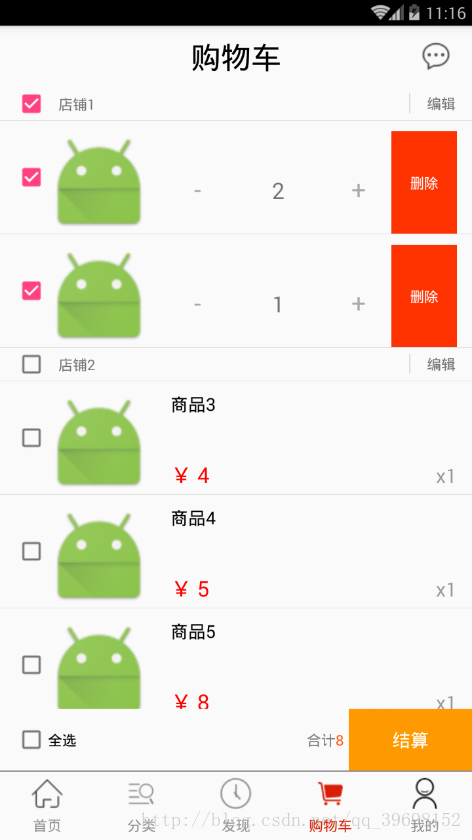
编辑的功能我就不具体讲了,我的原理就是隐藏或者显示布局来控制编辑功能。
在bean类中多一个boolean值来控制显示或者隐藏。
下面是写的demo的代码
首先是xml布局
购物车的xml
<?xml version="1.0" encoding="utf-8"?>
<RelativeLayout xmlns:android="http://schemas.android.com/apk/res/android"
    xmlns:xp="http://schemas.android.com/apk/res-auto"
    android:layout_width="match_parent"
    android:layout_height="match_parent">
    <xp.code.jd.view.TopBar
        android:id="@+id/gouwuche_topbar"
        android:layout_width="match_parent"
        android:layout_height="60dp"
        xp:rightImageSrc="@drawable/xx"
        xp:title="购物车"
        xp:titleColor="#000"
        xp:titleSize="19dp">
    </xp.code.jd.view.TopBar>
    <RelativeLayout
        android:layout_width="match_parent"
        android:layout_height="60dp"
        android:id="@+id/gouwuche_footer"
        android:layout_alignParentBottom="true">
        <CheckBox
            android:layout_width="wrap_content"
            android:layout_height="match_parent"
            android:layout_centerVertical="true"
            android:gravity="center_vertical"
            android:layout_marginLeft="15dp"
            android:text="全选"
            android:id="@+id/gouwuche_footer_check"
            />
        <TextView
            android:text="结算"
            android:textColor="#fff"
            android:gravity="center"
            android:background="#f90"
            android:layout_width="120dp"
            android:layout_height="match_parent"
            android:id="@+id/gouwuche_footer_jiesuan"
            android:clickable="true"
            android:layout_alignParentRight="true"
            android:textSize="18dp"
            />
        <TextView
            android:layout_width="wrap_content"
            android:layout_height="wrap_content"
            android:text="¥ 0 "
            android:id="@+id/gouwuche_footer_price"
            android:layout_toLeftOf="@+id/gouwuche_footer_jiesuan"
            android:layout_marginRight="5dp"
            android:layout_centerVertical="true"
            android:textColor="#FF5201"
            />
        <TextView
            android:layout_width="wrap_content"
            android:layout_height="wrap_content"
            android:text="合计"
            android:id="@+id/gouwuche_footer_heji"
            android:layout_toLeftOf="@+id/gouwuche_footer_price"
            android:layout_centerVertical="true"/>
    </RelativeLayout>
    <ExpandableListView
        android:layout_above="@+id/gouwuche_footer"
        android:id="@+id/gouwuche_expanded"
        android:layout_width="match_parent"
        android:layout_height="match_parent"
        android:layout_below="@+id/gouwuche_topbar">
    </ExpandableListView>
    <TextView
        android:id="@+id/gouwuche_tv"
        android:textSize="31dp"
        android:textColor="#999"
        android:gravity="center"
        android:text="购物车为空..."
        android:layout_below="@+id/gouwuche_topbar"
        android:layout_above="@+id/gouwuche_footer"
        android:layout_width="match_parent"
        android:layout_height="match_parent" />
</RelativeLayout>
- 1
- 2
- 3
- 4
- 5
- 6
- 7
- 8
- 9
- 10
- 11
- 12
- 13
- 14
- 15
- 16
- 17
- 18
- 19
- 20
- 21
- 22
- 23
- 24
- 25
- 26
- 27
- 28
- 29
- 30
- 31
- 32
- 33
- 34
- 35
- 36
- 37
- 38
- 39
- 40
- 41
- 42
- 43
- 44
- 45
- 46
- 47
- 48
- 49
- 50
- 51
- 52
- 53
- 54
- 55
- 56
- 57
- 58
- 59
- 60
- 61
- 62
- 63
- 64
- 65
- 66
- 67
- 68
- 69
- 70
- 71
- 72
- 73
- 74
- 75
- 76
- 77
一级列表的xml
<?xml version="1.0" encoding="utf-8"?>
<RelativeLayout xmlns:android="http://schemas.android.com/apk/res/android"
    android:layout_width="match_parent"
    android:layout_height="40dp">
    <CheckBox
        android:layout_width="wrap_content"
        android:layout_height="wrap_content"
        android:layout_marginLeft="15dp"
        android:layout_centerVertical="true"
        android:id="@+id/cart_expand_1_check"
        />
    <TextView
        android:layout_width="wrap_content"
        android:layout_height="wrap_content"
        android:text="shop_name"
        android:id="@+id/cart_expand_1_shopname"
        android:layout_toRightOf="@+id/cart_expand_1_check"
        android:layout_centerVertical="true"
        android:layout_marginLeft="10dp"
        android:drawablePadding="18dp"/>
    <TextView
        android:layout_width="60dp"
        android:layout_height="20dp"
        android:layout_centerVertical="true"
        android:gravity="center"
        android:text="编辑"
        android:layout_alignParentRight="true"
        android:id="@+id/cart_expand_1_bianji"
        android:clickable="true"/>
    <TextView
        android:layout_width="1dp"
        android:layout_height="20dp"
        android:layout_centerVertical="true"
        android:gravity="center"
        android:background="#ddd"
        android:id="@+id/cart_expand_1_div"
        android:clickable="true"
        android:layout_toLeftOf="@+id/cart_expand_1_bianji"/>
</RelativeLayout>- 1
- 2
- 3
- 4
- 5
- 6
- 7
- 8
- 9
- 10
- 11
- 12
- 13
- 14
- 15
- 16
- 17
- 18
- 19
- 20
- 21
- 22
- 23
- 24
- 25
- 26
- 27
- 28
- 29
- 30
- 31
- 32
- 33
- 34
- 35
- 36
- 37
- 38
- 39
二级列表的xml
<?xml version="1.0" encoding="utf-8"?>
<RelativeLayout
    xmlns:android="http://schemas.android.com/apk/res/android"
    android:layout_width="match_parent"
    android:layout_height="120dp">
    <CheckBox
        android:layout_marginTop="10dp"
        android:layout_width="wrap_content"
        android:layout_height="match_parent"
        android:layout_marginLeft="15dp"
        android:layout_centerVertical="true"
        android:id="@+id/cart_expand_2_check"
        />
    <ImageView
        android:layout_marginTop="10dp"
        android:layout_width="100dp"
        android:layout_height="100dp"
        android:src="@mipmap/ic_launcher"
        android:layout_toRightOf="@+id/cart_expand_2_check"
        android:id="@+id/cart_expand_2_image"
        />
    <RelativeLayout
        android:layout_marginTop="10dp"
        android:layout_width="match_parent"
        android:layout_marginLeft="15dp"
        android:layout_marginRight="15dp"
        android:layout_height="100dp"
        android:layout_toRightOf="@+id/cart_expand_2_image"
        android:id="@+id/cart_expand_2_relative"
        >
        <TextView
            android:layout_width="match_parent"
            android:layout_height="wrap_content"
            android:maxLines="3"
            android:ellipsize="end"
            android:lines="2"
            android:text="title"
            android:textSize="17dp"
            android:textColor="#000"
            android:layout_marginLeft="5dp"
            android:id="@+id/cart_expand_2_title"
            />
        <TextView
            android:layout_width="wrap_content"
            android:layout_height="wrap_content"
            android:layout_marginLeft="5dp"
            android:text="¥ 0 "
            android:textSize="21dp"
            android:layout_alignParentBottom="true"
            android:layout_marginBottom="5dp"
            android:textColor="#f00"
            android:id="@+id/cart_expand_2_price"
            android:lines="1"
            />
        <TextView
            android:layout_width="wrap_content"
            android:layout_height="wrap_content"
            android:layout_marginLeft="5dp"
            android:text="×1"
            android:textSize="19dp"
            android:layout_alignParentRight="true"
            android:layout_alignParentBottom="true"
            android:layout_marginBottom="5dp"
            android:textColor="#999"
            android:id="@+id/cart_expand_2_salenum"
            android:lines="1"
            />
    </RelativeLayout>
    <LinearLayout
        android:orientation="horizontal"
        android:layout_marginTop="10dp"
        android:layout_width="match_parent"
        android:layout_marginLeft="15dp"
        android:layout_marginRight="15dp"
        android:layout_height="100dp"
        android:layout_toRightOf="@+id/cart_expand_2_image"
        android:id="@+id/cart_expand_2_linear"
        android:weightSum="9">
        <Button
            android:layout_marginTop="10dp"
            android:layout_width="0dp"
            android:layout_weight="2"
            android:layout_height="wrap_content"
            android:background="@null"
            android:text="-"
            android:textSize="25dp"
            android:textColor="#aaa"
            android:layout_alignParentRight="true"
            android:id="@+id/cart_expand_2_add"/>
        <TextView
            android:layout_marginTop="10dp"
            android:layout_width="0dp"
            android:layout_weight="3"
            android:layout_height="wrap_content"
            android:gravity="center"
            android:text="1"
            android:textSize="22dp"
            android:id="@+id/cart_expand_2_num"
            android:layout_toLeftOf="@+id/cart_expand_2_add"
            />
        <Button
            android:layout_marginTop="10dp"
            android:layout_toLeftOf="@+id/cart_expand_2_num"
            android:layout_width="0dp"
            android:layout_weight="2"
            android:layout_height="wrap_content"
            android:background="@null"
            android:text="+"
            android:textSize="25dp"
            android:textColor="#aaa"
            android:id="@+id/cart_expand_2_jian"/>
        <Button
            android:layout_width="0dp"
            android:layout_height="match_parent"
            android:layout_weight="2"
            android:text="删除"
            android:textColor="#fff"
            android:background="#f30"
            android:id="@+id/cart_expand_2_del_good"/>
    </LinearLayout>
</RelativeLayout>- 1
- 2
- 3
- 4
- 5
- 6
- 7
- 8
- 9
- 10
- 11
- 12
- 13
- 14
- 15
- 16
- 17
- 18
- 19
- 20
- 21
- 22
- 23
- 24
- 25
- 26
- 27
- 28
- 29
- 30
- 31
- 32
- 33
- 34
- 35
- 36
- 37
- 38
- 39
- 40
- 41
- 42
- 43
- 44
- 45
- 46
- 47
- 48
- 49
- 50
- 51
- 52
- 53
- 54
- 55
- 56
- 57
- 58
- 59
- 60
- 61
- 62
- 63
- 64
- 65
- 66
- 67
- 68
- 69
- 70
- 71
- 72
- 73
- 74
- 75
- 76
- 77
- 78
- 79
- 80
- 81
- 82
- 83
- 84
- 85
- 86
- 87
- 88
- 89
- 90
- 91
- 92
- 93
- 94
- 95
- 96
- 97
- 98
- 99
- 100
- 101
- 102
- 103
- 104
- 105
- 106
- 107
- 108
- 109
- 110
- 111
- 112
- 113
- 114
- 115
- 116
- 117
- 118
- 119
- 120
- 121
主界面
package xp.code.jd.fragment;

import android.content.SharedPreferences;
import android.os.Bundle;
import android.support.annotation.Nullable;
import android.support.v4.app.Fragment;
import android.view.LayoutInflater;
import android.view.View;
import android.view.ViewGroup;
import android.widget.CheckBox;
import android.widget.CompoundButton;
import android.widget.ExpandableListView;
import android.widget.TextView;

import java.io.IOException;
import java.util.ArrayList;
import java.util.List;

import okhttp3.Call;
import okhttp3.Callback;
import okhttp3.Response;
import xp.code.jd.R;
import xp.code.jd.adapter.CartAdapter;
import xp.code.jd.bean.ChildBean;
import xp.code.jd.bean.Msg;
import xp.code.jd.bean.ParentBean;
import xp.code.jd.iview.ICartView;
import xp.code.jd.system.API;
import xp.code.jd.util.ToastUtil;
import xp.code.jd.view.TopBar;
import xp.code.okhttp3.utils.OkHttp3Utils;
import xp.code.okhttp3.utils.callback.GsonObjCallback;

/**
 * Created by XP on 2017/10/18.
 */
public class GouwucheFragment extends Fragment implements View.OnClickListener,ICartView {
    private View view;
    private TopBar mTopbar;

    private ExpandableListView expandableListView;

    private CartAdapter adapter;

    private List<ParentBean> parentList;
    private List<List<ChildBean>> childList;

    private CheckBox gouwuche_footer_check;
    private TextView gouwuche_footer_jiesuan;
    private TextView gouwuche_footer_price;
    private TextView gouwuche_footer_heji;

    private TextView gouwuche_tv;

    private SharedPreferences sp;

    private int sum=0;//总价

    @Nullable
    @Override
    public View onCreateView(LayoutInflater inflater, @Nullable ViewGroup container, @Nullable Bundle savedInstanceState) {
        view = inflater.inflate(R.layout.fragment_gouwuche, container, false);
        initView(view);

        initData();
        createEvent();
        return view;
    }

    private void initData() {
        this.sp= API.sp;
        /**
         * 先不进行判断登录状态,写死数据
         */
        if(/*sp.getBoolean("islogin",false)*/true)
        {
            gouwuche_tv.setVisibility(View.GONE);
            expandableListView.setVisibility(View.VISIBLE);
            //登录成功
            //调用P层获取数据
            /*以下为假数据*/
            parentList = new ArrayList<>();
            parentList.add(new ParentBean("店铺1", false,true));
            parentList.add(new ParentBean("店铺2", false,true));
            parentList.add(new ParentBean("店铺3", false,true));
            childList = new ArrayList<>();
            List<ChildBean> child_1 = new ArrayList<>();
            child_1.add(new ChildBean("商品1",2, false,2,true));
            child_1.add(new ChildBean("商品2",1, false,4,true));
            List<ChildBean> child_2 = new ArrayList<>();
            child_2.add(new ChildBean("商品3",1, false,4,true));
            child_2.add(new ChildBean("商品4",1, false,5,true));
            child_2.add(new ChildBean("商品5",1, false,8,true));
            List<ChildBean> child_3 = new ArrayList<>();
            child_3.add(new ChildBean("商品3",1, false,4,true));
            child_3.add(new ChildBean("商品4",1, false,5,true));
            child_3.add(new ChildBean("商品5",1, false,8,true));
            childList.add(child_1);
            childList.add(child_2);
            childList.add(child_3);

            adapter = new CartAdapter(getContext(), parentList, childList,this);
            expandableListView.setAdapter(adapter);

            expandableListView.setGroupIndicator(null);
            for (int i = 0; i < adapter.getGroupCount(); i++) {
                expandableListView.expandGroup(i);
            }
        }
        else
        {
            //隐藏TextView
            gouwuche_tv.setVisibility(View.VISIBLE);
            expandableListView.setVisibility(View.GONE);
        }
    }

    private void initView(View view) {
        mTopbar = (TopBar) view.findViewById(R.id.gouwuche_topbar);
        expandableListView = (ExpandableListView) view.findViewById(R.id.gouwuche_expanded);
        gouwuche_footer_check = (CheckBox) view.findViewById(R.id.gouwuche_footer_check);
        gouwuche_footer_jiesuan = (TextView) view.findViewById(R.id.gouwuche_footer_jiesuan);
        gouwuche_footer_jiesuan.setOnClickListener(this);
        gouwuche_footer_price = (TextView) view.findViewById(R.id.gouwuche_footer_price);
        gouwuche_footer_heji = (TextView) view.findViewById(R.id.gouwuche_footer_heji);
        gouwuche_tv= (TextView) view.findViewById(R.id.gouwuche_tv);
    }

    private void createEvent() {
        mTopbar.setOnTopBarClickListener(new TopBar.TopBarClickListener() {
            @Override
            public void leftClick() {
                ToastUtil.show(getContext(), "扫一扫");
            }

            @Override
            public void rightClick() {
                ToastUtil.show(getContext(), "消息中心功能敬请期待");
            }
        });

        //设置选中监听去实现全选
        gouwuche_footer_check.setOnCheckedChangeListener(new CompoundButton.OnCheckedChangeListener() {
            @Override
            public void onCheckedChanged(CompoundButton compoundButton, boolean b) {
                if(b==true)
                {
                    adapter.allCheck(true);
                }
            }
        });
        //设置点击监听去实现反选
        gouwuche_footer_check.setOnClickListener(new View.OnClickListener() {
            @Override
            public void onClick(View view) {
                //获取购物车的CheckBox的选中状态
                boolean isCheck=gouwuche_footer_check.isChecked();
                if(!isCheck)
                {
                    adapter.allCheck(false);
                }
            }
        });
    }


    @Override
    public void onClick(View v) {
        switch (v.getId()) {
            case R.id.gouwuche_footer_jiesuan:
                break;
        }
    }

    //修改全选按钮的状态
    @Override
    public void changeCheckBtn(boolean flag) {
        gouwuche_footer_check.setChecked(flag);
    }

    //计算总价的方法
    @Override
    public void addPrice() {
        //初始化总价
        sum=0;
        //遍历所有的子集合
        for(int i=0;i<adapter.getGroupCount();i++)
        {
            for (int j=0;j<adapter.getChildrenCount(i);j++)
            {
                ChildBean child=adapter.getChild(i,j);
                //如果该对象被选中,则加上这个对象中的价钱
                if(child.isCheck)
                {
                    sum+=child.price*child.saleNum;
                }
            }
        }
        //得到总价,更新UI控件
        gouwuche_footer_price.setText(sum+"");
    }

    @Override
    public void delete() {
        //删除的接口回调

        //通知P层去删除数据,通过回调请求
    }
}
- 1
- 2
- 3
- 4
- 5
- 6
- 7
- 8
- 9
- 10
- 11
- 12
- 13
- 14
- 15
- 16
- 17
- 18
- 19
- 20
- 21
- 22
- 23
- 24
- 25
- 26
- 27
- 28
- 29
- 30
- 31
- 32
- 33
- 34
- 35
- 36
- 37
- 38
- 39
- 40
- 41
- 42
- 43
- 44
- 45
- 46
- 47
- 48
- 49
- 50
- 51
- 52
- 53
- 54
- 55
- 56
- 57
- 58
- 59
- 60
- 61
- 62
- 63
- 64
- 65
- 66
- 67
- 68
- 69
- 70
- 71
- 72
- 73
- 74
- 75
- 76
- 77
- 78
- 79
- 80
- 81
- 82
- 83
- 84
- 85
- 86
- 87
- 88
- 89
- 90
- 91
- 92
- 93
- 94
- 95
- 96
- 97
- 98
- 99
- 100
- 101
- 102
- 103
- 104
- 105
- 106
- 107
- 108
- 109
- 110
- 111
- 112
- 113
- 114
- 115
- 116
- 117
- 118
- 119
- 120
- 121
- 122
- 123
- 124
- 125
- 126
- 127
- 128
- 129
- 130
- 131
- 132
- 133
- 134
- 135
- 136
- 137
- 138
- 139
- 140
- 141
- 142
- 143
- 144
- 145
- 146
- 147
- 148
- 149
- 150
- 151
- 152
- 153
- 154
- 155
- 156
- 157
- 158
- 159
- 160
- 161
- 162
- 163
- 164
- 165
- 166
- 167
- 168
- 169
- 170
- 171
- 172
- 173
- 174
- 175
- 176
- 177
- 178
- 179
- 180
- 181
- 182
- 183
- 184
- 185
- 186
- 187
- 188
- 189
- 190
- 191
- 192
- 193
- 194
- 195
- 196
- 197
- 198
- 199
- 200
- 201
- 202
- 203
- 204
- 205
- 206
- 207
- 208
- 209
- 210
购物车实现的接口
package xp.code.jd.iview;


/**
 * Created by XP on 2017/10/19.
 */
public interface ICartView {
    //修改购物车中全选按钮的状态
    void changeCheckBtn(boolean flag);

    //计算总价的方法
    void addPrice();
    //删除条目的方法
    void delete(/*里面是你要用的参数*/);
}
- 1
- 2
- 3
- 4
- 5
- 6
- 7
- 8
- 9
- 10
- 11
- 12
- 13
- 14
- 15
- 16
ExpandableListView的适配器
package xp.code.jd.adapter;

import android.content.Context;
import android.view.View;
import android.view.ViewGroup;
import android.widget.BaseExpandableListAdapter;
import android.widget.Button;
import android.widget.CheckBox;
import android.widget.CompoundButton;
import android.widget.ImageView;
import android.widget.LinearLayout;
import android.widget.RelativeLayout;
import android.widget.TextView;
import android.widget.Toast;

import java.util.List;

import xp.code.jd.R;
import xp.code.jd.bean.ChildBean;
import xp.code.jd.bean.ParentBean;
import xp.code.jd.iview.ICartView;

/**
 * Created by XP on 2017/10/18.
 */
public class CartAdapter extends BaseExpandableListAdapter {
    private Context context;

    private List<ParentBean> parentList;
    private List<List<ChildBean>> childList;

    private ICartView iCartView;

    public CartAdapter(Context context,List<ParentBean> parentList,List<List<ChildBean>> childList,ICartView iCartView)
    {
        this.context=context;
        this.parentList=parentList;
        this.childList=childList;
        this.iCartView=iCartView;
    }

    @Override
    public int getGroupCount() {
        return childList.size();
    }

    @Override
    public int getChildrenCount(int i) {
        return childList.get(i).size();
    }

    @Override
    public ParentBean getGroup(int i) {
        return parentList.get(i);
    }

    @Override
    public ChildBean getChild(int i, int i1) {
        return childList.get(i).get(i1);
    }

    @Override
    public long getGroupId(int i) {
        return i*998;
    }

    @Override
    public long getChildId(int i, int i1) {
        return i*456+i1;
    }

    @Override
    public boolean hasStableIds() {
        return true;
    }

    @Override
    public boolean isChildSelectable(int i, int i1) {
        return true;
    }

    @Override
    public View getGroupView(final int i, boolean b, View view, ViewGroup viewGroup) {
        List_1 list_1=null;
        //赋值
        final ParentBean parentBean=getGroup(i);
        if(view==null)
        {
            list_1=new List_1();
            view=View.inflate(context, R.layout.cart_expand_1,null);
            list_1.shop_name= (TextView) view.findViewById(R.id.cart_expand_1_shopname);
            list_1.checkBox= (CheckBox) view.findViewById(R.id.cart_expand_1_check);
            list_1.bianji= (TextView) view.findViewById(R.id.cart_expand_1_bianji);
            //绑定数据
            view.setTag(list_1);
            list_1.checkBox.setTag(parentBean);
        }
        else
        {
            list_1= (List_1) view.getTag();
            list_1.checkBox.setTag(parentBean);
        }
        final List_1 list_11=list_1;
        list_1.checkBox.setChecked(parentBean.isCheck);
        list_1.shop_name.setText(parentBean.title);
        //编辑按钮
        list_1.bianji.setOnClickListener(new View.OnClickListener() {
            @Override
            public void onClick(View view) {
                ParentBean parentBean1= (ParentBean) list_11.checkBox.getTag();
                if(parentBean1.ziCheck)
                {
                    parentBean1.ziCheck=false;
                    //去修改二级列表的boolean
                    ziChangeBianji(i,parentBean1.ziCheck);
                }
                else
                {
                    parentBean1.ziCheck=true;
                    //去修改二级列表的boolean
                    ziChangeBianji(i,parentBean1.ziCheck);
                }
                notifyDataSetChanged();
            }
        });
        //CheckBox添加选中监听器实现全选
        list_1.checkBox.setOnCheckedChangeListener(new CompoundButton.OnCheckedChangeListener() {
            @Override
            public void onCheckedChanged(CompoundButton compoundButton, boolean b) {
                ParentBean parentBean1= (ParentBean) list_11.checkBox.getTag();
                parentBean1.isCheck=b;

                parentCheck(i);
                //判断是否全选中,方法中含有接口回调
                allCheckChangeFromParent();
                //刷新适配器
                notifyDataSetChanged();
            }
        });
        //CheckBox添加点击监听器实现全选
        list_1.checkBox.setOnClickListener(new View.OnClickListener() {
            @Override
            public void onClick(View view) {
                boolean isCheck=((CheckBox)view).isChecked();
                if(!isCheck)
                {
                    shopCheck(false,childList.get(i));
                }
            }
        });
        return view;
    }
    @Override
    public View getChildView(final int i, int i1, boolean b, View view, ViewGroup viewGroup) {
        List_2 list_2=null;
        final ChildBean childBean=getChild(i,i1);
        if(view==null)
        {
            list_2=new List_2();
            view=View.inflate(context,R.layout.cart_expand_2,null);
            list_2.title= (TextView) view.findViewById(R.id.cart_expand_2_title);
            list_2.checkBox= (CheckBox) view.findViewById(R.id.cart_expand_2_check);
            list_2.price= (TextView) view.findViewById(R.id.cart_expand_2_price);
            list_2.image= (ImageView) view.findViewById(R.id.cart_expand_2_image);
            list_2.salenum= (TextView) view.findViewById(R.id.cart_expand_2_salenum);

            list_2.relative= (RelativeLayout) view.findViewById(R.id.cart_expand_2_relative);
            list_2.linear= (LinearLayout) view.findViewById(R.id.cart_expand_2_linear);
            list_2.num= (TextView) view.findViewById(R.id.cart_expand_2_num);
            list_2.add= (Button) view.findViewById(R.id.cart_expand_2_add);
            list_2.jian= (Button) view.findViewById(R.id.cart_expand_2_jian);
            list_2.del= (Button) view.findViewById(R.id.cart_expand_2_del_good);
            view.setTag(list_2);
            list_2.checkBox.setTag(childBean);
        }
        else
        {
            list_2= (List_2) view.getTag();
            list_2.checkBox.setTag(childBean);
        }
        final List_2 list_21=list_2;

        final ChildBean childBean1= (ChildBean) list_2.checkBox.getTag();

        if(childBean1.viewChange)
        {
            list_2.linear.setVisibility(View.GONE);
            list_2.relative.setVisibility(View.VISIBLE);
        }
        else
        {
            list_2.linear.setVisibility(View.VISIBLE);
            list_2.relative.setVisibility(View.GONE);
        }
        list_2.salenum.setText("x"+childBean1.saleNum);
        list_2.num.setText(childBean1.saleNum+"");
        list_2.jian.setOnClickListener(new View.OnClickListener() {
            @Override
            public void onClick(View view) {
                childBean1.saleNum++;
                iCartView.addPrice();
                notifyDataSetChanged();
            }
        });
        list_2.del.setOnClickListener(new View.OnClickListener() {
            @Override
            public void onClick(View view) {
                //接口回调进行删除
                iCartView.delete();
            }
        });
        list_2.add.setOnClickListener(new View.OnClickListener() {
            @Override
            public void onClick(View view) {
                childBean1.saleNum--;
                if(childBean1.saleNum>0)
                {
                    iCartView.addPrice();
                    notifyDataSetChanged();
                    return;
                }
                else if(childBean1.saleNum==0)
                {
                    Toast.makeText(context, "真抠,最少一个,不能再少了", Toast.LENGTH_SHORT).show();
                    childBean.saleNum=1;
                }
            }
        });

        list_2.checkBox.setChecked(childBean.isCheck);
        list_2.title.setText(childBean.content);
        list_2.price.setText("¥ "+childBean.price);
        //CheckBox添加监听器
        list_2.checkBox.setOnCheckedChangeListener(new CompoundButton.OnCheckedChangeListener() {
            @Override
            public void onCheckedChanged(CompoundButton compoundButton, boolean b) {
                ChildBean childBean1= (ChildBean) list_21.checkBox.getTag();
                childBean1.isCheck=b;

                childCheck(i);
                //接口回调    调用计算总价的方法
                iCartView.addPrice();
                //刷新适配器
                notifyDataSetChanged();
            }
        });
        return view;
    }
    class List_2
    {
        CheckBox checkBox;
        ImageView image;
        TextView title,price,num;

        RelativeLayout relative;
        LinearLayout linear;
        Button add,jian,del;
        TextView salenum;
    }
    class List_1
    {
        CheckBox checkBox;
        TextView shop_name,bianji;
    }
    //改变编辑状态的方法
    private void ziChangeBianji(int position,boolean flag)
    {
        //修改子布局
        List<ChildBean> childBeen=childList.get(position);
        for (int i=0;i<childBeen.size();i++)
        {
            ChildBean bean=childBeen.get(i);
            bean.viewChange=flag;
        }
    }
    //全选
    public void allCheck(boolean isCheck)
    {
        //通过遍历所有的集合,修改bean类来控制CheckBox的选中状态
        for(int i=0;i<getGroupCount();i++)
        {
            ParentBean p=parentList.get(i);
            p.isCheck=isCheck;

            for(int a=0;a<getChildrenCount(i);a++)
            {
                ChildBean c=childList.get(i).get(a);
                c.isCheck=isCheck;
            }
        }
        //刷新适配器
        notifyDataSetChanged();
    }

    //判断二级列表全选中时,一级列表选中
    private void childCheck(int parentPosition)
    {
        //获取一级列表的bean 来修改isCheck属性
        ParentBean parentBean=getGroup(parentPosition);

        for(int i=0;i<getChildrenCount(parentPosition);i++)
        {
            //当前的Childbean
            ChildBean bean=getChild(parentPosition,i);
            if(!bean.isCheck)
            {
                parentBean.isCheck=false;
                return;
            }
            parentBean.isCheck=true;
        }
    }

    //一级列表的全选    一级列表不需要反选
    private void parentCheck(int parentPosition)
    {
        //获取一级列表的bean 来修改isCheck属性
        ParentBean parentBean=getGroup(parentPosition);

        if(parentBean.isCheck)
        {
            shopCheck(true,childList.get(parentPosition));
            return;
        }
    }

    //修改二级列表Check的属性
    private void shopCheck(boolean flag,List<ChildBean> childBeans)
    {
        for(ChildBean c:childBeans)
        {
            c.isCheck=flag;
        }
    }

    //当一级列表全选时,全选按钮选中
    private void allCheckChangeFromParent()
    {
        //遍历一级列表数据
        for (ParentBean p:parentList)
        {
            //有一个未被选中,则全选按钮不会被选中
            if(!p.isCheck)
            {
                iCartView.changeCheckBtn(false);
                return;
            }
        }
        //如果都被选中,则全选按钮选中
        iCartView.changeCheckBtn(true);
    }
}
- 1
- 2
- 3
- 4
- 5
- 6
- 7
- 8
- 9
- 10
- 11
- 12
- 13
- 14
- 15
- 16
- 17
- 18
- 19
- 20
- 21
- 22
- 23
- 24
- 25
- 26
- 27
- 28
- 29
- 30
- 31
- 32
- 33
- 34
- 35
- 36
- 37
- 38
- 39
- 40
- 41
- 42
- 43
- 44
- 45
- 46
- 47
- 48
- 49
- 50
- 51
- 52
- 53
- 54
- 55
- 56
- 57
- 58
- 59
- 60
- 61
- 62
- 63
- 64
- 65
- 66
- 67
- 68
- 69
- 70
- 71
- 72
- 73
- 74
- 75
- 76
- 77
- 78
- 79
- 80
- 81
- 82
- 83
- 84
- 85
- 86
- 87
- 88
- 89
- 90
- 91
- 92
- 93
- 94
- 95
- 96
- 97
- 98
- 99
- 100
- 101
- 102
- 103
- 104
- 105
- 106
- 107
- 108
- 109
- 110
- 111
- 112
- 113
- 114
- 115
- 116
- 117
- 118
- 119
- 120
- 121
- 122
- 123
- 124
- 125
- 126
- 127
- 128
- 129
- 130
- 131
- 132
- 133
- 134
- 135
- 136
- 137
- 138
- 139
- 140
- 141
- 142
- 143
- 144
- 145
- 146
- 147
- 148
- 149
- 150
- 151
- 152
- 153
- 154
- 155
- 156
- 157
- 158
- 159
- 160
- 161
- 162
- 163
- 164
- 165
- 166
- 167
- 168
- 169
- 170
- 171
- 172
- 173
- 174
- 175
- 176
- 177
- 178
- 179
- 180
- 181
- 182
- 183
- 184
- 185
- 186
- 187
- 188
- 189
- 190
- 191
- 192
- 193
- 194
- 195
- 196
- 197
- 198
- 199
- 200
- 201
- 202
- 203
- 204
- 205
- 206
- 207
- 208
- 209
- 210
- 211
- 212
- 213
- 214
- 215
- 216
- 217
- 218
- 219
- 220
- 221
- 222
- 223
- 224
- 225
- 226
- 227
- 228
- 229
- 230
- 231
- 232
- 233
- 234
- 235
- 236
- 237
- 238
- 239
- 240
- 241
- 242
- 243
- 244
- 245
- 246
- 247
- 248
- 249
- 250
- 251
- 252
- 253
- 254
- 255
- 256
- 257
- 258
- 259
- 260
- 261
- 262
- 263
- 264
- 265
- 266
- 267
- 268
- 269
- 270
- 271
- 272
- 273
- 274
- 275
- 276
- 277
- 278
- 279
- 280
- 281
- 282
- 283
- 284
- 285
- 286
- 287
- 288
- 289
- 290
- 291
- 292
- 293
- 294
- 295
- 296
- 297
- 298
- 299
- 300
- 301
- 302
- 303
- 304
- 305
- 306
- 307
- 308
- 309
- 310
- 311
- 312
- 313
- 314
- 315
- 316
- 317
- 318
- 319
- 320
- 321
- 322
- 323
- 324
- 325
- 326
- 327
- 328
- 329
- 330
- 331
- 332
- 333
- 334
- 335
- 336
- 337
- 338
- 339
- 340
- 341
- 342
- 343
- 344
- 345
- 346
- 347
- 348
- 349
- 350
- 351
- 352
- 353
二级列表的bean类
package xp.code.jd.bean;

/**
 * Created by XP on 2017/10/18.
 */
public class ChildBean {
    public String content;      //二级列表的内容
    public boolean isCheck;     //二级列表的CheckBox
    public boolean viewChange;  //二级列表是否显示编辑界面
    public int saleNum;         //二级列表的数量
    public int price;           //二级列表的价格
    public ChildBean(String content,int saleNum,boolean isCheck,int price,boolean viewChange)
    {
        this.saleNum=saleNum;
        this.viewChange=viewChange;
        this.content=content;
        this.isCheck=isCheck;
        this.price=price;
    }
}
- 1
- 2
- 3
- 4
- 5
- 6
- 7
- 8
- 9
- 10
- 11
- 12
- 13
- 14
- 15
- 16
- 17
- 18
- 19
- 20
- 21
一级列表的bean类
package xp.code.jd.bean;

/**
 * Created by XP on 2017/10/18.
 */
public class ParentBean {
    public String title;        //一级列表的标题
    public boolean isCheck;     //一级列表的CheckBox
    public boolean ziCheck;     //一级列表的编辑开关
    public ParentBean(String title,boolean isCheck,boolean ziCheck)
    {
        this.ziCheck=ziCheck;
        this.title=title;
        this.isCheck=isCheck;
    }
}
- 1
- 2
- 3
- 4
- 5
- 6
- 7
- 8
- 9
- 10
- 11
- 12
- 13
- 14
- 15
- 16
- 17
如果需要我的项目可以联系我的QQ,利用MVP来做的电商
QQ:2282336136
GitHub的地址还未更新,到时候我会更新博客。
呃呃呃,我只是帮别人写的,博主不是我,通过上面的QQ号,可以联系我,遇到什么问题可以进行咨询。
--------------------- 本文来自 2410002148 的CSDN 博客 ,全文地址请点击:https://blog.csdn.net/qq_39698152/article/details/78302391?utm_source=copy

 浙公网安备 33010602011771号