
ExpandableListView的使用详解
在Android开发中,我们知道经常会用到ListView来加载一些列表数据,但有时候ListView并不能完全十分满足我们的需求。比如如下图的效果用ExpandableListView实现起来就更方便点,我们直接用ExpandableListView,设置Group不能点击即可。好,费话不多说。下面详细介绍ExpandableListView的使用。

图(一)
ExpandableListView主要由组与子元素组成。所以我们要分别对组元素以及子元素进行配置及操作。由于ExpandableListView与ListView类似,所以ExpandableListView必不可少的配置过程是必不可少的。首先在XML文件里配置ExpandableListView。
main.xml配置如下:
-
<RelativeLayout xmlns:android="http://schemas.android.com/apk/res/android"
-
xmlns:tools="http://schemas.android.com/tools"
-
android:layout_width="match_parent"
-
android:layout_height="match_parent"
-
tools:context=".MainActivity" >
-
<ExpandableListView
-
android:id="@+id/list"
-
android:layout_width="fill_parent"
-
android:layout_height="fill_parent"
-
android:background="#ffffff"
-
android:cacheColorHint="#00000000"
-
android:listSelector="#00000000"
-
>
-
</ExpandableListView>
-
</RelativeLayout>
-
-
<LinearLayout xmlns:android="http://schemas.android.com/apk/res/android"
-
android:layout_width="match_parent"
-
android:layout_height="wrap_content"
-
android:gravity="center"
-
android:orientation="vertical" >
-
<TextView
-
android:id="@+id/group_text"
-
android:layout_width="match_parent"
-
android:layout_height="wrap_content"
-
android:paddingTop="10dip"
-
android:paddingBottom="10dip"
-
android:gravity="center_horizontal"
-
android:text="122"
-
/>
-
-
</LinearLayout>
-
<pre name="code" class="html">
-
<LinearLayout xmlns:android="http://schemas.android.com/apk/res/android"
-
android:layout_width="match_parent"
-
android:layout_height="match_parent"
-
android:orientation="horizontal" >
-
<ImageView
-
android:id="@+id/image"
-
android:layout_width="60dip"
-
android:layout_height="60dip"
-
android:src="@drawable/ic_launcher"
-
/>
-
<LinearLayout
-
android:layout_width="match_parent"
-
android:layout_height="wrap_content"
-
android:orientation="vertical"
-
>
-
<TextView
-
android:id="@+id/textOne"
-
android:layout_width="match_parent"
-
android:layout_height="match_parent"
-
android:text="1"
-
/>
-
<TextView
-
android:id="@+id/textTwo"
-
android:layout_width="match_parent"
-
android:layout_height="match_parent"
-
android:text="2"
-
/>
-
<TextView
-
android:id="@+id/textThree"
-
android:layout_width="match_parent"
-
android:layout_height="match_parent"
-
android:text="3"
-
/>
-
</LinearLayout>
-
</LinearLayout>
前面介绍过ExpandableListView与ListView类似,所以ListView Adapter中存在的方法,ExpandableListView Adapter必定存在,只是Group和Child分别重写了ListView Adapter中的方法,同时新增加了两个方法,分别是hasStableIds() 和isChildSelectable(int groupPosition, int childPosition),所以,ExpandableListView Adapter中总共重写了10个方法。
其中要注意hasStableIds() 和isChildSelectable(int groupPosition, int childPosition)这两个方法。hasStableIds() 主要是用来判断ExpandableListView内容id是否有效的(返回true or false),系统会跟据id来确定当前显示哪条内容,也就是firstVisibleChild的位置。而isChildSelectable(int groupPosition, int childPosition)用来判断某Group某个child是否可可选。我们可以添加条件控制某Group某个child可点或不可点击。当不加任何条件直接返回false,所有的组的child均不可点击。
经过对ExpandableListView Adapter简单的说明,下面我们来看下TestExpandableListViewDemo源码。
其MainActiivty.java如下所示:
-
<pre name="code" class="java">package com.example.testexpandlistview;
-
-
import java.util.ArrayList;
-
import java.util.List;
-
-
import android.app.Activity;
-
import android.os.Bundle;
-
import android.view.LayoutInflater;
-
import android.view.View;
-
import android.view.View.OnClickListener;
-
import android.view.ViewGroup;
-
import android.widget.BaseExpandableListAdapter;
-
import android.widget.ExpandableListView;
-
import android.widget.ExpandableListView.OnChildClickListener;
-
import android.widget.ExpandableListView.OnGroupClickListener;
-
import android.widget.ExpandableListView.OnGroupCollapseListener;
-
import android.widget.ExpandableListView.OnGroupExpandListener;
-
import android.widget.ImageView;
-
import android.widget.TextView;
-
import android.widget.Toast;
-
-
public class MainActivity extends Activity {
-
private ExpandableListView mListView;
-
private List<StrBean> group_list;
-
private List<memBean> child_list;
-
private StrBean strbean;
-
private memBean membean;
-
private LayoutInflater mInflater;
-
-
protected void onCreate(Bundle savedInstanceState) {
-
super.onCreate(savedInstanceState);
-
setContentView(R.layout.activity_main);
-
initView();
-
}
-
-
private void initView(){
-
mListView = (ExpandableListView) findViewById(R.id.list);
-
mInflater = LayoutInflater.from(MainActivity.this);
-
group_list = new ArrayList<StrBean>();
-
for(int i=0;i<5;i++){
-
strbean =new StrBean();
-
strbean.spacename = "深圳航港"+i;
-
strbean.childsize = 8;
-
child_list = new ArrayList<memBean>();
-
for(int j=0;j<8;j++){
-
membean = new memBean();
-
membean.price=1+j+"万";
-
membean.secondPrice="1.6万";
-
membean.flag = i;
-
membean.title = "商务卡";
-
child_list.add(membean);
-
}
-
strbean.setList(child_list);
-
group_list.add(strbean);
-
}
-
Adapter adapter = new Adapter();
-
mListView.setGroupIndicator(null);
-
-
/**
-
* ExpandableListView的组监听事件
-
*/
-
mListView.setOnGroupClickListener(new OnGroupClickListener() {
-
-
-
public boolean onGroupClick(ExpandableListView parent, View v,
-
int groupPosition, long id) {
-
Toast.makeText(MainActivity.this, "第"+groupPosition+"组被点击了", 0).show();
-
return true;
-
}
-
});
-
/**
-
* ExpandableListView的组展开监听
-
*/
-
mListView.setOnGroupExpandListener(new OnGroupExpandListener() {
-
-
-
public void onGroupExpand(int groupPosition) {
-
Toast.makeText(MainActivity.this, "第"+groupPosition+"组展开", 0).show();
-
}
-
});
-
/**
-
* ExpandableListView的组合拢监听
-
*/
-
mListView.setOnGroupCollapseListener(new OnGroupCollapseListener() {
-
-
-
public void onGroupCollapse(int groupPosition) {
-
Toast.makeText(MainActivity.this, "第"+groupPosition+"组合拢", 0).show();
-
}
-
});
-
/**
-
* ExpandableListView的子元素点击监听
-
*/
-
mListView.setOnChildClickListener(new OnChildClickListener() {
-
-
-
public boolean onChildClick(ExpandableListView parent, View v,
-
int groupPosition, int childPosition, long id) {
-
Toast.makeText(MainActivity.this, "第"+groupPosition+"组的第"+childPosition+"被点击了", 0).show();
-
return true;
-
}
-
});
-
-
mListView.setAdapter(adapter);
-
//设置Group默认展开
-
int groupCount = mListView.getCount();
-
for(int i=0;i<groupCount;i++){
-
mListView.expandGroup(i);
-
}
-
}
-
-
//自定义适配器
-
class Adapter extends BaseExpandableListAdapter{
-
//获取子元素对象
-
-
public Object getChild(int groupPosition, int childPosition) {
-
return null;
-
}
-
//获取子元素Id
-
-
public long getChildId(int groupPosition, int childPosition) {
-
return childPosition;
-
}
-
//加载子元素并显示
-
-
public View getChildView(final int groupPosition, final int childPosition,
-
boolean isLastChild, View convertView, ViewGroup parent) {
-
View view=null;
-
ChildHolder childholder = null;
-
if(convertView!=null){
-
view = convertView;
-
childholder = (ChildHolder) view.getTag();
-
}else{
-
view = View.inflate(MainActivity.this,R.layout.item, null);
-
childholder = new ChildHolder();
-
childholder.mImage = (ImageView) view.findViewById(R.id.image);
-
childholder.mPrice = (TextView) view.findViewById(R.id.textTwo);
-
childholder.mStateText = (TextView) view.findViewById(R.id.textOne);
-
childholder.mSecondPrice = (TextView) view.findViewById(R.id.textThree);
-
view.setTag(childholder);
-
}
-
childholder.mImage.setOnClickListener(new OnClickListener() {
-
-
public void onClick(View v) {
-
Toast.makeText(MainActivity.this, "第"+groupPosition+"组的第"+childPosition+"圖標被点击了", 0).show();
-
}
-
});
-
childholder.mPrice.setText(group_list.get(groupPosition)
-
.getList().get(childPosition).price);
-
int len = group_list.get(groupPosition)
-
.getList().size();
-
System.out.println(len+"-----------------");
-
childholder.mStateText.setText(group_list.get(groupPosition)
-
.getList().get(childPosition).title);
-
childholder.mSecondPrice.setText(group_list.get(groupPosition)
-
.getList().get(childPosition).secondPrice);
-
return view;
-
}
-
//获取子元素数目
-
-
public int getChildrenCount(int groupPosition) {
-
return group_list.get(groupPosition).childsize;
-
}
-
//获取组元素对象
-
-
public Object getGroup(int groupPosition) {
-
return group_list.get(groupPosition);
-
}
-
//获取组元素数目
-
-
public int getGroupCount() {
-
return group_list.size();
-
}
-
//获取组元素Id
-
-
public long getGroupId(int groupPosition) {
-
return groupPosition;
-
}
-
//加载并显示组元素
-
-
public View getGroupView(int groupPosition, boolean isExpanded,
-
View convertView, ViewGroup parent) {
-
View view=null;
-
GroupHolder groupholder = null;
-
if(convertView!=null){
-
view = convertView;
-
groupholder = (GroupHolder) view.getTag();
-
}else{
-
view = View.inflate(MainActivity.this,R.layout.textview, null);
-
groupholder =new GroupHolder();
-
groupholder.mSpaceText = (TextView) view.findViewById(R.id.group_text);
-
view.setTag(groupholder);
-
}
-
groupholder.mSpaceText.setText(group_list.get(groupPosition).spacename);
-
return view;
-
}
-
-
-
public boolean hasStableIds() {
-
-
return true;
-
}
-
-
-
-
public boolean isChildSelectable(int groupPosition, int childPosition) {
-
-
return false;
-
}
-
-
}
-
-
static class GroupHolder{
-
TextView mSpaceText;
-
}
-
-
static class ChildHolder{
-
ImageView mImage;
-
TextView mStateText;
-
TextView mPrice;
-
TextView mSecondPrice;
-
}
-
}
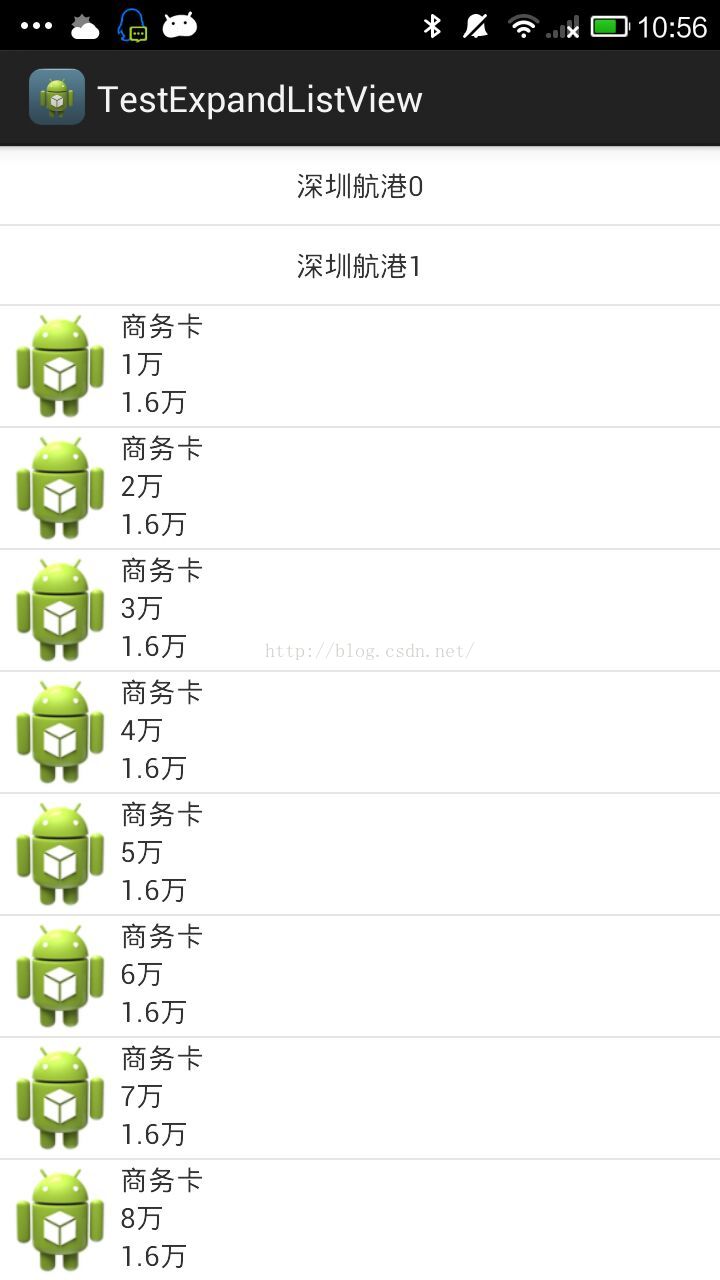
效果图
setOnGroupCollapseListener,setOnChildClickListener这四个监听事件,分别表示组元素点击事件,组元素展开,组收缩,子元素点击事件。我们可按需添加这四个监听事件即可。由此看来ExpandableListView是多么的简单。看似简单,但我们也要注意其中的一些细节。我相信你听过细节决定成败。下面我们就来一起看看细节。
1.
当设置setOnGroupClickListener监听并让其返回true时,所有Group消费点击事件,事件均不能分发传递给child(换言之,设置setOnChildClickListener不起任何作用)。
2.默认设置完Group以及child,Group左边会默认有以上下切换的图标,假如你有强迫症可以通过mListView.setGroupIndicator(null)去除。
3.前面已经简单说明了isChildSelectable(int groupPosition, int childPosition)方法的作用,所以当我们需要child可点击时,必须将setOnGroupClickListener和isChildSelectable对应设置为false和true。
4.说到这里也许读者会问,到底还是没有说出图一的做法。现在对图一进行详细的介绍。图一主要是将Group设置为不能收缩并且使其默认展开(即设置setOnGroupClickListener返回true,并且添加源码中setAdapter后三行代码)。
以上就是本人对ExpandableListView的一些浅薄之见,今天也是鄙人第一次写博客。都说Android技术博大精深,可能我阐述的只是冰山一角,希望大家踊跃的给出批评与建议。本人也希望能与热爱技术的开发人员进行深入的学习与交流。
--------------------- 本文来自 金杰米 的CSDN 博客 ,全文地址请点击:https://blog.csdn.net/jamy2015/article/details/51131583?utm_source=copy

 浙公网安备 33010602011771号