
ExpandListview应用(实现二级列表和实现新闻分类)
ExpandListView在我们开发中使用非常常见,但原生的ExpandListView往往会达不到我们使用的效果,我们会以两个例子为例来理解ExpandListView,现在我们看下如何做呢?
实现二级列表
首先我们看下效果图:
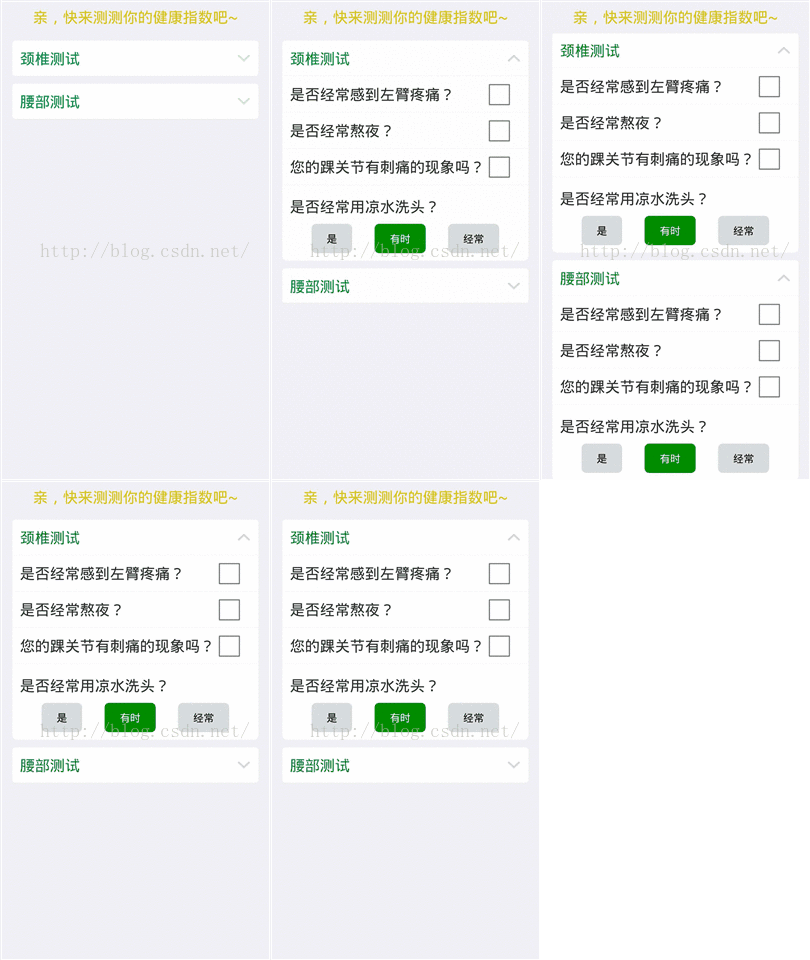
我们看下布局文件:
-
-
<LinearLayout xmlns:android="http://schemas.android.com/apk/res/android"
-
android:layout_width="fill_parent"
-
android:layout_height="fill_parent"
-
android:background="@color/back"
-
android:orientation="vertical" >
-
-
-
-
<LinearLayout
-
android:layout_width="fill_parent"
-
android:layout_height="44dp" >
-
-
<TextView
-
android:layout_width="fill_parent"
-
android:layout_height="wrap_content"
-
android:layout_gravity="center"
-
android:layout_marginLeft="1px"
-
android:gravity="center"
-
android:text="@string/message"
-
android:textColor="#DAC310"
-
android:textSize="20dp" />
-
</LinearLayout>
-
-
<LinearLayout
-
android:layout_width="wrap_content"
-
android:layout_height="wrap_content"
-
android:orientation="horizontal" >
-
-
<ExpandableListView
-
android:id="@+id/list"
-
android:layout_width="fill_parent"
-
android:layout_height="wrap_content"
-
android:layout_marginLeft="16dp"
-
android:layout_marginRight="16dp"
-
android:childDivider="@color/item_line_color"
-
android:divider="@null"
-
android:dividerHeight="1px"
-
android:gravity="center"
-
android:listSelector="#00000000"
-
android:scrollbars="none" >
-
</ExpandableListView>
-
-
</LinearLayout>
-
-
</LinearLayout>
我们还需要做一下的准备child_layout.xml;child_s_layout.xml;group_layout.xml:
child_layout.xml:
-
-
<RelativeLayout xmlns:android="http://schemas.android.com/apk/res/android"
-
android:layout_width="fill_parent"
-
android:layout_height="match_parent"
-
android:background="@color/white" >
-
-
<TextView
-
android:id="@+id/child_text"
-
android:layout_width="wrap_content"
-
android:layout_height="wrap_content"
-
android:layout_alignParentLeft="true"
-
android:layout_centerVertical="true"
-
android:layout_marginLeft="10dp"
-
android:textColor="@color/item_text_color"
-
android:textSize="20dp" />
-
-
<CheckBox
-
style="@style/my_CheckBox"
-
android:layout_width="wrap_content"
-
android:layout_height="wrap_content"
-
android:layout_alignParentRight="true"
-
android:layout_centerVertical="true" />
-
-
</RelativeLayout>
child_s_layout.xml:
-
-
<RelativeLayout xmlns:android="http://schemas.android.com/apk/res/android"
-
android:layout_width="fill_parent"
-
android:layout_height="match_parent"
-
android:background="@drawable/text_item_bottom_bg" >
-
-
<TextView
-
android:id="@+id/child_text"
-
android:layout_width="wrap_content"
-
android:layout_height="wrap_content"
-
android:layout_marginLeft="10dp"
-
android:layout_marginTop="15dp"
-
android:textColor="@color/item_text_color"
-
android:textSize="20dp" />
-
-
<LinearLayout
-
android:layout_width="fill_parent"
-
android:layout_height="match_parent"
-
android:layout_below="@id/child_text"
-
android:gravity="center_horizontal"
-
android:orientation="horizontal"
-
android:padding="10dp" >
-
-
<Button
-
android:layout_width="wrap_content"
-
android:layout_height="wrap_content"
-
android:background="@drawable/btn_nromal_bg"
-
android:paddingBottom="10dp"
-
android:paddingLeft="20dp"
-
android:paddingRight="20dp"
-
android:paddingTop="10dp"
-
android:text="是" />
-
-
<Button
-
android:layout_width="wrap_content"
-
android:layout_height="wrap_content"
-
android:layout_marginLeft="30dp"
-
android:background="@drawable/btn_pressed_bg"
-
android:paddingBottom="10dp"
-
android:paddingLeft="20dp"
-
android:paddingRight="20dp"
-
android:textColor="@color/white"
-
android:paddingTop="10dp"
-
android:text="有时" />
-
-
<Button
-
android:layout_width="wrap_content"
-
android:layout_height="wrap_content"
-
android:layout_marginLeft="30dp"
-
android:background="@drawable/btn_nromal_bg"
-
android:paddingBottom="10dp"
-
android:paddingLeft="20dp"
-
android:paddingRight="20dp"
-
android:paddingTop="10dp"
-
android:text="经常" />
-
</LinearLayout>
-
-
</RelativeLayout>
group_layout.xml:
-
-
<LinearLayout xmlns:android="http://schemas.android.com/apk/res/android"
-
android:layout_width="fill_parent"
-
android:layout_height="wrap_content"
-
android:orientation="vertical" >
-
-
<View
-
android:layout_width="fill_parent"
-
android:layout_height="10dp"
-
android:background="#00000000" />
-
-
<RelativeLayout
-
android:id="@+id/group_layout"
-
android:layout_width="fill_parent"
-
android:layout_height="wrap_content"
-
android:background="@drawable/text_item_bg"
-
android:paddingBottom="10dp"
-
android:paddingTop="10dp" >
-
-
<TextView
-
android:id="@+id/group_title"
-
android:layout_width="wrap_content"
-
android:layout_height="wrap_content"
-
android:layout_alignParentLeft="true"
-
android:layout_centerInParent="true"
-
android:layout_marginLeft="10dp"
-
android:textColor="@color/head_text_color"
-
android:textSize="20dp" />
-
-
<ImageView
-
android:id="@+id/group_state"
-
android:layout_width="wrap_content"
-
android:layout_height="wrap_content"
-
android:layout_alignParentRight="true"
-
android:layout_centerInParent="true"
-
android:layout_marginRight="10dp" />
-
</RelativeLayout>
-
-
</LinearLayout>
下面我们看下activity如何写:
-
package com.adth.eagleeducation.ui;
-
-
import java.util.ArrayList;
-
import java.util.List;
-
-
import android.app.Activity;
-
import android.content.pm.ActivityInfo;
-
import android.os.Bundle;
-
import android.view.View;
-
import android.view.View.OnClickListener;
-
import android.view.Window;
-
import android.widget.ImageView;
-
import android.widget.ListView;
-
import android.widget.TextView;
-
import android.widget.Toast;
-
-
import com.adth.eagleeducation.adapter.Today_activity_adapter;
-
import com.adth.eagleeducation.adapter.Today_course_Adapter;
-
import com.adth.eagleeducation.bean.Activityinformation;
-
import com.adth.eagleeducation.bean.Course;
-
-
public class DailyEventActivity extends Activity {
-
-
private ListView lv_daily_course;
-
private List<Course> list = new ArrayList<Course>();
-
private Course course;
-
private Today_course_Adapter adapter;
-
-
private ImageView btn_title_bar_without_cancel;
-
private TextView tv_title_bar_without_name;
-
-
private ListView lv_daily_event;
-
private List<Activityinformation> lv_activity = new ArrayList<Activityinformation>();
-
private Activityinformation actinfor;
-
private Today_activity_adapter adapter_activity;
-
private String date;
-
private TextView tv_daily_event_add;
-
-
protected void onCreate(Bundle savedInstanceState) {
-
super.onCreate(savedInstanceState);
-
requestWindowFeature(Window.FEATURE_NO_TITLE);
-
setRequestedOrientation(ActivityInfo.SCREEN_ORIENTATION_LANDSCAPE);
-
setContentView(R.layout.fragment_daily_event);
-
-
date = this.getIntent().getStringExtra("date");
-
init();
-
}
-
-
-
public void init(){
-
btn_title_bar_without_cancel = (ImageView) findViewById(R.id.btn_title_bar_without_cancel);
-
btn_title_bar_without_cancel.setOnClickListener(new OnClickListener() {
-
-
-
public void onClick(View v) {
-
// TODO Auto-generated method stub
-
DailyEventActivity.this.finish();
-
}
-
});
-
-
tv_title_bar_without_name = (TextView) findViewById(R.id.tv_title_bar_without_name);
-
if(date != null){
-
tv_title_bar_without_name.setText(date);
-
}else{
-
tv_title_bar_without_name.setText("");
-
}
-
-
this.lv_daily_course = (ListView) this.findViewById(R.id.lv_daily_course);
-
course = new Course("1", "KeyStone", "Room 301", "9:00-9:40", "K11", "35");
-
list.add(course);
-
course = new Course("2", "Early starter", "Room 302", "10:00-10:40", "IN1A", "40");
-
list.add(course);
-
course = new Course("3", "Intensive", "Room 303", "2:00-2:40", "ST1A", "36");
-
list.add(course);
-
course = new Course("4", "Standard", "Room 304", "3:00-3:40", "ESA1", "37");
-
list.add(course);
-
adapter = new Today_course_Adapter(DailyEventActivity.this, list);
-
lv_daily_course.setAdapter(adapter);
-
//list of activity
-
lv_daily_event = (ListView) findViewById(R.id.lv_daily_event);
-
actinfor = new Activityinformation("1", "go to Nanjing School to study", "10:00-11:30");
-
lv_activity.add(actinfor);
-
adapter_activity = new Today_activity_adapter(this, lv_activity);
-
lv_daily_event.setAdapter(adapter_activity);
-
-
tv_daily_event_add = (TextView) findViewById(R.id.tv_daily_event_add);
-
tv_daily_event_add.setOnClickListener(new OnClickListener() {
-
-
-
public void onClick(View v) {
-
// TODO Auto-generated method stub
-
Toast.makeText(DailyEventActivity.this, "new event", 1).show();
-
}
-
});
-
}
-
-
}
实现新闻分类
我们看下效果图:
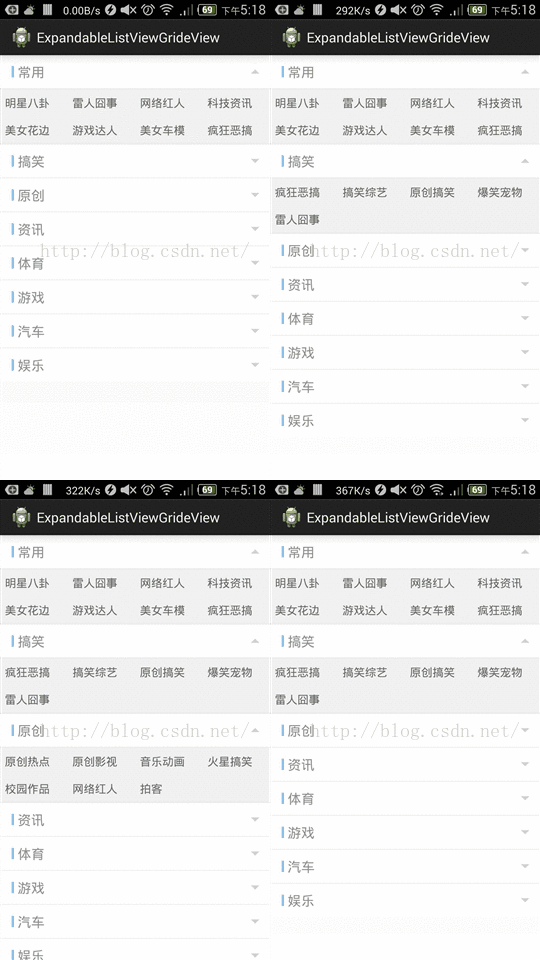
这里的布局文件是这样的:
-
<RelativeLayout xmlns:android="http://schemas.android.com/apk/res/android"
-
xmlns:tools="http://schemas.android.com/tools"
-
android:layout_width="match_parent"
-
android:layout_height="match_parent"
-
tools:context=".MainActivity" >
-
-
<ExpandableListView
-
android:id="@+id/expandableListView"
-
android:layout_width="match_parent"
-
android:layout_height="wrap_content"
-
android:background="@drawable/channel_expandablelistview_bg"
-
android:cacheColorHint="#00000000"
-
android:divider="#ebebeb"
-
android:dividerHeight="1dp"
-
android:footerDividersEnabled="false"
-
android:groupIndicator="@null" >
-
</ExpandableListView>
-
-
</RelativeLayout>
我们自定义一个ExpandableListViewAdapter.java:
-
package com.ziaho.ui;
-
-
import java.util.ArrayList;
-
import java.util.HashMap;
-
-
import com.cn.main.R;
-
-
import android.content.Context;
-
import android.graphics.Color;
-
import android.graphics.drawable.ColorDrawable;
-
import android.util.Log;
-
import android.view.LayoutInflater;
-
import android.view.View;
-
import android.view.ViewGroup;
-
import android.widget.AdapterView;
-
import android.widget.BaseExpandableListAdapter;
-
import android.widget.GridView;
-
import android.widget.ImageView;
-
import android.widget.SimpleAdapter;
-
import android.widget.TextView;
-
import android.widget.Toast;
-
-
public class ExpandableListViewAdapter extends BaseExpandableListAdapter {
-
public String[] group = { "常用", "搞笑", "原创", "资讯", "体育", "游戏", "汽车", "娱乐" };
-
public String[][] gridViewChild = {
-
{ "明星八卦", "雷人囧事", "网络红人", "科技资讯", "美女花边", "游戏达人", "美女车模", "疯狂恶搞" },
-
{ "疯狂恶搞", "搞笑综艺", "原创搞笑", "爆笑宠物", "雷人囧事" },
-
{ "原创热点", "原创影视", "音乐动画", "火星搞笑", "校园作品", "网络红人", "拍客" },
-
{ "社会资讯", "国内资讯", "国际资讯", "财富资讯", "科技资讯" },
-
{ "篮球天地", "足球世界", "综合体育", "极限运动", "武术摔角", "美女花边" },
-
{ "网络游戏", "电子竞技", "单机电玩", "游戏达人", "工会战队" },
-
{ "新车速递", "车型推荐", "改装酷玩", "汽车广告", "评测报告", "美女车模" },
-
{ "明星八卦", "影视资讯" } };
-
String[][] child = { { "" }, { "" }, { "" }, { "" }, { "" }, { "" },
-
{ "" }, { "" } };
-
LayoutInflater mInflater;
-
Context context;
-
-
public ExpandableListViewAdapter(Context context) {
-
// TODO Auto-generated constructor stub
-
mInflater = LayoutInflater.from(context);
-
this.context = context;
-
}
-
-
-
public Object getChild(int groupPosition, int childPosition) {
-
// TODO Auto-generated method stub
-
return child[groupPosition][childPosition];
-
}
-
-
-
public long getChildId(int groupPosition, int childPosition) {
-
// TODO Auto-generated method stub
-
return childPosition;
-
}
-
-
-
public View getChildView(int groupPosition, int childPosition,
-
boolean isLastChild, View convertView, ViewGroup parent) {
-
// TODO Auto-generated method stub
-
if (convertView == null) {
-
mViewChild = new ViewChild();
-
convertView = mInflater.inflate(
-
R.layout.channel_expandablelistview_item, null);
-
mViewChild.gridView = (GridView) convertView
-
.findViewById(R.id.channel_item_child_gridView);
-
convertView.setTag(mViewChild);
-
} else {
-
mViewChild = (ViewChild) convertView.getTag();
-
}
-
-
SimpleAdapter mSimpleAdapter = new SimpleAdapter(context,
-
setGridViewData(gridViewChild[groupPosition]),
-
R.layout.channel_gridview_item,
-
new String[] { "channel_gridview_item" },
-
new int[] { R.id.channel_gridview_item });
-
mViewChild.gridView.setAdapter(mSimpleAdapter);
-
setGridViewListener(mViewChild.gridView);
-
mViewChild.gridView.setSelector(new ColorDrawable(Color.TRANSPARENT));
-
return convertView;
-
}
-
-
/**
-
* 设置gridview点击事件监听
-
*
-
* @param gridView
-
*/
-
private void setGridViewListener(final GridView gridView) {
-
gridView.setOnItemClickListener(new GridView.OnItemClickListener() {
-
-
public void onItemClick(AdapterView<?> parent, View view,
-
int position, long id) {
-
// TODO Auto-generated method stub
-
if (view instanceof TextView) {
-
// 如果想要获取到哪一行,则自定义gridview的adapter,item设置2个textview一个隐藏设置id,显示哪一行
-
TextView tv = (TextView) view;
-
Toast.makeText(context,
-
"position=" + position + "||" + tv.getText(),
-
Toast.LENGTH_SHORT).show();
-
Log.e("hefeng", "gridView listaner position=" + position
-
+ "||text=" + tv.getText());
-
}
-
}
-
});
-
}
-
-
/**
-
* 设置gridview数据
-
*
-
* @param data
-
* @return
-
*/
-
private ArrayList<HashMap<String, Object>> setGridViewData(String[] data) {
-
ArrayList<HashMap<String, Object>> gridItem = new ArrayList<HashMap<String, Object>>();
-
for (int i = 0; i < data.length; i++) {
-
HashMap<String, Object> hashMap = new HashMap<String, Object>();
-
hashMap.put("channel_gridview_item", data[i]);
-
gridItem.add(hashMap);
-
}
-
return gridItem;
-
}
-
-
-
public int getChildrenCount(int groupPosition) {
-
// TODO Auto-generated method stub
-
return child[groupPosition].length;
-
}
-
-
-
public Object getGroup(int groupPosition) {
-
// TODO Auto-generated method stub
-
return group[groupPosition];
-
}
-
-
-
public int getGroupCount() {
-
// TODO Auto-generated method stub
-
return group.length;
-
}
-
-
-
public long getGroupId(int groupPosition) {
-
// TODO Auto-generated method stub
-
return groupPosition;
-
}
-
-
-
public View getGroupView(int groupPosition, boolean isExpanded,
-
View convertView, ViewGroup parent) {
-
// TODO Auto-generated method stub
-
if (convertView == null) {
-
mViewChild = new ViewChild();
-
convertView = mInflater.inflate(
-
R.layout.channel_expandablelistview, null);
-
mViewChild.textView = (TextView) convertView
-
.findViewById(R.id.channel_group_name);
-
mViewChild.imageView = (ImageView) convertView
-
.findViewById(R.id.channel_imageview_orientation);
-
convertView.setTag(mViewChild);
-
} else {
-
mViewChild = (ViewChild) convertView.getTag();
-
}
-
-
if (isExpanded) {
-
mViewChild.imageView
-
.setImageResource(R.drawable.channel_expandablelistview_top_icon);
-
} else {
-
mViewChild.imageView
-
.setImageResource(R.drawable.channel_expandablelistview_bottom_icon);
-
}
-
mViewChild.textView.setText(getGroup(groupPosition).toString());
-
return convertView;
-
}
-
-
-
public boolean hasStableIds() {
-
// TODO Auto-generated method stub
-
return true;
-
}
-
-
-
public boolean isChildSelectable(int groupPosition, int childPosition) {
-
// TODO Auto-generated method stub
-
return true;
-
}
-
-
ViewChild mViewChild;
-
-
static class ViewChild {
-
ImageView imageView;
-
TextView textView;
-
GridView gridView;
-
}
-
}
channel_expandablelistview_item.xml:
-
-
<com.ziaho.ui.CustomGridView xmlns:android="http://schemas.android.com/apk/res/android"
-
android:id="@+id/channel_item_child_gridView"
-
android:layout_width="match_parent"
-
android:layout_height="match_parent"
-
android:background="#f0f0f0"
-
android:numColumns="4" >
-
-
</com.ziaho.ui.CustomGridView>
CustomGridView.java:
-
package com.ziaho.ui;
-
-
import android.content.Context;
-
import android.util.AttributeSet;
-
import android.widget.GridView;
-
-
-
public class CustomGridView extends GridView {
-
-
public CustomGridView(Context context, AttributeSet attrs) {
-
super(context, attrs);
-
// TODO Auto-generated constructor stub
-
}
-
-
-
protected void onMeasure(int widthMeasureSpec, int heightMeasureSpec) {
-
// TODO Auto-generated method stub
-
int expandSpec = MeasureSpec.makeMeasureSpec(Integer.MAX_VALUE >> 2,
-
MeasureSpec.AT_MOST);
-
super.onMeasure(widthMeasureSpec, expandSpec);
-
}
-
}
channel_expandablelistview.xml:
-
-
<RelativeLayout xmlns:android="http://schemas.android.com/apk/res/android"
-
android:layout_width="fill_parent"
-
android:layout_height="wrap_content"
-
android:background="#ffffff"
-
android:orientation="horizontal"
-
android:padding="10dip" >
-
-
<View
-
android:id="@+id/channel_line"
-
android:layout_width="3dp"
-
android:layout_height="15dp"
-
android:layout_marginLeft="5dp"
-
android:layout_alignParentLeft="true"
-
android:layout_centerVertical="true"
-
android:background="#79BEF7" />
-
-
<TextView
-
android:id="@+id/channel_group_name"
-
android:layout_width="wrap_content"
-
android:layout_height="wrap_content"
-
android:layout_centerVertical="true"
-
android:layout_gravity="center"
-
android:layout_marginLeft="5dp"
-
android:layout_toRightOf="@id/channel_line"
-
android:text="体育"
-
android:textColor="#8e8e8e"
-
android:textSize="18sp" />
-
-
<ImageView
-
android:id="@+id/channel_imageview_orientation"
-
android:layout_width="wrap_content"
-
android:layout_height="wrap_content"
-
android:layout_alignParentRight="true"
-
android:layout_centerVertical="true"
-
android:layout_marginRight="5dp"
-
android:src="@drawable/channel_expandablelistview_bottom_icon" />
-
-
</RelativeLayout>
channel_gridview_item.xml:
-
-
<TextView xmlns:android="http://schemas.android.com/apk/res/android"
-
android:id="@+id/channel_gridview_item"
-
android:layout_width="fill_parent"
-
android:layout_height="wrap_content"
-
android:background="#f0f0f0"
-
android:paddingBottom="8dip"
-
android:paddingLeft="6dip"
-
android:paddingRight="6dip"
-
android:paddingTop="8dip"
-
android:text="篮球天地"
-
android:textColor="@color/channel_gridview_item_click"
-
android:textSize="15sp" />
最后我们来看MainActivity:
-
package com.ziaho.ui;
-
-
import com.cn.main.R;
-
-
import android.app.Activity;
-
import android.os.Bundle;
-
import android.util.Log;
-
import android.view.View;
-
import android.widget.ExpandableListView;
-
-
-
public class MainActivity extends Activity {
-
ExpandableListView mExpandableListView;
-
ExpandableListViewAdapter mExpandableListViewAdapter;
-
private static final String TAG = "Main";
-
-
-
protected void onCreate(Bundle savedInstanceState) {
-
super.onCreate(savedInstanceState);
-
setContentView(R.layout.activity_main);
-
mExpandableListView = (ExpandableListView) findViewById(R.id.expandableListView);
-
mExpandableListViewAdapter = new ExpandableListViewAdapter(this);
-
mExpandableListView.setAdapter(mExpandableListViewAdapter);
-
mExpandableListView.expandGroup(0);
-
mExpandableListView
-
.setOnGroupClickListener(new ExpandableListView.OnGroupClickListener() {
-
-
public boolean onGroupClick(ExpandableListView parent,
-
View v, int groupPosition, long id) {
-
return false;
-
}
-
});
-
mExpandableListView
-
.setOnChildClickListener(new ExpandableListView.OnChildClickListener() {
-
-
public boolean onChildClick(ExpandableListView parent,
-
View v, int groupPosition, int childPosition,
-
long id) {
-
Log.e(TAG, "groupPosition=" + groupPosition
-
+ ",childPosition=" + childPosition);
-
return false;
-
}
-
});
-
-
}
-
-
}
好了!希望对你们有帮助。
如下为下载链接:
http://download.csdn.net/detail/hehaiminginadth/9089793
--------------------- 本文来自 hehaiminginadth 的CSDN 博客 ,全文地址请点击:https://blog.csdn.net/hehaiminginadth/article/details/48294203?utm_source=copy

 浙公网安备 33010602011771号