
自定义控件(视图)2期笔记14:自定义视图之View事件分发 dispatchTouchEvent,onTouch,onTouchEvent,onClick逻辑顺序过程
1. 这里我们先从案例角度说明dispatchTouchEvent,onTouch,onTouchEvent,onClick逻辑顺序过程:
(1)首先我们重写一个MyButton 继承自 Button,代码如下:

 1 package com.himi.eventdemo;
 2
 3 import android.content.Context;
 4 import android.util.AttributeSet;
 5 import android.util.Log;
 6 import android.view.MotionEvent;
 7 import android.widget.Button;
 8
 9 public class MyButton extends Button {
10
11     private static String TAG = "MyButton";
12     public MyButton(Context context) {
13         super(context);
14     }
15
16     public MyButton(Context context, AttributeSet attrs) {
17         super(context, attrs);
18     }
19
20     public MyButton(Context context, AttributeSet attrs, int defStyleAttr) {
21         super(context, attrs, defStyleAttr);
22     }
23
24
25     @Override
26     public boolean dispatchTouchEvent(MotionEvent event) {
27
28         switch (event.getAction()) {
29             case MotionEvent.ACTION_DOWN:
30                 Log.e(TAG,"dispatchTouchEvent====MyButton=====ACTION_DOWN");
31                 break;
32             case MotionEvent.ACTION_MOVE:
33                  Log.e(TAG,"dispatchTouchEvent====MyButton=====ACTION_MOVE");
34                 break;
35             case MotionEvent.ACTION_UP:
36                  Log.e(TAG,"dispatchTouchEvent====MyButton=====ACTION_UP");
37                 break;
38         }
39
40         return super.dispatchTouchEvent(event);
41     }
42
43     @Override
44     public boolean onTouchEvent(MotionEvent event) {
45
46         switch (event.getAction()) {
47             case MotionEvent.ACTION_DOWN:
48                  Log.e(TAG,"onTouchEvent====MyButton=====ACTION_DOWN");
49                 break;
50             case MotionEvent.ACTION_MOVE:
51                  Log.e(TAG,"onTouchEvent====MyButton=====ACTION_MOVE");
52                 break;
53             case MotionEvent.ACTION_UP:
54                  Log.e(TAG,"onTouchEvent====MyButton=====ACTION_UP");
55                 break;
56         }
57
58         return super.onTouchEvent(event);
59     }
60 }
(2)来到主布局文件activity_main.xml,如下:
 1 <RelativeLayout xmlns:android="http://schemas.android.com/apk/res/android"
 2     xmlns:tools="http://schemas.android.com/tools"
 3     android:layout_width="match_parent"
 4     android:layout_height="match_parent"
 5     android:gravity="center"
 6     tools:context="com.himi.eventdemo.MainActivity" >
 7
 8     <com.himi.eventdemo.MyButton
 9         android:id="@+id/myButton"
10         android:layout_width="wrap_content"
11         android:layout_height="wrap_content"
12         android:text="测试"
13         />
14
15 </RelativeLayout>
(3)测试MainActivity,如下:
 1 package com.himi.eventdemo;
 2
 3 import android.app.Activity;
 4 import android.os.Bundle;
 5 import android.util.Log;
 6 import android.view.MotionEvent;
 7 import android.view.View;
 8 import android.widget.Button;
 9
10 public class MainActivity extends Activity {
11
12     private static String TAG ="MainActivity";
13
14
15     private Button myButton;
16
17
18     @Override
19     protected void onCreate(Bundle savedInstanceState) {
20         super.onCreate(savedInstanceState);
21         setContentView(R.layout.activity_main);
22
23         myButton = (Button) findViewById(R.id.myButton);
24
25         myButton.setOnTouchListener(new View.OnTouchListener() {
26             @Override
27             public boolean onTouch(View v, MotionEvent event) {
28                 switch (event.getAction()) {
29                     case MotionEvent.ACTION_DOWN:
30                          Log.e(TAG,"onTouch====MyButton=====ACTION_DOWN");
31                         break;
32                     case MotionEvent.ACTION_MOVE:
33                          Log.e(TAG,"onTouch====MyButton=====ACTION_MOVE");
34                         break;
35                     case MotionEvent.ACTION_UP:
36                          Log.e(TAG,"onTouch====MyButton=====ACTION_UP");
37                         break;
38                 }
39                 return false;
40             }
41         });
42
43         myButton.setOnClickListener(new View.OnClickListener() {
44             @Override
45             public void onClick(View v) {
46                 Log.e(TAG,"onClick====MyButton=====onClick");
47             }
48         });
49
50
51     }
52
53
54 }
(4)部署程序到手机上,如下:

点击测试按钮,打印结果如下:

从上面打印的结果分析:
点击Button按钮事件分发过程如下:
dispatchTouchEvent --> onTouch --> onTouchEvent --> onClick
相信细心的你肯定发现了,都是在ACTION_UP事件之后才触发onClick点击事件。
2. 下面我们从源码的角度分析dispatchTouchEvent,onTouch,onTouchEvent,onClick逻辑顺序过程:
(1)事件分发都是从dispatchTouchEvent方法开始的,那么我们这里是重写了dispatchTouchEvent方法,并且最后也调用了父类的super.dispatchTouchEvent(event)方法。那么我们看看父类中的方法到底做了什么??点击进入父类的dispatchTouchEvent方法,发现此方法在View类中找到,其实也不奇怪,所有控件的父类都是View。这里我贴出最新源码如下:
 1 public boolean dispatchTouchEvent(MotionEvent event) {
 2         boolean result = false;
 3
 4         if (mInputEventConsistencyVerifier != null) {
 5             mInputEventConsistencyVerifier.onTouchEvent(event, 0);
 6         }
 7
 8         final int actionMasked = event.getActionMasked();
 9         if (actionMasked == MotionEvent.ACTION_DOWN) {
10             // Defensive cleanup for new gesture
11             stopNestedScroll();
12         }
13
14         if (onFilterTouchEventForSecurity(event)) {
15             //noinspection SimplifiableIfStatement
16             ListenerInfo li = mListenerInfo;
17             if (li != null && li.mOnTouchListener != null
18                     && (mViewFlags & ENABLED_MASK) == ENABLED
19                     && li.mOnTouchListener.onTouch(this, event)) {
20                 result = true;
21             }
22
23             if (!result && onTouchEvent(event)) {
24                 result = true;
25             }
26         }
27
28         if (!result && mInputEventConsistencyVerifier != null) {
29             mInputEventConsistencyVerifier.onUnhandledEvent(event, 0);
30         }
31
32         // Clean up after nested scrolls if this is the end of a gesture;
33         // also cancel it if we tried an ACTION_DOWN but we didn't want the rest
34         // of the gesture.
35         if (actionMasked == MotionEvent.ACTION_UP ||
36                 actionMasked == MotionEvent.ACTION_CANCEL ||
37                 (actionMasked == MotionEvent.ACTION_DOWN && !result)) {
38             stopNestedScroll();
39         }
40
41         return result;
42     }
忽略其他无关代码,我们直接看17--25行。
第17行的 if 判断关键在于li.mOnTouchListener.onTouch(this, event) 的返回值,
这个接口回调就是我们外面写的myButton.setOnTouchListener事件(Button 的onTouch事件),
在MainActivity代码里,我们setOnTouchListener返回的值是false,所以在源码中我们可以看到 17行的条件不成立,那么条件不成立,result=false;
因此,源码的第23行 if 判断第一个条件成立,继续执行第二个条件,也就是onTouchEvent。我们跳到这个方法里看看里面干啥了?看如下代码:
 1 public boolean onTouchEvent(MotionEvent event) {
 2
 3         if (((viewFlags & CLICKABLE) == CLICKABLE ||
 4                 (viewFlags & LONG_CLICKABLE) == LONG_CLICKABLE)) {
 5             switch (event.getAction()) {
 6                 case MotionEvent.ACTION_UP:
 7                     boolean prepressed = (mPrivateFlags & PFLAG_PREPRESSED) != 0;
 8                     if ((mPrivateFlags & PFLAG_PRESSED) != 0 || prepressed) {
 9                         // take focus if we don't have it already and we should in
10                         // touch mode.
11                         boolean focusTaken = false;
12                         if (isFocusable() && isFocusableInTouchMode() && !isFocused()) {
13                             focusTaken = requestFocus();
14                         }
15
16                         if (prepressed) {
17                             // The button is being released before we actually
18                             // showed it as pressed.  Make it show the pressed
19                             // state now (before scheduling the click) to ensure
20                             // the user sees it.
21                             setPressed(true, x, y);
22                        }
23
24                         if (!mHasPerformedLongPress) {
25                             // This is a tap, so remove the longpress check
26                             removeLongPressCallback();
27
28                             // Only perform take click actions if we were in the pressed state
29                             if (!focusTaken) {
30                                 // Use a Runnable and post this rather than calling
31                                 // performClick directly. This lets other visual state
32                                 // of the view update before click actions start.
33                                 if (mPerformClick == null) {
34                                     mPerformClick = new PerformClick();
35                                 }
36                                 if (!post(mPerformClick)) {
37                      performClick();
38                                 }
39                             }
40                         }
41
42                         if (mUnsetPressedState == null) {
43                             mUnsetPressedState = new UnsetPressedState();
44                         }
45
46                         if (prepressed) {
47                             postDelayed(mUnsetPressedState,
48                                     ViewConfiguration.getPressedStateDuration());
49                         } else if (!post(mUnsetPressedState)) {
50                             // If the post failed, unpress right now
51                             mUnsetPressedState.run();
52                         }
53
54                         removeTapCallback();
55                     }
56                     break;
57             return true;
58         }
59
60         return false;
61     }
我们看看这里边都做了些什么,忽略其他,我们直接看37行的 performClick(); 方法,跳进去继续看:
(注意:这里的performClick方法是在ACTION_UP手势里边执行的哦!!!)
 1 public boolean performClick() {
 2         final boolean result;
 3         final ListenerInfo li = mListenerInfo;
 4         if (li != null && li.mOnClickListener != null) {
 5             playSoundEffect(SoundEffectConstants.CLICK);
 6             li.mOnClickListener.onClick(this);
 7             result = true;
 8         } else {
 9             result = false;
10         }
11
12         sendAccessibilityEvent(AccessibilityEvent.TYPE_VIEW_CLICKED);
13         return result;
14     }
看见没??
第6行 li.mOnClickListener.onClick(this);
这个接口回调就是我们Button的 onClick事件。到此为止,我们从源码分析了Button事件分发过程。
结论:
dispatchTouchEvent---->onTouch---->onTouchEvent----->onClick。并且如果仔细的你会发现,在onTouchEvent方法内部判断执行onClick方法,但是,在所有ACTION_UP事件之后才触发onClick点击事件。
3. 现在我们来看看其他情况:当onTouch返回为true,打印结果如下:
 1 package com.himi.eventdemo;
 2
 3 import android.app.Activity;
 4 import android.os.Bundle;
 5 import android.util.Log;
 6 import android.view.MotionEvent;
 7 import android.view.View;
 8 import android.widget.Button;
 9
10 public class MainActivity extends Activity {
11
12     private static String TAG ="MainActivity";
13
14
15     private Button myButton;
16
17
18     @Override
19     protected void onCreate(Bundle savedInstanceState) {
20         super.onCreate(savedInstanceState);
21         setContentView(R.layout.activity_main);
22
23         myButton = (Button) findViewById(R.id.myButton);
24
25         myButton.setOnTouchListener(new View.OnTouchListener() {
26             @Override
27             public boolean onTouch(View v, MotionEvent event) {
28                 switch (event.getAction()) {
29                     case MotionEvent.ACTION_DOWN:
30                          Log.e(TAG,"onTouch====MyButton=====ACTION_DOWN");
31                         break;
32                     case MotionEvent.ACTION_MOVE:
33                          Log.e(TAG,"onTouch====MyButton=====ACTION_MOVE");
34                         break;
35                     case MotionEvent.ACTION_UP:
36                          Log.e(TAG,"onTouch====MyButton=====ACTION_UP");
37                         break;
38                 }
39                 return true;
40             }
41         });
42
43         myButton.setOnClickListener(new View.OnClickListener() {
44             @Override
45             public void onClick(View v) {
46                 Log.e(TAG,"onClick====MyButton=====onClick");
47             }
48         });
49
50
51     }
52
53
54 }
打印结果如下:
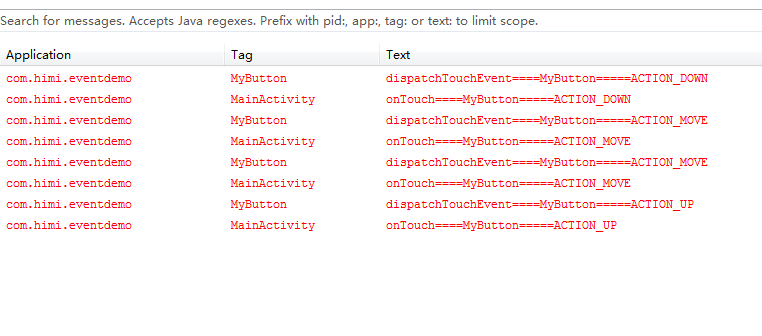
结论:
dispatchTouchEvent---->onTouch
惊奇的发现,竟然没有执行onClick事件是吧????如果你仔细阅读上面的文章,估计你知道为什么了吧?还是跟大家一起分析一下吧:源码如下:
 1 public boolean dispatchTouchEvent(MotionEvent event) {
 2         boolean result = false;
 3
 4         if (mInputEventConsistencyVerifier != null) {
 5             mInputEventConsistencyVerifier.onTouchEvent(event, 0);
 6         }
 7
 8         final int actionMasked = event.getActionMasked();
 9         if (actionMasked == MotionEvent.ACTION_DOWN) {
10             // Defensive cleanup for new gesture
11             stopNestedScroll();
12         }
13
14         if (onFilterTouchEventForSecurity(event)) {
15             //noinspection SimplifiableIfStatement
16             ListenerInfo li = mListenerInfo;
17             if (li != null && li.mOnTouchListener != null
18                     && (mViewFlags & ENABLED_MASK) == ENABLED
19                     && li.mOnTouchListener.onTouch(this, event)) {
20                 result = true;
21             }
22
23             if (!result && onTouchEvent(event)) {
24                 result = true;
25             }
26         }
27
28         if (!result && mInputEventConsistencyVerifier != null) {
29             mInputEventConsistencyVerifier.onUnhandledEvent(event, 0);
30         }
31
32         // Clean up after nested scrolls if this is the end of a gesture;
33         // also cancel it if we tried an ACTION_DOWN but we didn't want the rest
34         // of the gesture.
35         if (actionMasked == MotionEvent.ACTION_UP ||
36                 actionMasked == MotionEvent.ACTION_CANCEL ||
37                 (actionMasked == MotionEvent.ACTION_DOWN && !result)) {
38             stopNestedScroll();
39         }
40
41         return result;
42     }
从第 17 行可以看出,条件成立,result=true;
那么第 23 行 if 条件根本不会执行第二个判断,那么就不会执行onTouchEvent方法,也就不会调用 onClick的接口,因此Button 不会执行setOnClickListener中的onClick事件。
4. 总结:


 浙公网安备 33010602011771号