
C# 提取Word表格中图片
此经验将介绍通过C#编程来提取Word表格中的图片。
dll引用
-
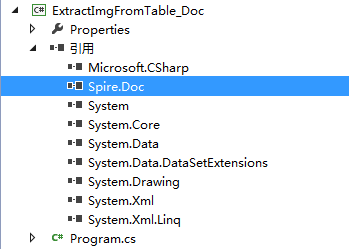
1.通过官网(https://www.e-iceblue.cn/Introduce/Free-Spire-Doc-NET.html)下载安装包--解压-安装。在程序中添加引用Spire.doc.dll,dll文件在安装路径下的bin文件夹中。
2.通过Nuget官网下载。(http://www.nuget.org/packages/FreeSpire.Doc/)
添加引用完成后,如下图:
![C# 提取Word表格中图片]() END
END
C#代码示例
-
using Spire.Doc;
using Spire.Doc.Documents;
using Spire.Doc.Fields;
using System;
using System.Collections.Generic;
using System.Text;
namespace ExtractImgFromTable_Doc
{
class Program
{
static void Main(string[] args)
{
//创建Document实例
Document doc = new Document();
//加载Word文档
doc.LoadFromFile("sample.docx");
//获取文档中第一个节
Section section = doc.Sections[0];
//调用ExtractImagesFromTables方法,提取表格中的图片
ExtractImagesFromTables(section);
//关闭
doc.Close();
}
//创建静态方法ExtractImagesFromTables,参数为Section对象
static void ExtractImagesFromTables(Section section)
{
int index = 0;
String imageName = null;
//遍历section中的表格,提取表格中的图片并保存到本地
foreach (Table table in section.Tables)
{
for (int i = 0; i < table.Rows.Count; i++)
{
for (int j = 0; j < table.Rows[i].Cells.Count; j++)
{
foreach (Paragraph para in table[i, j].Paragraphs)
{
foreach (DocumentObject obj in para.ChildObjects)
{
if (obj is DocPicture)
{
imageName = String.Format("TableImage-{0}.png", index);
(obj as DocPicture).Image.Save(imageName, System.Drawing.Imaging.ImageFormat.Png);
index++;
}
}
}
}
}
}
}
}
}
-
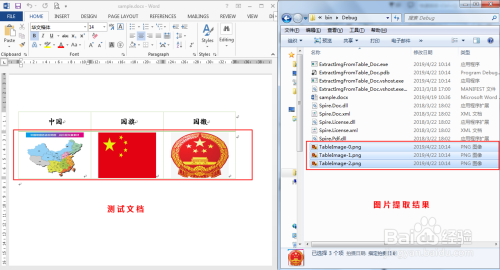
图片提取结果(如下图):
![C# 提取Word表格中图片]()

 浙公网安备 33010602011771号