

vue3+ts 上传组件
本来是用的jeecg-vue3中的上传组件,如下图:
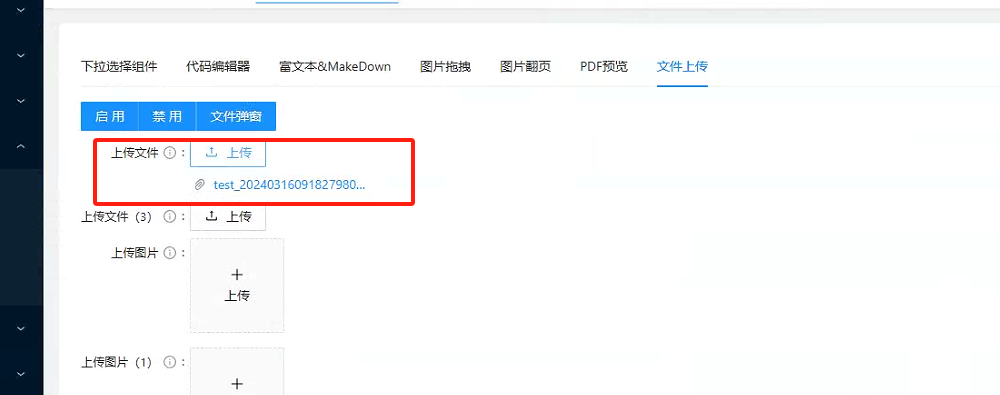
功能上还是蛮全的,就是上图中这个链接的代码死活找不到,查了下,是基于antv的a-upload实现的。但是antv中也没找到,上图这个只有移入删除的功能
但是我这边的需求是点击链接可以直接在网页预览,而不是下载,移入后有个删除和下载的功能按钮。
预览这个跟后端同事搞定了,通过点击文件名直接预览,但是!!!下载的按钮想加到文件名后面是死活加不上去了,真心找不到代码,无奈只能自己写一个了
先看效果图:
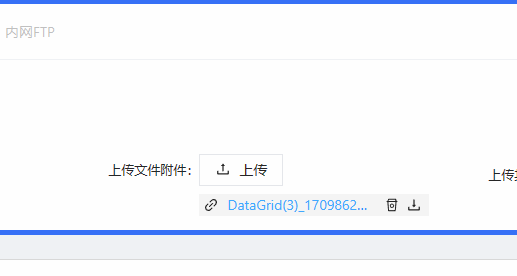
样式就是根据jeecg的上传组件样式模仿的,但是,我的移入比它的多了一个下载的按钮,哈哈哈哈
由于项目是基于jeecg开发的,所以如过有人用的话,大概只能作为参考
这个组件并没写的特别完善,只是针对我当前的项目需求进行了开发props
目前开放的属性有:
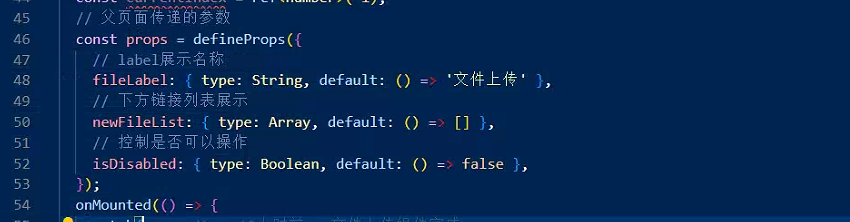
大家可以根据自己情况进行改造
emit('success'), 是将当前操作的fileList数据返回到父页面好进行操作处理
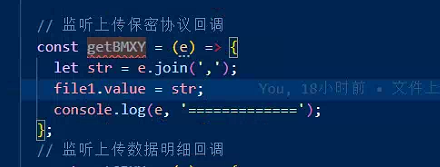
引用案例:

上代码:
放到了components中

wjUpload.vue:
<template>
  <div class="wjUpload">
    <input type="file" ref="fileInput" style="display: none" @change="handleFileChange" />
    <div class="tops">
      <div class="labels">
        <label class="upSpan" :class="isDisabled == true ? 'noSpan' : ''">{{ fileLabel }}:</label>
      </div>
      <button class="upBtn" :disabled="isDisabled" @click="triggerFileSelectAndUpload">
        <Icon icon="ant-design:upload-outlined" />
        <span class="upBtnText">上传</span>
      </button>
    </div>
    <div class="bottoms" v-if="fileList.length > 0">
      <div class="b_items" v-for="(item, index) in fileList" :key="index">
        <div class="b_i_item" @mouseover="currentIndex = index" @mouseout="currentIndex = -1">
          <Icon style="margin-left: 4px" icon="ant-design:link-outlined" />
          <div class="b_i_i_a" @click="ylClick(item)">
            <a>{{ setNewItem(item) }}</a>
          </div>
          <div class="downs" v-show="currentIndex == index" @click.stop="downClick(item)">
            <Icon icon="ant-design:download-outlined" />
          </div>
          <div class="deletes" v-show="currentIndex == index && isDisabled == false" @click.stop="deleteFileClick(item, index)">
            <Icon icon="ant-design:rest-outlined" />
          </div>
        </div>
      </div>
    </div>
  </div>
</template>
<script lang="ts" setup>
  import { computed, ref, unref, onMounted, watch } from 'vue';
  import { Icon } from '/@/components/Icon';
  import { setUploads, getDownFile } from './wjUp.ts';
  import { getToken } from '/@/utils/auth';
  import { getJiaMi } from '/@/api/common/api';
  import { Bus, getYLurl, getYLurl2 } from '/@/utils/bus.js';
  // 获取emit
  const emit = defineEmits(['success']);
  const fileInput = ref(null);
  // 存放数据地址列表
  const fileList = ref<Array>([]);
  // 是否显示操作按钮--根据下标进行控制
  const currentIndex = ref<number>(-1);
  // 父页面传递的参数
  const props = defineProps({
    // label展示名称
    fileLabel: { type: String, default: () => '文件上传' },
    // 下方链接列表展示
    newFileList: { type: Array, default: () => [] },
    // 控制是否可以操作
    isDisabled: { type: Boolean, default: () => false },
  });
  onMounted(() => {
    watch(
      () => props.newFileList,
      async () => {
        console.log(props.newFileList, '----------aaaaaaaaaaaa------------sssssssssss');
        if (props.newFileList) {
          const newArr = props.newFileList;
          if (typeof newArr === 'string') {
            const fileArray = newArr.split(','); // 假设你想根据逗号来分割字符串
            fileList.value = fileArray;
            console.log('--------');
          } else {
            // 处理不是字符串的情况
            console.log('props.newFileList 不是一个字符串');
          }
        } else {
          fileList.value = [];
        }
      },
      { deep: true, immediate: true }
    );
    watch(fileList, () => {
      // 每当fileList发生变化,就将数据返回到父页面中
      emit('success', fileList.value);
    });
  });

  // 处理文件选择变化
  const handleFileChange = (event) => {
    const file = event.target.files[0];
    if (file) {
      uploadFile(file);
    }
  };

  // 上传文件
  const uploadFile = async (file) => {
    console.log(file, '二进制');
    const formData = new FormData();
    formData.append('file', file);
    const res = await setUploads({ file });
    if (res.code == 200) {
      fileList.value.push(res.result);
      emit('success', fileList.value);
    }
  };
  // 对文件路径进行处理返回文件名
  const setNewItem = (item) => {
    let str = item.slice(item.lastIndexOf('/') + 1);
    return str;
  };

  // 触发文件选择并上传
  const triggerFileSelectAndUpload = () => {
    fileInput.value.click(); // 模拟点击文件选择按钮
  };
  // 监听点击文件预览
  const ylClick = async (e) => {
    console.log(e, '------------>');
    let str = e.slice(e.lastIndexOf('/') + 1);
    let token = getToken();
    let ylUrl = getYLurl();
    let ylUrl2 = getYLurl2();
    var url = ylUrl2 + 'bcCommon/getFileStreamByLocalPath?filePath=' + e + '&fullfilename=' + str + '&XSSTOKEN=' + token; //要预览文件的访问地址
    let cs_base = window.btoa(unescape(encodeURIComponent(url)));
    const newUrls = await getJiaMi({ jiaMiCode: encodeURIComponent(cs_base) });
    window.open(ylUrl + 'onlinePreview?url=' + newUrls);
  };
  // 监听点击下载按钮
  const downClick = async (e) => {
    console.log(e, '=========================');
    // const res = await getDownFile({ filePath: e });
    // console.log(res, '=->++++++++++++>');
    let str = e.slice(e.lastIndexOf('/') + 1);
    getDownFile({ filePath: e }).then((res) => {
      console.log('res-----------', res);
      let url = window.URL.createObjectURL(new Blob([res.data]));
      let link = document.createElement('a');
      link.style.display = 'none';
      link.href = url;
      link.setAttribute('download', str);
      document.body.appendChild(link);
      link.click();
      document.body.removeChild(link); //下载完成移除元素
      window.URL.revokeObjectURL(url); //释放掉blob对象
    });
  };
  // 监听点击删除按钮
  const deleteFileClick = (item, index) => {
    console.log(item, index);
    fileList.value.splice(index, 1);
    console.log('===============>', fileList.value);
    emit('success', fileList.value);
  };
</script>

<style lang="less" scoped>
  .wjUpload {
    width: 360px;
    min-height: 60px;
    margin: 10px;
    .tops {
      width: 100%;
      height: 40px;
      display: flex;
      align-items: center;
      .labels {
        width: 130px;
        height: 100%;
        display: flex;
        align-items: center;
        justify-content: flex-end;
        .upSpan {
          position: relative;
          display: inline-flex;
          align-items: center;
          max-width: 100%;
          height: 32px;
          color: rgba(0, 0, 0, 0.85);
          font-size: 13px;
          margin-left: 26px;
        }
      }
      .upBtn {
        width: 84px;
        height: 32px;
        border: 1px solid #e5e7eb;
        background-color: #fff;
        .upBtnText {
          font-size: 14px;
          color: rgba(0, 0, 0, 0.85);
          margin-left: 8px;
        }
      }
      .upBtn:hover {
        color: #40a9ff;
        border-color: #40a9ff;
        background: #fff;
        .upBtnText {
          color: #40a9ff;
        }
      }
      .upBtn[disabled],
      .upBtn[disabled]:hover,
      .upBtn[disabled]:focus,
      .upBtn[disabled]:active {
        color: rgba(0, 0, 0, 0.25);
        border-color: #d9d9d9;
        background: #f5f5f5;
        text-shadow: none;
        box-shadow: none;
        .upBtnText {
          color: rgba(0, 0, 0, 0.25);
        }
      }
    }
    .bottoms {
      width: 100%;
      min-height: 20px;
      .b_items {
        width: 100%;
        height: 30px;
        margin: 5 0 5px 0;
        display: flex;
        align-items: center;
        .b_i_item {
          width: 240px;
          height: 22px;
          margin-left: 130px;
          display: flex;
          align-items: center;
          transition: background-color 0.3s;
          position: relative;
          .b_i_i_a {
            width: 144px;
            height: 100%;
            margin: 0 8px;
            white-space: nowrap; /* 防止文本换行 */
            overflow: hidden; /* 隐藏超出div的内容 */
            text-overflow: ellipsis; /* 超出部分显示为省略号 */
            color: #1890ff;
          }
          .downs {
            width: 22px;
            height: 22px;
            position: absolute;
            right: 4px;
            display: flex;
            align-items: center;
            justify-content: center;
          }
          .deletes {
            width: 22px;
            height: 22px;
            position: absolute;
            right: 26px;
            display: flex;
            align-items: center;
            justify-content: center;
          }
        }

        .b_i_item:hover {
          background-color: #f5f5f5;
        }
      }
    }
  }
</style>
wjUp.ts:
import { defHttp } from '/@/utils/http/axios';
enum Api {
  setUpload = '/bcCommon/upload',
  getDownFile = '/bcCommon/getFileStream',
}
// 文件上传
export const setUploads = (params) => defHttp.uploadFile({ url: Api.setUpload }, params, { isReturnResponse: true });
// 文件下载
export const getDownFile = (params?) => defHttp.get({ url: Api.getDownFile, params, responseType: 'blob' });

 浙公网安备 33010602011771号